Category: Security testing

  • How to Perform a Basic Website Security Audit

    How to Perform a Basic Website Security Audit

    Is your website secure or an easy target for hackers?

    Hackers consistently seek out weaknesses in websites. Even the smallest security flaw can lead to breaches that result in stolen information and financial loss. If your website isn’t secured, it may only be a matter of time before attackers infiltrate it.

    A website security audit helps identify vulnerabilities and resolve them before a hacker takes advantage. It ensures the website adheres to best practices concerning security, including the standards of ISO 27001, OWASP, and compliance with the General Data Protection Regulation. 

    By using tools like a website vulnerability scanner, you can quickly detect and fix potential security gaps. Regular security audits keep your site’s information secure, protect your users, and build trust by showing visitors that their data is safe.

    What is a Security Audit?

    A security audit studies your business defense systems, looking for potential weaknesses that cybercriminals can exploit. This audit inspects all areas, including data protection guidelines, system protection elements, building properties, and staff tasks.

    The goal? Find vulnerabilities before cybercriminals do. During a security audit your defenses will be tested to find vulnerabilities while presenting specific actions for a stronger security stance. Your business remains secure and aware of new dangers when you conduct audits regularly.

    Why Do Companies Need Security Audits?

    Security audits are important because organizations require them to gain an understanding of the extent of their risks, compliance with regulatory standards, and safeguarding their information and image. So, here are the most important points regarding security audits:

    1. Identify & Fix Vulnerabilities

    • Security audits help to find weaknesses in websites, networks, and applications.
    • Preventing data breaches, malware infections and unauthorized access before attackers can exploit them is the reason for them.

    2. Protective Sensitive Data

    • The business handles customers’ data, financial records, intellectual property, or anything else.
    • Security audits verify the security of storage, encryption, and access to prevent leaks.

    3. Prevent Financial & Legal Consequences

    • Fines, lawsuits, and loss of business can all be a result of a security breach.
    • They can face heavy penalties for non-compliance with regulations such as GDPR, HIPAA, PCI-DSS, etc.

    4. Maintain Customer Trust & Brand Reputation

    • A hacked website or data breach is bad enough to ruin a company’s reputation.
    • Businesses should secure their customer’s personal information and keep private information private.

    How to do a website security audit?

    A website security audit evaluates weaknesses, assesses risks, and implements security protocols in place for defending against possible threats. This is a step-by-step guide: 

    Step 1: Identify Website Assets

    It’s very important, before starting with a security audit, to understand what you’re protecting. You should start with a comprehensive listing of all assets on your website. This is:

    • Domain and Subdomains: Identify all forms of variants of your website’s domain name to cover all the possible links to that domain.
    • Provider of Web Hosting: This gives you an idea of where the hosting for the website is and what physical security is in place.
    • SSL Certificates: Verify that the SSL/TLS certificates you are using are current and when the next renewal date is.
    • Connections: Identify which databases are relevant to your website and ensure they are secure.
    • APIs and Integrations: List down all third-party services integrated and interacting with the website.
    • User Accounts and Permissions: Settings of all the users that have access to your website.

    This is a foundation for determining what content on your site needs to be encrypted and which assets are most important.

    Step 2: Check SSL/TLS Encryption

    A secure website uses HTTPS to ensure information transmitted between the client and server is safe. Be certain your SSL/TLS certificates are configured correctly and that the latest ones are utilized by using SSL Labs’ SSL Test to make a comparison of the level of encryption over possible vulnerabilities.

    Check the compliance of your TLS settings with current security standards and disable all insecure ciphers. A secure SSL/TLS helps to prevent man-in-the-middle attacks that compromise your website and keep the data entered by the visitors safe.

    Step 3: Scan for Vulnerabilities

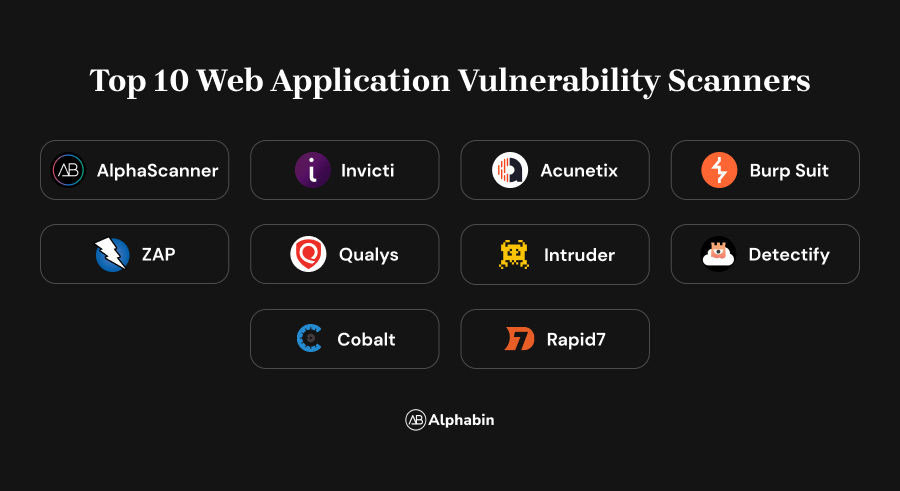
    Utilize easy ways to check website vulnerabilities for known exploits. These will define areas in your code that are prone to attacks, corrupt configurations, and outdated features that make your site vulnerable. Some tools to consider:

    • OWASP ZAP: A widely known tool for testing the security of web applications and helps detect possible vulnerabilities.
    • Nikto: An HTTP scanner capable of detecting vulnerabilities of outdated software and misconfigured systems.
    • Acunetix: A functional and powerful scanner used for such serious vulnerabilities as SQL injection and cross-site scripting.
    • SSL Labs: The best site to assess SSL/TLS configurations.

    It prevents hackers from taking advantage of vulnerable points in your security system by scanning for them routinely.

    Step 4: Review User Access and Permissions

    One of the most common ways attackers gain access to systems is through weak or unauthorized user accounts. To prevent this:

    • Audit User Roles: Limit the scope of users for only working with the sections that you know that they should gain access to. Limit admin accounts.
    • Expire Old Admins: Disable long-unused or never-used accounts. This will give you fewer avenues for threats
    • Enforce Strong Password: Complexity All passwords must have a minimum set strength and satisfy the required security standard.
    • Activate Multi-Factor Authentication (MFA): This means the user or an admin will be required to put more elements, beyond a password, to fully log in.

    {{cta-image}}

    Step 5: Keep Up to Date on Outdated Software

    The usage of outdated software creates a major security risk for systems. Most attackers go after attacking existing vulnerabilities that are found in outdated CMS platforms, server software, and installed plugins. To ensure your website is kept safe,

    • The CMS needs to run the most recent version using either WordPress, Joomla, or Drupal.
    • Update both the plugins and the themes regularly. Hackers generally attack systems using old, outdated plugins.
    • Upgrade every component on your server from a web server up to databases for the protection of the system.

    Auto-updates will make it more efficient; however, all updates should first be tested on the staging environment before being used on the production level.

    Step 6: Malware and Security Scan

    Malware is a security threat that causes significant problems on your website through file destruction, data theft, and malicious site redirection. How to prevent this:

    • Sucuri SiteCheck: This scans your site for malware infections and blacklisting.
    • Google Safe Browsing: Check here if Google flagged your site as dangerous.
    • Wordfence: This is a WordPress plugin that scans for malware and offers real-time firewall protection.

    Step 7: Validate Security Headers

    Security headers are extra measures, such as cross-site scripting as well as clickjacking. Check that the settings of the following header vary the following:

    • Content Security Policy (CSP): Prevents XSS attacks by specifying resources that are allowed to be loaded on the site.
    • HTTP Strict Transport Security (HSTS): This means forcing the secure connection so that all the transmission is safe.
    • X-Frame Options X-Frame will guard against clickjacking.
    • X-XSS Protection: Blocks some types of XSS attacks.

    Use the Security Headers tool to check for missing or misconfigured security headers.

    Step 8: Perform a Backup and Recovery Test

    These are crucial in case there is a break in or loss of data in the organization. Ensure you:

    • Back-up copies: It is important to back up the web contents, such as files and databases, daily or weekly at most.
    • Backup Management: It is recommended to take the backups every day and keep them in another secure place.
    • Disaster: From time to time, make sure you have a backup that can be used in the event of misfortune.

    Step 9: Analyze Website Logs

    These logs are quite helpful in predicting possible security threats in the network. Review:

    • Server Logs: Monitor information service activity, signs of possible errors, and other suspicious activities.
    • Application Logs: Keep a check on Login, Invalid credentials, and other activities that look like a potential threat.
    • Security Plugin Logs: This way, use the security tools to analyze the potentially dangerous threats.

    Tools like Splunk or Graylog can automate log analysis and alert you to anomalies.

    Step 10: Document Findings and Implement Fixes

    After doing your audit, document the outcomes and prioritize the motions in light of risk severity. Key actions include:

    • Address High-Risk Issues: Eliminate high-risk issues as soon as possible.
    • Security Improvement Strategy: Work through medium and low-risk issues.
    • Implement Security Policies: Set up standard operating procedures to monitor security routines.

    Conclusion: Secure Your Website Today

    A website security audit is necessary to guarantee your website remains safe from cyber attacks. Conducting these steps will help you expose weaknesses, improve your defenses, and gain the user’s trust. Regular security audits not only are considered a best practice but also save your reputation and sensitive data.

    Secure your site before a breach. If you want a more extensive security assessment, think of the option to find a professional penetration testing services provider such as Alphabin. What we can offer our clients is a deeper insight, advanced threat detection, and ongoing monitoring of your website against evolving cyber risks.

  • How to Protect Your Web App from Common Cyber Threats

    How to Protect Your Web App from Common Cyber Threats

    Hackers always attack web applications, trying to exploit vulnerabilities. Cyber threats such as data breaches, malware, phishing, and DDoS (Distributed-Denial of Services) attacks can bother and cause serious damage to businesses and users alike. So how do you protect your web application from these dangers?

    The good news is that if you use the right security practices, most cyber threats can be avoided. This guide covers the most common cyber threats to web apps and how you can prevent them. If you are in charge of building, securing, or managing web applications, these risks are the first step to creating a safer web. Let’s dive in!

    Understanding Web Applications

    A web application is software that is run on a web application server and is accessed using a web browser. Web applications are developed so that they have a user-friendly interface where a user can interact with content and perform a task directly from the browser. 

    They’re built with HTML, CSS, and JavaScript and are cross-platform, meaning they run on Windows, macOS, and Linux.

    {{cta-image}}

    Types of Web Applications

    Web applications come in various forms, each serving different purposes and offering unique functionalities:

    • Static Web Apps: HTML, CSS, and JavaScript fixed content with no user interaction.
    • Dynamic Web Apps: Applications that interact with databases to look up and communicate live data.
    • E-commerce Apps: Online shopping platforms with product catalogs, carts, and secure payments.
    • CMS Web Apps: Users don’t need coding skills to create and manage content.
    • SPAs (Single-Page Apps): Dynamically update content along with a seamless experience.
    • Multiple-Page Apps: Navigate pages fully instead of navigating the path to a page, such as news sites and search engines.
    • Portal Web Apps: It allows users to access multiple resources with a single interface.
    • Animated Web Apps: Interactive and engaging experiences are where you can use animations.
    • RIAs (Rich Internet Apps): Provide an advanced browser experience to deliver a desktop-like experience.
    • PWAs (Progressive Web Apps): Push notifications, offer offline access, and cross-platform compatibility.

    Common Cyber Threats to Web Apps

    Cyber threats to web applications have been of various types that can consequently result in the compromise of their security and integrity.

    • SQL Injection Attacks: This happens when an attacker sends malicious SQL code into a web application’s database query and now can access, insert into, or delete sensitive data.
    • Cross-Site Scripting (XSS) Attacks: An XSS attack involves attackers injecting malicious JavaScript code into web pages, that other users then read. Such things can involve data theft, session hijacking, and more malicious activities.
    • Cross-Site Request Forgery (CSRF) Attacks: CSRF attacks fool authenticated users into doing things they don’t intend to do on a web application, like changing account settings or transacting in a fashion not authorized by them.
    • Authentication and Authorization Attacks: These attacks attack a web application’s basic mechanisms for authentication and authorization and then provide the attackers with unauthorized access to information and functionality.
    • Denial of Service (DoS) and Distributed Denial of Service (DDoS) Attacks: These attacks try to take a web application out of action by flooding it with too much traffic to make the service unavailable and possibly resulting in downtime.

    8 Best Practices to Protect Your Web Application

    It’s important to follow these security best practices to ensure the safety and integrity of your web application. Here are 8 essential practices to secure your web application:

    1. Secure Authentication and Authorization for Web Applications

    Authentication and Authorization are two components that form a very important part of the development and security of a web application. Web applications are stored on a remote server and are accessed through the Internet. 

    Bad authentication mechanisms make it possible for attackers to access data and systems in an unauthorized way, causing data breaches and system compromises.

    Key Actions

    • Force strong password policies by pairing letters, numbers, and special characters.
    • Using MFA (Multi-Factor Authentication) will give you an extra layer of security.
    • To manage identities securely, use OAuth 2.0, OpenID Connect, or SAML.
    • Use role-based access control (RBAC) so only people need to have what they need.

    2. Prevent SQL Injection and XSS Attacks in Web Browsers

    SQL injection and cross-site scripting (XSS) attacks are among the top web attacks we now face. Such vulnerabilities enable attackers to manipulate database queries and inject malicious scripts into web pages.

    Key Actions

    • Use parameterized SQL queries to protect data from SQL injection attacks.
    • Validate every user entry before letting it pass through safety checks to fight XSS attacks.
    • Use a Content Security Policy to control which scripts should run in your system.
    • Check your system continuously for IDOR (Insecure Direct Object References) weaknesses to block unwanted system access.

    3. Secure Data Transmission

    Data transmitted from a source to a destination is as vulnerable as when at rest and thus requires protection from eavesdropping and man-in-the-middle attacks.

    Key Actions

    • Compel HTTPS with TLS for additional levels of data security guarantee, for establishing a secure connection with clients and secure transfer of data between the clients and the servers.
    • Set HTTP Strict Transport Security (HSTS) to prevent a hostile party from changing connection layers with plain HTTP and force strict transport security on each connection.
    • Do not allow weak SSL/TLS ciphers, use secure headers that serve to reduce the risks such as SSL stripping, and only make use of strong encryption.

    4. Strengthen Web Application Development Infrastructure

    Attackers take advantage of weak areas in web application infrastructure, like using old systems and incorrect security controls.

    Key Actions

    • Update all installed products to erase existing security weaknesses from the system. The web server needs to stay current because it handles user demands and connects the application with the database.
    • Put WAFs (Web Application Firewalls) systems to work as they analyze incoming traffic and block attempts from hackers.
    • Support your system with defenses that protect your services when attackers send massive volumes of traffic.
    • Keep important administrative tools out of public view.

    5. Secure API Endpoints

    Web applications have many weak points but their APIs remain a primary target for hackers.

    Key Actions

    • Only APIs authenticated and authorized using API keys or JWT tokens are permitted to access APIs.
    • Use of rate limiting and throttling to avoid misuse and keep undesirable attacks away, like the DoS.
    • Secure data in different API calls by unauthorized access or leakage and data breaches.
    • To prevent injection attacks, sanitize the input data.

    6. Implement Logging and Monitoring

    Monitoring activities to run on the app will let you know if suspicious behavior is taking place or if you should deal with a threat as the first line of defense.

    Key Actions

    • Watch your system record authentication events and system changes as they happen.
    • Security Information and Event Management tools will help you scan logs to find security threats.
    • Look at your logs repeatedly to spot differences between normal operations and signs of security trouble.
    • Have your system notify you when users make too many unsuccessful login attempts.

    7. Conduct Regular Security Testing

    Security testing shows us where our systems have weaknesses before cybercriminals can find and misuse them.

    Key Actions

    • Perform automated vulnerability scans with tools like OWASP ZAP, Nessus, or Burp Suite.
    • Conduct manual penetration testing to uncover business logic flaws and complex attack vectors.
    • Integrate continuous security testing into the software development lifecycle (DevSecOps).
    • Engage in bug bounty programs to leverage ethical hackers for security assessments.

    {{cta-image-second}}

    8. Protect Cloud and Third-Party Integrations in Web Applications

    Cloud services and third-party integrations in many web applications are relied upon too much, adding more security risks to the process.

    Key Actions

    • Limit your use of cloud resources with the least privilege.
    • It isolates critical workloads from other workloads and prevents lateral spread.
    • Do a security evaluation on third-party services and dependencies before you integrate with them.
    • Review cloud security policies and access controls regularly.
    • Make sure web apps (based on JavaScript, HTML5, or CSS) are ready to run in modern browsers.

    Utilize Web Application Firewalls (WAFs)

    Web Application Firewalls (WAFs) are a must-have security solution for web applications. A network security system that monitors and controls the traffic on the incoming and outgoing network according to predefined security rules is called WAF. Here are some key benefits of using WAFs:

    • Improved Security: WAF stands for protection against most common web attacks like SQL injection and XSS. WAFs filter and monitor HTTP requests and block malicious traffic before reaching your web application.
    • Reduced Risk of Breaches: WAFs prevent common Web attacks and effectively reduce the risk of security breaches and data theft. Sensitive web applications like online banking web apps, or e-commerce web apps, this is important.
    • Enhanced Compliance: WAFs meet many security regulations and standards. The easiest way to achieve this is to implement a WAF.
    • Improved Performance: WAFs can improve the performance, as well as the availability of web applications, and help to shield against DDoS attacks and other high-volume threats.

    Conclusion

    The defenses that protect against cyber threats change just as fast as the threats themselves. Strong security practices like keeping your software updated, strong authentication, and monitoring suspicious activity all go a long way toward reducing the risk of attacks on your web application. To keep a secure digital environment, we need to stay informed and proactive.

    If you are searching for some expert guidance and astute cybersecurity solutions, then Alphabin is ready to take care of it. We offer you industry-leading strategies and tools to protect your web applications from ever-evolving threats. 

  • Top 10 Mobile App Security Companies in USA for 2025

    Top 10 Mobile App Security Companies in USA for 2025

    Imagine downloading an app, and inputting your personal data, and a hacker in seconds finds a flaw to steal your information. Sounds scary, right? And today, mobile app security is no longer an add-on, it’s the basis for user trust and business integrity.

    The overall global average cost per data breach was $4.88M and the highest spending emerged from the healthcare industry. Data protection of customers is critical to the stability of mobile apps, so client trust and confidence remain intact.

    Your defense should also get smarter, because so should cybercriminals. So when there are so many security providers out there, how do you choose the right one? That is where we come in! Fortunately for you, we have collated a list of the top 10 mobile app security companies in the USA for 2025, so you can confidently make a decision.

    Why Mobile App Security Can’t Be an Afterthought

    A cybercriminal can hit you with every tap, swipe, and login in your mobile app. The consequences? Data breaches, identity theft, financial loss, and brand damage. Here’s why investing in mobile app security is non-negotiable:

    • Data Protection: Protect user credentials, financial transactions, and sensitive info.
    • Regulatory Compliance: GDPR, CCPA, and HIPAA compliance will save you from big fines.
    • Customer Trust: One breach and it’s gone forever. Keep them trusting you.
    • Competitive Advantage: Your app is not just required—it’s a selling point.

    Now, let’s explore the top cybersecurity champions that are securing mobile applications in 2025!

    {{cta-image}}

    What Makes a Mobile App Secure?

    Before choosing a security provider, ensure they tick all the right boxes:

    ✔ End-to-end Encryption: The encryption of data in rest and transit would protect sensitive user information.

    ✔ Multi-Factor Authentication (MFA): an additional layer to the security in addition to a password.

    ✔ Real-Time Threat Detection: Cyber threats are detected and neutralized in real-time.

    ✔ Regular Security Audits & Patching: It ensures that vulnerabilities are patched before hackers exploit them.

    ✔ Secure Coding Practices: It prevents loopholes that cybercriminals can manipulate.

    ✔ Comprehensive Security Testing: Validates the app’s ability to withstand various cyber threats.

    Types of Mobile App Security Threats

    Mobile apps are susceptible to a variety of security threats, including:

    • Malware and Ransomware Attacks: Data theft or locking a user out of his device until he pays a ransom.
    • Data Breaches and Unauthorized Access: Exposure of sensitive data to access that can have data leaks and violations of privacy.
    • Phishing and Social Engineering Attacks: Tactics used to trick the user into revealing personal information.
    • SQL Injection and Cross-Site Scripting (XSS) Attacks: Trick an app into doing something that it otherwise wouldn’t.
    • Denial of Service (DoS) and Distributed Denial of Service (DDoS) Attacks: Sending too many requests to the app’s servers to make it crash and inaccessible.

    Key Features of a Mobile App Security Company

    As you look for a security company for your mobile apps, it is important to evaluate the following factors that will enable the security of your apps. A top-tier mobile app security company should possess the following:

    • Expertise in Mobile App Security Testing and Vulnerability Assessment: Ability to work with the concept of threat and vulnerability, as applied to mobile applications.
    • Experience in Penetration Testing and Compliance Scanning: It has the benefit of practicing attacks and make sure that all that it does complies with the standard set in the industry.
    • Knowledge of Mobile App Security Standards and Regulations: Minimum competencies in OWASP MASVS and ADA MASVS that define the standard state of the art for secure websites.
    • Comprehensive Security Assessments and Risk Analysis: Providing detailed reports together with an appraisal of the threats and vulnerabilities of the apps.
    • Self-Service Training and Education: Offering tools and classes for development groups to explain and ensure compliance with security guidelines.
    • Strong Customer Support and Response Time: Guaranteeing appropriate response and help within cases of security threats identification.
    • Scalability and Customization of Security Solutions: Currently, security measures can be developed and implemented to fit the requirements of varied firms and their mobile applications.

    These features are essential so that your mobile app security company becomes an efficient shield for your digital assets and keeps the integrity of your mobile applications.

    Security Practices and Protocols

    A competent mobile app security firm should have good practices that enhance the protection of mobile applications. These practices include:

    Encryption and Access Control

    • Encryption of Sensitive Data in Transit and at Rest: To guarantee that data is safe, embracing security technologies of data while it is in transit and at rest.
    • Secure Authentication and Authorization Mechanisms: Enforcing password measures consisting of Multi-Factor confirmation as a way of confirming identity.
    • Access Control and Role-Based Access Control (RBAC): One is limiting the exposure of important resources across the identified user roles/responsibilities matrix.
    • Secure Data Storage and Management: Protecting the data and knowing how to work with them to meet the ideal industry standards.
    • Regular Security Updates and Patch Management: Ensuring that the names and versions of all of the components of the app and the application as a whole bear the latest security updates.
    • Compliance with Industry Standards and Regulations: By following the current legal requirements, which range from GDPR to HIPAA in an endeavor to meet legal necessities and safe end-client information.

    Meet the Top 10 Mobile App Security Leaders of 2025

    To be more specific, the world of mobile app security in 2025 is oriented toward pioneers who decide on data protection and user safety. So, here are the top 10 leaders that are stretching on the matters of mobile app security.

    1. Alphabin: The Unmatched Leader in Mobile Security

    Alphabin demonstrates unmatched leadership among next-gen mobile application security solutions. Alphabin has earned the trust of Fortune 500 companies and startup businesses since it offers AI-powered security protection alongside real-time cyber threat alerts that keep development security operations smoothly flowing. Digital security advancement through their unique strategy has established Alphabin as the market leader for mobile protection.

    Why Alphabin?

    • Unparalleled AI-powered threat intelligence.
    • Stopping breaches before they happen with proactive vulnerability scanning.
    • DevSecOps integration with no seams to build security into development.
    • Best-in-class customer support with 24/7 rapid response.

    2. Veracode: The Application Security Powerhouse

    Veracode focuses on performing full application security testing to ensure the development teams can identify and correct the application vulnerabilities as they occur.

    Key Features:

    • Static & Dynamic Application Security Testing (SAST & DAST)
    • AI-driven threat detection
    • Seamless DevOps integration

    3. Checkmarx: The Secure Code Guardian

    Checkmarx specializes in developer-first security testing products and tools, which are SAST, DAST, and IAST, to identify bugs before release.

    Key Features:

    • AI-powered security insights
    • Open-source risk management
    • Automated vulnerability scanning

    4. FireEye: The Cyber Threat Intelligence Leader

    FireEye concerns itself with thorough threat intelligence and incident response, helping businesses avoid being a step behind cyber threats.

    Key Features:

    • AI-driven malware detection
    • Incident response & forensics
    • Behavioral analytics for proactive defense

    5. Fortinet: The Enterprise Security Powerhouse

    Fortinet is quite strong in firewalls and endpoint security and provides threat intelligence in real-time and zero-trust framework.

    Key Features:

    • Next-gen firewall integration
    • Zero-trust security framework
    • Cloud security optimization

    6. Symantec (by Broadcom): The Endpoint Security Giant

    Being a popular name in the sphere of endpoint security, the Mobile Security Suite of Symantec offers great security features that can safeguard against malware attacks, phishing scams, and other data theft.

    Key Features:

    • AI-powered threat prevention
    • Secure mobile device management (MDM)
    • Endpoint detection and response (EDR)

    7. Palo Alto Networks: The AI-Driven Security Innovator

    At Palo Alto Networks, we continue to develop state-of-the-art AI-based security technologies so that mobile apps can continue to avoid new attacks.

    Key Features:

    • Automated security orchestration
    • AI-powered threat intelligence
    • Proactive incident response

    8. Micro Focus: The DevSecOps Security Specialist

    Micro Focus offers security solutions that can be implemented with DevOps so that the people who develop applications can incorporate security from the outset.

    Key Features:

    • Automated security scanning
    • Developer-centric security solutions
    • Secure DevOps pipeline integration

    9. Rapid7: The Continuous Security Monitoring Expert

    Real-time security monitoring is done through the insight offered by Rapid7, which helps businesses fight rising cyber threats.

    Key Features:

    • Real-time security analytics
    • API security testing
    • Cloud-native security solutions

    10. IBM Security AppScan: The Compliance-First Security Solution

    IBM AppScan helps to keep mobile applications safe and compliant with essential security requirements such as HIPAA, GDPR, and SOC 2.

    Key Features:

    • AI-powered threat detection
    • Compliance & risk management solutions
    • Security auditing & vulnerability assessments

    {{cta-image-second}}

    Choosing the Best Security Partner

    When choosing your security provider, don’t just go for the big-name providers. Here’s how to make an informed decision:

    ✔ Threat Detection Capabilities: How soon can they overcome threats?

    ✔ Regulatory Compliance: Do they assist with legal security standards?

    ✔ Integration & Usability: Are they integrated into your DevOps cycle in a way that they will complement your process?

    ✔ Scalability: Can their security solutions scale up with your business requirements or demands?

    ✔ Customer Support: When you need their security experts, can you trust them?

    Conclusion

    By 2025, mobile app security is not simply an IT problem, but it is a business problem. Among the giants of the industry, Alphabin ranks first due to its AI-based, on-top security model that keeps businesses one step ahead of cybersecurity threats.

    Each on this list specializes in security, but none can match Alphabin in terms of experience, integration, and security for future technologies to cater to the needs of any serious business in the mobile security industry.

    Do not wait for a breach of security to occur and then start reacting to it. Get the best mobile security today with Alphabin, a leading company in mobile security services.

    🚀 Are you eager to enhance the security of your mobile application? Get ready for a safer digital experience; let Alphabin lead the way!

  • Top 10 VAPT Testing Companies in USA

    Top 10 VAPT Testing Companies in USA

    Security in the present fast-growing digital situation is not just a preference but a necessity that organizations cannot afford to compromise.

    As cyber threats like ransomware, phishing, and data breaches grow more sophisticated, businesses must adopt proactive measures to safeguard their digital infrastructure. One proven method?

    “Vulnerability Assessment and Penetration Testing (VAPT)”

    These services not only identify potential weaknesses but also help prevent security breaches before they happen. For businesses in the USA, where the stakes are much higher, finding a reliable VAPT testing partner is critical.

    {{cta-image}}

    What is VAPT?

    Vulnerability Assessment and Penetration Testing (VAPT) is a two-pronged approach to cybersecurity:

    1. Vulnerability Assessment: Identifies and evaluates weak points in systems, networks, and applications.
    2. Penetration Testing: Simulates real-world attacks to test whether these vulnerabilities can be exploited.

    Together, these techniques provide a comprehensive evaluation of an organization’s security posture, ensuring no vulnerabilities go unnoticed.

    VAPT helps in preventing data breaches and cyber-attacks by proactively identifying and addressing vulnerabilities. This not only protects critical assets but also helps maintain customer trust and compliance with industry standards.

    Key Components of VAPT

    VAPT includes several critical areas to ensure full-spectrum security:

    1. Network Security Testing: Scans firewalls, routers, and other network elements to uncover issues like open or misconfigured ports.
    2. Application Security Testing: Evaluates weaknesses in web, mobile, and cloud applications.
    3. Configuration Audits: Identifies misconfigurations in servers, databases, and operating systems.
    4. Access Control Review: Ensures robust user authentication and appropriate access rights.

    Vulnerability assessment tools are essential for identifying system weaknesses, allowing businesses to prevent data breaches and cyber threats.

    VAPT Methodology

    There are three different methods or strategies used to conduct VAPT: black box testing, white box testing, and gray box testing.

    • Black Box Testing: This method involves testing the system without any prior knowledge of its internal workings. The tester simulates an external attack, mimicking the approach of a real-world hacker who has no insider information. This helps in identifying vulnerabilities that could be exploited by external attackers.
    • White Box Testing: It is different because the test is carried out on complete knowledge of how the system works from the inside. The person testing has sources of all the source codes, architecture documents, and other internal information. This method is too comprehensive and serves to spot security flaws that may otherwise not be evident from the outside view.
    • Gray Box Testing: This is a hybrid approach to testing the system based on some knowledge regarding the internal workings of the system. The tester enjoys partial access to internal information and can bring about better focus and efficiency in an assessment. It is also termed as the best of both worlds, that is, the depth of white box testing and the realism of the black box testing method.

    Common Vulnerabilities Detected

    VAPT testing often reveals vulnerabilities that hackers exploit, such as:

    • Unpatched software vulnerabilities
    • Misconfigured servers
    • Weak passwords or insecure APIs
    • Injection flaws (e.g., SQL Injection or Cross-Site Scripting)
    • Broken authentication mechanisms

    Why VAPT is Non-Negotiable for Businesses

    By 2025, global cybercrime costs are projected to reach $10.5 trillion annually, up from $3 trillion in 2015. This data, provided by Cybersecurity Ventures, reflects the alarming inclination in cyber threats worldwide.

    Such a steep rise underscores the critical need for businesses to strengthen themselves digitally. Vulnerability Assessment and Penetration Testing (VAPT) plays a vital role in identifying and dissolving risks before they turn into costly disasters.

    Penetration tests are essential in identifying and mitigating security risks. These tests simulate attacks to uncover vulnerabilities, using methods like black box, white box, and grey box testing to help organizations safeguard against potential cyber threats.

    Here are some factors to consider when deciding whether to do VAPT or not:

    1. Proactive Identification of Threats
      VAPT fosters businesses to identify potential threats before attackers can exploit them. Understanding exposures can benefit organizations in developing a strong defense against advanced threats.
    2. Strengthening System Defenses
      ‍
      Regular VAPT exercises help businesses close existing security bugs and adapt their defenses to future risks, creating a more secure IT infrastructure.
    3. Regulatory Compliance
      ‍
      Adhering to regulatory standards like GDPR, HIPAA, and PCI-DSS is a must. VAPT makes sure that businesses meet these requirements, avoiding hefty fines and reputational damage.
    4. Cost-Effective Security
      ‍
      Addressing vulnerabilities early is much cheaper than recovering from an attack. A single breach can cost millions, making VAPT a wise financial investment.
    5. Enhanced Customer Trust
      ‍
      Demonstrating robust cybersecurity practices through VAPT builds trust within customers and partners, reinforcing your commitment to make their data safe.

    Top 10 VAPT Testing Companies in the USA

    Choosing the right VAPT testing provider is not just about ticking a cybersecurity checkbox; it’s about building a resilient defense against ever-evolving threats.

    A strong partner can help businesses detect vulnerabilities, mitigate risks, and ensure compliance with industry regulations.

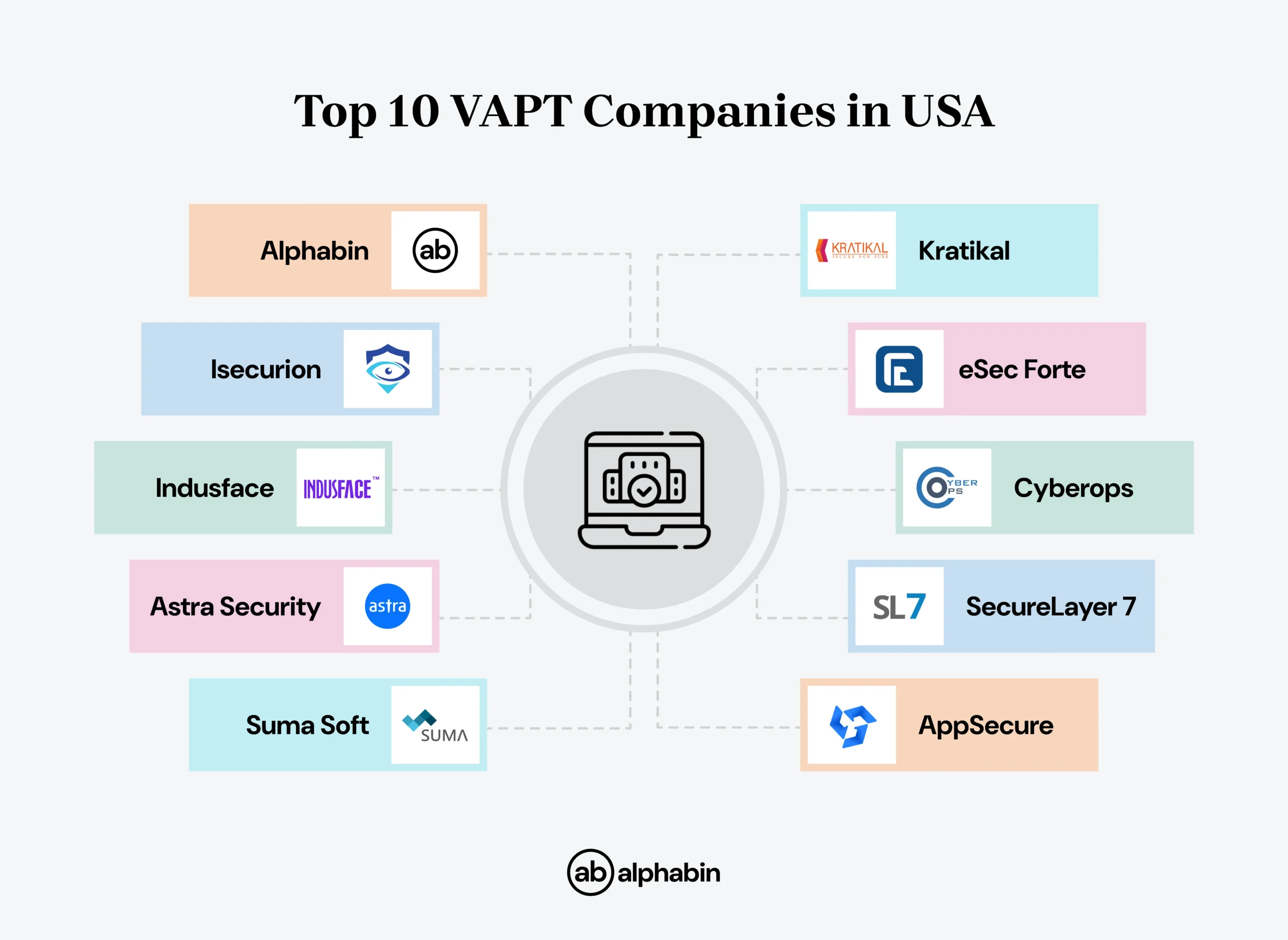
    Top 10 VAPT Companies in USA

    1. Alphabin

    Alphabin leads the VAPT industry with its innovative tools and customized security solutions. The company offers security testing services to identify and remediate vulnerabilities.

    Key Features

    • Networking and applications, cloud, and IoT are covered systematically to ensure that all forums are detected.
    • Very informative and documented test reports accompanied by clear procedures of how to solve the identified defects.
    • Much emphasis is placed on pre-emptive measures for more recent risks.

    Pros

    • Tailor-made products in response to the requirements of certain enterprises.
    • Praised for an ability to manage complicated structures of an IT organization.
    • Being popular among both local and international large-scale companies and small /growing companies.
    • High levels of performance with the delivery of improved security results.

    2. Isecurion

    Known for detailed reporting and remediation, Isecurion excels in network, application, and database security testing.

    Key Features

    • Specializes in network, application, and database security testing
    • Focuses on regulatory compliance such as GDPR, HIPAA, and PCI-DSS
    • Real-world attack simulations

    Pros

    • Renowned for its thorough testing and detailed remediation strategies.
    • Strong presence in finance and healthcare industries
    • Risk-based approach to prioritize critical vulnerabilities

    3. Indusface

    Specializing in application security, Indusface protects web and mobile platforms with 24/7 monitoring and SaaS-based tools.

    Key Features

    • Focused on web application security testing with 24/7 monitoring capabilities
    • Offers a SaaS-based platform for continuous vulnerability tracking
    • Real-time updates on identified risks and weaknesses

    Pros

    • Ideal for businesses with heavy reliance on web applications
    • Provides quick and accurate results with easy integration
    • Recognized for proactive application security measures

    4. Astra Security

    Astra Security’s user-friendly platform simplifies VAPT processes while delivering precise, actionable results.

    Key Features

    • Simplified cloud-based platform for vulnerability assessment and reporting
    • Combines automated and manual testing
    • Generates user-friendly reports with actionable insights

    Pros

    • Highly intuitive interface suitable for non-technical teams
    • Provides excellent post-testing support and guidance

    5. Suma Soft

    Suma Soft offers affordable, high-quality VAPT services tailored to small and medium-sized businesses.

    Key Features

    • Offers cost-effective VAPT services
    • Specializes in network penetration testing for SMBs
    • Focuses on both internal and external threat evaluations

    Pros

    • Flexible pricing and engagement models
    • Detailed and prioritized action plans

    6. Kratikal

    Kratikal’s end-to-end services emphasize ethical hacking and phishing simulations to tackle human-factor vulnerabilities.

    Key Features

    • Renowned for its expertise in ethical hacking and social engineering tests
    • Offers phishing simulations to tackle human-factor vulnerabilities
    • Focuses on delivering custom VAPT solutions for critical industries

    Pros

    • Excellent for human-related vulnerability assessments
    • Delivers in-depth insights into potential attack vectors
    • End-to-end solutions

    7. eSec Forte

    Combining manual and automated testing, eSec Forte excels in securing diverse IT ecosystems by delivering comprehensive VAPT services. 

    Key Features

    • Combines manual and automated techniques of VAPT
    • Expertise in IoT, cloud, and mobile security
    • Regular follow-ups to ensure effective resolution

    Pros

    • Ideal for businesses with diverse IT ecosystems
    • Excellent scalability for growing organizations

    8. Cyberops

    Cyberops provides a wide range of VAPT services tailored to industry-specific needs. Its advanced tools and techniques secure networks, applications, and databases.

    Key Features

    • Delivers detailed attack surface analysis and mitigation strategies
    • Focused on addressing emerging threats with timely updates.

    Pros

    • Trusted for its customer-centric approach and responsiveness.
    • Educates clients on the root causes of vulnerabilities.
    • Offers flexible testing packages to suit different industries.

    9. SecureLayer 7

    With a focus on web, mobile, and API security, SecureLayer 7 strengthens application defenses effectively.

    Key Features

    • Specializes in application security, including web, mobile, and API testing
    • Offers compliance-specific testing services for industries like finance and healthcare
    • Delivers clear and concise remediation reports

    Pros

    • Excellent choice for businesses focused on securing applications
    • Provides expert guidance on achieving regulatory compliance
    • Customizable testing methodologies for client-specific needs

    10. AppSecure

    AppSecure specializes in addressing modern threats with its advanced VAPT services. The company’s actionable insights ensure vulnerabilities are quickly and effectively resolved.

    Key Features

    • Focused on modern threats with AI-powered tools for vulnerability detection
    • Tailored services for startups and agile development environments
    • Delivers quick and actionable reports to accelerate security fixes

    Pros

    • Rapid and reliable testing for fast-moving businesses
    • Strong focus on application and API security
    • Trusted by technology-first organizations for its specialized solutions

    Why Choosing the Right VAPT Provider Matters

    VAPT provider selection is important as we deal with sensitive data and digital infrastructures. Here are some factors to consider while choosing the right partner:

    Vulnerability testing is a crucial component of a comprehensive security assessment, enabling organizations to identify and address potential threats to their applications, ensure compliance with data security standards, and mitigate hacking attempts effectively.

    1. Tailored Solutions: A good VAPT provider understands the unique risks a business faces and delivers customized security strategies accordingly.
    2. Expertise: Top providers utilize the latest technology and deep knowledge to stay ahead of threats and prevent them from breaching the organization.
    3. Comprehensive Support: Look for providers offering 24/7 threat monitoring and post-testing support as attackers don’t see timezones while attacking!
    4. Trust: Ensure your provider has strong client testimonials and case studies as proof of trust.
    5. Cost Effectiveness: Investing in a reliable VAPT provider saves money by preventing costly breaches and downtime.

    Look Beyond Cost

    When selecting a VAPT provider, it’s essential to look beyond cost. While cost is an important factor, it’s not the only consideration. Look for a provider that offers value and ROI beyond the initial assessment. Evaluate the depth of reports, customization metrics (if any), post-assessment support, remediation guidance, and retesting options. A provider that delivers comprehensive and actionable insights will help you address identified vulnerabilities effectively and enhance your overall security posture.

    {{cta-image-second}}

    Conclusion

    To secure your business, you need to identify and address vulnerabilities of your digital infra by conducting VAPT, which can be done hassle-free by partnering with a trusted VAPT provider.

    Not only that, VAPT helps build lasting customer trust, showcasing a business commitment to cybersecurity. VAPT testing provider is like hiring a contractual watchman for your home.

    So, choose wisely and carefully, and grow by investing in a secure future.

  • How to Perform Mobile Penetration Testing on Android & iOS

    How to Perform Mobile Penetration Testing on Android & iOS

    Do you believe all the mobile apps you use in daily life are secure?

    Nowadays, mobile app usage is increasing, and therefore, the types of cyber threats have become essential to focus on security for developers and users.

    Testing mobile applications for vulnerabilities is complex, especially when dealing with the unique architectures and security models of Android and iOS platforms. Insufficient or improper testing can leave critical flaws unaddressed, putting user data and organizational reputation at risk.

    This blog is a step-by-step guide on how to go about performing mobile application penetration testing on both Android and iOS.

    {{cta-image}}

    Introduction to Mobile App Penetration Testing

    Mobile App Penetration Testing is the most important process of simulating real-world attacks on mobile applications, thus pointing out the weaknesses and vulnerabilities that need to be taken care of. 

    The aim of mobile application penetration testing is primarily to boost the security posture of mobile applications and make sure that these mobile applications are secured against cyber threats. It includes the process for both Android and iOS applications and the not-so-popular BlackBerry and Windows Phone. 

    By conducting thorough penetration testing, organizations can identify potential security vulnerabilities before malicious actors exploit them, thereby protecting sensitive data and maintaining user trust.

    Why is Mobile Application Penetration Testing Important?

    Mobile devices have become an essential part of our daily lives, and we store sensitive information on them. If your business offers mobile apps, it’s crucial to protect user data by testing the security of your mobile application. 

    This penetration testing validates the problems that you are having, finds vulnerabilities, and prevents them from exploiting your business while increasing trust and compliance with regulations.

    Understanding Mobile Application Architectures

    Mobile app architectures differ greatly from traditional web applications. Android and iOS apps have unique components that make up the architecture. 

    Android App Architecture 

    • Services Activities Broadcast Receivers Content Providers.
    • These components allow you to create features in your app. For example, a service can run in the background and update data, while an activity is a single screen with user interface elements.
    • To prevent data leakage, it’s essential to declare the components in your Android manifest and define intent filters.

    iOS App Architecture

    • iOS apps are based on view controllers and delegates. The view controllers manage the user interface, while the delegated handle interactions. For example, a delegate can respond to touches on the screen.
    • The Apple Secure Enclave handles cryptographic operations, such as encrypting and decrypting data. Your app can interact with the Secure Enclave using the iOS Keychain.

    Preparing for a Mobile Application Penetration Test

    Before beginning with a mobile application penetration test, it is important to prepare carefully to ensure a thorough and effective assessment. Here are some key steps to ensure you are ready for a penetration test:

    Setting up the Penetration Testing Environment

    The first step to success in a pen-testing engagement is the proper setup of the testing environment. Here’s what you’ll need:

    • A mobile device (Android or iOS)
    • A computer or laptop with internet access
    • A mobile automation testing framework (such as the OWASP Mobile Top Ten)
    • A set of testing tools (such as Burp Suite and ZAP)

    Only having the right tools and setting up the right environment can help. Running the penetration test will be a smoother job for it and will help find vulnerabilities that the mobile app is at risk of.

    Common Vulnerabilities in Mobile Applications

    The principal strategy engaged with penetration testing is to search for security vulnerabilities and then rectify them. Some of those threats common in mobile application development are as follows:

    common vulnerabilities in mobile applications

    1. Insecure Data Storage

    Information, including passwords, tokens, or any other financial details provided by the users in an insecure manner, shall be vulnerable to hackers by learning how to root or jailbreak the device.

    For example, data can be stored in plaintext files, SQLite databases, or unprotected shared preferences. It is crucial to secure data storage in Android mobile apps to prevent unauthorized access and ensure the integrity of the application.

    Mitigation

    • Set the correct file permissions so only the right people can access them. 
    • Use secure cryptographic libraries like Bouncy Castle or OpenSSL, etc.

    2. Weak Server-Side Control

    Mobile applications that have a backend most of the time employ APIs as a way of interacting with the servers. The inability to perform server-side controls leads to data leakage or unauthorized access.

    For instance, exploiting confidential data due to faulty API interface configuration.

    Mitigation

    • On the server side, it is recommended to have rigid input validation and semantic output sanitization.
    • Use rate limiting to prevent possible brute force or DoS.
    • For API requests, authentication technologies such as OAuth2 must be properly set up.

    3. Insufficient Transport Layer Protection

    Any information that is transferred over the network must be encrypted to avoid interference by attackers.

    Here is an example of insufficient transport layer protection

    • Sending over sensitive information on 401 unencrypted HTTP.
    • Not using an encryption protocol in use (e.g., TLS 1.0) or using an old version.

    Mitigation

    • Force HTTPS communications between the app and server.
    • This can include using modern encryption protocols like TLS 1.3, but also modern cipher suites.
    • Perform rigorous delegated validation of SSL/TLS certificates to fight Man-in-the-Middle (MITM) attacks.
    • A few additional things you can do to secure your clients are to implement certificate pinning.

    4. Poor Authentication and Authorization

    Mobile applications are vulnerable to unauthorized access if weak or poor implementation of authentication and authorization mechanisms is done.

    Here are several examples

    • Using weak passwords without enforcing complex rules.
    • Lack of session timeouts or improper session management.
    • Failure to differentiate user roles and permissions.

    Mitigation

    • Increase security by enforcing multi-factor authentication (MFA).
    • Provide token-based authentication platforms like OAuth2 or JWT, etc.
    • Secure session management via short session durations and renewal mechanisms and secure cookies.

    5. Code Tampering

    Attackers are capable of entering a code into an application that eliminates the in-app purchase protection checks as well as the planting of malware in the application.

    For example, manipulating APK or IPA files for inserting forbidden code.

    Mitigation

    • Try to do code obfuscation to make reverse engineering a bit tougher.
    • Utilise runtime protection mechanisms that include SafetyNet ( Android) or App Attest (iOS).
    • Integrate anti-tampering libraries and monitor checksum integrity during runtime.

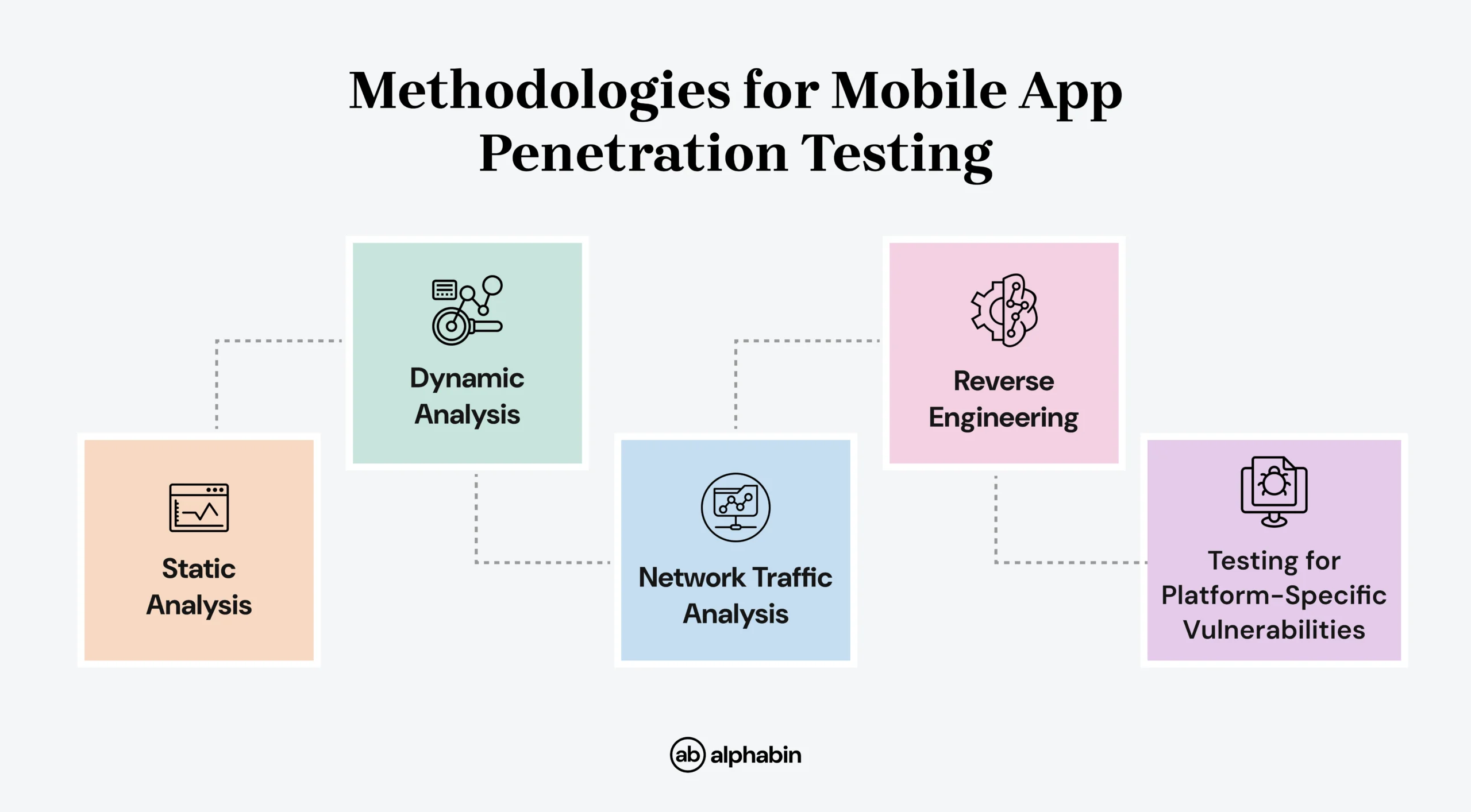
    Methodologies for Mobile App Penetration Testing

    The traditional approach of mobile app pen testing provides a critical process for analyzing and securing mobile applications comprehensively. Below are the essential steps:

    Methodologies for mobile app penetration testing

    Static Analysis

    Static code analysis entails examining the source code of an application in order to identify weaknesses without running the code. This technique is very effective in the discovery of hard-coded credentials written in script and other vulnerabilities.

    Key Tools

    • MobSF: Mobile Security Framework (MobSF) is quite a versatile tool used for the security analysis of source codes of mobile applications.
    • JADX: A Java decompiler for a dex (Dalvik Executive) to Java that reduces the complexity of the source codes.

    Dynamic Analysis

    Dynamic analysis is a method of analyzing an application’s behavior in use while it is running. That is, through realism, testers can identify various scenarios, such as the system crashing at a certain point as opposed to the normal operating pattern.

    Key Tools

    • Frida: A dynamic tool used by testers as it enables them to alter an app’s behavior in real time.

    Network Traffic Analysis

    Network traffic analysis looks at the traffic exchange of data packets between an application and its servers. This methodology assists in discovering risks such as sending data without encryption or executing API connections insecurely.

    Key Tools

    • Burp Suite: A widely used tool for intercepting, analyzing, and modifying network traffic.

    Reverse Engineering

    Reverse engineering means to decompile an application to analyze the backstory of what makes it work, its architecture, as well as the vulnerabilities that it might have. Reverse engineers play a crucial role in this process by dissecting app code to identify potential security risks and weaknesses in back-end systems. 

    Such analysis of obfuscated code is essential in using this methodology to discover hidden functionality.

    Key Tools

    • APKTool: An Android app decompiling and recompiling tool.
    • Hopper: A disassembler and debugger for iOS applications.

    Platform-Specific Testing

    That is platform-specific testing, where we try to exploit platform-specific vulnerabilities that exist within Android and iOS platforms. This approach guarantees that tests will cover thoroughly how to secure the platform.

    Key Tools

    • Android: Try to exploit intentions and activity to determine whether there is improper access control.
    • iOS:  Assess the cryptographic vulnerability of secure enclave implementation.

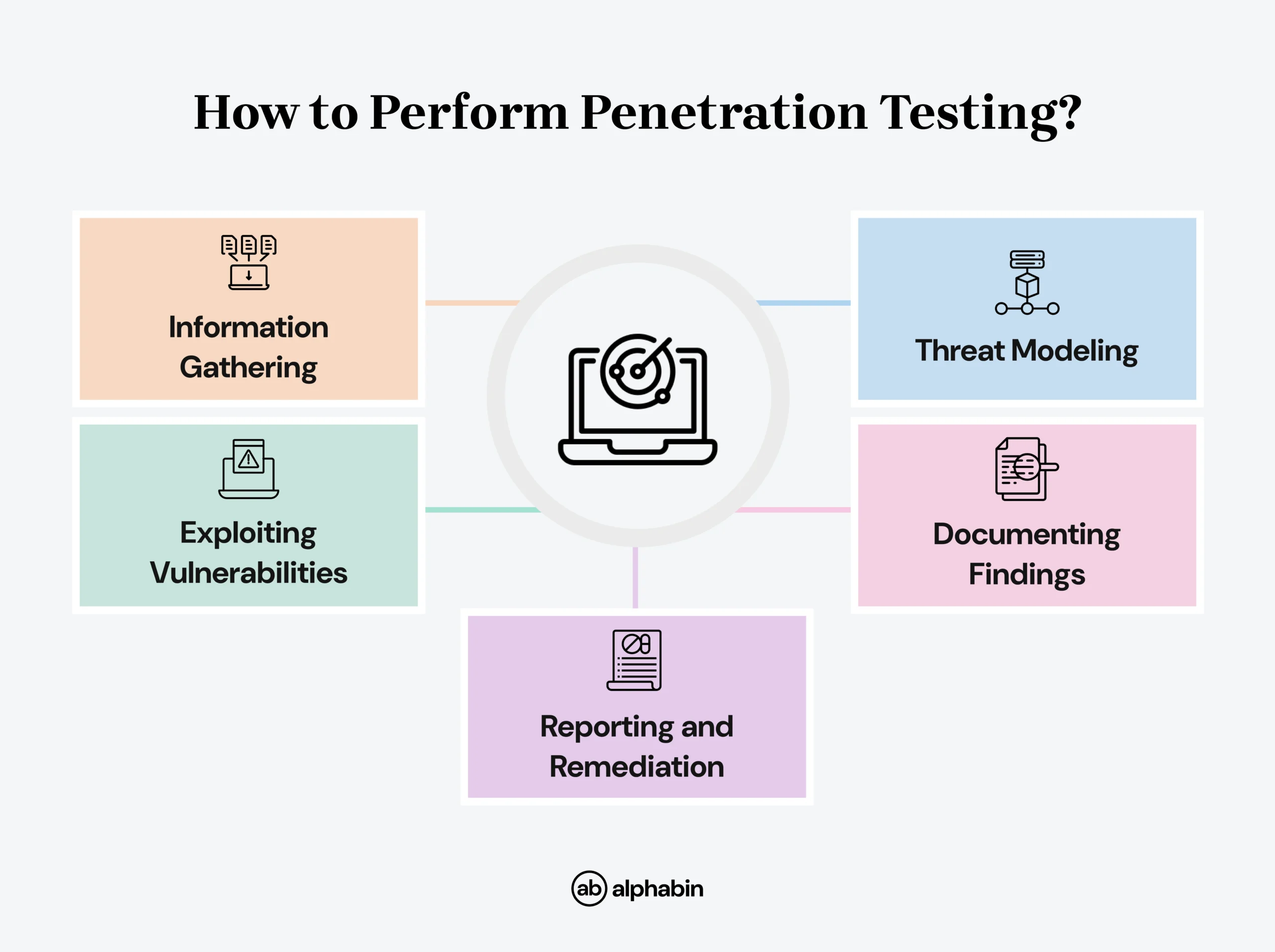
    How to Perform Penetration Testing?

    Mobile application security assessment is one of the key phases of penetration testing—a systematic approach to identifying vulnerabilities in an application or a system. Below are the key steps involved in performing an effective penetration test:

    How to perform penetration testing

    Information Gathering

    • Find out the features used in the app, the third-party APIs to be called, and which integrations live on the backend or front end.
    • Relearn the architecture and components of the system as much as you can simplify.

    Threat Modeling

    • It analyses the collected data to find out possible threats.
    • Think about which risks are going to have the greatest impact if they occur and what to test next.

    Exploit Vulnerabilities

    • Exploit the identified vulnerabilities by simulating real-world attacks.
    • Try to see how much each flaw can damage.

    Document Finding

    • Evidence of these record vulnerabilities includes screenshots, logs, or technical details.
    • Show what clear improvement steps you can take for each problem.

    Reporting

    • Write a document that summarizes the findings and their seriousness in your report.
    • Prioritized recommendations to help make the fixes to identified vulnerabilities effective.

    Tools for Mobile Application Penetration Testing

    This contains a list of tools that are very important when it comes to mobile application penetration testing for Android, iOS, and cross-platform. These tools are categorized based on their specific use cases and platforms:

    Android Penetration Testing Tools

    • APK Tool: For reverse engineering Android applications.
    • JADX: A decompiler for Android applications.
    • MobSF (Mobile Security Framework): An automated pen-testing framework capable of performing static and dynamic analysis.

    iOS Penetration Testing Tools

    • Needle: An open-source framework to reduce the effort involved in conducting security assessments of iOS apps.
    • Objection: A Frida-powered runtime mobile exploration toolkit for identifying the security posture of iOS apps.

    Cross-Platform Tools

    • OWASP ZAP (Zed Attack Proxy): A feature-rich web application penetration testing tool, also suitable for mobile app testing.
    • Frida: A dynamic instrumentation toolkit that enables injecting custom scripts into running apps for both Android and iOS.

    Certifications for Mobile App Penetration Testing

    Several well-known certifications for mobile app penetration testing can help you develop the skills needed to be successful in this role.

    • CompTIA PenTest+: Confirms the education that is required to undertake penetration testing and the management of vulnerabilities.
    • CompTIA Security+: Network security basics and risk management are covered in this area.
    • Certified Ethical Hacker (CEH): Centred on the modern equipment, processes, and strategies regarding commercial hackers.
    • Certified Information Systems Security Professional (CISSP): Indicates good knowledge about cybersecurity approaches and the way they are accomplished.
    • Certified Information Security Manager (CISM): Concentrates more on the administration of information security programs.
    • Certified Information Security Analyst (CISA): Takes time in auditing, control, and assurance.

    These certifications, along with the mobile app penetration testing certifications, demonstrate a high level of knowledge in mobile app penetration testing and offer a great way for individuals and organizations to learn and validate the skills needed to protect themselves from today’s cyber threats.

    Best Practices and Recommendations

    To maintain high levels of security that will protect mobile applications, organizations must work towards increased precaution. The following best practices serve as a guide to mitigate risks and enhance the overall security posture:

    Regular Security Assessment

    Penetration testing and security assessment of mobile applications should be done at regular intervals to gather information about the risks present in applications. 

    These exams replicate actual attacks to expose vulnerabilities so that developers can solve problems before they are solved maliciously by hackers.

    Implementing Secure Coding Practices

    Using secure code standards and secure code guidelines lowers the chances of integrating the vulnerabilities in the code. This includes checking the inputs, the no hard code secrets, and proper authentication and authorization methods.

    Staying Updated with Security Trends

    Comparatively, it can be said that the security environment constitutes a vibrant network of securities that is updated with time and new securities threats are identified frequently.

    Learning new threats, attacks, and countermeasures keeps applications protected from changing threatening factors. Securing every app is keeping up with the security advisories, registering for lectures, and joining a security group.

    {{cta-image-second}}

    Conclusion

    Application security and protecting user data require mobile application penetration testing for Android and iOS. Organizations can overcome the risks by following a structured way of addressing platform-specific vulnerabilities and integrating testing into the development lifecycle. 

    To provide security and reliability in mobile applications, one needs to be secured, tested repeatedly, updated with the flow of threats, and much more. By introducing Penetration Testing as a Service and automating many aspects of penetration testing, Alphabin makes it easier for organizations to enhance their protection securely.

  • Web Security Testing: A Comprehensive Guide for Beginners

    Web Security Testing: A Comprehensive Guide for Beginners

    In the ever-evolving digital world, the security of web applications has never been more critical. At Starwest 2024 conference, this interesting topic took center stage, highlighted by Tom Stiehm, the CTO of Coveros, during his insightful session, “Web Security Testing: The Basics and More” Stiehm highlighted reality: as businesses increasingly rely on web applications to access sensitive information, protecting these systems has become a primary aspect of software testing. 

    Alphabin delivers a full range of security testing services focused on identifying vulnerabilities early in the development process, ensuring that security is integrated into every structure of your web applications. By partnering with Alphabin, businesses obtain potential security gaps as well as help find the right measures to increase the overall security of web applications. In this blog, we will explore what web security testing requires, why it is crucial for businesses, and the essential steps for conducting it successfully. 

    {{cta-image}}

    What is Web Security Testing?

    Security tests are performed to guarantee that the security levels of an application or website are up to date. The security testing is conducted in order to check if all the security measures provide protection and if the defenses were breached. Web security testing is done to check that the security measures of the web app are adequate.

    The primary goal of web security testing

    • The main aim of web security testing is to verify that no application is weak, vulnerable and open to leakage of critical data or facing any type of cyberattack.  
    • It also helps organizations to meet up with the regulations and set standards, such as the PCI DSS and HIPAA, among others.

    What is the Need for Web Security Testing?

    Web security testing is a very effective method when it comes to protection of applications from cyber threats. It guarantees that risks are recognized and covered before they are exploited. Here’s why web security testing is needed:

    What is the need for Web Security Testing?

    Preventing Growing Threats

    As threats are evolving every day, frequent security testing is a must to recognize and prevent new vulnerabilities. This makes it prevent data leaks and other vicious acts such as malware and viruses on websites and thus ensure application integrity.

    Addressing Protection and Privacy Concerns

    Privacy and data protection issues are beginning to be a concern to users. Security testing makes sure that apps process sensitive data in the right manner, users’ expectations on privacy are met, and that the application has a particular regard for data privacy.

    Mitigation Data Impact

    A security breach leads to a variety of losses, including financial losses and the risk of facing a lawsuit. Web security testing helps reduce this risk even further as it helps make the given website robust to withstand any attempt on the data.

    Maintaining Trust and Reputation

    Users expect businesses to secure their personal and financial data. A security breach can seriously harm an organization’s reputation, resulting in a loss of client confidence and possible revenue. Regular security testing helps to retain a company’s trust and ensures that consumers’ data is secure.

    Web Security Testing Checklist

    Web security testing has to be done all the time to ensure that no single loophole has been left open. It offers a guide that checks all the essential sections to reduce the chances of the web application being attacked.

    Web Security Testing Checklist

    Authentication and Authorization

    • Make sure that some functions and data are only accessible to authorized users.
    • Enforce secure password regulations and check for weak or default passwords.
    • Put multi-factor authentication (MFA) into practice to increase security.

    Input Validation

    • Verify that none of the user inputs include any harmful scripts or code.
    • Automated testing tools can simulate thousands of input combinations to identify potential vulnerabilities such as SQL injections or XSS attacks.
    • Use input sanitization to verify input formats and eliminate dangerous characters.

    Error Handling

    • Make sure that private information like server routes, database details, or stack traces are not disclosed in error messages.
    • Make user-friendly customizations to error messages while concealing technical information.
    • To monitor and diagnose problems without disclosing information to possible attackers, securely log errors.

    Data Protection

    • Validate the various encryptions of sensitive data both on the go (using HTTPS/SSL) and stored (using various storage methods).
    • Make sure that any sensitive data, like passwords and the rest, is stored in some encrypted format.
    • Maintain up to date encryption protocols for the association in an effort to meet the current security features.

    Session Management

    • Device timeouts on sessions should be implemented to log out users who have been inactive for some time, greatly helping in keeping out unauthorized individuals.  
    • When generating session IDs, make sure they can not be guessed through random values or stolen from other users.  
    • Use methods to regulate and organize sessions in such a manner so that there is a minimization, or rather elimination, of session chromium and other types of session attacks.

    Compliance

    • Check that it meets the usability standards of your chosen industry, such as the PCI DSS, HIPAA, and other protection norms, such as the GDPR.
    • It would be useful to conduct continuous periodic assessments and a proper compliance check to identify all compliance problems.
    • Regular updating of security documents to demonstrate compliance with practices and security procedures in a firm.

    Effective Web Security Testing Technique

    As stated earlier, maintaining web application security testing requires using a mix of testing strategies to cover various threats. Alone with other methods, it discovers potential defeat areas and improves security methods. Here are some key techniques for effective web security testing:

    Effective Web Security Testing Technique

    Manual Testing

    • Manual testing involves human testers exploring the application to uncover hidden vulnerabilities that automated tools might miss.
    • Simulates real-world scenarios, helping identify logical flaws, misconfigurations, and weaknesses in the app’s functionality.

    Penetration Testing

    • Is used to mimic what an attacker will do as per behavior in relation to how they will infiltrate an organization’s system and exploit the existing loopholes.
    • Penetration testing helps identify areas of vulnerability, estimate the risks, and suggest what actions can be taken to prevent real security breaches from happening.

    Static and Dynamic Analysis

    • Static Analysis: A person should be able to wade through the reviews and look for signs of security flaws deep in the application’s code set, which makes it possible to identify the problem at the design stage of the application.
    • Dynamic Analysis: Checks the running application and performs finding in real time while stressing it to determine any gaps in its activity.

    How Can Alphabin Help with Web Security Testing?

    Alphabin is designed to enhance and improve the web security testing convenience so that web applications will be well protected. Contact us for more know about it. Here’s how it can make a difference:

    • Automated Vulnerability Scanning: Alphabin performs initial flyover scans on web applications and identifies—and reports—the presence of inherent security flaws, including SQL injection, cross-site script (XSS) attacks, and misconfigurations. Moreover, it eliminates the needed time to detect risks and also provides the best result in a short period.
    • Real-Time Threat Monitoring: Alphabin also works with the capability of performing the monitoring continuously and easily detecting the threats together with other unusual activities. This real-time analysis works in order to prevent the attacks and prevent their damage and publicity.
    • Compliance Management: With Alphabin, users are able to meet standard requirements and legal issues, including the PCI DSS and HIPAA. Built-in compliance checks are supporting features of the tool that help organizations analyze their security situation and pinpoint weaknesses.
    • Comprehensive Reporting: The platform provides the users with reports containing information about the potential and real threats, assessing their potential impact and providing recommendations on how they can be addressed. Such reports facilitate the action toward security threats and make it easier to grasp the weaknesses.
    • User-Friendly Interface: With the help of a simple and clear dashboard, Alphabin provides all the tools for security teams to manage testing processes, analyze results and apply security solutions without a deep technical background. 

    {{cta-image-second}}

    Conclusion

    Web security testing is no longer a luxury—it’s a necessity in today’s digital world. As threats continue to evolve, regular and comprehensive security testing becomes vital to safeguarding sensitive information and maintaining trust with users. From understanding the basics to exploring advanced techniques, it’s clear that a proactive approach to identifying and addressing vulnerabilities can make all the difference in protecting your applications from cyberattacks.

    Alphabin, with their automated vulnerability scanning, real-time threat monitoring, and comprehensive reporting, simplifies the process of identifying and mitigating security risks. By leveraging such professional services, businesses can not only meet compliance requirements but also build a solid foundation of security for their web applications.

  • What is ISO 27001? A Simple Guide to Security Standards

    What is ISO 27001? A Simple Guide to Security Standards

    In a world where cyber threats are on the rise, protecting your organization’s sensitive information is more important than ever. Information security isn’t just a technical concern—it’s a critical part of running a successful business. One of the best ways to safeguard your data and build trust with clients is by following the ISO 27001 security standards.

    ISO 27001 is a well-recognized international standard that provides a framework for managing and protecting information assets. It helps organizations of all sizes and industries secure their data against potential risks. By implementing ISO 27001, you can ensure that your business stays compliant with legal requirements and maintains a strong reputation for security.

    In this blog, we will explore what ISO 27001 is, its key components, and the benefits it brings to your organization. We will also guide you through the steps to implement ISO 27001 and overcome common challenges you might face. Let’s dive into understanding how it can strengthen your organization’s security measures.

    What is ISO 27001?

    ISO 27001 outlines how to set up an Information Security Management System (ISMS), a structured approach to managing your organization’s sensitive data. The goal is to ensure the confidentiality, integrity, and availability of information.

    History and Development

    ISO 27001 was first published in 2005 by the International Organization for Standardization (ISO) and the International Electrotechnical Commission (IEC). It was developed to address the growing need for organizations to protect their information assets in an increasingly connected world. The current version, ISO/IEC 27001:2022/Amd 1:2024, provides the latest guidelines and practices.

    Scope of ISO 27001

    It is versatile and can be applied to any organization, regardless of its size or industry. Whether you run a small business or a large corporation, ISO 27001 helps you identify risks and implement controls to manage or reduce them. This standard is particularly beneficial for companies that handle large amounts of sensitive data, such as financial institutions, healthcare providers, and IT service companies.

    Key Components of ISO 27001

    Understanding the key components of ISO 27001 security standard is essential for implementing the standard effectively. Here are the main elements you need to know:

    1. Information Security Management System (ISMS)
      The ISMS is the backbone of ISO 27001. It is a framework of policies and procedures that includes all legal, physical, and technical controls involved in an organization’s information risk management processes. The ISMS helps you systematically manage and improve your information security.
    2. Risk Assessment and Treatment
      It emphasizes identifying and evaluating risks to your information assets. Risk assessment involves understanding what threats exist, their likelihood, and their potential impact. After determining the risks, you need to decide how to treat them. Treatment options include accepting, avoiding, transferring, or mitigating the risks.
    3. Control Objectives and Controls
      Annex A of ISO 27001:2022 lists 93 controls organized into 4 themes: organizational, people, physical, and technological controls. These controls help you address specific security risks and achieve your information security objectives.
    4. Statement of Applicability (SoA)
      The SoA is a crucial document in ISO 27001. It outlines which controls from Annex A apply to your organization and why they were selected. It also explains why certain controls were not chosen. The SoA demonstrates your organization’s commitment to managing information security risks and ensures appropriate measures are in place.

    By understanding and implementing these key components, you can create a robust ISMS that protects your organization’s sensitive information and aligns with ISO 27001 security standards.

    Benefits of Implementing ISO 27001

    Implementing ISO 27001 offers numerous benefits for your organization, enhancing security and building trust with stakeholders. Here are some key advantages:

    • Enhanced Security: By following ISO 27001 standards, you create a robust framework for managing and protecting your information assets. This helps to prevent data breaches and cyber-attacks, ensuring your sensitive information remains secure.
    • Compliance: It helps your organization meet legal, regulatory, and contractual requirements related to information security. Compliance with these standards can prevent legal issues and fines, demonstrating your commitment to protecting data.
    • Risk Management: This standard provides a systematic approach to identifying, assessing, and managing risks. This proactive risk management helps you address potential threats before they become significant issues, minimizing the impact on your business.
    • Reputation and Trust: Achieving ISO 27001 certification enhances your organization’s reputation. It shows clients, partners, and stakeholders that you prioritize information security, building trust and confidence in your business practices.
    • Operational Efficiency: Implementing it leads to improved processes and controls. This can result in greater efficiency, reducing the likelihood of security incidents and minimizing downtime. Streamlined operations can also lead to cost savings over time.
    • Continuous Improvement: ISO 27001 promotes a culture of continuous improvement. Regular audits, reviews, and updates to your ISMS ensure that your information security measures remain effective and up-to-date with the latest threats and technologies.
    • Competitive Advantage: Being ISO-certified can give you a competitive edge in the market. It can be a key differentiator when bidding for contracts or attracting new clients who prioritize information security.

    By implementing ISO 27001, your organization can achieve these benefits and more, creating a secure and efficient environment for managing information assets.

    Steps to Implement ISO 27001 in Your Organization

    Implementing ISO 27001 involves a series of steps that ensure your organization effectively manages information security risks. Here’s a simplified guide to get you started:

    Preparation and Planning

    • Gain Management Support: Secure commitment from top management to ensure adequate resources and support for the implementation.
    • Define Scope and Objectives: Determine the scope of your ISMS and set clear objectives for what you want to achieve with ISO 27001.

    Risk Assessment

    • Identify Risks: List all potential threats to your information assets.
    • Evaluate Risks: Assess the likelihood and impact of each identified risk.
    • Risk Treatment Plan: Decide how to handle each risk (accept, avoid, transfer, or mitigate).

    Developing the ISMS

    • Create Policies and Procedures: Develop comprehensive security policies and procedures aligned with ISO 27001 standards.
    • Implement Controls: Apply the necessary controls from Annex A to manage and mitigate risks.

    Training and Awareness

    • Educate Staff: Conduct training sessions to ensure all employees understand their roles and responsibilities in maintaining information security.
    • Promote Awareness: Foster a culture of security awareness throughout the organization.

    Monitoring and Review

    • Continuous Monitoring: Regularly monitor and measure the effectiveness of your ISMS.
    • Internal Audits: Conduct periodic internal audits to ensure compliance with ISO 27001 standards.
    • Management Review: Hold management review meetings to assess the ISMS performance and make necessary improvements.

    Certification Process

    • Choose a Certification Body: Select an accredited certification body to conduct the external audit.
    • Stage 1 Audit (Documentation Review): The certification body reviews your ISMS documentation to ensure it meets ISO 27001 requirements.
    • Stage 2 Audit (Implementation Review): The certification body assesses the implementation and effectiveness of your ISMS.
    • Achieve Certification: If your organization meets the standards, the certification body will grant ISO 27001 certification.

    Following these steps will help your organization implement ISO 27001 effectively, ensuring robust information security management and compliance with international standards.

    Common Challenges and How to Overcome Them

    Implementing ISO 27001 can be challenging. Here are common obstacles and solutions:


    Challenge Description Solution
    Resource Constraints Limited time, budget, and personnel. Prioritize key areas, use external consultants, and secure management support.
    Resistance to Change Employees may resist new processes. Communicate benefits, provide training, and involve staff in implementation.
    Maintaining Compliance Keeping up with standards and new threats. Regularly review and update your ISMS, conduct audits, and use automated monitoring tools.
    Complex Documentation Time-consuming to produce and maintain. Use templates, software tools, and break tasks into manageable pieces.
    Integrating with Existing Systems Aligning ISO 27001 with current systems. Assess current systems, identify gaps, and plan careful integration.
    Scope Creep Expanding the scope too broadly. Define the scope clearly and stick to it, making incremental improvements.


    By addressing these challenges effectively, your organization can successfully implement and maintain ISO 27001.

    Conclusion

    Implementing ISO 27001 is a valuable investment in your organization’s information security. By following this international standard, you can protect your sensitive data, comply with legal and regulatory requirements, and build trust with clients and stakeholders. Although there are challenges, with careful planning and commitment, you can overcome them and create a robust Information Security Management System (ISMS).

    Remember, the key components of ISO 27001—such as risk assessment, control implementation, and continuous improvement—are essential for maintaining a secure environment. The benefits, from enhanced security to competitive advantage, far outweigh the initial efforts.

    Consider ISO 27001 not just as a compliance requirement but as a strategic approach to safeguarding your business. Start your journey today, and take proactive steps to ensure your organization’s information remains secure and resilient against ever-evolving threats. For expert guidance in implementing ISO 27001, consider consulting with professionals like Alphabin, who specialize in information security and can provide tailored solutions for your organization.

    For more information on how Alphabin can assist you, visit Alphabin’s consultation services and begin securing your business with confidence.

  • Why Every Business Needs a Web Vulnerability Scanner?

    Why Every Business Needs a Web Vulnerability Scanner?

    Did you realize that a cyber attack occurs every 39 seconds? Businesses worldwide had millions of data breaches in 2023, with each incident costing an average of $4.24 million. With such startling statistics, it’s evident that no firm is immune to cyber dangers.

    Every organization needs an online vulnerability scanner to guard against these expanding dangers. This crucial tool identifies and fixes security flaws in your online apps, preventing criminals from abusing them.

    In this article, we’ll explain why a web vulnerability scanner is essential for your organization, highlight its benefits, and advise how to implement it successfully. By the conclusion, you’ll understand how this tool may be an essential component of your cybersecurity approach.

    Web Vulnerability Scanners in Increasing Threat Landscape

    A web vulnerability scanner is a software program that automatically scans your website for security issues. It discovers typical vulnerabilities such as SQL injection, cross-site scripting (XSS), and failed authentication and generates full reports on the issues discovered.

    In today’s society, cyber risks are always changing. Hackers are employing more sophisticated tactics to circumvent security measures. For example, recent statistics indicate a 67% surge in phishing attempts and a 30% increase in ransomware attacks. These dangers can cause severe financial losses, brand harm, and legal ramifications for corporations.

    Common web vulnerabilities are:

    • SQL Injection: Attackers put malicious SQL code into your database, gaining access to sensitive information.
    • Cross-Site Scripting (XSS): Hackers insert dangerous scripts into your web pages, which are subsequently executed by unsuspecting users.
    • Broken Authentication: Weak login systems provide attackers unauthorized access to user accounts.

    Using an online vulnerability scanner, you can proactively find and address these flaws, safeguarding your company from prospective assaults. This solution helps to safeguard your online applications, lowering the risk of data breaches and other cyber attacks.

    Benefits of Using a Web Vulnerability Scanner

    In the fight against cyber crimes, having proper tools is essential. A web vulnerability scanner has numerous important features that can help you keep your company safe from future cyber attacks.

    • Early Detection
      A web vulnerability scanner helps detect security weaknesses in web applications early before criminals can exploit them. By finding vulnerabilities early, businesses can fix issues promptly, preventing data breaches and other attacks.
    • Cost Savings
      Identifying and fixing vulnerabilities early can save businesses a lot of money. Data breaches and cyber attacks can lead to huge financial losses due to downtime, legal fees, and damage control. Preventing these incidents helps businesses avoid these high costs.
    • Compliance and Regulations
      Many industries have strict rules about data protection and cybersecurity, like GDPR and PCI-DSS. Using a web vulnerability scanner helps businesses stay compliant with these regulations by regularly checking for and fixing security weaknesses.
    • Automated and Continuous Monitoring
      Automated web vulnerability scanners provide continuous monitoring of your web applications. This ensures that any new vulnerabilities are detected and addressed quickly, keeping your security measures up-to-date.

    Integrating a web vulnerability scanner in your digital environment is not just a preventive measure but a proactive strategy that helps secure your business in the ever-evolving world of cyber threats.

    Choosing the Right Web Vulnerability Scanner

    Selecting the best web vulnerability scanner for your business involves considering several important factors. Here’s what you need to know:

    Features to Look For

    When choosing a web vulnerability scanner, look for features such as comprehensive scanning capabilities, ease of use, and detailed reporting. Comprehensive scanning ensures that all potential vulnerabilities, from SQL injection to cross-site scripting, are thoroughly checked. Ease of use ensures that even non-technical users can operate the scanner effectively, while detailed reporting provides clear insights into identified vulnerabilities and recommended fixes. Now, let’s take a look at some of the popular tools you can use to keep your business safe from cybercriminals.

    Popular Tools

    • AlphaScanner: Offers an easy-to-use user interface with comprehensive scanning and detailed reports vetted by experts.
    • Nessus: Known for its comprehensive scanning capabilities and extensive vulnerability database.
    • Acunetix: Offers automated scanning and detailed reports, suitable for both small businesses and large enterprises.
    • Burp Suite: A favorite among security professionals for its manual testing capabilities and advanced features.
    • OpenVAS: An open-source scanner that provides powerful vulnerability scanning capabilities.

    Each web vulnerability scanner comes with its own set of pros and cons. For instance, while automated scanners offer convenience and speed, they may miss certain vulnerabilities that require manual testing. On the other hand, manual scanners provide more detailed insights but require more time and expertise to operate effectively.

    Choosing the right web vulnerability scanner depends on your business needs, technical expertise, and budget. It’s essential to evaluate these factors carefully to ensure you select a scanner that enhances your cybersecurity efforts effectively.

    {{cool-component}}

    Implementing a Web Vulnerability Scanning Strategy

    Cybersecurity is crucial for every business with an online presence. Every business which is having online presence is vulnerable to cyber threats. It could cause financial and reputational loss to businesses and brands. So, here’s how to use web vulnerability scanning to keep your website safe:

    • Start Early in Development
      Make security testing a part of your website creation process. Use website security tools to find and fix problems before your site goes live. This helps build a secure website from the ground up.
    • Scan Regularly and Update Quickly
      Set up automated vulnerability scans to run often. Use a reliable web application scanner to check for new threats. When you find issues, patch them fast. This ongoing website security check helps close gaps before hackers can use them.
    • Train Your Team
      Teach everyone involved with your website about online security risks. Show them how to use web vulnerability assessment tools and understand scan results. When your whole team knows about web security best practices, your site stays safer.

    Remember, keeping your website secure is an ongoing job. Hackers are always finding new ways to attack, so your defense needs to keep improving too. By making security scans a regular part of your work, you’ll help protect your business from cyber-attacks. We can also help you keep your business and brand identity safe by providing testing services such as penetration tests with our security scanner – AlphaScanner.

    Conclusion

    In conclusion, integrating a web vulnerability scanner is essential for protecting your business from cyber threats. With attacks becoming more frequent and sophisticated, businesses must adopt proactive measures to keep their digital assets safe.

    By using a web vulnerability scanner, you can:

    • Detect and Mitigate Risks Early: Identify vulnerabilities before they are exploited, reducing the risk of data breaches.
    • Save Costs: Addressing vulnerabilities promptly minimizes the financial impact of cyber attacks and compliance violations.
    • Ensure Compliance: Meet regulatory requirements by regularly scanning and fixing security weaknesses.
    • Enable Continuous Monitoring: Implement automated scanning to maintain ongoing protection against evolving threats.

    Choose a web vulnerability scanner that fits your business needs and integrates seamlessly with your operations. By taking these steps, you can strengthen your cybersecurity defenses and protect your business in cyberspace.

  • Top 10 Web Application Vulnerability Scanners in 2024

    Top 10 Web Application Vulnerability Scanners in 2024

    Last year, cyberattacks on web applications accounted for over 30% of all data breaches, highlighting the critical need for robust security measures. Web applications are prime targets for hackers, making it essential to protect them from vulnerabilities. Using a top web application vulnerability scanner can help you identify and fix security issues before they are exploited. In this blog, we will discuss the top 10 web application vulnerability scanners. We will cover their features, pros, and Limitations, and provide a comparison table to help you choose the best tool for your needs. Secure your web applications with these highly-rated vulnerability scanners. If you want to learn more about what vulnerability scanners are and how does it work?

    Web App Vulnerability Scanners

    Choosing the right web application vulnerability scanner is crucial for businesses. These tools offer essential features to detect and mitigate security risks in web applications. Whether you’re looking for automated scanning, detailed reporting, or integration with existing systems, understanding each scanner’s capabilities is key. Below, we explore the key features, pros and cons, and ideal use cases of leading web security scanners to help you select the best fit for your security strategy.

    Top 10 Web Vulnerability Scanners

    1. AlphaScanner

    AlphaScanner is a robust web security scanner designed for comprehensive vulnerability assessments. It automates the detection of web application vulnerabilities to enhance security posture. It has a free vulnerability scanning module alongside the paid version.

    Key Features:

    • Scanner Capabilities: Automated scans of entire web apps, detailed findings, and recommendations.
    • Accuracy: 100% with expert vetted scans
    • Compliance: OWASP Top 10 coverage, HIPAA, and NIST scans
    • Integrations: CI/CD pipelines, Slack, Jira, Jenkins
    • Pricing: $99 per month, limited free trial features

    Pros:

    • Relatively lower price than other scanners
    • Provides manual penetration testing with ease
    • All the alerts are verified before sending it to the client.

    Limitations:

    • There are only limited features in the free trial.

    AlphaScanner is ideal for all-sized businesses seeking automated and proactive web security scanning capabilities.

    2. Invicti

    Invicti, formerly Netsparker, offers automated web application security testing to identify and prioritize vulnerabilities accurately. It is a powerful web application security solution that automates vulnerability scanning and remediation throughout the Software Development Life Cycle (SDLC).

    Key Features:

    • Scanner Capabilities: Proof-based scanning, Scalability for large applications
    • Accuracy: High accuracy in vulnerability detection.
    • Integrations: CI/CD pipelines, Jira, GitHub, GitLab, Kenna, Bitbucket
    • Pricing: Available on quote

    Pros:

    • High accuracy in vulnerability detection
    • Scalable solution suitable for large enterprises

    Cons:

    • Higher cost compared to some competitors
    • Scanning for API endpoints can be improved

    Invicti is well-suited for enterprises needing scalable and accurate web application security testing integrated into their development workflows.

    3. Acunetix

    Acunetix offers advanced web security scanning with comprehensive features for thorough vulnerability detection and risk management. It provides detailed scanning reports, and compliance checks, and integrates with DevOps tools for continuous testing.

    Key Features:

    • Scanner Capabilities: Automatic risk prioritization, detailed scanning reports
    • Accuracy: Comprehensive vulnerability detection
    • Integrations: DevOps tools, GitHub, Jira, Atlassian
    • Pricing: Available on quote

    Pros:

    • User-friendly interface with powerful scanning capabilities
    • Automatic prioritization of identified risks

    Cons:

    • Higher initial setup and configuration time
    • Errors with performing credential scans

    Acunetix is recommended for organizations looking for a user-friendly yet powerful tool to ensure web application security and compliance.

    4. Burp Suite

    Burp Suite is a top web vulnerability scanner and security testing tool widely used by professionals and developers. It offers both manual and automated scanning capabilities. Its detailed analysis and reporting make it ideal for in-depth security assessments.

    Key Features:

    • Scanner Capabilities: Manual and automated scanning, Tools for spidering, and penetration testing.
    • Accuracy: Detailed analysis and reporting
    • Integrations: Third-party plugins
    • Pricing: The community version is free, the Pro version is available for $449/year and 7-day free trial is provided. 

    Pros:

    • Powerful manual testing capabilities
    • Detailed analysis and reporting

    Cons:

    • The steep learning curve for new users
    • Burp Crawler sometimes misses out on end-points

    Burp Suite is ideal for security professionals and advanced users needing customizable and detailed web application security testing and analysis.

    5. ZAP

    ZAP, from OWASP, is an open-source web application vulnerability scanner providing both automated and manual testing for web applications. It offers comprehensive testing features and extensive community support. Ideal for developers and security enthusiasts.

    Key Features:

    • Scanner Capabilities: Active and passive scanning, fuzzing capabilities
    • Accuracy: Comprehensive testing features
    • Integrations: Extensible through API and add-ons
    • Pricing: Free and open-source

    Pros:

    • Free and open-source with a supportive community
    • Comprehensive features for both automated and manual testing

    Cons:

    • Requires technical expertise for effective use
    • Less intuitive interface compared to commercial tools

    ZAP suits developers and security enthusiasts looking for a powerful, free, and extensible web security testing tool.

    6. Qualys

    Qualys Web Application Scanning delivers automated security assessments with comprehensive reporting. It integrates seamlessly with other Qualys products for unified security management. Ideal for enterprises needing robust, integrated security solutions.

    Key Features:

    • Scanner Capabilities: Automated scanning, Continuous monitoring
    • Accuracy: Detailed compliance checks and reports
    • Integrations: Qualys Continuous Monitoring
    • Pricing: Available on quote

    Pros:

    • Integration with other Qualys security products
    • Detailed compliance checks and reporting

    Cons:

    • Struggles with highly dynamic web applications
    • Difficulties with multi-factor authentication scenarios.

    Qualys is ideal for enterprises needing a robust and integrated web application security and compliance solution.

    7. Intruder

    Intruder is a web vulnerability scanner offering proactive scanning with continuous monitoring and integration capabilities. It’s suitable for modern security operations, providing detailed reporting and seamless integration with existing workflows.

    Key Features:

    • Scanner Capabilities: continuous scanning, detailed reporting
    • Accuracy: proactive threat detection
    • Compliance: integration with SIEM platforms
    • Integrations: easy integration into workflows
    • Pricing: $284/month for 1 application and 1 infrastructure license, free trial available

    Pros:

    • Proactive scanning approach with continuous updates
    • Easy integration with existing security infrastructure

    Cons:

    • Limited manual testing capabilities
    • Remediation guidance can be a bit generic at times

    Intruder is recommended for businesses seeking proactive vulnerability management integrated into their security operations.

    8. Detectify

    Detectify is a web vulnerability scanner that leverages ethical hacker expertise for automated security testing. It offers continuous updates and asset monitoring, ensuring up-to-date protection. Detectify provides detailed insights for actionable security intelligence.

    Key Features:

    • Scanner Capabilities: Automated scanning by ethical hackers, Continuous updates
    • Accuracy: high accuracy from ethical hacker expertise
    • Integration: with its surface monitoring product
    • Pricing: starting from €82/month and a 2-day free trial available

    Pros:

    • Ethical hacker-driven scanning for high accuracy
    • Continuous updates for the evolving threat landscape

    Cons:

    • Higher cost compared to some competitors
    • Less focus on manual testing capabilities

    Detectify is ideal for companies looking for automated and expert-driven security testing to stay ahead of evolving web threats.

    9. Cobalt

    Cobalt offers comprehensive vulnerability assessment by combining automated scanning with expert manual penetration testing. It ensures thorough security management through real-time collaboration and detailed reporting.

    Key Features:

    • Scanner Capabilities: automated and manual testing, real-time collaboration
    • Accuracy: expert-driven penetration testing
    • Integrations: DevOps workflows
    • Pricing: Available on quote

    Pros:

    • Expert-driven penetration testing for accurate results
    • Real-time collaboration features for teams

    Cons:

    • Requests for retesting can take longer than expected
    • The pricing model can be slightly confusing

    Cobalt is perfect for businesses needing a blend of automated scanning and expert-driven penetration testing to enhance web application security.

    10. Rapid7

    Rapid7 AppSpider is a dynamic web vulnerability scanner with advanced scanning capabilities. It offers comprehensive application security testing and integrates seamlessly with the Rapid7 Insight platform.

    Key Features:

    • Scanner Capabilities: dynamic scanning, advanced capabilities
    • Accuracy: comprehensive detection
    • Integrations: Rapid7 Insight platform
    • Pricing: available on quote

    Pros:

    • Integration with Rapid7 Insight for unified security management
    • Comprehensive scanning capabilities

    Cons:

    • Slow turnaround on fixing bugs in the product
    • Complex configuration for optimal use

    Rapid7 AppSpider is recommended for enterprises needing dynamic and integrated web application security testing within their security management framework.

    Now let me help you choose the best from the best. See the next question right after this, yeah it is for you if you are confused about what scanner to use.

    ‍

    How can you choose the best from the top 3 web app vulnerability scanning tools?

    When choosing a web application vulnerability scanning tool, it’s essential to consider several key criteria to ensure it meets your security needs effectively. Here, we compare the top 3 scanners based on pricing, ease of use, integration capabilities, and detection capabilities.

    Criteria for Comparison

    • Pricing: Cost-effectiveness of the scanner’s licensing or subscription model.
    • Ease of Use: User-friendly interface and intuitive navigation.
    • Integration: Compatibility with other security tools and systems.
    • Detection Capabilities: Accuracy and comprehensiveness in identifying vulnerabilities.

    Side-by-Side Comparison Table


    Feature AlphaScanner Invicti (formerly Netsparker) Acunetix
    Platform Online Online Online
    Ease of Use User-friendly User-friendly User-friendly
    Workflow Integration CI/CD Integration, Slack, Jira, and Jenkins JIRA, GitHub, GitLab, Kenna, and Bitbucket GitHub, JIRA, and Atlassian
    Detection Capabilities Automated scanning Proof-based scanning, scalability Automatic risk prioritization
    Scan Behind Login Yes No No
    Custom Reports Yes No No
    Pricing $99 per month Available on quote Available on quote


    Conclusion

    Choosing the right web application vulnerability scanner is critical for protecting your online assets from cyber threats. This blog has explored the top 9 scanners, highlighting their features, pros, and limitations, with a comparison table to aid your decision-making process. Key factors to consider include pricing, ease of use, integration capabilities, and detection effectiveness. For small businesses, Acunetix offers automatic risk prioritization and DevOps integration, while Invicti provides scalable security testing. AlphaScanner excels in compliance checks and proactive scanning, ideal for regulated industries. Remember, a scanner is part of a broader security strategy that includes secure coding, updates, and training to enhance overall security posture.

  • What is Vulnerability Scanner and How Does It Work?

    What is Vulnerability Scanner and How Does It Work?

    In 2023, the global cost of cybercrime reached a staggering $8 trillion, underscoring the critical need for robust cybersecurity measures. With cyberattacks becoming increasingly sophisticated, businesses and individuals must protect their sensitive information. This is where vulnerability scanners come into play. Vulnerability scanners are essential tools in the fight against cyber threats, helping to identify and address security weaknesses before malicious actors can exploit them. In this blog post, we will delve into what vulnerability scanners are, how they work, and why they are a vital component of any robust cybersecurity strategy. Whether you’re an IT professional or a business owner, understanding the importance of vulnerability scanners can significantly enhance your security posture. Read on to learn more about these powerful tools and how they can safeguard your digital assets.

    What is a Vulnerability Scanner?

    A vulnerability scanner is software that checks computers, networks, or web applications for known security issues. It compares the state of the system against a database of known vulnerabilities, finding potential security gaps that need fixing.

    Types of Vulnerability Scanners

    There are different types of vulnerability scanners, each designed for specific parts of a network or system. Let’s take a brief look at them.

    Scanner Type What does it do?
    Network-Based Scanners These scanners scan entire networks to find open ports, misconfigurations, and known vulnerabilities in the network infrastructure.
    Host-Based Scanners These focus on individual computers or servers, checking the operating system and applications for security issues and missing patches.
    Wireless Scanners These analyze wireless networks, identifying weaknesses in Wi-Fi protocols, access points, and connected devices.
    Web Application Scanners These target web applications, looking for security flaws like SQL injection and cross-site scripting (XSS).
    Database Scanners These check database systems for vulnerabilities, such as weak passwords and unnecessary privileges.


    Importance of Scanners

    Vulnerability scanners are crucial for keeping IT systems secure. They automate the process of finding and managing security weaknesses, ensuring potential issues are quickly identified and fixed. By using vulnerability scanners, organizations can:

    • Prevent Data Breaches: Find and fix vulnerabilities before hackers can exploit them.
    • Ensure Compliance: Meet regulatory and industry standards that require regular vulnerability checks.
    • Improve Security: Continuously monitor and enhance the security of their IT infrastructure.

    Regular use of vulnerability scanners helps businesses stay ahead of potential threats, protect sensitive data, and maintain customer trust.

    How Do Vulnerability Scanners Work?

    Understanding how vulnerability scanners work is key to appreciating their role in cybersecurity. Here’s a simple breakdown of their process and techniques.

    Scanning Process

    1. Discovery: The scanner first finds all devices, systems, and applications within the network. It identifies every endpoint that needs to be checked for vulnerabilities.
    2. Vulnerability Identification: The scanner then checks these endpoints for known vulnerabilities. It looks for outdated software, missing patches, misconfigurations, and other security issues.
    3. Assessment: The scanner analyzes the potential impact of each identified vulnerability. It assesses how easily each vulnerability could be exploited and what the consequences might be.

    Techniques Used

    • Signature-Based Detection: This method uses a database of known vulnerabilities. The scanner compares the system’s state against this database to find matches.
    • Behavioral Analysis: Here, the scanner monitors system behavior to detect anomalies that might indicate a security issue. It looks for unusual patterns that deviate from normal activity.
    • Heuristic Methods: These techniques use algorithms to detect unknown vulnerabilities. They analyze the system’s behavior and configuration to find potential security gaps that aren’t yet in the database.

    Workflow

    1. Initiation: Setting up the scanner involves defining what to scan and configuring the scanner settings. This step includes specifying the scope and scheduling scans.
    2. Execution: The scanner runs the scan according to the defined scope. It examines the network, systems, and applications, looking for vulnerabilities.
    3. Reporting: After the scan, the scanner generates reports detailing its findings. These reports include information about each vulnerability, its severity, and recommendations for fixing it.

    By following this process, vulnerability scanners help organizations stay ahead of potential security threats, ensuring their systems remain secure and up-to-date.

    Key Features of Vulnerability Scanners

    Vulnerability scanners come with various features that make them effective tools for enhancing cybersecurity. Here are some key features to look for:

    1. Automated Scanning
      Automated scanning allows vulnerability scanners to run regular checks without manual intervention. This ensures that vulnerabilities are identified and addressed promptly, reducing the risk of exploitation.
    2. Comprehensive Databases
      A good vulnerability scanner has access to extensive databases of known vulnerabilities. These databases are regularly updated to include the latest security issues, ensuring the scanner can identify a wide range of threats.
    3. Customization
      Customization options let users tailor scans to their specific needs. This includes setting scan parameters, scheduling scans, and focusing on particular systems or applications. Customization ensures that scans are relevant and efficient.
    4. Integration
      Integration with other security tools and systems enhances the effectiveness of vulnerability scanners. This can include integration with patch management systems, firewalls, and security information and event management (SIEM) systems. Such integration helps in automating responses to identified vulnerabilities.
    5. User-Friendly Interface
      A user-friendly interface makes it easy to set up and run scans, interpret results, and take action. Clear dashboards, intuitive controls, and detailed reports help users quickly understand and address security issues.
    6. Reporting and Alerts
      Detailed reporting provides insights into identified vulnerabilities, their severity, and recommended fixes. Real-time alerts notify users of critical vulnerabilities as soon as they are detected, enabling immediate action to mitigate risks.

    By offering these features, vulnerability scanners help organizations maintain a strong security posture, effectively manage vulnerabilities, and reduce the risk of cyberattacks.

    Benefits of Using a Vulnerability Scanner

    Vulnerability scanners are must-have cybersecurity solutions that deliver major benefits to organizations affecting every aspect of the business in a way. Here are the major benefits of them:

    1. Proactive Vulnerability Management: Hardening your attack surface by discovering and patching vulnerabilities before hackers can exploit them.
    2. Regulatory Compliance Scanning: In-depth security scanning can help achieve and prove compliance with mandates like PCI DSS, HIPAA, etc.
    3. Cyber Risk Assessment: Prioritize vulnerabilities by severity for risk mitigation based on valuable detailed vulnerability analysis provided by scanners.
    4. Cost-Effectiveness: Organizations can reduce the possible effects of cyberattacks by detecting and resolving security vulnerabilities before they can be used against them by hackers.
    5. Continuous Vulnerability Monitoring: Automated vulnerability detection keeps you ahead of new cybersecurity threats providing organizations with ongoing visibility into the security posture of their IT infrastructure.

    By proactively scanning for and fixing security holes through automated vulnerability scanners, organizations strengthen security posture, meet compliance requirements, manage risks through vulnerability prioritization, reduce breach costs, and maintain strong cyber defenses against evolving hacker tactics and exploit techniques.

    Challenges and Limitations

    While vulnerability scanners are powerful tools in cybersecurity, they also come with certain challenges and limitations. Understanding these can help organizations use them more effectively.

    1. False Positives and Negatives
      One common issue with vulnerability scanners is the occurrence of false positives and false negatives. A false positive is when the scanner identifies a vulnerability that doesn’t exist. This can lead to wasted time and resources as IT teams investigate and resolve non-existent issues. A false negative is when the scanner fails to identify an actual vulnerability, leaving the system exposed to potential attacks.
    2. Complexity
      Managing and interpreting scan results can be complex, especially for large organizations with extensive IT infrastructures. The sheer volume of data generated by scans can be overwhelming, making it difficult to prioritize and address the most critical vulnerabilities.
    3. Resource Intensive
      Vulnerability scans can be resource-intensive, potentially affecting the performance of the systems being scanned. This is particularly true for thorough, deep scans that analyze every aspect of a system. Organizations need to plan scans carefully to minimize the impact on system performance.
    4. Dependency on Updates
      The effectiveness of a vulnerability scanner depends heavily on its database of known vulnerabilities. If the database is not regularly updated with the latest security threats, the scanner may miss new vulnerabilities. This makes it crucial for organizations to ensure their vulnerability scanners are always up-to-date.
    5. Limited Scope
      While vulnerability scanners are excellent at identifying known vulnerabilities, they may not detect new, unknown threats or complex attack vectors. They are best used as part of a broader cybersecurity strategy that includes other tools and practices, such as penetration testing and threat intelligence.

    By being aware of these challenges and limitations, organizations can better integrate vulnerability scanners into their overall cybersecurity strategy, ensuring they are used effectively and complement other security measures.

    Best Practices for Using Vulnerability Scanners

    To maximize the effectiveness of vulnerability scanners and enhance your cybersecurity posture, follow these best practices:

    • Regular Scanning: Schedule weekly or monthly scans to promptly identify and address new vulnerabilities as they emerge.
    • Patch Management: Apply necessary patches or updates promptly when vulnerabilities are identified to prevent exploits.
    • Prioritization: Focus on fixing high-risk vulnerabilities first to minimize the chances of a successful attack.
    • Continuous Improvement: Regularly update your scanners and their databases to detect the latest threats effectively.
    • Training and Awareness: Train IT staff in using scanners and interpreting results; raise employee awareness about cybersecurity best practices.

    By following these best practices, organizations can use vulnerability scanners more effectively to secure their IT infrastructure and stay ahead of threats. Now, let’s explore some of the most popular vulnerability scanners available.

    Popular Vulnerability Scanners

    There are several vulnerability scanners available, each offering unique features and benefits. Here are some of the most popular ones:

    Commercial Solutions

    • AlphaScanner: AlphaScanner provides in-depth scanning with industry-standard checks and offers a hassle-free experience by directly emailing scanning results to the user. Learn more about AlphaScanner.
    • Nessus: Nessus is widely used for its comprehensive vulnerability scanning capabilities. It offers detailed reports and integrates well with other security tools.
    • Qualys: Qualys provides cloud-based vulnerability scanning and management. It is known for its scalability and robust reporting features.
    • Rapid7 Nexpose: Nexpose by Rapid7 offers real-time vulnerability management and is highly regarded for its detailed insights and ease of use.

    Open Source Solutions

    • OpenVAS: OpenVAS is a powerful open-source scanner that offers a wide range of features similar to commercial solutions. It is regularly updated and highly customizable.
    • Nikto: Nikto is an open-source web server scanner that checks for over 6,700 potentially dangerous files and programs. It is straightforward to use and highly effective for web application scanning.

    By exploring these popular vulnerability scanners, their features, and challenges organizations can choose the one that best fits their needs.

    Conclusion

    Vulnerability scanners play a pivotal role in maintaining a secure IT environment. With their automated scanning capabilities and comprehensive databases, they provide organizations with a proactive approach to cybersecurity. By leveraging these tools, businesses can efficiently identify vulnerabilities, meet compliance standards, and protect against cyber threats.

    While there are several popular vulnerability scanners available, AlphaScanner stands out as an excellent option. With its comprehensive scanning capabilities, industry compliance checks, and expert opinions, organizations can stay ahead of potential threats. Its user-friendly interface and efficient workflow make vulnerability scanning a seamless process, ensuring that vulnerabilities are identified and addressed promptly.