Category: API testing

  • Key Benefits of API Testing for Your Business

    Key Benefits of API Testing for Your Business

    APIs are everywhere, quietly powering the apps and services we use daily. They allow seamless communication between software, forming the backbone of modern applications.

    However, if your APIs fail, your business eventually fails. Therefore, API testing becomes important as it checks for secure, high quality and integrated software.

    Unlike UI testing, it’s designed to cope with quick release cycles, continuous changes, and the complexity of current development practices such as DevOps and continuous delivery.

    With the rise of cloud computing and interconnected platforms, API testing has never been more critical. The question is — what makes it so valuable? Let’s dive into the key advantages of API testing.

    {{cta-image}}

    What is API Testing?

    API testing ensures that system software interfaces match business specifications in terms of operations and security requirements. 

    API tests focus solely on the part of an application that processes data between services instead of verifying the appearance of the user interface.

    APIs serve as communication channels between software parts to transfer vital data. When API messengers do not work properly, a system error impacts the entire application.

    API Testing ensures that:

    • The API returns the correct response for a given request.
    • The data exchanged is accurate, consistent, and secure.
    • The API performs reliably under expected and extreme conditions.
    • Errors are handled properly without crashing the system.

    Types of API Testing

    API testing is not just one type of test; it covers a variety of crucial areas to ensure the quality and security of APIs:

    • Functional Testing: Verifies API functionality against defined business requirements.
    • Load Testing: A way of checking out API performance with the anticipated and peak load.
    • Security Testing: Determines vulnerabilities, unauthorized access, and data exposure.
    • Reliability Testing: Making sure that the APIs give correct responses for multiple requests.
    • Validation Testing: Validates data accuracy, structure, and response correctness.
    • Error Handling Testing: Testing how an API reacts to the entry of incorrect input, failure, and exception.
    • Automation Testing: The repetitive API test cases are automated to speed up regression cycles.
    • Integration Testing: Ensures seamless collaboration of system components, particularly in the context of API connections.

    API Testing vs UI Testing

    Although API testing and UI testing are both necessary for delivering quality software, they do different things. Therefore, one has to understand the major differences between each so that teams can decide when and where to use them efficiently.

    Aspect API Testing UI Testing
    Focus Checks backend logic and data exchange Tests frontend user interface
    Speed Fast and lightweight Slower due to rendering overhead
    Stability Less prone to frequent changes Breaks often due to UI changes
    Best Suited For Early and backend testing User-facing feature validation

    Not like UI testing, which depends heavily on design elements and user flows, API Testing allows teams to validate core system functionalities even before the UI is developed. This enables early defect detection, improves development speed, and ensures backend systems work as expected.

    Why API is Crucial for Business Applications?

    It holds high value because all modern business applications greatly rely on internal and external API connections. These APIs perform the main tasks, such as payment handling, secure account access, information exchange, and connection setup.

    Why API is Crucial for Business Applications?

    Relying on Third-Party/Internal APIs

    Modern applications come together like a puzzle system where every service piece connects to a special API. Online commerce systems connect to financial services through APIs by using Stripe or PayPal. 

    Apps for mobile devices need APIs to provide social sign-in options through Google and Facebook. Business departments can securely exchange data thanks to internal APIs between teams.

    Broken APIs stop all application features from running no matter what part of the app users access. Testing APIs becomes necessary because our systems heavily rely on them.

    Risks Without API Testing

    Skipping or underestimating API testing tools opens doors to serious problems:

    • Data Breaches: A weak API can expose sensitive customer data.
    • Revenue Loss: A failed payment API during peak shopping hours means lost sales.
    • Customer Churn: Users leave if apps crash or misbehave.
    • Reputational Damage: A security flaw or performance issue can damage trust.

    API Testing Prevents Costly Failures

    Look at an internet food shipping business. When the system for restaurant listings and payment processing fails at dinner time, their business can lose many orders quickly. Businesses that test their APIs prevent these serious financial losses.

    Another example is a banking application. When banks deploy new features without complete testing, they may lose customer trust along with receiving financial penalties.

    API testing helps businesses by:

    • Detecting bugs early during the development phase.
    • Reducing time spent on debugging later.
    • Preventing financial losses caused by system downtimes.
    • Ensuring a smooth experience for users.

    Key Advantages of API Testing for Your Business Application

    It is important to note that for many today it has become not just a technical imperative but a competitive advantage. But let’s discuss the advantages it is serving in today’s business applications, which make it extensively useful.

    Key Advantages of API Testing for Your Business Application

    1. Improved Test Coverage

    • Testing all essential functionality, workflow, and integration is ensured through API testing.
    • It involves backend logic, data validation, error handling, and third-party services.
    • This turn enables more reliable applications than relying just on UI tests.
    • It ensures that no sticky points occur when UI changes in an e-commerce platform like in our case, PayPal.

    2. Faster Development & Release Cycles

    • Even before the UI is ready, tests can be created for the API.
    • They enable development teams to find bugs faster, minimizing sharp ends.
    • It significantly reduces delays and hence software release cycles.
    • Continuous testing of critical processes and maintaining stability play a very important role in automated tests in ensuring complete test coverage.
    • Before the UI development and in short development cycles, a banking app tests financial services APIs early, catching data errors.

    3. Cost-Effective Testing

    • Catching bugs early during testing saves massive rework costs later.
    • It reduces dependency on time-consuming manual or UI-based testing efforts.
    • Fewer production defects translate to lower maintenance and support costs.
    • A health tech company catches data validation errors during API testing, avoiding expensive post-launch fixes and customer complaints.

    4. Enhanced Reliability & Stability

    • Every program depends on APIs to process essential data and manage server activities.
    • Our API testing system evaluates how well the product behaves while handling heavy traffic unexpectedly.
    • Your users receive stable and dependable applications because of this testing procedure.
    • A health technology firm finds API data validation problems during testing before launch to prevent customer problems and repair costs.

    5. Better Security Testing

    • Attackers routinely try to break into different parts of APIs to steal data.
    • It detects flaws that include insecure user accounts and unguarded data.
    • Your application security defenses improve, and you meet the required safety standards.
    • A fintech app studies its API systems to find security threats and protect bank and financial data.

    6. Improved Automation and CI/CD Integration

    • It works perfectly well when you put them into your CI/CD workflow.
    • They work along with agile delivery by allowing testing during every phase.
    • Teams can set up their systems to run automatic checks for basic, regular, and security-related tests.
    • The SaaS company uses automated API testing to verify new features during CI/CD pipeline delivery.

    7. Independent of User Interface Changes

    • API tests remain stable even if the front end undergoes frequent changes.
    • This prevents unnecessary test maintenance caused by UI redesigns or updates.
    • It allows teams to focus on backend validation without worrying about UI shifts.
    • A social media app frequently updates its UI, but API tests ensure core data operations like messaging and posting remain intact.

    Challenges in API Testing and How to Overcome Them

    API testing offers a huge amount of benefits and is also accompanied by its very own problems. Knowledge of these barriers will allow teams to be better prepared, and to make the right strategy.

    Common Obstacles Faced During API Testing

    1. Missing or outdated API specs require testers to invest too much time to know what is being tested, slowing the test.
    2. APIs usually work with huge and complex data structures.
    3. Frequent changes to APIs cause unstable and failing test cases.
    4. Teams will often forget or perhaps fail to perform security testing.
    5. External APIs may result in flaky or unreliable test results.

    How to Overcome These Challenges

    • Use automated API testing tools like TestGenX, which achieves clear documentation for API.
    • Implement data-driven and reusable test data strategies.
    • Create an automated tests API and automate them as early as possible.
    • Utilize security testing as integrated into your CI/CD pipelines.
    • Avoid third-party dependent issues by mocking external APIs.

    {{cta-image-second}}

    Conclusion

    Considering API validation essential to business growth delivers actual business value. Strong API testing provides the needed edge to stay ahead because clients today demand fast, secure, and reliable systems.

    Through effective strategies and challenge resolution, you achieve software enhancement, which lays a foundation for long-term success and customer faith.

    Most successful companies make API testing a core practice in their development process to achieve their scaling and creating goals. Embrace the position of industry leader instead of following what others do.
  • Top 10 API Testing Tools to Use in 2025

    Top 10 API Testing Tools to Use in 2025

    Is Your API Built to Handle the Real World?

    APIs power everything—from your favorite apps to critical business systems. But what happens when your API is subjected to large or unexpected traffic, security threats, or plunges under load? One weak link can destroy UX, destroy data or take down your service.

    API testing serves as your safety system beyond being a mandatory requirement. Faster development schedules and increased user demands during 2025 require organizations to make essential testing tool choices.

    A poorly tested API can lead to downtime, frustrated users, and lost trust—while a well-tested one delivers speed, security, and seamless performance. The right approach ensures your API doesn’t just work—it thrives under real-world demands.

    {{cta-image}}

    What is API Testing?

    API testing serves as a tool to test programming interfaces to analyze system behavior and gauge dependability and performance without compromising security. API testing targets business logic by API verification, which occurs before UI functionality goes live.

    It ensures the data is valid and the responses correct before thinking of the user interface at all. REST, SOAP, and GraphQL use different communication protocols for APIs, thus, each of them will use different formats for certain parameters and variables.

    Key Aspects of API Testing

    API testing evaluates several critical components:

    1. Functionality: Verify that APIs return expected responses.
    2. Reliability: Check if APIs function right over some time.
    3. Performance: Measure speed and efficiency under different loads.
    4. Security: Identifies vulnerabilities to prevent data breaches.

    Benefits of Using Specialized API Testing Tools

    API testing helps both developers and organizations as part of their testing process. This list shows the main results this approach provides for testing teams and organizations.

    1. Improved Accuracy
      This API testing will ensure that the APIs work correctly and return the desired response, thereby decreasing the risk of error, bugs, etc. Software applications must maintain integrity through this accuracy to ensure their quality.
    2. Increased Speed API testing automatizes the testing process which shortens the time and quality input for evaluation of APIs. It takes a lesser time and effort to maintain manual testing, which in turn helps in faster development cycle.
    3. Better Teamwork
      ‍
      API testing fosters better collaboration between developers and QA testers. It confirms if APIs fulfill the needed standards, thus ensuring a more coherent and faster development procedure.
    4. Stronger and More Reliable Software
      ‍
      API testing aims to check that APIs are robust, reliable, and secure. It reduces potential errors or bugs that can spoil the quality of the whole software and provides a more reliable one.
    5. Faster Release Process
      ‍
      API testing allows testing the APIs much faster and efficiently. This helps organizations to have the freedom to bring their products to market more quickly than others.

    Why Should You Choose API Testing Tools?

    Automated validation of API functionality is an important part of the process, and API testing tools make this as easy as possible. By using these tools, teams can more than double the test efficiency, coverage, and accuracy so that the quality of their software goes up.

    Efficiency

    • Repetitive tests can be automated using automated tools that perform the tests quickly and accurately.
    • Having teams concentrate on critical test scenarios helps reduce manual effort.
    • Decrease time to test execution speed to oppose a fast-paced development cycle.

    Coverage

    • Ensures proper testing of all the API endpoints for the same.
    • It supports functional, performance, security, and load testing.
    • Ensures API responses are validated for different environments and data inputs.

    Accuracy

    • It points out security vulnerabilities, performance bottlenecks, and functional flaws.
    • Reduces the amount of human errors in test execution.
    • Makes the API responses consistent and reliable.

    Collaboration

    • It allows for an uninterrupted conversation between developers, QA testers, and the DevOps team.
    • Provides a way to integrate into CI/CD pipelines for continuous testing.
    • Provides communication between reports, logs, and test cases that are shared.

    Top 10 API Testing Tools to Use

    The reliability, performance, and security of applications depend on API testing. These leading 10 API testing tools will be efficient and possess great capabilities as 2025 unfolds.

    1. TestGenX

    TestGenX is an API testing tool built with AI that enables test case creation without writing codes. By streamlining the testing process, the testing effort goes down without affecting the accuracy and efficiency.

    With the AI-enabled maintenance, test cases of TestGenX can be updated according to how API evolves. Thus, it becomes a perfect option for teams aiming to expand their testing attempts effectively to ensure complete coverage and reliability.

    Key Features

    • No coding required: This is Perfect for testers at all skill levels.
    • Effortless automation: Through test automation, it generates test scripts by capturing user actions, cutting down test creation time by 50%.
    • Enterprise-ready: Execute multiple API test scripts in parallel for large-scale testing operations.
    • AI-powered efficiency: Tests run 4x to 5x faster with stable, reliable element identifiers.

    Seamless integration: Fully supports CI/CD workflows and integrates easily with Jira, GitHub, and Slack for efficient collaboration.

    2. Postman

    Postman is a popular API testing and development tool that is widely used for its simple interface and wide variety of features. This speeds up the API life cycle by allowing developers and QA to streamline the design, testing, and monitoring processes. 

    Postman has automation capabilities that can set up workflow automation for teams, which saves time and helps keep APIs reliable.

    Key Features

    • Automated API testing with Postman Collection
    • CI/CD integration for continuous testing
    • Mock servers for testing API responses
    • Real-time collaboration and API documentation

    3. Katalon Studio

    Katalon Studio is a complete test automation platform for programming API, web, and mobile application testing. A Friendly user interface, which, along with powerful scripting, enables it to be used both by beginners and pros. 

    Katalon has built-in test creation tools (script or no code) available, but you still have the flexibility if you prefer scripting. It offers extensive integration with the CI/CD pipeline, making the software development workflow fully automated.

    Key Features

    • Simplifies test creation with predefined test steps, reducing manual scripting efforts.
    • Provides detailed insights, logs, and dashboards to track test execution and performance.
    • Enables continuous testing in automated deployment pipelines.
    • Ensures broad compatibility for various API architectures.

    4. JMeter

    Apache JMeter is an powerful open-source load-testing tool used for testing APIs, web applications, and servers. Its main feature is to test the scalability and response times of applications under heavy traffic, while also it supports functional API testing. 

    It allows the testers to simulate thousands of concurrent users and so is great for stress or endurance testing. JMeter has an intuitive GUI with enough scripting capability for beginners and advanced users.

    Key Features

    • Supports multi-node execution to simulate high user loads.
    • Supports various protocols, including HTTP, HTTPS, and FTP that ensures broad compatibility with different API and network protocols.
    • Enhances functionality with custom plugins, Java, and Groovy scripting.
    • Works with Jenkins, GitLab, and other DevOps tools for continuous optimization.

    5. Soap UI

    SoapUI is an API testing tool capable of testing SOAP and REST web services. It is being used within the enterprise environment for complex API architectures with advanced validation, security, and automation. 

    Xml testing is easy with SoapUI and has great features like functional, regression, and performance. The tester can simulate the API interactions, handle the dynamic responses, and load testing to make sure the system is reliable.

    Key Features

    • Detects vulnerabilities, performs penetration testing, and ensures API compliance with security standards.
    • Uses external data sources like databases, Excel, and JSON to enhance test coverage.
    • Enables powerful scripting for complex assertions and workflows.
    • Provides detailed execution reports, logs, and test summaries for in-depth analysis.

    6. Rest-Assured

    Rest Assured is a Java-based API testing framework that helps us with the automation of the RESTful web service. It gives the developer an intuitive, fluent syntax to write concise and readable API tests. It is specifically built for Java environments and works perfectly well with testing frameworks like JUnit and TestNG.

    Key Features

    • Behavior-Driven Development (BDD) support
    • JSON and XML response validation
    • Seamless integration with Java-based projects
    • Built-in support for authentication and authorization testing

    7. Karate DSL

    Karate DSL is a powerful test automation framework to automate API testing, performance testing, and automation in a single tool. BDD-guided, lets testers or developers write API tests using a simple and human-readable syntax without having domain programming skills. It’s a versatile API as it supports JSON and XML response validation.

    Key Features

    • Uses Gherkin-style syntax for intuitive and readable test case definitions.
    • Supports API response parsing and validation for different data structures.
    • Runs multiple tests concurrently to speed up execution times.
    • Works smoothly with Jenkins, GitHub Actions, and other DevOps tools.

    8. Apigee

    Apigee, a Google Cloud API management platform, offers powerful tools for API development, security, and analytics. It is an API lifecycle management tool that lets businesses build and deploy their APIs efficiently. Integrated testing by Apigee guarantees API health as APIs continue to be secure, reliable, and performant at different workloads. 

    It is an ideal choice for scaling an enterprise’s API infrastructure with built-in threat detection, automated governance, and real-time traffic monitoring.

    Key Features

    • API traffic monitoring and analytics that provide real-time insights into API performance and usage trends.
    • Identifies vulnerabilities and prevents unauthorized access with robust security measures.
    • Automated API governance and policy enforcement
    • CI/CD integration for continuous testing that supports DevOps workflows for automated API testing and deployment.

    9. Swagger

    Swagger is a part of the OpenAPI Initiative and is a great toolset for designing, documenting, and testing APIs. This helps simplify the development of API by giving you interactive documentation to view all API endpoints, API endpoints themselves can be tested directly and are validated by the API spec. 

    For an API-first development team, swagger formalizes agreement across an API using the OpenAPI Specification (OAS), making it a necessity.

    Key Features

    • Ensures compliance with the OpenAPI standard for consistent API design.
    • Enables testing without relying on a fully developed backend, speeding up development.
    • Allows developers to explore and test APIs directly from the documentation.
    • Works with tools like Postman, Apigee, and CI/CD pipelines for efficient testing.

    10. Assertible

    If end-to-end API testing is something you need in your CI/CD process, then Assertible is your partner in the API testing tool. It automates test execution and validation so that the API contracts can be kept intact during the whole software development lifecycle. 

    With Assertible, teams can define custom assertions, which helps test a lot of different API scenarios in depth.

    Key Features

    • Ensures API responses adhere to expected structures and behaviors.
    • Run automated tests during deployments to catch errors early.
    • Supports flexible validation rules for precise testing.
    • Alerts teams immediately when API issues arise, preventing production failures.

    How to Choose the Right API Testing Tool for Your Needs?

    The selection of API testing tools depends on project requirements in combination with team expertise and budget elements. Several critical elements need attention when selecting an API testing tool.

    How to choose the right API testing tool for your needs?

    1. Project Requirements

    • Determine their functional testing, performance testing, security testing, or automation testing requirements.
    • The tool should also support the type of applications it connects to, such as REST, SOAP, GraphQL, and others.

    2. Team Expertise

    • Select a tool that will be compatible with the technical level of knowledge of the team.
    • If your team does not have an experienced programming team, then low-code or no-code solutions are preferable.

    3. Integration with CI/CD Pipelines

    • Make sure that the tool fits nicely into your CI/CD pipelines for the process to be as automated as possible.
    • Check for integration with tools and services such as Jenkins, GitHub, Actions, and Azure DevOps.

    4. Scalability and Performance

    • For the enterprise, choose the tools that are capable of load testing and work in distributed systems.
    • If you consider using it as a not saturating with infrastructure options, then search for cloud services.

    5. Community and Support

    • Tools that have active communities, are well documented, and have good customer support should be considered.
    • Open-sourcing software, especially those that have large community support, has been proven to be strategic in the long run.

    {{cta-image-second}}

    Conclusion

    By 2025, successful API testing will be crucial for the functioning of contemporary applications in the world. As the software systems become more complicated, the testing tool can improve the effectiveness, safety, and stability of your APIs. In the first step, one must choose a tool that would be best suited to your functional requirement, performance testing, or security testing.

    API testing if done properly with the right tool, is beneficial for the team to reduce overhead and enhance the efficiency of handing over the product to another department. If you find yourself in possession of the right tool, the APIs provide increased user satisfaction and substantially improve the entire software product.

  • API Security Testing: Best Practices & Step-by-Step Guide

    API Security Testing: Best Practices & Step-by-Step Guide

    Imagine you’ve built an advanced app, your users love it, and your business is thriving. But one day, you wake up to the news of a data breach—your API was hacked, and sensitive user data is now roaming the dark web. Sounds like a nightmare, right? Unfortunately, this scenario is all too real.

    According to a report by Salt Security, 94% of organizations experienced security issues in their production APIs, with 17% suffering a breach due to API vulnerabilities. Even tech giants like Facebook and Twitter haven’t been immune—Facebook’s 2021 API breach exposed the personal data of 533 million users.

    Many API security tests create a false sense of safety by focusing on known vulnerabilities and static checks, missing how attackers exploit logic flaws, privilege escalations, and business logic abuse. Clean reports often hide real risks.

    The real challenge? Test the API the way an attacker would—turning low-risk behaviors into high-impact exploits, exposing hidden flaws, and abusing functionalities in unexpected ways. Only then will you find what traditional methods miss.

    {{cta-image}}

    What is API Security Testing?

    API security testing involves a comprehensive assessment of API endpoints to identify and remediate vulnerabilities such as improper input handling, parameter manipulation, and injection-based threats. By rigorously testing these endpoints, it helps prevent exploitation by malicious actors, acting as a crucial layer of defense.

    Strong API security relies on three core principles: continuous testing, protection against API threats, and control over API access. Each principle focuses on different aspects of security, and employing specialized testing techniques for each ensures overall security across the API ecosystem.

    Types of API Security Testing

    API security testing involves various methodologies to identify and mitigate vulnerabilities:

    1. DAST (Dynamic Application Security Testing): Tests the API in its running state to identify real-world vulnerabilities.
    2. SAST (Static Application Security Testing): Analyzes source code to catch vulnerabilities early in the development process.
    3. SCA (Software Composition Analysis): Ensures third-party components don’t introduce security risks.
    4. Vulnerability Scanning: Identifies known vulnerabilities in the API.
    5. Penetration Testing: Simulates attacks to uncover security weaknesses.
    6. Fuzz Testing: Tests the API with random inputs to identify edge cases.
    7. Functional Security Testing: Ensures the API behaves securely under various conditions.
    8. Load Testing: Checks how the API performs under heavy traffic.
    9. Configuration Testing: Verifies that security settings are properly configured.

    Common Types of APIs

    Here we have some common types of APIs.

    Common types of APIs

    REST APIs

    REST (Representational State Transfer) APIs are lightweight, simple, and widely used for web services. They rely on standard HTTP methods like GET, POST, PUT, and DELETE, making them easy to implement and integrate. 

    REST APIs are stateless, meaning each request is independent, and they typically return data in formats like JSON or XML. Their simplicity and scalability make them a popular choice for modern web and mobile applications.

    SOAP APIs

    SOAP (Simple Object Access Protocol) APIs are known for their strict standards and robust security features. They use XML for message formatting and rely on protocols like HTTP, SMTP, and more. 

    SOAP APIs are highly structured, with built-in error handling and compliance with WS-* standards, making them ideal for enterprise-level applications where security and reliability are critical, such as in banking or healthcare.

    GraphQL APIs

    GraphQL APIs offer flexibility and efficiency, allowing clients to request exactly the data they need in a single query. Unlike REST, which returns fixed data structures, GraphQL enables developers to define the shape and depth of the response, reducing over-fetching or under-fetching of data. 

    This makes it a powerful choice for complex systems, microservices, and applications where performance and precise data retrieval are priorities.

    Common API Security Threats You Can’t Ignore

    APIs face numerous threats, and the OWASP API Security Top 10 is an excellent resource for understanding them. Here are some of the most critical risks: 

    1. Broken Object Level Authorization: Hackers can manipulate object IDs to access data.
    2. Injection Attacks: Malicious inputs (like SQL or XSS) exploit vulnerabilities in your API.
    3. Excessive Data Exposure: Your API spills the beans, returning more data than it should.
    4. Security Misconfigurations: Default settings or missing security headers leave your API wide open.
    5. Broken Authentication: Weak passwords or flawed authentication mechanisms let attackers in.

    The consequences? Think of data breaches, financial losses, and reputational damage. For example, in 2021, a major social media platform suffered a breach due to an API vulnerability, exposing 533 million users’ data.

    What are the Benefits of API Security Testing?

    API security testing isn’t just about fixing bugs—it’s about protecting your business. Here’s why it’s a must:

    • Protects Sensitive Data: Keeps personal, financial, and proprietary info safe.
    • Ensures Compliance: Helps you meet regulations like GDPR, HIPAA, and PCI-DSS.
    • Builds Trust: Shows your users and stakeholders that you take security seriously.
    • Saves Money: Prevents costly breaches, fines, and legal headaches.

    In short, API security testing is your best defense against cyber threats.

    How to Perform API Security Testing?

    API security testing isn’t just about running a few scans—it’s a systematic process that requires attention to detail. Here’s a comprehensive step-by-step guide to help you secure your APIs effectively:

    How to perform API security testing?

    1. API Discovery & Information Gathering

    Before you can secure your API, you need to understand it inside and out.

    • What to Do:
      • Review the API documentation to identify all endpoints, parameters, and data flows.
      • Use tools like Postman or Swagger to explore the API’s structure.
      • Map out how data moves between systems and identify potential attack surfaces.
    • Why It Matters:
      • You can’t protect what you don’t know. Understanding your API’s architecture is the first step to securing it.

    2. Authentication Testing

    Authentication is the gatekeeper of your API. If it’s weak, attackers can easily break in.

    • What to Do:
      • Test for weak authentication mechanisms, such as easily guessable API keys or poorly implemented OAuth.
      • Verify that multi-factor authentication (MFA) is in place for sensitive endpoints.
      • Use tools like Burp Suite or OWASP ZAP to simulate authentication attacks.
    • Why It Matters:
      • Strong authentication ensures that only authorized users can access your API.

    3. Authorization Testing

    Even if users are authenticated, they shouldn’t have access to everything.

    • What to Do:
      • Test for privilege escalation by trying to access resources beyond the user’s permission level.
      • Verify that role-based access control (RBAC) is properly implemented.
      • Check for vulnerabilities like IDOR (Insecure Direct Object References).
    • Why It Matters:
      • Proper authorization ensures users can only access what they’re supposed to.

    4. Input Validation & Injection Testing

    APIs often process user inputs, making them vulnerable to injection attacks.

    • What to Do:
      • Test for common injection vulnerabilities like SQL injection, XSS (Cross-Site Scripting), and command injection.
      • Use tools like SQLmap to automate injection testing.
      • Ensure the API validates and sanitizes all inputs before processing them.
    • Why It Matters:
      • Input validation prevents attackers from exploiting your API to execute malicious code.

    5. Sensitive Data Exposure Testing

    APIs often return more data than necessary, exposing sensitive information.

    • What to Do:
      • API Testing responses to ensure they don’t include unnecessary sensitive data (e.g., PII, financial info).
      • Identify and mitigate security vulnerabilities in API endpoints to protect valuable data.
      • Verify that sensitive data is encrypted in transit (using HTTPS/TLS) and at rest.
      • Use tools like OWASP ZAP to scan for data exposure vulnerabilities.
    • Why It Matters:
      • Limiting data exposure reduces the risk of breaches and ensures compliance with regulations like GDPR.

    6. Error Handling & Exception Management

    Error messages can reveal sensitive information if not handled properly.

    • What to Do:
      • Test how the API handles errors—ensure it doesn’t reveal internal details like stack traces or database schemas.
      • Verify that error messages are generic and don’t expose sensitive information.
      • Use tools like Postman to simulate error conditions and analyze responses.
    • Why It Matters:
      • Proper error handling prevents attackers from gaining insights into your API’s internal workings.

    7. Security Misconfiguration Testing

    Misconfigurations are one of the most common API vulnerabilities.

    • What to Do:
      • Check for default settings, unnecessary features, and misconfigured security headers.
      • Verify that the API follows secure configuration guidelines (e.g., disabling unused HTTP methods).
      • Use tools like Nmap or Nikto to scan for misconfigurations.
    • Why It Matters:
      • Secure configurations reduce the attack surface and prevent common exploits.

    8. Rate Limiting & DDoS Protection

    APIs are often targeted by brute force and DDoS attacks.

    • What to Do:
      • Test if the API can handle excessive requests and prevent brute-force attacks.
      • Implement rate limiting and throttling to restrict the number of requests per user.
    • Why It Matters:
      • Rate limiting and DDoS protection ensure your API remains available and secure under attack.

    9. Logging, Monitoring & Alerting

    Even the most secure APIs need monitoring to detect and respond to threats.

    • What to Do:
      • Ensure logs are maintained for all API activity, including access attempts and errors.
      • Set up monitoring tools like ELK Stack to analyze logs in real time.
      • Configure alerts for suspicious activity, such as multiple failed login attempts.
    • Why It Matters:
      • Logging and monitoring help you detect and respond to threats before they escalate.

    Best Practices for API Security Testing

    To ensure your API security testing is effective, follow these best practices:

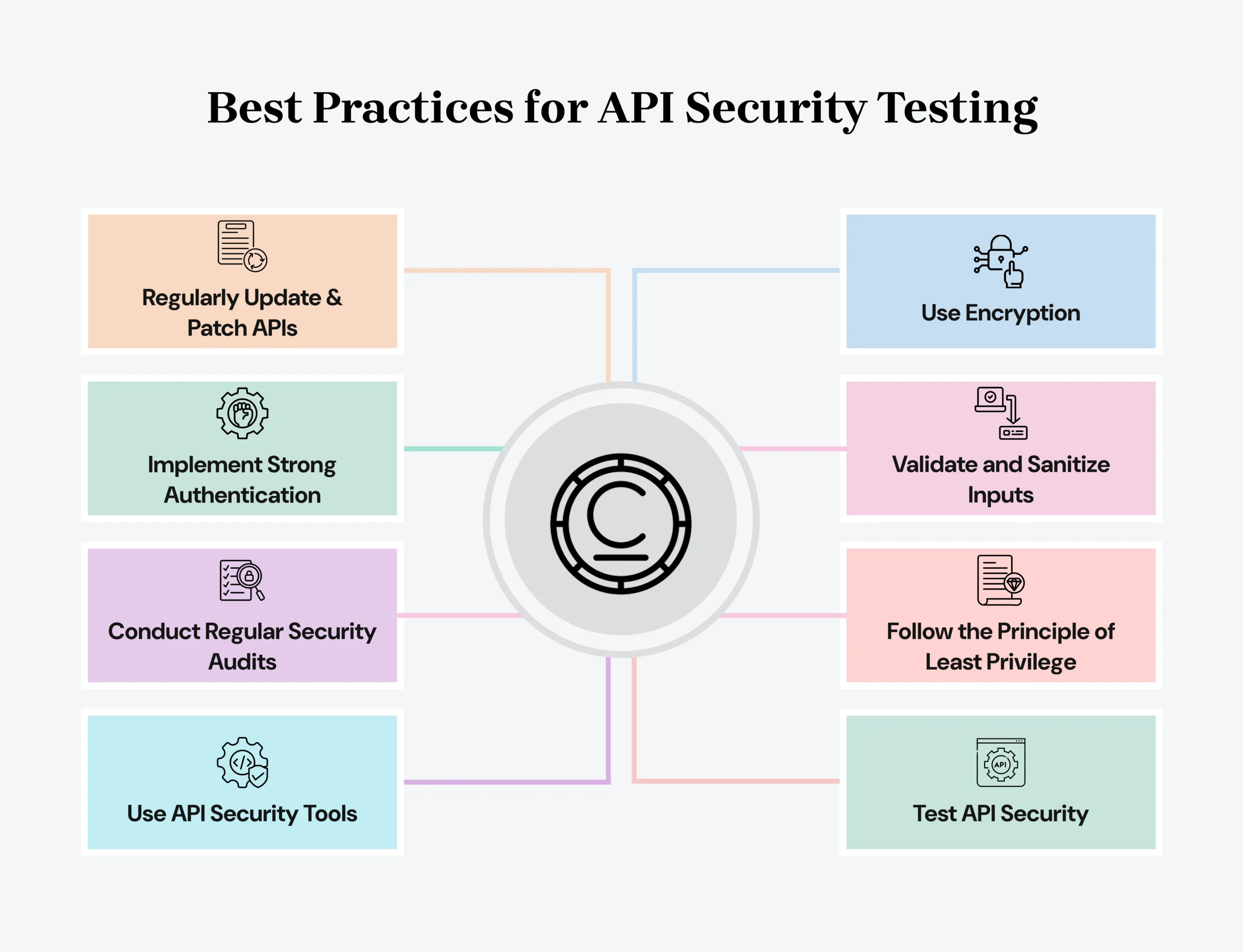
    Best practices for API security testing
    1. Regularly Update & Patch APIs: Keep your APIs up-to-date with the latest security patches.
    2. Use Encryption: Encrypt data in transit (HTTPS/TLS) and at rest to protect sensitive information.
    3. Implement Strong Authentication: Use OAuth 2.0, API keys, or multi-factor authentication (MFA).
    4. Validate and Sanitize Inputs: Prevent injection attacks by validating and sanitizing all inputs.
    5. Conduct Regular Security Audits: Perform periodic security assessments and penetration testing.
    6. Follow the Principle of Least Privilege: Restrict access to only what’s necessary for each user.
    7. Use API Security Tools: Leverage tools like OWASP ZAP, Burp Suite, Postman and Tigergate API Security to automate testing.
    8. Test API Security: Integrate security assessments into the development lifecycle, especially in dynamic environments like DevOps.

    {{cta-image-second}}

    Final Thought

    APIs are critical for modern applications, but they are also a prime target for cyberattacks. The consequences of poor API security—data breaches, financial losses, and reputational damage—can be dangerous.

    By following these steps and implementing best practices, you can protect your APIs from evolving threats and ensure the security of your systems. Remember, API security isn’t a one-time task—it’s an ongoing process that requires vigilance and proactive measures.

    Don’t wait for a breach to happen. Start securing your APIs today!

  • How to Ensure API Quality with API Testing Using Postman in 2024

    How to Ensure API Quality with API Testing Using Postman in 2024

    Whether you’re a Software Developer, DevOps Engineer, or Quality Assurance (QA) specialist, mastering API testing with tools like Postman is essential, especially during development. API testing for Postman makes it possible to increase security, provide better user experiences, and minimize the possibility of losses through bugs or vulnerabilities.

    Postman can be described as an API development environment that can be used in designing, testing, documenting, and managing APIs with ease through the use of a GUI. With automation capabilities, it streamlines API testing workflows. Thus, a recent survey of over 40,000 developers revealed that more than 43% of respondents, including many company executives, indicated that APIs account for over a quarter of their organization’s revenue.

    API management is also well figured out with Postman for testing APIs. The software focuses on functional testing, ensuring that APIs are active as required, receptive to various conditions, and effective in performance.

    At the same time, its compatibility with tools like Jenkins and GitHub integrated with API testing capabilities and flexibility in working with REST, GraphQL, and SOAP APIs makes it one of the most popular solutions for API testing in 2024.

    When navigating the complex world of API testing, challenges can arise at every stage, whether it’s securing seamless integration, debugging errors, or addressing security vulnerabilities to maintain high security. Postman, while being an excellent tool for API testing, can still present challenges during development.

    As you are aware, there are always testing barriers that make API testing processes challenging at times, but at Alphabin, we pride ourselves on providing solutions that guarantee perfect processes in API testing. 

    By utilizing the team’s work, we improve the testing frameworks to perform them as quickly and effectively as possible, to avoid any bugs, and to ensure that your platform works at its best so the software is ready for deployment.

    What is API Quality, and Why Does It Matter?

    API quality is the effectiveness of API in its function to be reliable, efficient, and easy to interact with. Quality of API means that the interface between different software components, systems, or services is efficient and significantly related to easy and perfect communication flow for better user interface or business outcomes. API testing using Postman facilitates these qualities since it enables one to confirm that APIs are operating appropriately.

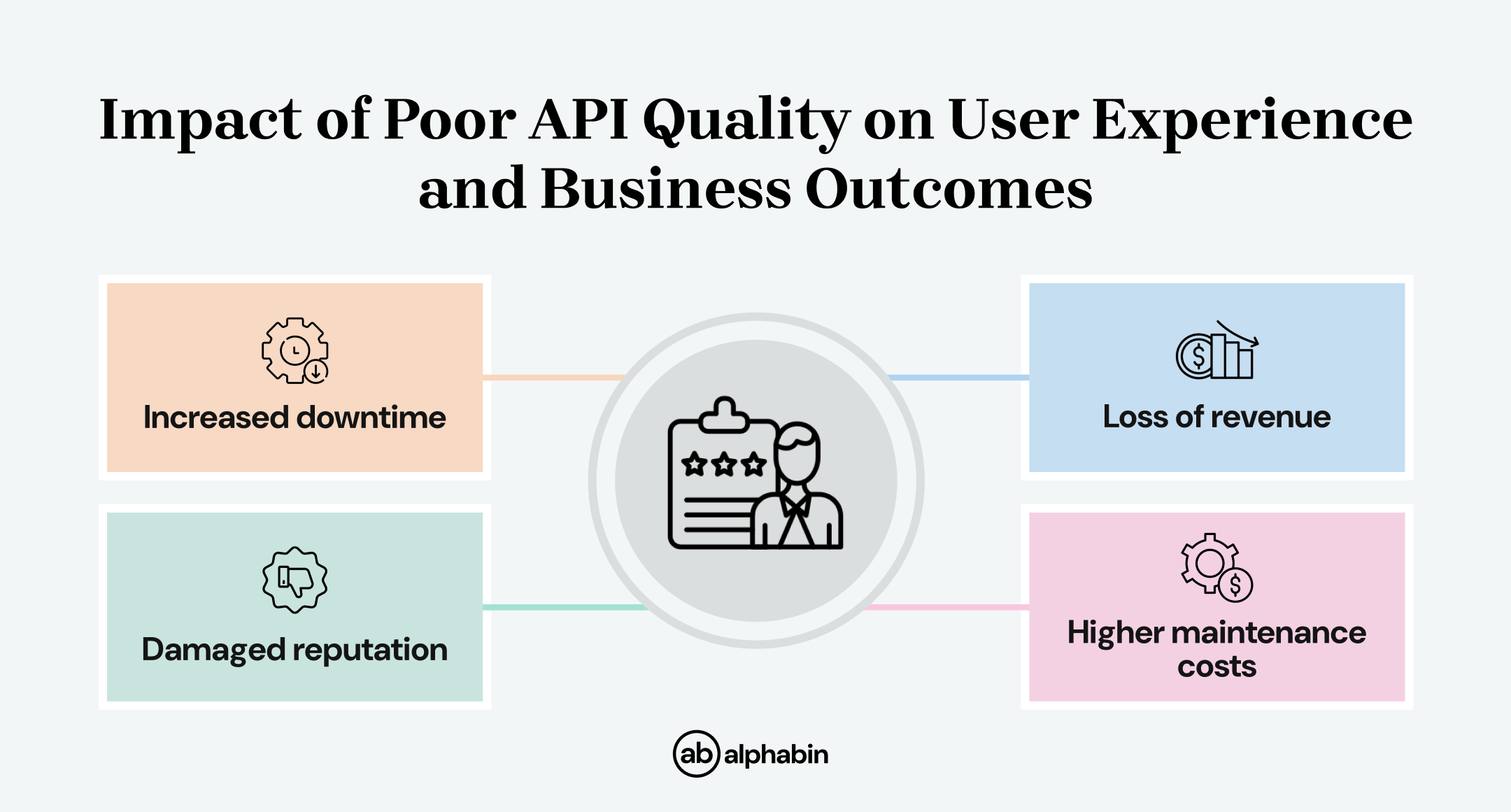
    Impact of Poor API Quality on User Experience and Business Outcomes

    Impact of poor API quality on user experience and business outcomes

    Poor API performance can have a significant negative impact on both users and businesses. Users may face disrupted web services or inconsistent functionality if an API is unreliable, slow, or fails to deliver the expected results. This leads to frustration and a poor user experience, potentially driving customers away from a product.

    For businesses, poor API performance can result in:

    • Increased downtime: This may cause the system to have a lot of outages where the outages are a result of inefficient or buggy APIs.
    • Loss of revenue: Losing customers is bad enough, but when the business suffers from inaccurate APIs and users run to other services, then that bad business.
    • Damaged reputation: Continuous issues with APIs can put a brand in a negative light since consumers will not be able to trust them.
    • Higher maintenance costs: There is always some level of debugging as well as patching for low-quality APIs that consume resources.

    Why Consistent Testing is Essential for Maintaining API Quality

    Thus, maintaining high quality of APIs requires testing and for this purpose, tools such as Postman can be employed. Thus, using API testing with the help of Postman, developers are provided with the possibility to create scripts for testing purposes to check whether every function of an API operates perfectly at different stages of environments

    Consistent API testing helps:

    • Identify bugs early: Avoid significant problems before they affect the customers.
    • Enusre performance: Testing APIs guarantees fast and accurate responses during high traffic loads.
    • Verify integrations: API testing ensures that the interaction between different components of software is seamless.

    By utilizing API testing Postman, teams can continually monitor and improve API performance, ensuring top-tier quality and reducing risks of failure. It also proves to be more effective in contributing to improved satisfaction of users, and therefore enhanced business performance.

    {{cta-image}}

    Why Postman is the Go-To Tool for API Testing in 2024

    In 2024, Postman remains a top choice for developers worldwide when it comes to API testing. With its user-friendly interface and powerful automation capabilities, Postman simplifies the API testing process, allowing teams to ensure seamless API functionality. Let’s explore the key features, how it compares to other API testing tools, and how major companies use Postman for their API testing needs.

    Postman will maintain its authority as the go-to tool for developers globally when it comes to API testing. With its simple and reflexive interface and the functionality to organize work with APIs, the Postman tool helps manage the testing frameworks and guarantees its successful work in teams. 

    I will discuss the main points, how it stands out from the competition, and what large enterprises utilize Postman for API testing.

    Postman’s Key Features and Benefits

    Postman offers several standout features that make it the go-to tool for API testing for Postman:

    Postman's key features and benefits
    • Ease of Use: His tool has a clean and easily understandable interface, which is helpful for developers ranging from beginners to very experienced ones.
    • Automation: While using Postman, teams can schedule tests to be done, and this helps in the testing of the APIs as they are always assured to work in every environment.
      Postman for API testing improves the use of CI/CD pipelines so that testing can go on through continuous testing and deployment is also done quickly.
    • Comprehensive Testing Capabilities: Postman is suitable for testing REST, SOAP, and GraphQL APIs, providing versatility regardless of the type of API employed by a business.
    • Collaboration: Postman’s workspace enables API collections, environments and test results to be shared within a team to make it easier to collaborate.
    • API Monitoring: Postman provides real-time monitoring of APIs, allowing teams to ensure performance remains optimal under various conditions.

    Real-World Examples of Companies Using Postman for API Testing

    Many global companies leverage Postman for their API testing needs due to its flexibility and scalability.

    • Twitter: They use Postman to check their public APIs to consumers, thus guaranteeing API users a perfect experience with their platform.
    • Shopify: Uses Postman to try several API platforms so that their user interface for merchants does not differ from one system to another.
    • PayPal: Postman for internal and external API testing while ensuring a high amount of transaction security as well as continually focusing on users.

    That is why many of these companies use Postman because the quality of their API and test checks are done here without any issues. This real-world application above shows why Postman is still the best API testing tool to use in testing APIs using Postman in 2024.

    This real-world reliance demonstrates why Postman continues to be the go-to tool for API testing for Postman in 2024.

    How to Test APIs Using Postman

    Here are some of the things that you have to go through when attempting to use Postman for API testing: creating a new API request, writing a test, and even running the test. Postman is a widely used application for API testing and documentation, and no developer or QA engineer should work without it. Here’s a guide on how to use Postman for testing APIs:

    Step 1: Installing Postman 

    1. Download and install Postman from the official site.
    2. Once installed, launch the application.

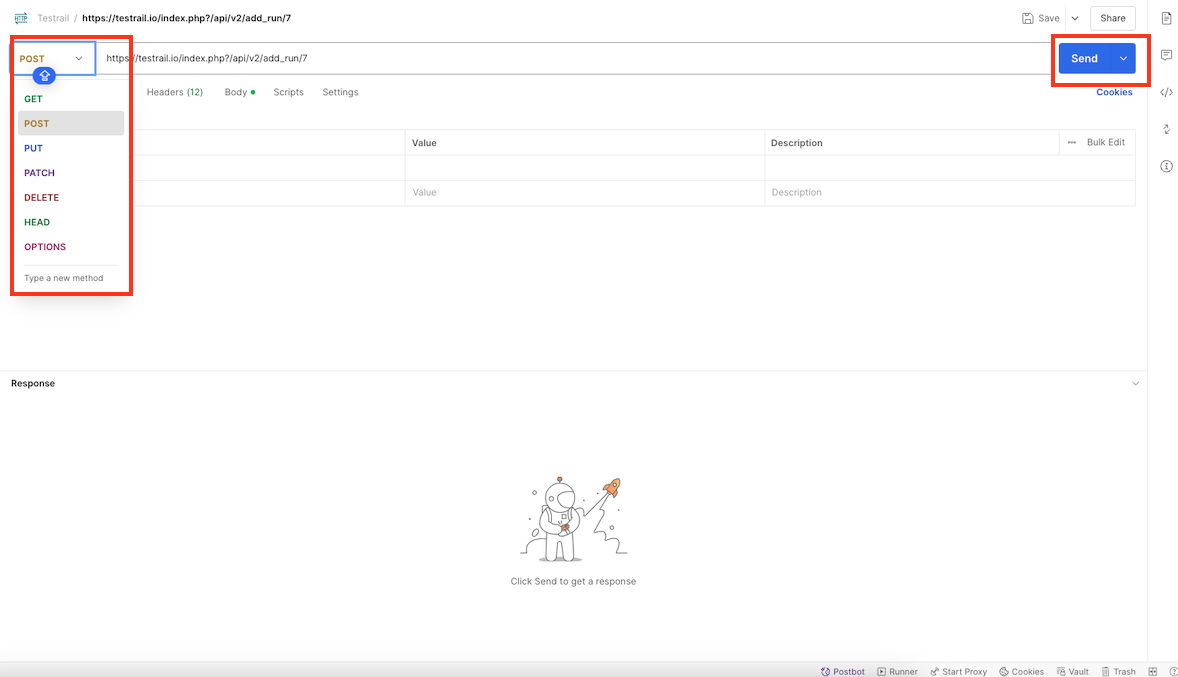
    Step 2: Creating a New Request

    1. Open Postman and click the New button.
    2. Choose HTTP Request to create a new request.
    3. Enter the URL and the API you want to test in the request URL field.
    4. Select the appropriate HTTP method like GET, POST, PUT, or DELETE based on the API.

    Step 3: Setting Up the Request

    1. Params: If the API requires URL parameters, click on the “Params” tab and add key-value pairs.
    2. Headers: Add any required headers (e.g., Content-Type: application/json, Authorization tokens) in the “Headers” tab.
    3. Body: If you are making a POST, PUT, or PATCH request, go to the “Body” tab and select the format (e.g., raw, form-data, x-www-form-urlencoded). Enter the JSON or form data you need for the request.

    Step 4: Sending the Request

    1. After setting up the request, click on the Send button.
    2. Postman will execute the request and display the response from the server in the Response section below.

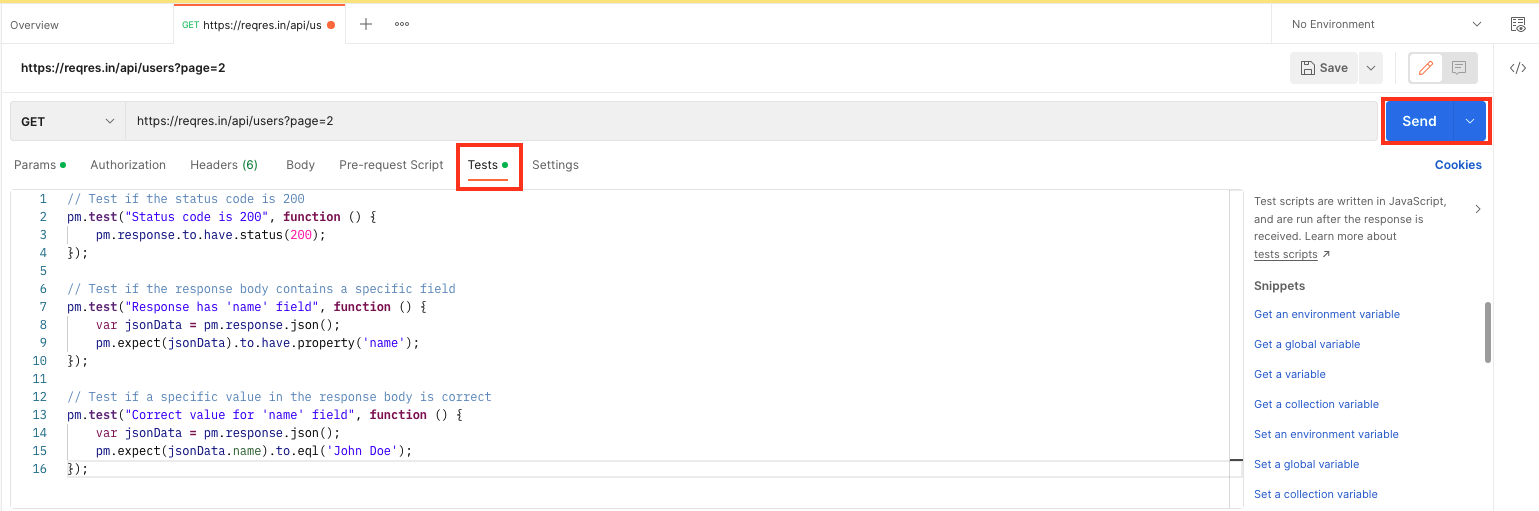
    Step 5: Writing Test

    In the “Tests” tab, Postman lets you write tests using JavaScript. These tests assist in confirming the response data and as well ensure the API responds as it was programmed.

    1. Click on the Tests tab.
    2. Use Postman objects to write tests. Here is a code
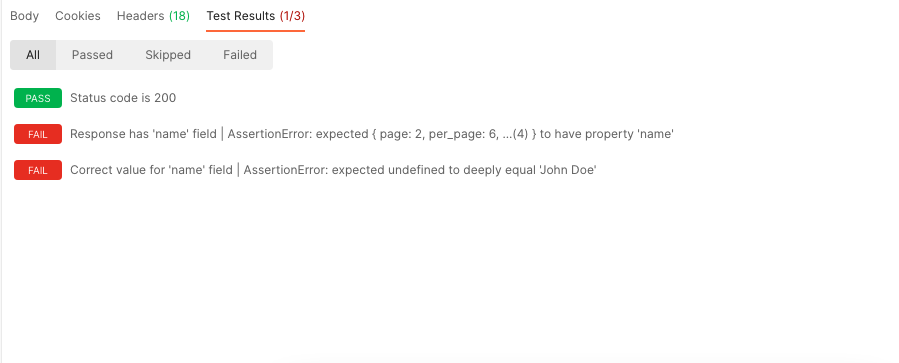
    // Test if the status code is 200
    pm.test("Status code is 200", function () {
        pm.response.to.have.status(200);
    });
    
    // Test if the response body contains a specific field
    pm.test("Response has 'name' field", function () {
        var jsonData = pm.response.json();
        pm.expect(jsonData).to.have.property('name');
    });
    
    // Test if a specific value in the response body is correct
    pm.test("Correct value for 'name' field", function () {
        var jsonData = pm.response.json();
        pm.expect(jsonData.name).to.eql('John Doe');
    });
    1. After adding the test script, click Send to run the request and automatically execute the tests.
    2. Test results appear at the bottom of the Tests tab, showing which tests passed and failed.

    Step 6: Using Environment and Global Variables

    Postman allows you to create variables for dynamic values (like API keys or environment URLs) which can be reused across requests.

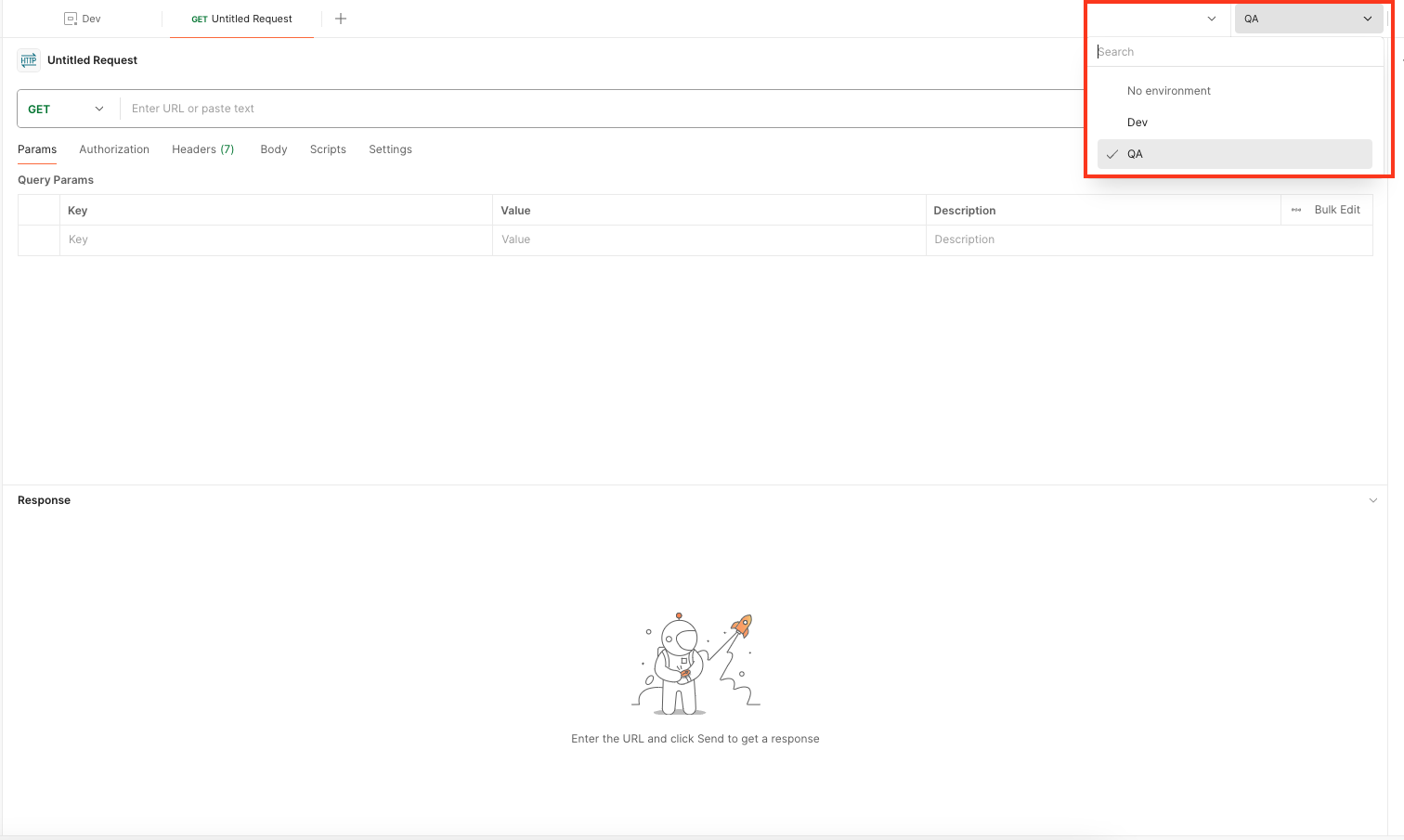
    1. Environment Variables: Go to the top-right corner and click on the Environment dropdown. Create a new dedicated testing environment (e.g., “Dev”, “Production”) and add variables.
    2. Global Variables: Use global variables for values that do not change across environments.
    3. Using Variables: Use the syntax {{variable_name}} in the request URL, headers, or body to reference variables.‍
    pm.environment.set("token", "your_api_token_here");

    Then, use {{token}} in headers for authentication.

    Step 7: Creating Collections for API Requests

    1. Collections in Postman allow you to organize multiple API requests.
    2. To create a collection, click on New and choose Collection. Give it a name (e.g., “User API Tests”).
    3. Add requests to the collection for easy access and execution.

    Step 8: Running a Collection (Collection Runner)

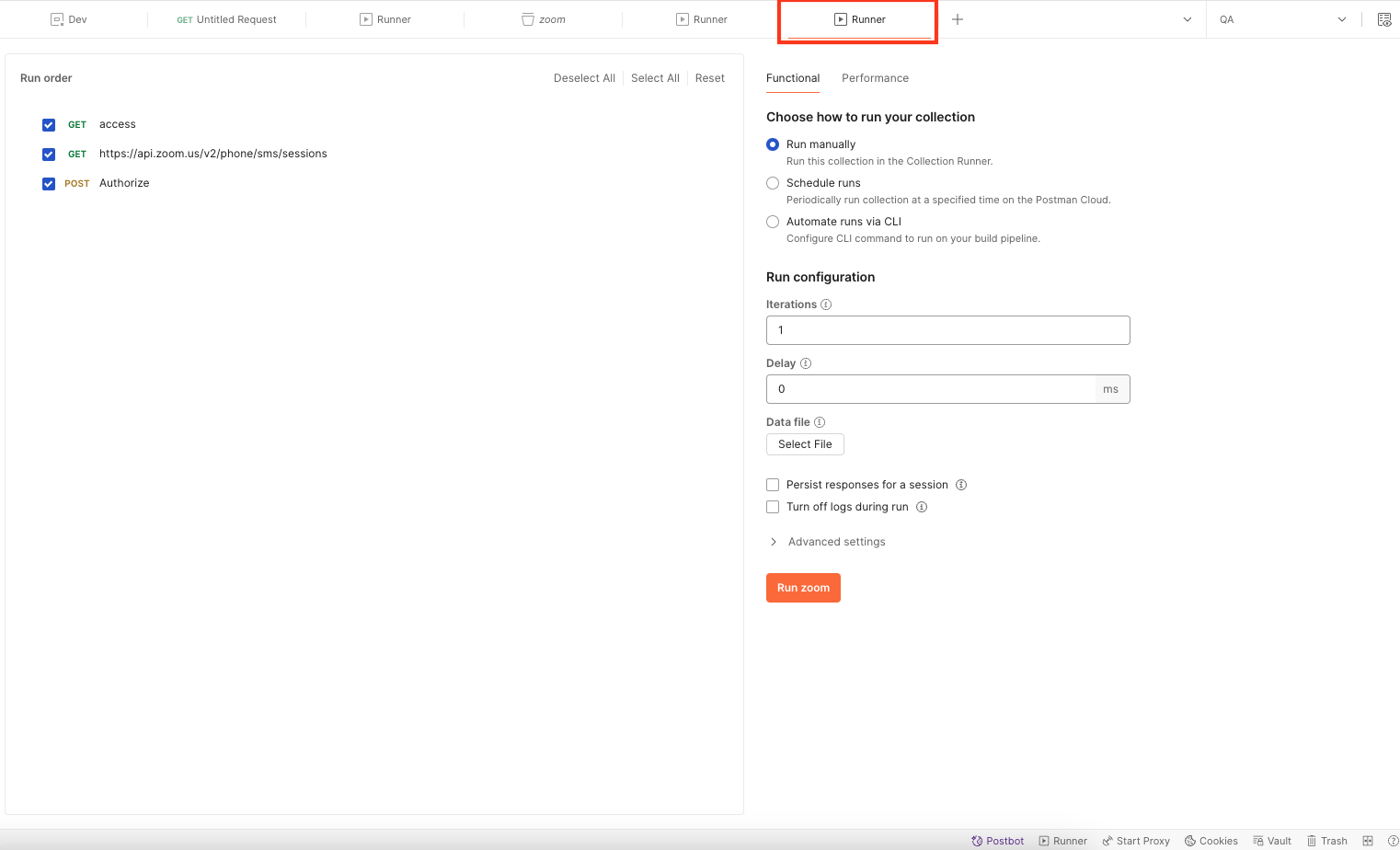
    1. Click on the Runner button in the top left corner to open the Collection Runner.
    2. Select the collection you want to run and choose an environment (if applicable).
    3. Click Start Test to execute all requests and tests in the collection. The results will be displayed, showing which tests passed or failed.

    Step 9: Generating API Documentation

    1. Select the collection you want to document.
    2. Click on the View More Actions next to the collection and select Generate Collection Documentation.
    3. You can publish this documentation or share it with your team.

    {{cool-component}}

    Common Pitfalls in API Testing and How to Avoid Them

    API testing is important to check how different components in software work and interface with each other, but this activity is not without its problems. Some of the most common problems that can cause a decrease in the effectiveness of testing are omissions of edge cases, incorrect handling of errors, and differing environments of testing.

    In this section, let’s discuss some of the most common pitfalls people make when testing APIs and how you can avoid them to have a solid, reliable, and fast set of tests.

    Typical Mistakes Made During API Testing

    1. Inadequate Test Coverage: Lack of attention to the scenarios and edge cases, boundary values, and negative examples that can result in invisible bugs in production.
    2. Hard-Coding Values: By entering real URLs, authentication keys, or inputs, tests cannot easily be modified and maintained whenever there is a change in APIs between development and production environments.
    3. Ignoring Performance Testing: The practice of not testing APIs in terms of their capabilities to handle loads, stress, or pressure may lead to poor user experience while in the expansion of the given system or during high traffic.
    4. Not Validating Response Structure: For instance, only validating the status code results in important problems because the response only checks if the HTTP status code was correctly sent without validating that the required fields, objects, or even data types are present in the full response body.

    Simple Solutions to Avoid Common API Testing Pitfalls

    Simple solutions to avoid common API testing pitfalls
    1. Expand Test Coverage: Ensure that all areas of the software are sufficiently addressed through the incorporation of both positive and negative test cases as well as edge tests
    2. Use Environment Variables: Do not use a specific path or any URL or token directly in the code; instead, use environment variables. This makes it possible to run tests without complications in different environments such as development, staging, and production.
    3. Incorporate Performance Testing: Include load testing tools such as JMeter for testing or Postman for monitoring to simulate high-traffic scenarios, ensuring the API can handle real-world usage.
    4. Validate Response Structure: Don’t rely on the status codes alone; make sure fields, data types and response time exist in the API response to be able to capture any small error.

    Tips for ensuring consistent and reliable API tests

    To ensure reliable API tests, store your test collections in version control to maintain consistency and track changes. CI/CD pipelines should be used to automated testing for the identification of problems at the earliest time possible. Last but not least, use environment variables and clean test data before each run for the tests to be more flexible and standard across different environments.

    Conclusion

    In this blog, I have shared some of the key concepts of API testing with Postman, such as environment management, dynamic testing, API testing issues, and their best solutions. When applied alongside the power of Postman test automation environment variables, and its efficient testing features, you can guarantee that your APIs are not only robust but also elastic and capable of filling the demands of complex application environments.

    In general, knowing these practices can help improve the efficiency and productivity of API testing regardless of whether you’re a developer, DevOps engineer, or QA specialist to guarantee that your software will work without a pitfall.

    While performing API testing, if you face any problems, get stuck, or find any bugs or errors, please ping us. Believe us, Alphabin’s team has faced all those problems often, working with Postman and API testing, so we know how to assist you.

    Whether you need help with improving the testing process, dealing with problems, or getting professional recommendations, we’ll make your API processes flawless. Let us manage the intricacies for you to unleash the optimum form of your software.

  • API Testing for Beginners: A Simple Tutorial

    API Testing for Beginners: A Simple Tutorial

    Beginners API Testing Tutorial

    Welcome to the beginner’s guide to API testing! In this guide, we’ll guide you through the basics of API testing, its importance, best practices, and popular tools. Whether you’re new to software testing or looking to expand your skills, this guide is designed to provide you with the knowledge and resources you need to get started with API testing.

    What is an API?

    An Application Programming Interface (API) serves as a conduit for diverse software applications to interact. It establishes a framework of rules and protocols that facilitate seamless communication between these applications. APIs define the methods and data formats that applications can use to request and exchange information, enabling integration between systems.

    What is API testing?

    API testing looks at different parts of software testing. It makes sure that APIs work as they should. It checks if they’re solid, quick, and secure. It tests many areas of an API. This includes checking if requests and responses are correct, data is right, mistakes are managed, and safety features work.

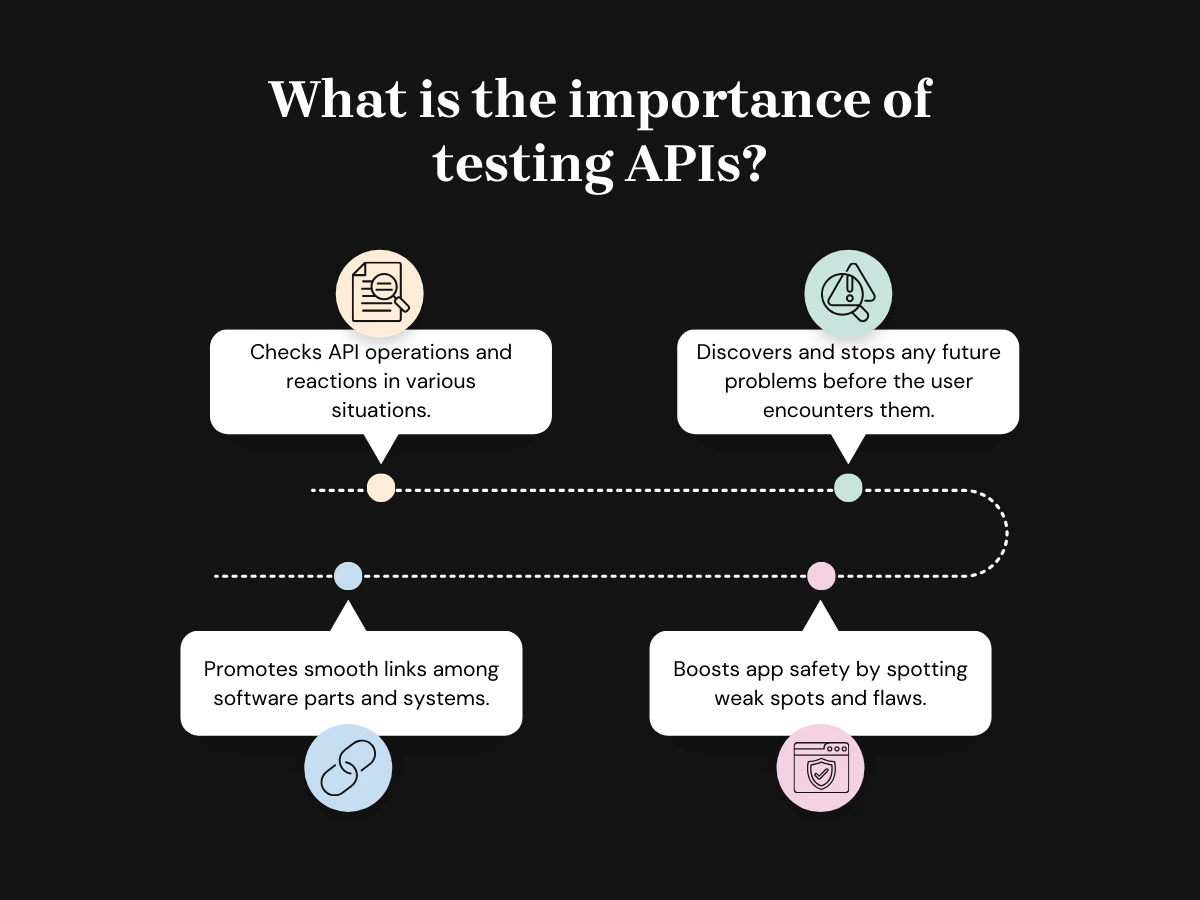
    What is the importance of testing APIs?

    In order to achieve improved user experience and business success, it is necessary for APIs to meet performance and reliability standards.

    1. Checks API operations and reactions in various situations.
    2. Discovers and stops any future problems before the user encounters them.
    3. Promotes smooth links among software parts and systems.
    4. Boosts app safety by spotting weak spots and flaws.
    What is the importance of testing APIs?

    Let’s find out what exactly needs to be verified

    1. HTTP status codes
    2. Request and response validation
    3. Data accuracy
    4. Error handling
    5. Authentication and authorization mechanisms
    6. Performance and scalability
    7. Response time

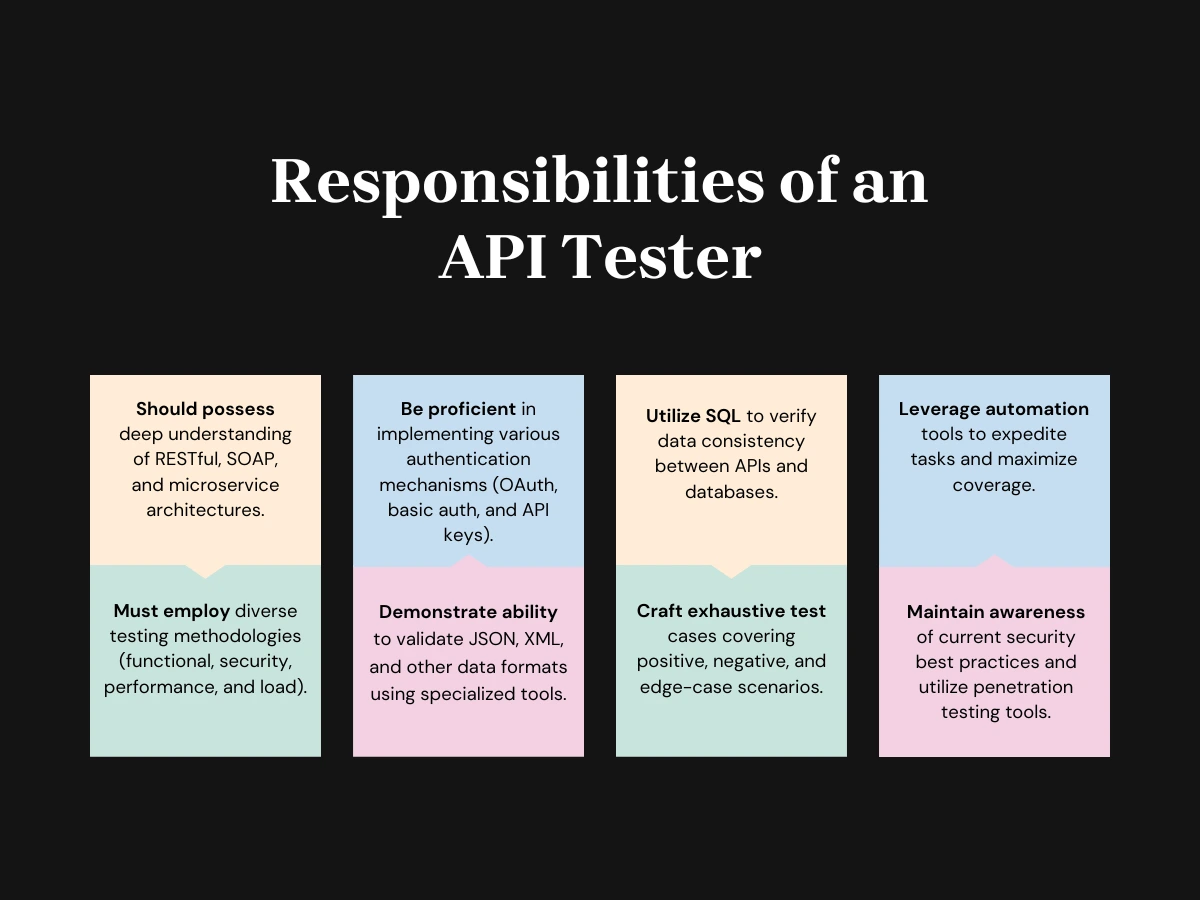
    Responsibilities of an API Tester

    API testing involves various roles, each with specific responsibilities.

    1. Should possess: Deep understanding of RESTful, SOAP, and microservice architectures.
    2. Must employ: Diverse testing methodologies (functional, security, performance, and load).
    3. Be proficient in: Implementing various authentication mechanisms (OAuth, basic auth, and API keys).
    4. Demonstrate ability to: Validate JSON, XML, and other data formats using specialized tools.
    5. Utilize SQL to: Verify data consistency between APIs and databases.
    6. Craft exhaustive test cases: Covering positive, negative, and edge-case scenarios.
    7. Leverage automation tools: To expedite tasks and maximize coverage.
    8. Maintain awareness of: Current security best practices and utilize penetration testing tools.
    Responsibilities of an API Tester

    Best Practices for API Testing

    Before you dive into practical implementation, here are Seven essential tips to ensure your testing journey is successful and effective!

    1. Collaborate with stakeholders
      This practice emphasizes the importance of involving stakeholders early in the testing process. By aligning testing efforts with business objectives, you ensure that the API meets the intended purpose and delivers value to users.
    2. Validate input data
      Properly validating input data is crucial for security. By ensuring that the API handles various input scenarios correctly (including edge cases), you prevent security vulnerabilities and maintain data integrity.
    3. Test authentication methods
      Verifying authentication mechanisms ensures that only authorized users can access the API. Testing different authentication methods (such as OAuth, API keys, or tokens) helps identify any weaknesses or misconfigurations.
    4. Monitor response times
      Regularly monitoring response times helps identify bottlenecks and performance issues. Optimizing response times ensures a better user experience and efficient API usage.
    5. Check device compatibility
      Testing across various devices (browsers, mobile devices, etc.) ensures consistent behavior. Compatibility testing helps catch device-specific issues and guarantees a seamless user experience.
    6. Evaluate error handling
      Robust error handling is essential. By testing how the API responds to invalid requests, unexpected inputs, and edge cases, you ensure system stability and graceful failure.
    7. Document API contracts
      Clear API documentation is crucial for collaboration. Documenting contracts (endpoints, request/response formats, expected behavior) helps both developers and testers understand the API’s functionality.

    What is the future of API Testing?

    The future of API testing is shaped by the integration of technologies like Artificial Intelligence (AI) and Machine Learning (ML). AI-driven testing tools enable faster analysis of data, predictive insights, and enhanced automation, revolutionizing how tests are conducted. As microservices architecture and IoT continue to proliferate, API testing will evolve to meet the demands of increasingly complex systems.

    Let’s compare popular API Tools


    Tool Postman SoapUI RestAssured Karate
    Type API Client, Testing, and Collaboration API Testing and Service Virtualization Java-based API Testing Framework API Testing and BDD Framework
    Language JavaScript Groovy Java Java
    License Freemium, Subscription, Enterprise Open-source, Pro, Enterprise Open-source Open-source
    Platforms Web, Desktop, Mobile Web, Desktop, Mobile No-specific platform No-specific platform
    Protocol REST, SOAP, GraphQL REST, SOAP, HTTP, JMS, AMF REST HTTP, REST
    Documentation Extensive Detailed Detailed Extensive
    Learning Curve Moderate Moderate to High Moderate Moderate to Low
    Community Large Large Large Growing
    Integrations Extensive Limited Limited Growing

    Conclusion

    In this guide, we’ve covered the basics of API testing, its importance, best practices, and popular tools. By implementing effective API testing strategies, you can ensure the reliability, performance, and security of your APIs, leading to improved user satisfaction and business success.

    If you’re looking for professional API testing services, Alphabin Tech Consulting is here to help. Contact us today to learn more about how we can support your API testing needs.