Most Black Friday lists run to a hundred tools, and you close the tab before you reach the tenth. This one is short on purpose. We picked seven deals for the 2026 sale, covering the teams that test, build, host, publish and sell a product, the agencies that run client work, and the stores that sell on WooCommerce. For each, you get the discount, how to claim it, the last day and what you pay, followed by a checklist to run before you enter a card number.
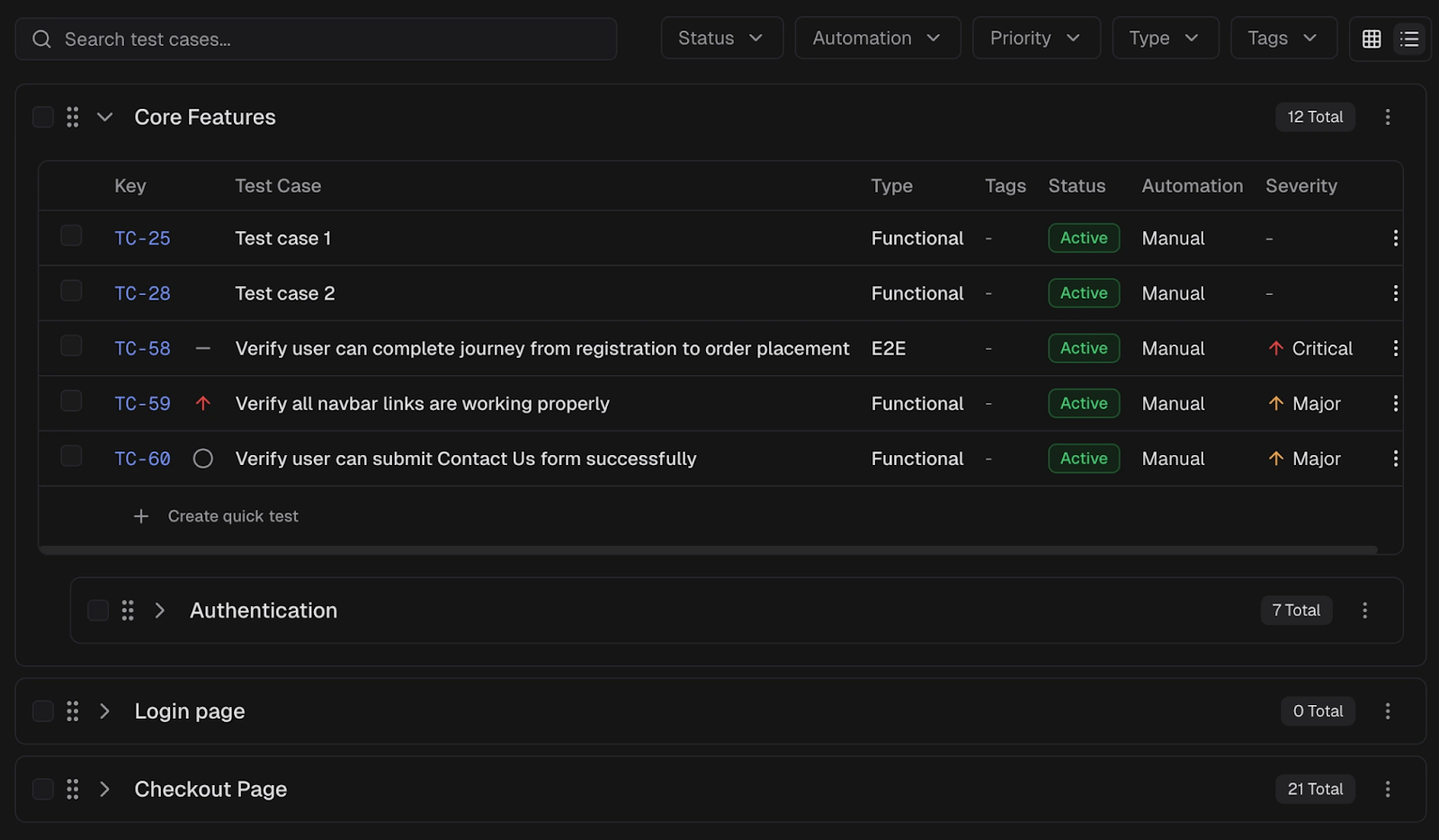
TestDino: 30% off the first year for Playwright teams
The short version: If your team spends more time reading Playwright reports than fixing what they show, this is the deal to look at first. TestDino collects every run from your CI pipeline in one dashboard and tells you which failures are real bugs and which are flaky tests.
Offer: 30% off the first year on annual Pro and Team plans. From the second year, the plan renews at the regular annual price.
Coupon: DINOFRIDAY30
Last day: December 3, 2026
Try it first: A 14-day trial on Pro and Team, and a free plan with 5,000 test executions a month.
10,000 test executions a month, 3 users, 3 projects, 3 months of analytics
Team
$99 a month
$69 a month, billed annually ($828)
$360
40,000 test executions a month, 30 users, 5 projects, 1 year of analytics
Enterprise
Custom
Not part of the deal
None
Custom volume, SSO and SCIM, audit logs, on-premises deployment
All prices are in US dollars. Monthly billing is not part of the deal.
Why QA teams use it
One place for every run: Run summaries, test history, run-to-run comparisons and trend analytics
Evidence for each failure: Screenshots, videos, traces, console logs and network requests attached to the failed test
Flaky test scoring: A stability score per test, with the likely cause, such as timing, network or environment
AI failure grouping: Similar errors are clustered, so one fix can clear many failing tests
Works with your pipeline: Live results from GitHub Actions and GitLab CI, with comments on pull requests
Ready for AI agents: An MCP server gives coding assistants access to real run data
A reporting tool shows you where a suite is weak. If the suite itself needs rebuilding, that is a job for an automation testing team.
GoDAM: half price on video hosting for WordPress
The short version: Video files slow down a WordPress site when they sit in the media library. GoDAM moves them to dedicated hosting, streams them from a CDN, and lets you manage everything from the WordPress dashboard.
Offer: 50% off the first month or the first year on any plan, for new customers. After that, the regular price applies.
Coupon: BFCM2026
Last day: December 3, 2026, until 11:59 p.m. in your own time zone
Try it first: A 60-day trial with no credit card.
Bonus: The GoDAM team migrates your whole video library from Vimeo, Vidyard or Wistia at no charge.
All prices are in US dollars. Every plan includes all features, with unlimited sites and users.
Why web teams use it
Faster playback: Videos are transcoded automatically and streamed at the right quality from 119+ CDN locations
Video that does something: Add hotspots, polls, forms and calls to action inside the player
Sales from video: WooCommerce stores get product hotspots, add-to-cart buttons in the video and revenue reports
Captions: Upload caption files in several languages and let viewers choose (paid plans)
Search visibility: A video sitemap and chapters that Google can show as key moments
A single library: Videos, images and documents in one place, with publishing to YouTube, Vimeo and Wistia
EngageBay: 40% off an all-in-one CRM
The short version: A growing business often pays for one tool to send email, another to track deals and a third to answer support tickets. EngageBay puts all three on one set of customer records, and it is used by 135,000+ businesses.
Offer: 40% off every plan, with 50,000 free email credits, for first-time purchases.
Coupon: None. The discount is applied when you sign up from the offer page.
Last day: December 4, 2026. The offer has been open since November 9.
Try it first: A free plan for teams of up to 15 users, with no credit card.
Bonus: The EngageBay team designs your first email template and first landing page, migrates your data from HubSpot and other vendors, and runs your onboarding, all free.
10,000 contacts, 50,000 branded emails, web analytics, SSO, role management, dedicated account manager
All prices are in US dollars, per user, on monthly billing. The discounted figures are worked out from the regular rates, so check the final amount at checkout.
Why small businesses use it
Marketing: Email campaigns, autoresponders, landing pages, web forms and automation workflows
Sales: A CRM with deals, pipelines, email sequences, meeting booking and call tracking
Support: Ticketing, live chat and a help center
Automation across teams: One visual workflow builder that marketing, sales and support share
Help getting started: Free migration and free onboarding, so you are not moving data on your own
CodedThemes: 60% off dashboard templates and UI kits
The short version: Most products need an admin panel, and building one from an empty file takes weeks that nobody planned for. CodedThemes sells ready-made dashboard templates and UI kits for the common front-end stacks, and 400K+ developers use them.
Offer: 60% off everything in the store.
Coupon: BFCM2026
Last day: December 1, 2026. The sale started on November 15.
Try it first: Most premium templates have a free edition.
Safety net: A money-back guarantee if you ask within 14 days of purchase.
Bootstrap, Tailwind, React, Next.js, Angular, Vue and more
$89
About $35.60
All prices are in US dollars for a single use license: one project, one payment and lifetime use, with a year of updates and support. The discounted figures are worked out from the regular prices, so check the final amount at checkout.
Why front-end teams use it
A head start on dashboards: Mantis, Berry, Able Pro and Datta Able come with ready pages and components
Your stack is covered: Versions for React, Next.js, Angular, Vue, Tailwind, Bootstrap and shadcn/ui, and for Laravel, Django, .NET and Node.js
Design and code that match: Figma UI kits for the main templates
Bundles for agencies: The Big Bundle holds 30+ premium products
A license for each case: Single use, multi use, and extended licenses for SaaS products
Cloudways: 80% off managed cloud hosting for 2 months
The short version: Cloudways runs your WordPress, WooCommerce, Magento, Laravel, PHP or Node.js app on a cloud provider you choose (DigitalOcean, Vultr, Linode, AWS or Google Cloud) and manages the servers for you. Backups, free SSL, a CDN and 24/7 support are part of the service, and the team moves your WordPress and other PHP apps over for free.
Offer: 80% off for 2 months on hosting plans, AI agents and add-ons, capped at $200 off a month, for new customers. Standard pricing follows.
Coupon: BFCM802. Type it in at checkout, because it is not applied for you.
Last day: December 4, 2026
Try it first: A 5-day trial of the Flexible plan with no credit card.
What you pay: Flexible hosting from $2.20 a month for the two discounted months, down from $11.
Taskip: 70% off lifetime plans for agencies and freelancers
The short version: Agencies often run client work across a project board, a proposal tool, an invoicing app and a shared inbox. Taskip keeps projects, tasks, clients, proposals, contracts and invoices in one workspace, and its AI assistant, Taspi, handles routine work when you ask.
Offer: 70% off lifetime plans. One payment, no renewals.
Coupon: None. The discount is applied at checkout on the offer page.
Last day: November 26, 2026, the day before Black Friday. The offer opened on November 16.
Try it first: A free Starter plan with no credit card.
Safety net: A 30-day refund with no questions asked.
1 workspace, 1 user, 100 GB storage, 200 AI credits a month
Startup Team
$1,049
$319
$730
1 workspace, 10 team members, 250 GB storage, 1,000 AI credits a month
Growing Agency
$2,099
$699
$1,400
3 workspaces, 25 team members, 500 GB storage, 4,000 AI credits a month, white label
Agency Pro
$3,209
$959
$2,250
5 workspaces, unlimited team members, 1 TB storage, 10,000 AI credits a month, white label
All prices are in US dollars, paid once. The two larger plans can be split into 3 monthly payments at no extra cost.
Why agencies use it
A portal for clients: Clients join for free by invitation, follow their projects and pay invoices online
Project work in one place: Unlimited projects and tasks in Kanban, list, Gantt or calendar view, with time tracking
From proposal to payment: Proposals, quotations, contracts with e-signature, and one-time or recurring invoices
An AI assistant: Taspi creates invoices, adds leads and manages projects on request
A built-in CRM: Leads and sales pipelines, with one step to turn a lead into a client
Acowebs: up to 30% off WooCommerce plugins
The short version: A WooCommerce store often needs features that the core plugin does not include. Acowebs sells plugins that add them, such as wishlists, product add-ons, dynamic pricing and PDF invoices, and during the sale the discount grows with every plugin you add to the order.
Offer: Up to 30% off WooCommerce plugins. One plugin gets 10% off, two get 20% off, and three or more get 30% off.
Last day: December 4, 2026. The offer opened on November 23.
Pricing and payments: Dynamic Pricing With Discount Rates, Deposits & Partial Payments, and Currency Switches
Checkout and orders: Checkout Field Editor and Manager, PDF Invoices and Packing Slips, and Table Rate Shipping
Wishlists: WooCommerce Wishlist
More from Acowebs: Product options & add-ons, and Labeler product labels
Key dates for BFCM 2026
Date
What happens
November 9, 2026
EngageBay’s offer opens
November 15, 2026
CodedThemes’ sale opens
November 16, 2026
Taskip’s offer opens
November 23, 2026
Acowebs’ offer opens
November 26, 2026
Thanksgiving in the United States, and the last day for Taskip
November 27, 2026
Black Friday
November 30, 2026
Cyber Monday
December 1, 2026
Last day for CodedThemes
December 3, 2026
Last day for TestDino and GoDAM
December 4, 2026
Last day for EngageBay, Cloudways and Acowebs
Taskip is the one to act on first: it closes on November 26, the day before Black Friday. The other six stay open until at least December 1, which is enough time to run a proper trial before you pay.
A buyer’s checklist for software on sale
We test software for a living, so we judge a tool by what it does under real use, not by the size of the discount. Ask these five questions before you buy.
Would we buy this at full price? A discount on a tool nobody uses is still wasted money. Start with a problem your team already has, such as flaky tests, slow video or scattered customer data.
Has it run on our real work? Use the trial on your own project, not the demo data. Connect your CI pipeline, upload your real videos or import a slice of your contacts. Teams building SaaS products can pair a trial with SaaS testing to see how a new tool behaves next to their own release process.
What does year two cost? TestDino and GoDAM both return to the regular price after the first term. EngageBay’s page says the discount stays on your account, so confirm the renewal price at checkout. Cloudways moves to standard pricing after two months, and a CodedThemes template or a Taskip lifetime plan is a one-time purchase. Put that number in next year’s budget today.
Does the plan fit our size? Check the limits that matter to you: test executions for TestDino, storage and bandwidth for GoDAM, contacts and users for EngageBay, the license type for CodedThemes, server size for Cloudways, team members and workspaces for Taskip, and the number of plugins for Acowebs. Upgrading in month three costs more than choosing the right plan now.
Who owns the rollout? A tool with no owner is unused by February. Name one person who sets it up, invites the team and reports back after 30 days.
Annual or monthly billing?
The answer depends on the deal. TestDino’s code works on annual plans only, so the saving comes with a one-year commitment. GoDAM lets you choose: take half off one month to keep the risk low, or half off a full year to save the most. EngageBay’s 40% applies to every plan, and its regular pricing already drops by 8% on yearly billing and 15% on two-year billing. CodedThemes and Taskip’s lifetime plans are single payments with no subscription, and Cloudways discounts your first two monthly bills with no contract. Acowebs ties its discount to the size of the order: the more plugins you buy together, the more you save.
A simple rule works here. If the tool passed your trial and solves a problem you will still have next year, pay annually. If you are still unsure after the trial, pay monthly where the deal allows it, or stay on the free plan and wait.
Final word
A good Black Friday purchase is one your team still uses in June. Pick the tool that fixes a problem you can name, test it on real work this week, and claim the deal before it closes in early December. If the problem is bigger than a tool, such as an automation suite that nobody trusts, Alphabin’s strategic QA consulting team can help you plan the fix. Contact us to talk it through.
Functional testing always sounds simple when you explain it. Make sure the app works the way it should, check it off, and keep things moving.
But once you’re actually doing it, especially in an enterprise setup, it rarely stays that clean.
You are not dealing with one clean workflow. You have multiple systems tied together, integrations that do not always behave the same way twice, and releases going out faster than most teams were originally built to handle. There is not really a clean testing phase anymore. It is just part of everything, all the time.
The real question is not whether you are using automation. It is whether it is actually helping when things get a little unpredictable.
Why Automated Functional Testing Is Now a Baseline
At this point, automation is not something teams aim for. It is something they are expected to have.
With how fast development moves today:
Releases happen more frequently
Systems change mid-cycle
Manual testing struggles to keep up
By the time a regression cycle finishes, parts of the application have already shifted.
That is why automated functional testing tools have become part of the day to day. They let teams keep validating critical workflows without slowing everything else down.
But this is also where things start to get a little messy.
Where Things Start to Break
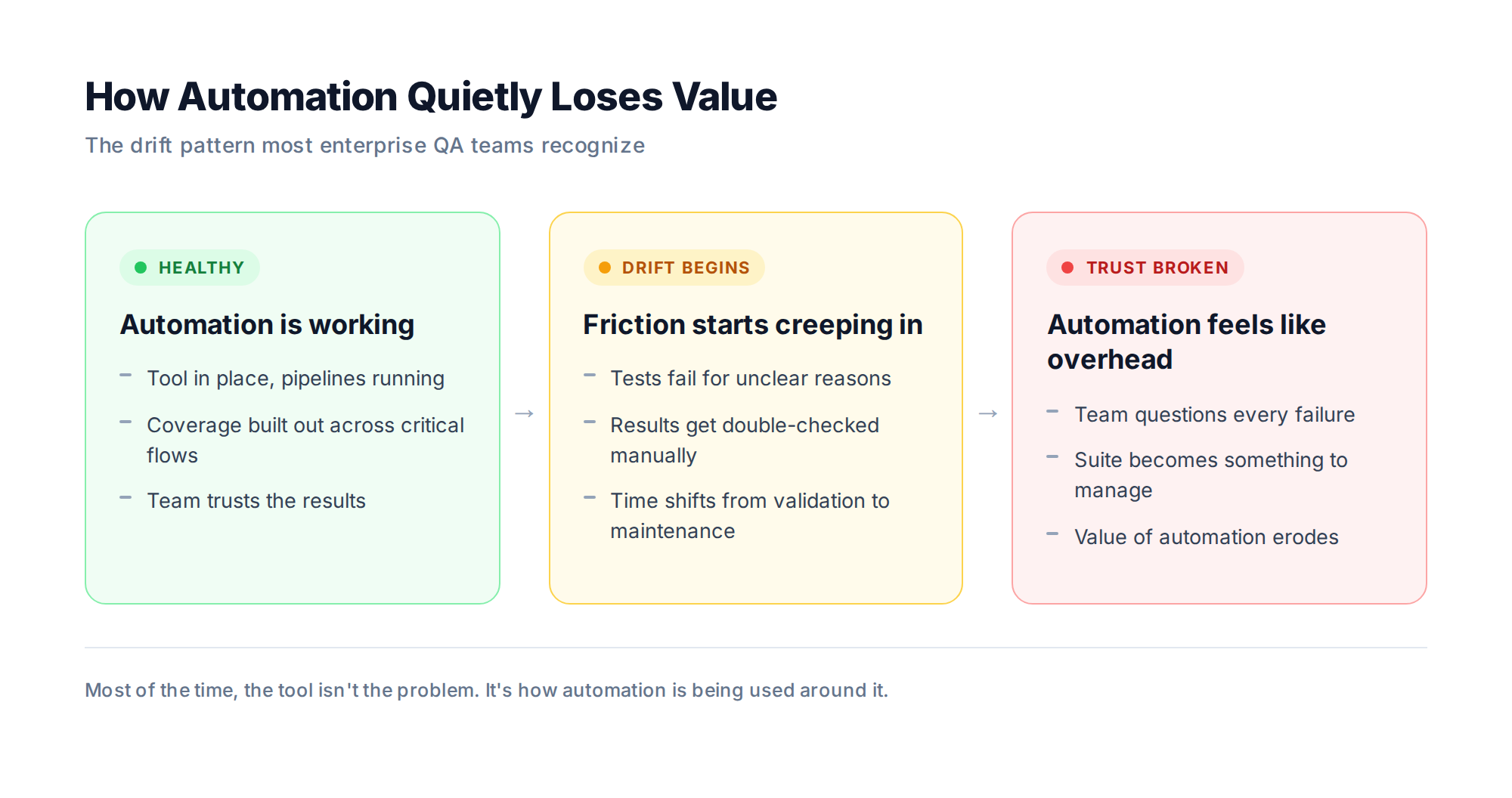
Most teams go through the same progression:
Bring in a testing tool
Build out automation coverage
Expect consistency
Instead, they run into friction.
One test fails, then another. Before long, you are spending more time fixing tests than actually catching real issues. It is a slow shift, but once it happens, it is hard to ignore.
You start to see patterns like:
Tests failing for unclear reasons
Results getting double checked manually
Time shifting from validation to maintenance
And over time, that changes how the team feels about automation.
Instead of trusting it, they start questioning it.
That is the turning point. When automation stops feeling like an advantage and starts feeling like something you have to manage.
And most of the time, that is not really about the tool. It is about how it is being used.
Why Enterprise Application Testing Feels Different
Enterprise testing is not just bigger. It is fundamentally different.
What looks like a simple action can trigger a lot behind the scenes:
Services communicating
Data moving across systems
APIs firing
External integrations kicking in
So when something breaks, it is not always obvious where it actually started.
And the stakes are higher.
A defect in an enterprise system can impact:
Revenue
Customer experience
Compliance requirements
That is why enterprise application testing needs more than basic automation. It needs tools that can handle how systems behave in real conditions.
What we see on enterprise engagements
A single defect in a billing microservice can quietly affect reporting in a system two layers away. That is why our QA engagements with enterprise clients like HDFC Bank, ixigo, and JSW One usually start with mapping system dependencies before writing a single test. The tool is not what determines coverage. The testing strategy around it is.
What Actually Matters When Choosing Functional Testing Tools
There is no shortage of tools that promise full coverage and easy automation. Most teams realize pretty quickly that it is not that simple.
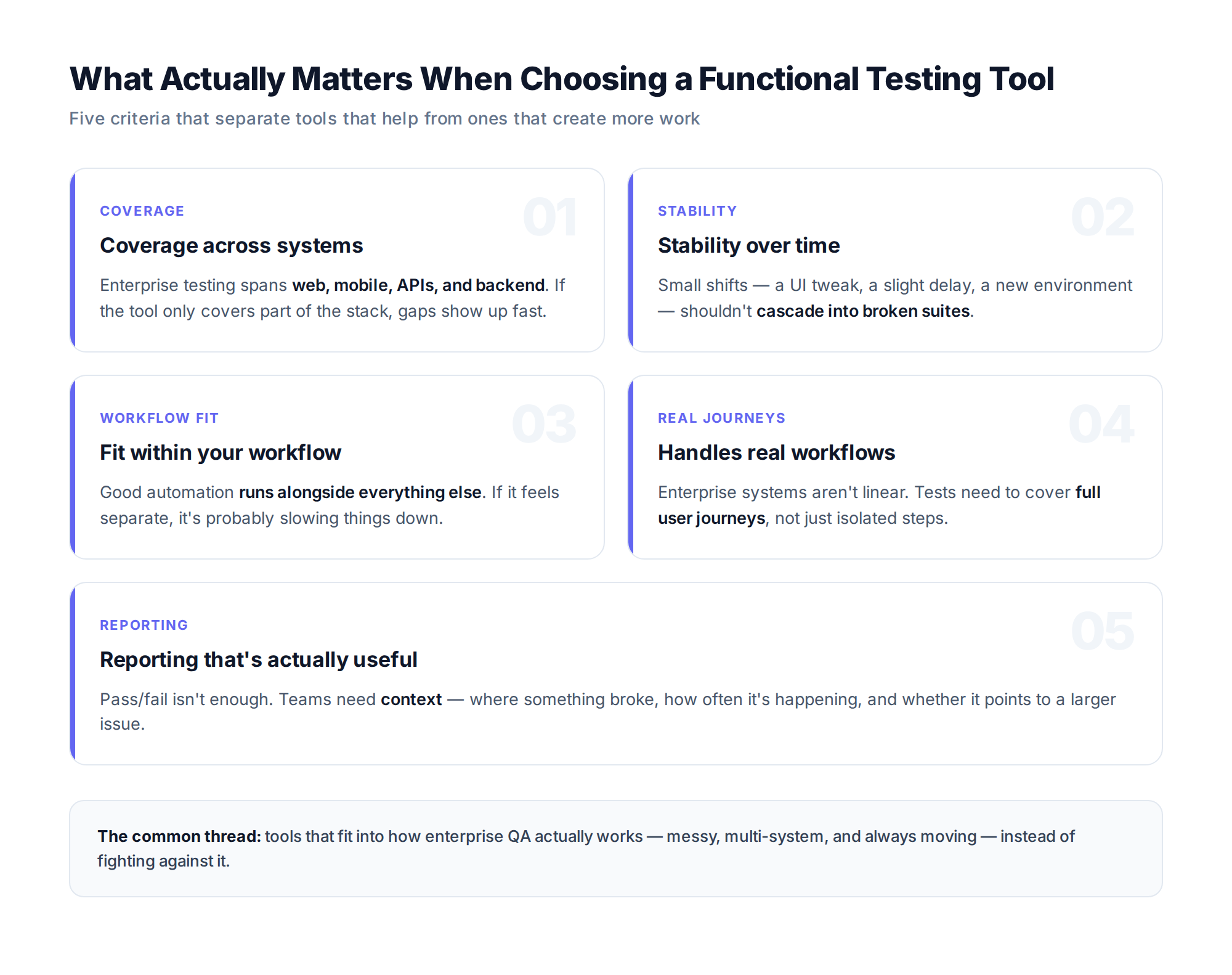
A few things tend to separate the tools that help from the ones that create more work.
Coverage across systems matters first. Enterprise testing does not happen in one layer. You need visibility across web, mobile, APIs, and backend systems. If your tool only covers part of the stack, gaps show up quickly.
Stability over time is where things quietly fall apart. It is rarely one big issue. It is the small stuff. A UI tweak, a slight delay in load time, or running tests in a different environment can throw things off.
One failure leads to another, and before long you are spending more time fixing tests than using them. That is when automation starts to lose its value.
Fit within your workflow matters more than most teams expect. Good automation does not feel separate. It runs alongside everything else. If it feels like something you have to manage manually, it is probably slowing things down.
You also need tools that can handle real workflows. Enterprise systems are not linear. Testing needs to reflect that by covering full user journeys, not just isolated steps.
And finally, reporting needs to be useful. A simple pass or fail is not enough. Teams need context around where something broke, how often it is happening, and whether it points to a larger issue.
Common Mistakes Teams Still Make
Even with the right tools, certain patterns show up again and again.
Expecting tools to fix deeper workflow or collaboration issues
Most of the time, the challenge is not the tool. It is how everything around it is structured.
What Teams Do Differently When It Works
The teams that actually get value out of automated functional testing tools do not approach automation as something they need to complete.
They are more selective about where they invest their effort.
Instead of trying to automate everything, they focus on the parts of the system that really matter. The workflows users rely on every day, and the areas where something breaking would actually cause problems.
They also think in terms of reuse. Rather than rebuilding tests over and over, they create components that can be used across different scenarios. It keeps things manageable as the system grows.
There is usually a shift in where testing happens too. Instead of waiting for issues to show up in the UI, they catch things earlier at the API or integration level, before they have a chance to create noise later on.
And maybe the biggest difference is how they think about testing overall. It is not treated as something separate that happens after development. It is just part of how the product gets built and shipped. When that mindset changes, the tools tend to work a lot better too.
How Modern Platforms Are Changing the Approach
As systems grow more complex, traditional automation approaches are starting to show their limits.
Newer platforms are shifting things by:
Adapting to changes instead of constantly breaking
Expanding coverage without full rewrites
Prioritizing execution based on what actually matters
For enterprise application testing, that shift makes a real difference.
Platforms like Qyrus are part of that evolution. By bringing testing across different layers into a single, coordinated workflow, they help teams manage complexity without adding more overhead.
The focus moves away from maintaining tests and toward maintaining confidence.
The Future of Functional Testing
Automation is not slowing down, but expectations are changing.
Teams are starting to expect more from their tools. Not just execution, but support:
Less time fixing scripts. More time thinking about coverage, risk, and how the system actually behaves.
At the same time, visibility is becoming critical. As systems connect in more ways, understanding how changes ripple across the application matters more than ever.
Final Thoughts
So if you take everything else away, it really comes down to this. Does the application actually work the way it should?
That part has not changed.
What has changed is everything around it. Systems are more connected, releases move faster, and there is a lot less room for things to go wrong without it being noticed.
Most teams already have functional testing tools for automation in place. That is not the hard part anymore.
What really matters is whether those tools are doing what they are supposed to do. Not just running tests but giving the team enough confidence to move forward without constantly second-guessing things.
When automation is in a good place, you do not really think about it. You are not stopping to question every failure or digging into logs trying to figure out if something is real. It runs, it catches what it needs to catch, and you trust it.
And that trust is what everything else depends on.
FAQs
What is automated functional testing?
Automated functional testing uses scripts or tools to verify that an application behaves the way it should. Instead of a tester manually clicking through each workflow, automated tests run those same checks on every release. The focus stays on what the application does, not how fast it runs or how secure it is.
Can functional testing be fully automated?
Not practically. Some things automate well. Login flows, CRUD operations, and payment processing have clear expected behavior, so scripts can validate them reliably. Others do not. Exploratory testing, usability feedback, and edge cases that have not been seen yet still need a person. Most mature QA teams aim for high automation on repetitive workflows and keep skilled manual testing in the loop for everything else.
What is the difference between functional testing and end-to-end testing?
Functional testing checks whether individual features work as expected. A single form, an API endpoint, a specific workflow. End-to-end testing validates the full chain of systems that make up a business process. You can have passing functional tests on each component and still have a broken end-to-end flow because of how the pieces interact.
How do you know when an automation suite is becoming a maintenance burden?
A few signs. Tests fail for reasons that have nothing to do with the application. Engineers start re-running failed tests to see if they pass the second time. Nobody trusts red builds enough to investigate them. When the team spends more time fixing tests than fixing bugs, the suite has drifted. Usually the root cause is design, not the tool itself.
Which functional testing tools work best for enterprise applications?
There is no universal answer. The right tool depends on your tech stack, how your team works, and how much framework maintenance you are willing to take on. The more honest question is whether the tool supports how your systems actually behave. Across layers, under load, and when integrations change. Not just whether it can execute a test case.
How much of your testing should be automated?
It depends on the system, but the common pattern is to automate workflows that run constantly and matter most if they break. Core user journeys, critical API contracts, and regressions on stable features. New features, edge cases, and anything requiring human judgment usually benefit from manual testing first, then get automated once the behavior stabilizes.
There was a time when software teams shipped code hoping nothing would break, relying on slow manual testing and last-minute sanity checks.
Those teams that failed to adapt were quickly left behind as release cycles shortened and user expectations skyrocketed.
Today’s high-performing engineering teams use a top automation testing framework to deliver rapid feedback, reliable regression coverage, and continuous validation at scale.
Without the right automation testing framework, even well-written code becomes a liability in fast-moving CI/CD environments.
In 2026, automation testing frameworks will no longer be a “nice to have” but a core pillar of modern software delivery. The best automation testing frameworks now power cloud-native testing, cross-browser automation, API validation, and AI-assisted quality engineering.
In this guide, you will explore the top automation testing framework options in 2026, understand how they work, and learn how to choose the right automation testing framework for your project.
What Is an Automation Testing Framework?
An automation testing framework is a structured ecosystem that combines libraries, tools, coding standards, and architectural patterns to support automated testing.
It enables engineering teams to design, execute, analyze, and maintain automated tests efficiently across web, mobile, and API platforms.
Without a well-defined automation testing framework, test suites quickly become fragile, costly to maintain, and impossible to scale in CI/CD pipelines.
Core Components of an Automation Testing Framework
A modern automation testing framework is built from multiple interconnected components that work together seamlessly.
Each component plays a critical role in ensuring reliability, performance, and developer productivity.
1. Test runner and execution engine
This component controls how tests are discovered, executed, parallelized, and retried across environments.
Popular automation testing frameworks use optimized runners to support distributed and cloud-based execution.
2. Assertions and reporting mechanism
Assertions validate application behavior while reporting systems provide actionable insights into test results.
A top automation testing framework offers detailed logs, screenshots, traces, and failure analytics.
3. Test data and configuration management
This layer handles dynamic test data, environment variables, secrets, and runtime configurations.
Proper data management prevents flaky tests and improves reusability across test scenarios.
4. Integration with CI/CD and version control
Seamless integration with CI/CD tools ensures automated tests run on every code change.
Version control integration allows teams to scale automation testing alongside application development.
Top 22 Automation Testing Frameworks in 2026
1. Playwright
Overview:
Playwright is a modern end-to-end automation testing framework built for speed, reliability, and cross-browser consistency. It enables teams to automate Chromium, Firefox, and WebKit using a single API with built-in auto-waiting and parallel execution.
Key Features:
Provides native cross-browser automation without external drivers, reducing setup complexity and execution failures
Automatically waits for elements, network requests, and page transitions, eliminating most synchronization issues
Includes a powerful test runner with retries, parallel execution, and test sharding support
Offers advanced debugging capabilities such as execution traces, screenshots, and video recordings
Pros:
Extremely stable with minimal flaky tests due to intelligent waiting mechanisms
Faster execution compared to traditional WebDriver-based frameworks
Excellent integration with CI/CD pipelines and cloud-based testing platforms
Cons:
Smaller plugin ecosystem compared to older frameworks
Primarily optimized for modern web applications rather than legacy systems
Best for
Teams that use modern JavaScript or TypeScript-based web applications
Pricing
Open-source
Ideal for
Small to large engineering teams
2. Selenium
Overview:
Selenium is the most widely used automation testing framework for browser-based applications. It supports multiple programming languages and browsers, making it a long-standing industry standard.
Key Features:
Supports Java, Python, C#, JavaScript, and other languages for flexible automation development
Enables cross-browser testing across Chrome, Firefox, Safari, and Edge
Allows distributed and parallel execution through Selenium Grid
Integrates easily with third-party frameworks, CI/CD tools, and cloud providers
Pros:
Massive global community and extensive documentation
Highly flexible and adaptable to complex enterprise needs
Works across nearly all browsers and operating systems
Cons:
Requires significant setup and framework design effort
No built-in test runner or reporting without additional tools
Cypress is a JavaScript-based end-to-end testing framework focused on modern frontend applications. It runs directly inside the browser, providing fast feedback and interactive debugging.
Key Features:
Executes tests in the same event loop as the application for faster feedback
Automatically waits for DOM updates, API responses, and UI rendering
Provides a visual test runner with real-time reloads and snapshots
Includes built-in mocking, stubbing, and network interception
Pros:
Very easy to learn for frontend developers
Excellent debugging and developer experience
Fast execution for UI-focused test suites
Cons:
Limited support for multi-tab and cross-domain testing
Not ideal for non-JavaScript tech stacks
Criteria
Details
Best for
JavaScript-heavy modern frontend applications
Pricing
Open-source (optional paid dashboard)
Ideal for
Small to medium teams
4. Puppeteer
Overview:
Puppeteer is a Node.js library that provides low-level control over Chromium browsers using the Chrome DevTools Protocol. It is commonly used for browser automation tasks such as UI testing, web scraping, performance analysis, and PDF generation.
Key Features:
Provides direct access to browser internals, enabling precise control over page rendering, network requests, and JavaScript execution
Supports both headless and headed browser modes for flexible automation and debugging workflows
Enables advanced browser actions such as screenshots, video capture, and performance metrics collection
Pros:
Lightweight and fast due to its direct integration with Chromium
Ideal for custom browser tooling and performance-focused automation
Simple API for teams already familiar with Node.js
Cons:
Limited to Chromium-based browsers only
Lacks built-in test runners and reporting features
Criteria
Details
Best for
Chrome-focused browser automation and tooling
Pricing
Open-source
Ideal for
Small engineering teams
5. Gauge
Overview:
Gauge is a lightweight test automation framework designed around readable specifications written in Markdown. It focuses on separating business intent from test implementation to improve collaboration and maintainability.
Key Features:
Uses Markdown files to define test specifications that are easy for non-technical stakeholders to understand
Supports multiple programming languages, allowing teams to reuse existing skills
Provides IDE plugins for real-time feedback and execution
Pros:
Clean and highly readable test definitions
Strong alignment with behavior-driven and specification-driven development
Easy to maintain large test suites
Cons:
Smaller community compared to mainstream frameworks
Limited third-party integrations
Criteria
Details
Best for
Specification-driven and BDD-style testing
Pricing
Open-source
Ideal for
Small to medium teams
6. Mocha
Overview:
Mocha is a flexible JavaScript testing framework widely used for unit, integration, and API-level testing. It gives developers full control over how tests are structured, executed, and reported, making it highly adaptable.
Key Features:
Supports synchronous and asynchronous testing using callbacks, promises, and async/await, which makes it suitable for modern JavaScript applications
Provides lifecycle hooks such as before, after, beforeEach, and afterEach to manage test setup and teardown logic cleanly
Allows integration with assertion libraries like Chai and Sinon for assertions, spies, mocks, and stubs
Works seamlessly with browser automation tools like Selenium, Playwright, or Puppeteer when building custom frameworks
Pros:
Extremely flexible and does not impose rigid testing patterns
Can be used across backend services, APIs, and frontend applications
A large ecosystem of reporters and plugins that enhance visibility and debugging
Cons:
Does not include assertions, mocking, or reporting by default
Requires additional configuration to build a complete automation solution
Criteria
Details
Best for
Custom JavaScript testing architectures
Pricing
Open-source
Ideal for
Small to medium engineering teams
7. Appium
Overview:
Appium is an open-source automation framework designed for testing mobile applications on Android and iOS platforms. It allows teams to reuse automation logic across platforms without modifying application source code.
Key Features:
Supports native, hybrid, and mobile web applications using a single automation approach
Works with real devices, emulators, simulators, and cloud-based device farms
Uses the WebDriver protocol, allowing tests to be written in multiple programming languages
Integrates with CI/CD pipelines for continuous mobile testing
Pros:
Enables true cross-platform mobile automation
Does not require application instrumentation or recompilation
Strong community support and broad industry adoption
Cons:
Test execution can be slower compared to native mobile frameworks
Environment setup and maintenance can be complex for large-scale suites
Criteria
Details
Best for
Cross-platform mobile automation for Android and iOS
Pricing
Open-source
Ideal for
Medium to large mobile QA teams
8. Cucumber
Overview:
Cucumber is a behavior-driven development framework that uses Gherkin syntax to define executable specifications. It helps bridge the communication gap between business stakeholders and technical teams.
Key Features:
Uses plain-language scenarios that describe application behavior in a business-readable format
Supports multiple programming languages and automation frameworks
Enables mapping of business requirements directly to automated tests
Encourages collaboration between QA, developers, and product owners
Pros:
Improves requirement clarity and shared understanding
Widely used in enterprise BDD workflows
Strong ecosystem and tooling support
Cons:
Step definition management can become complex at scale
Poorly designed scenarios can lead to maintenance issues
Criteria
Details
Best for
Behavior-driven development and business-readable tests
Pricing
Open-source
Ideal for
Medium to large product teams
9. Robot Framework
Overview:
Robot Framework is a keyword-driven automation framework designed for acceptance testing, integration testing, and RPA use cases. It focuses on readability and extensibility, allowing both technical and non-technical users to contribute to automation.
Key Features:
Uses a keyword-driven syntax that abstracts technical complexity into reusable, human-readable actions
Supports web UI, API, database, desktop, and robotic process automation through rich libraries
Allows creation of custom keywords using Python or Java for advanced logic and reusability
Provides detailed logs and reports that clearly show test execution flow and failures
Pros:
Easy for testers and business users to understand and write tests
Highly extensible and adaptable to different testing domains
Strong open-source community and long-term stability
Cons:
Not ideal for highly complex conditional logic
Execution speed may decrease with very large test suites
Criteria
Details
Best for
Keyword-driven acceptance and integration testing
Pricing
Open-source
Ideal for
Small to medium QA-focused teams
10. Serenity BDD
Overview:
Serenity BDD is a test automation framework focused on behavior-driven development and advanced reporting. It transforms automated tests into living documentation that explains application behavior clearly.
Key Features:
Generates rich, narrative-style reports that map tests to business requirements
Integrates seamlessly with Selenium, Cucumber, REST APIs, and build pipelines
Tracks test coverage, requirements, and outcomes in a single unified view
Helps teams identify gaps in automation and untested scenarios
Pros:
Industry-leading reporting and traceability
Improves communication between technical and non-technical stakeholders
Well-suited for complex, long-running test suites
Cons:
Steeper learning curve compared to lightweight frameworks
Heavier configuration and setup effort
Criteria
Details
Best for
BDD automation with rich reporting and traceability
Pricing
Open-source
Ideal for
Medium to large engineering teams
11.WebDriverIO
Overview:
WebDriverIO is a JavaScript-based automation framework built on top of the WebDriver protocol. It supports both browser and mobile automation using modern JavaScript and TypeScript tooling.
Key Features:
Works with Selenium Grid, Appium, and cloud testing platforms like BrowserStack and Sauce Labs
Supports both synchronous and asynchronous execution models
Offers a rich plugin ecosystem for reporting, services, and test utilities
Provides strong TypeScript support for large and scalable codebases
Pros:
Highly configurable and flexible for custom automation architectures
Suitable for complex enterprise automation needs
Active community and frequent updates
Cons:
Configuration can be overwhelming for beginners
Requires understanding of WebDriver internals
Criteria
Details
Best for
JavaScript-based browser and mobile automation
Pricing
Open-source
Ideal for
Medium-sized automation teams
12. TestCafe
Overview:
TestCafe is a Node.js-based end-to-end testing framework that removes the need for WebDriver or browser plugins. It focuses on simplicity, stability, and automatic handling of asynchronous browser behavior.
Key Features:
Runs tests directly in the browser without relying on WebDriver binaries or browser drivers
Automatically handles waits for DOM updates, page loads, and network requests, reducing flaky tests
Supports parallel test execution across multiple browsers and machines
Provides built-in support for screenshots, assertions, and test retries
Integrates easily with CI/CD pipelines and containerized environments
Pros:
Very easy setup with minimal configuration
Stable execution due to built-in synchronization
Clean and readable test syntax for developers
Cons:
Smaller plugin ecosystem compared to Playwright or Selenium
Limited flexibility for highly customized browser interactions
Criteria
Details
Best for
Simple and reliable web UI automation
Pricing
Open-source
Ideal for
Small to medium engineering teams
13. NightwatchJS
Overview:
NightwatchJS is an end-to-end testing framework built on top of Selenium and WebDriver. It provides an integrated solution with a built-in test runner, assertions, and reporting.
Key Features:
Simple and expressive syntax for writing browser automation tests
Built-in test runner and assertion library reduce dependency overhead
Supports Selenium Grid and popular cloud testing platforms
Encourages Page Object Model for maintainable test architecture
Supports parallel execution and environment-based configurations
Pros:
Faster onboarding for Selenium-based testing
All-in-one solution with fewer setup steps
Good documentation and active maintenance
Cons:
Less flexible than lower-level frameworks like Selenium alone
Smaller ecosystem compared to mainstream tools
Criteria
Details
Best for
Quick Selenium-based end-to-end testing
Pricing
Open-source
Ideal for
Small to medium teams
14. Karate
Overview:
Karate is an automation framework focused on API testing, contract testing, and service validation. It enables teams to write expressive API tests without deep programming knowledge.
Key Features:
Built-in support for REST, SOAP, GraphQL, and gRPC APIs
Native JSON, XML, and schema validation without external libraries
Limited flexibility for very complex conditional logic
Criteria
Details
Best for
API, contract, and service testing
Pricing
Open-source
Ideal for
Small to medium backend teams
15. Taiko
Overview:
Taiko is a Node.js-based browser automation tool designed to simplify test creation through readable and expressive commands. It focuses on reducing test flakiness and maintenance by abstracting complex browser interactions.
Key Features:
Provides high-level APIs that describe user actions in a human-readable way, improving test clarity
Uses smart selectors that automatically adapt to UI changes, reducing locator breakage
Built-in waiting mechanisms handle asynchronous browser behavior without explicit waits
Integrates tightly with Gauge for specification-driven and BDD-style testing
Designed to minimize test code verbosity while maintaining expressiveness
Pros:
Very low learning curve for new automation engineers
Test scripts remain clean and easy to understand over time
Reduced maintenance effort due to resilient selector strategy
Cons:
Limited browser support compared to larger frameworks
Smaller ecosystem and community
Criteria
Details
Best for
Readable and low-maintenance browser automation
Pricing
Open-source
Ideal for
Small engineering teams
16. Jasmine
Overview:
Jasmine is a behavior-driven JavaScript testing framework primarily used for unit and component testing. It provides all core testing features out of the box without relying on third-party libraries.
Key Features:
BDD-style syntax that encourages readable and descriptive test cases
Built-in assertion library, spies, and test runner
Supports mocking and spying to validate function behavior
Works seamlessly with frontend frameworks such as Angular
Pros:
Lightweight and simple to set up
No dependency on external assertion or mocking libraries
Good fit for frontend unit testing workflows
Cons:
Limited support for end-to-end or browser automation
Smaller ecosystem compared to modern E2E frameworks
Criteria
Details
Best for
JavaScript unit and component testing
Pricing
Open-source
Ideal for
Small development teams
17. UFT One
Overview:
UFT One is a commercial functional test automation tool designed for large-scale enterprise environments. It supports automation across web, desktop, mobile, and legacy enterprise systems where modern open-source tools struggle.
Key Features:
Supports a wide range of enterprise technologies, including SAP, Oracle, Citrix, mainframe, and legacy Windows applications
Provides both keyword-driven (codeless) and script-based automation using VBScript
An advanced object recognition engine that handles dynamic and complex UI elements
Built-in test management, reporting, and ALM integrations for enterprise workflows
Strong support for regression testing in regulated and compliance-heavy environments
Pros:
Excellent coverage for legacy and enterprise systems
Professional vendor support, training, and long-term stability
Mature tooling trusted by large organizations
Cons:
High licensing and maintenance costs
Vendor lock-in with limited flexibility compared to open-source tools
Criteria
Details
Best for
Enterprise and legacy application testing
Pricing
Commercial
Ideal for
Large enterprise teams
18. Espresso
Overview:
Espresso is Google’s native UI testing framework for Android applications. It is built to provide fast, reliable, and synchronized UI automation tightly coupled with the Android platform.
Key Features:
Deep integration with Android SDK, Android Studio, and Gradle build system
Automatic synchronization with UI threads, eliminating the need for explicit waits
Simple and expressive APIs for UI interactions and assertions
Designed to run quickly as part of developer feedback loops and CI pipelines
Ideal for testing UI behavior at the component and screen level
Pros:
Extremely fast and stable execution
Official Google support and documentation
Minimal flakiness due to native synchronization
Cons:
Limited strictly to Android applications
Requires access to the application source code
Criteria
Details
Best for
Native Android UI testing
Pricing
Open-source
Ideal for
Small to medium mobile teams
19. XCUITest
Overview:
XCUITest is Apple’s native UI automation framework for iOS and macOS applications. It integrates directly with Xcode and Apple’s development and testing ecosystem.
Key Features:
Native UI automation with high performance and stability
Uses accessibility identifiers for reliable element selection
Seamless integration with Xcode, simulators, and iOS build tools
Designed to run efficiently in macOS-based CI environments
Supports both UI testing and performance testing
Pros:
Very stable and fast execution
Official Apple support ensures long-term reliability
Best choice for native iOS UI automation
Cons:
Limited to Apple platforms only
Requires macOS hardware and infrastructure
Criteria
Details
Best for
Native iOS and macOS UI automation
Pricing
Open-source
Ideal for
Small to medium mobile teams
20. OwlityAI
Overview:
OwlityAI is an AI-powered test automation platform designed to reduce manual scripting and maintenance effort. It leverages machine learning to create, adapt, and optimize automated tests based on application behavior.
Key Features:
AI-generated test cases derived from user flows and UI behavior
Self-healing selectors that automatically adapt when UI changes occur
Visual validation to detect layout shifts and rendering issues
Low-code approach that accelerates onboarding for non-technical users
Analytics dashboards that highlight risk areas and test coverage gaps
Pros:
Significantly reduces test maintenance and scripting effort
Faster automation adoption across teams
Useful for rapidly changing UI-driven applications
Cons:
Newer ecosystem with limited long-term benchmarks
Reduced transparency into AI-driven decisions
Criteria
Details
Best for
AI-assisted and low-code test automation
Pricing
Commercial
Ideal for
Medium-sized teams
21. TestNG
Overview:
TestNG is a Java testing framework inspired by JUnit and NUnit, designed for more advanced test execution control. It is widely used in Java-based automation frameworks for unit, integration, and end-to-end testing.
Key Features:
Annotation-driven configuration for flexible test lifecycle management
Supports parallel execution, test grouping, and dependency-based execution
Rich listener APIs for logging, reporting, and custom behavior
Strong integration with build tools like Maven and Gradle
Commonly used as the execution engine in Selenium-based frameworks
Pros:
Powerful execution and configuration capabilities
Well-suited for large and complex Java test suites
Strong community and enterprise adoption
Cons:
Java-only framework
Configuration can become complex for beginners
Criteria
Details
Best for
Advanced Java-based test execution control
Pricing
Open-source
Ideal for
Medium to large teams
22. JUnit
Overview:
JUnit is the most widely adopted Java testing framework and serves as the foundation of modern Java testing practices. It is primarily used for unit and component-level testing, enabling developers to validate business logic early in the development lifecycle.
Key Features:
Uses a simple annotation-based model that makes writing and organizing tests intuitive and consistent
Integrates deeply with popular Java IDEs, build tools, and CI systems for seamless execution
Supports parameterized tests, lifecycle hooks, and test categorization
Provides fast feedback loops by executing tests quickly during local development
Acts as the base framework for many higher-level testing tools and automation stacks
Pros:
Extremely easy to learn, even for junior developers
Stable, mature, and trusted across the Java ecosystem
Excellent tooling and IDE support with minimal configuration
Cons:
Limited execution control compared to advanced frameworks like TestNG
Not designed for end-to-end, UI, or browser-based automation
Criteria
Details
Best for
Java unit and component testing
Pricing
Open-source
Ideal for
Small to large development teams
23. Ranorex
Overview:
Ranorex is a commercial automation tool designed for testing desktop, web, and mobile applications in enterprise environments. It is particularly well-suited for applications that are difficult to automate using open-source tools.
Key Features:
Powerful object recognition engine that reliably identifies complex and dynamic UI elements
Supports desktop automation for Windows-based applications alongside web and mobile testing
Offers both codeless test creation for beginners and code-based automation using C# and .NET
Provides enterprise-grade reporting, logging, and CI/CD integrations
Designed to support long-term automation programs with strong maintainability
Pros:
Excellent support for desktop and legacy application testing
Professional vendor support, documentation, and training
Strong fit for enterprise-scale automation initiatives
Cons:
Licensing and maintenance costs can be high
Less flexible than open-source frameworks for custom tooling
Criteria
Details
Best for
Desktop, legacy, and enterprise application testing
Pricing
Commercial
Ideal for
Medium to large enterprise teams
Comparison of Top Automation Testing Frameworks
Framework
Web
Mobile
API
CI/CD
Cross-Browser
Parallel Exec
Reporting
Playwright
✅
⚠️
✅
✅
✅
✅
✅
Selenium
✅
⚠️
⚠️
✅
✅
✅
⚠️
Cypress
✅
❌
✅
✅
✅
✅
✅
Appium
❌
✅
❌
⚠️
❌
⚠️
⚠️
WebDriverIO
✅
✅
✅
✅
✅
✅
✅
Robot Framework
✅
✅
✅
✅
✅
✅
✅
Puppeteer
✅
❌
⚠️
⚠️
❌
⚠️
⚠️
Gauge
⚠️
❌
⚠️
⚠️
⚠️
⚠️
⚠️
Mocha
⚠️
❌
⚠️
✅
❌
⚠️
⚠️
Cucumber
⚠️
⚠️
⚠️
⚠️
⚠️
⚠️
⚠️
TestCafe
✅
❌
❌
⚠️
✅
⚠️
⚠️
NightwatchJS
✅
❌
⚠️
⚠️
✅
⚠️
⚠️
Serenity BDD
⚠️
❌
⚠️
⚠️
⚠️
⚠️
✅
Why Choosing the Top Automation Testing Framework Matters in 2026
Software systems in 2026 are increasingly distributed, API-driven, and cloud-native by default.
Only a top automation testing framework can reliably handle microservices architectures, parallel execution, and cross-browser testing at scale.
Choosing the wrong automation testing framework often results in flaky tests, unstable pipelines, and engineering distrust in test results.
In contrast, strong and mature automation testing frameworks build confidence, reduce regressions, and significantly accelerate deployment cycles.
Business Impact of the Right Automation Testing Framework
The impact of selecting a top automation testing framework extends beyond test automation into business outcomes.
It directly affects delivery speed, cost efficiency, and collaboration across engineering teams.
1. Faster release cycles with fewer defects
Automated regression suites provide continuous feedback throughout the development lifecycle.
This allows teams to ship features faster while maintaining high software quality.
2. Lower long-term maintenance cost
Stable automation testing frameworks minimize flaky failures and reduce test rework.
Over time, this lowers operational costs and improves return on automation investment.
3. Improved collaboration between QA and developers
Modern automation testing frameworks align testing practices with developer workflows.
This shared ownership transforms quality assurance into a collaborative engineering effort.
How to Choose the Right Automation Testing Framework for Your Project
Selecting the top automation testing framework depends on your system architecture, team skill set, and long-term quality strategy.
The right automation testing framework should reduce technical complexity, not introduce additional maintenance overhead.
Key Selection Criteria:
Choosing an automation testing framework requires evaluating both technical and organizational factors.
Each criterion helps ensure the framework scales with your product and engineering team.
1. Application type (web, mobile, API):
Different automation testing frameworks specialize in web UI, mobile apps, or API testing.
2. Team programming expertise:
Frameworks that match your team’s existing language skills improve adoption and productivity.
Developer-friendly automation testing frameworks reduce onboarding time and errors.
3. CI/CD and cloud compatibility:
Modern automation testing frameworks must integrate seamlessly with CI/CD pipelines and cloud infrastructure.
This ensures automated tests run reliably on every commit and deployment.
3. Community and long-term support:
A strong community ensures faster issue resolution and continuous framework evolution.
Well-supported automation testing frameworks are more future-proof and stable.
Future Trends in Automation Testing Frameworks
Automation testing frameworks are rapidly evolving from rule-based execution engines into intelligent quality platforms. The top automation testing framework of the future will generate, fix, and optimize automated tests with minimal human intervention.
As software delivery accelerates, automation testing frameworks must adapt to increasing complexity and scale.
Key Trends Shaping 2026
The following trends are redefining what teams expect from a modern automation testing framework.
These advancements help teams reduce maintenance effort while improving test reliability and coverage.
1. AI-generated test cases:
AI-driven automation testing frameworks analyze application behavior to create meaningful test scenarios.
This reduces manual scripting effort and improves coverage for complex user flows.
2. Self-healing locators:
Self-healing automation testing frameworks automatically adjust selectors when UI changes occur — a key reason why teams are actively evaluating Selenium alternatives in 2026.
This significantly reduces flaky tests and ongoing maintenance costs.
3. Cloud-native parallel execution:
Cloud-ready automation testing frameworks execute thousands of tests in parallel across browsers and devices.
This enables faster feedback and supports large-scale CI/CD pipelines.
4. Low-code automation layers:
Low-code automation testing frameworks allow non-developers to contribute to test creation.
This improves collaboration while preserving the power of underlying code-based automation.
Common Challenges in Automation Testing and How Frameworks Solve Them
Flaky tests remain one of the most expensive and frustrating challenges in automation testing. A top automation testing framework solves this by using smart waits, retries, stable selectors, and architecture-level reliability.
Modern automation testing frameworks are designed to eliminate recurring failures as test suites scale.
Common Challenges in Automation Testing and Framework Solutions:
Automation Testing Challenge
How a Top Automation Testing Framework Solves It
Flaky tests
Uses auto-waiting, intelligent retries, and resilient selector strategies
Synchronization failures
Applies event-driven execution and built-in wait mechanisms
Environment inconsistencies
Supports environment-based configuration and runtime variables
Test data dependency
Enables dynamic test data generation and test isolation
Reporting and traceability
Provides detailed logs, screenshots, traces, and analytics
Conclusion
In 2026, the top automation testing framework is no longer a single-purpose tool but an all-in-one solution that supports web, API, CI/CD, and parallel execution in one workflow.
Modern frameworks like Playwright, Cypress, WebDriverIO, and Robot Framework have raised the standard for speed, stability, and scalability in test automation.
Choosing the right automation testing framework depends on your application architecture, team skills, and long-term quality goals. When teams align their testing strategy with the right top automation testing framework, they reduce flakiness, ship faster, and build software with lasting confidence.
FAQs
1. What is the top automation testing framework in 2026?
There is no single winner, but Playwright, WebDriverIO, Cypress, and Robot Framework are considered top automation testing frameworks due to their all-in-one capabilities. The best choice depends on whether your focus is web, mobile, API testing, or enterprise scalability.
2. Is Playwright suitable for API testing in 2026?
Yes, Playwright includes a native request context for fast and reliable API testing. Many teams use it to combine UI and API tests within the same test suite and CI/CD pipeline.
3. Which automation testing framework is best for mobile testing?
For native iOS and Android apps, Appium remains the industry standard.If you want a unified approach for web, mobile, and API testing, WebDriverIO offers a better developer experience.
4. Are Selenium-based frameworks still relevant in 2026?
Yes, Selenium is still widely used, especially in enterprise and legacy environments. However, it requires more setup and maintenance compared to modern automation testing frameworks.
If a modern application fails in production, the root cause is rarely the UI and almost always an API behaving differently than expected.
As systems evolve into microservices, cloud platforms, and distributed architectures, API testing tools quietly determine whether software remains reliable or slowly breaks under real-world usage.
If developers trust an API without validating it under load, edge cases, and security constraints, failures are inevitable. That is why teams depend on API testing tools, automated testing tools, and REST API testing tools to expose issues long before users experience them.
If a single API response changes or authentication fails, mobile apps stop working, SaaS dashboards show incorrect data, and AI pipelines collapse. This dependency has made the best API testing tools a mandatory part of CI/CD pipelines, not a testing luxury.
In this guide, we explain how top API testing tools, modern API testing software, and proven API testing frameworks help teams validate APIs consistently, reduce production risk, and ship stable software in fast-moving DevOps environments.
What Are API Testing Tools?
API testing tools are specialized API testing software created to validate communication between software systems at the service layer.
They focus on requests, responses, payloads, headers, authentication mechanisms, and performance behavior.
API testing tools support REST, SOAP, GraphQL, and gRPC APIs and operate without any dependency on a graphical interface.
This makes top API testing tools faster, more stable, and easier to automate for modern development teams.
By testing APIs directly, developers can verify business logic before frontend components are available.
This early validation is why the best API testing tools are essential in microservices, cloud-native, and DevOps-driven environments.
This request checks API behavior by validating HTTP status codes, response payload structure, and authorization handling.
Modern API testing tools automate these checks at scale using assertions, detailed reports, and CI/CD integrations.
{{cta-image}}
Top 21 API Testing Tools
1. Swagger UI
Overview:
Swagger UI is an interactive interface that allows developers to visualize, explore, and test APIs directly from OpenAPI specifications. It acts as a critical layer between API design and implementation, helping teams validate endpoints early.
Key Features:
Renders OpenAPI specifications into interactive documentation
Enables sending real API requests from the browser
Displays request parameters, headers, and responses clearly
Supports authentication methods like OAuth and API keys
Pros:
Improves API discoverability and usability
Reduces onboarding time for new developers
Tight integration with the OpenAPI ecosystem
Cons:
Not designed for automation
No performance or load testing support
Depends heavily on accurate API specs
Best for:
Teams building or reviewing APIs during the design and development phase.
Pricing:
Free and open source
Ideal for:
Small to medium development teams
2. SoapUI
Overview:
SoapUI Open Source is a functional API testing tool built for validating REST and SOAP services at the protocol level. It is commonly used in environments where structured test cases and legacy service validation are required.
Key Features:
Native support for REST, SOAP, HTTP, HTTPS, and JMS protocols
Assertion-based validation for response status codes, headers, and payloads
Test projects organized into test suites and test cases
Property transfers to chain multiple API requests
Groovy scripting support for custom logic and validations
Pros:
Mature and widely adopted in enterprise environments
Excellent support for SOAP-based services
Clear test organization for functional testing
Strong documentation and community resources
Cons:
Outdated and resource-heavy UI
Limited scalability for large automated test suites
Weak CI/CD integration compared to modern tools
Reporting capabilities are basic
Best for:
Teams performing structured functional API testing, especially with SOAP services.
Pricing:
Free and open source
Ideal for:
Small to medium QA teams
3. Apache JMeter
Overview:
Apache JMeter is a performance testing tool designed to evaluate API behavior under heavy load. It focuses on measuring scalability, throughput, and response times rather than business logic correctness.
Key Features:
Load, stress, spike, and endurance testing capabilities
Distributed test execution across multiple machines
Support for HTTP, HTTPS, REST, TCP, JDBC, and more
Rich listeners for performance metrics and reports
Extensive plugin ecosystem for customization
Pros:
Industry-standard performance testing tool
Highly scalable for large traffic simulations
Strong community and plugin support
Proven reliability in enterprise systems
Cons:
Steep learning curve
Complex UI and configuration
Not suitable for functional API validation
High resource consumption for large tests
Best for:
Teams validating API performance and scalability before production releases.
Pricing:
Free and open source
Ideal for:
Medium to large engineering and performance testing teams
4. cURL
Overview:
cURL is a command-line tool used to transfer data to and from APIs using supported protocols such as HTTP and HTTPS.
It is widely used by developers and DevOps engineers for debugging, scripting, and low-level API validation.
Key Features:
Supports a wide range of protocols, including HTTP, HTTPS, FTP, SMTP, and more
Fine-grained control over request headers, methods, payloads, and authentication
Can be embedded into shell scripts for automation
Works seamlessly across Linux, macOS, and Windows
Supports SSL/TLS, proxies, cookies, and redirects
Pros:
Extremely lightweight with no overhead
Ideal for debugging APIs at the protocol level
Easy to integrate into CI/CD pipelines for basic checks
No dependency on GUI or third-party services
Cons:
No built-in assertion framework
No reporting or visualization
Requires a strong understanding of HTTP concepts
Not suitable for large test suites
Best for:
Teams that need fast, low-level API debugging and scripting.
Pricing:
Free and open source
Ideal for:
Individual developers and DevOps teams
5. REST Assured
Overview:
REST Assured is a Java-based framework for writing automated REST API tests using a fluent and readable syntax. It is commonly used in backend-heavy projects where API testing is treated as part of integration testing.
Key Features:
Fluent Java DSL for constructing requests and assertions
Built-in JSON and XML parsing and validation
Support for authentication mechanisms like OAuth, JWT, and Basic Auth
Seamless integration with JUnit and TestNG
Native compatibility with CI/CD pipelines
Pros:
High level of control over API behavior validation
Excellent fit for developer-owned API testing
Easily maintainable when structured properly
Strong community and ecosystem
Cons:
Limited to Java environments
Requires solid programming expertise
No graphical interface for exploratory testing
Best for:
Teams are automating API tests as part of Java integration test suites.
Pricing:
Free and open source
Ideal for:
Medium to large backend engineering teams
6. Insomnia
Overview:
Insomnia is a desktop API client designed for manual API testing and debugging. It helps developers quickly send requests and inspect responses during development.
Key Features:
REST and GraphQL request support
Environment-based variable management
Request history and reusable collections
Minimal, distraction-free UI
Plugin support for extended functionality
Pros:
Very fast setup and onboarding
Lightweight compared to heavier API clients
Excellent for debugging authentication and payload issues
Developer-focused user experience
Cons:
Limited automation and scripting
No performance or load testing
Collaboration features are basic
Best for:
Teams manually test and debug APIs during development.
Pricing:
Free with paid plans
Ideal for:
Small development teams
7. Karate DSL
Overview:
Karate DSL is an open-source API automation framework that combines testing, mocking, and validation using a BDD-style syntax. It allows teams to build scalable API tests without heavy programming effort.
Key Features:
Gherkin-based syntax that makes API tests readable and expressive
Built-in assertions for JSON and XML responses without external libraries
Native support for parallel execution, improving test performance
API mocking and stubbing capabilities for isolated testing
Teams looking for readable, maintainable, and scalable API automation.
Pricing:
Free and open source
Ideal for:
Medium to large QA and automation teams
8. Pyresttest
Overview:
Pyresttest is a Python-based REST API testing tool focused on configuration-driven testing. It allows teams to define tests using structured JSON or YAML files.
Key Features:
Configuration-based API test definitions
Assertion support for response status, headers, and payloads
Lightweight execution suitable for CI pipelines
Python extensibility for custom validation logic
Pros:
Simple and easy-to-read test format
Minimal setup and fast execution
Fits well into Python-based projects
Cons:
Limited reporting and analytics
Small community and ecosystem
Not ideal for complex automation workflows
Best for:
Teams performing basic REST API validation using Python.
Pricing:
Free and open source
Ideal for:
Small backend teams
9. Tavern
Overview:
Tavern is a Python-based API testing framework built on top of PyTest that enables teams to validate REST and GraphQL APIs using declarative YAML test definitions.
Key Features:
Tavern allows teams to define API test cases in YAML while executing them through PyTest, enabling a clear separation between test intent and implementation logic.
It supports REST and GraphQL APIs with built-in mechanisms for authentication, variable extraction, and request chaining across multiple API calls.
The framework integrates deeply with PyTest, allowing teams to reuse fixtures, parametrization, retries, and plugins for advanced automation workflows.
Pros:
Test cases remain extremely readable and version-control friendly, making them easy to review, maintain, and scale over time.
Because it is built on PyTest, teams gain access to a mature testing ecosystem with rich reporting and CI/CD compatibility.
Tavern works particularly well for regression testing and contract validation in backend-heavy systems.
Cons:
Debugging failures in YAML-based tests can be slower compared to code-based frameworks, especially for complex workflows.
Teams must already be comfortable with Python and PyTest concepts to use Tavern effectively.
The framework lacks built-in visualization dashboards or UI-based debugging tools.
Best for:
Teams that use Python and PyTest as their primary testing stack and want readable, maintainable API automation tightly integrated into their existing test pipelines.
Pricing:
Free and open source
Ideal for:
Small to medium automation teams
10. Mockoon
Overview:
Mockoon is a desktop application that enables developers to quickly create mock APIs without writing backend code. It is primarily used to unblock frontend development and integration testing when real APIs are unavailable or unstable.
Key Features:
Mockoon provides a graphical interface that allows users to define routes, responses, headers, and status codes without any programming effort.
It supports request matching based on headers, query parameters, and request bodies, enabling realistic API simulations.
The tool runs mock servers locally, allowing teams to work completely offline without dependency on external services.
Pros:
Mock APIs can be created in minutes, significantly accelerating frontend and integration development workflows.
Non-developers can easily create and manage mock services due to the intuitive GUI.
The tool eliminates backend dependency, enabling true parallel development across teams.
Cons:
Mockoon does not validate real business logic and should not be used as a substitute for actual API testing.
It lacks automation, scripting, and CI/CD integration capabilities.
Complex workflows and dynamic scenarios are difficult to model at scale.
Best for:
Teams that use frontend-first or parallel development workflows and need fast, local mock APIs to unblock development before real backend services are ready.
Pricing:
Free and open source
Ideal for:
Small frontend and backend teams
11. WireMock
Overview:
WireMock is a service virtualization tool that simulates real API behavior using programmable stubs and dynamic responses. It is widely used to isolate third-party or unstable API dependencies during automated testing.
Key Features:
WireMock allows teams to stub HTTP requests using highly flexible matching rules based on headers, paths, and payloads.
It supports dynamic response templating, fault injection, and latency simulation to mimic real production behavior.
The tool can run as a standalone server or be embedded as a Java library within test suites.
Pros:
WireMock enables deterministic and reliable integration tests by eliminating external dependency failures.
It integrates well with CI/CD pipelines and large-scale automation suites.
The tool is mature, stable, and widely adopted in enterprise systems.
Cons:
Configuration complexity increases significantly as the number of stubs grows.
The Java-centric setup can be limiting for non-Java teams.
Mock definitions require careful maintenance to stay aligned with real APIs.
Best for:
Teams that use integration testing and CI/CD pipelines need to reliably isolate third-party or unstable API dependencies using service virtualization.
Pricing:
Free and open source
Ideal for:
Medium to large engineering teams
12. Apache Synapse
Overview:
Apache Synapse is an enterprise service mediation engine designed to route, transform, and orchestrate API traffic across distributed systems. It is commonly deployed as part of complex integration, ESB, and SOA architectures.
Key Features:
Apache Synapse provides advanced message routing and mediation capabilities for connecting multiple services.
It supports protocol transformation, message enrichment, and orchestration across heterogeneous systems.
The engine is built for high throughput and scalability in enterprise environments.
Pros:
Extremely powerful for complex enterprise integration scenarios.
Highly extensible and customizable through mediation logic.
Proven reliability in large-scale production deployments.
Cons:
Heavyweight solution with significant operational overhead.
Steep learning curve for configuration and maintenance.
Not suitable for teams looking only for API testing functionality.
Best for:
Teams that use enterprise integration architectures and manage complex API routing, mediation, and orchestration across multiple distributed systems.
Pricing:
Free and open source
Ideal for:
Large enterprise teams
13. Fiddler
Overview:
Fiddler is an HTTP debugging proxy that captures and inspects API traffic between clients and servers. It is primarily used to diagnose request, response, and authentication issues in real time.
Key Features:
Fiddler intercepts HTTP and HTTPS traffic, allowing deep inspection of headers, payloads, cookies, and tokens.
It supports scriptable rules to modify traffic for debugging and testing purposes.
The tool provides real-time visibility into live API communication without backend changes.
Pros:
Excellent for debugging authentication, network, and proxy-related issues.
Provides unmatched visibility into live API interactions.
Lightweight and easy to install.
Cons:
Manual analysis only, with no automation support.
Limited reporting and result persistence.
Not suitable for regression or large-scale testing.
Best for:
Teams that use manual debugging and network-level inspection to diagnose API communication, authentication, and proxy-related issues in real time.
Pricing:
Free and open source
Ideal for:
Individual developers and small teams
14. Apache Bench
Overview:
Apache Bench is a command-line benchmarking tool used to measure basic API performance characteristics. It focuses on throughput and response time under concurrent load.
Key Features:
Apache Bench sends concurrent HTTP requests to measure latency and requests per second.
It is extremely lightweight and easy to script for quick performance checks.
The tool requires minimal configuration and runs directly from the command line.
Pros:
A very fast way to validate basic API performance.
No setup complexity or dependencies.
Ideal for quick smoke-level performance validation.
Cons:
Extremely limited metrics and analysis.
No scenario modeling or scripting logic.
No visualization or reporting capabilities.
Best for:
Teams that use quick performance sanity checks to validate basic API throughput and latency without running full-scale load tests.
Pricing:
Free and open source
Ideal for:
Small teams and individual testers
15. Schemathesis
Overview:
Schemathesis is an automated API testing tool that validates APIs against OpenAPI specifications using property-based testing. It focuses on discovering edge cases and contract violations automatically.
Key Features:
Automatically generates test cases from OpenAPI schemas.
Uses fuzz testing techniques to uncover unexpected edge cases.
Integrates cleanly into CI/CD pipelines for continuous validation.
Pros:
Excellent at finding hidden bugs that manual tests often miss.
Strong enforcement of API contracts and specifications.
Reduces manual test creation effort significantly.
Cons:
Requires understanding of property-based testing concepts.
Limited visualization and reporting.
Best used alongside other API testing tools.
Best for:
Teams that use OpenAPI-first or contract-driven development and want automated discovery of edge cases and schema violations in APIs.
Pricing:
Free and open source
Ideal for:
Medium to large engineering teams
16. ACCELQ
Overview:
ACCELQ is an AI-powered, codeless automation platform that enables teams to design, execute, and maintain API tests without writing traditional test scripts.
Key Features:
ACCELQ provides a completely codeless interface that allows testers to model API behavior using natural-language actions rather than programming constructs, significantly reducing the barrier to automation.
The platform uses AI-driven intelligence to automatically optimize test coverage and reduce maintenance when APIs change, which is especially valuable in fast-moving agile environments.
It offers native integration with CI/CD pipelines, version control systems, and reporting dashboards, allowing API tests to run automatically on every build or deployment.
Pros:
Enables non-technical QA teams to participate fully in API automation without depending on developers.
Dramatically reduces test maintenance through AI-assisted updates and centralized test logic.
Scales well across large organizations with multiple teams and projects.
Cons:
Commercial licensing can be expensive for smaller teams.
Limited low-level control compared to code-based frameworks.
Creates some dependency on vendor tooling and platform-specific workflows.
Best for:
Teams that use codeless or low-code automation strategies and want to scale API testing across CI/CD pipelines with minimal scripting effort.
Pricing:
Commercial
Ideal for:
Medium to large QA and enterprise testing teams
17. Assertible
Overview:
Assertible is a cloud-based API testing and monitoring platform focused on validating API behavior continuously across environments.
Key Features:
Assertible allows teams to define automated API assertions that validate status codes, response bodies, and headers on a scheduled or event-driven basis.
The platform integrates directly with CI/CD pipelines, enabling API tests to run automatically during deployments and send alerts when failures occur.
It provides monitoring and alerting capabilities that help teams detect API regressions in staging or production environments.
Pros:
Very easy to set up and operate without complex configuration.
Strong focus on API reliability and monitoring rather than just pre-release testing.
Teams that use continuous monitoring and post-deployment validation to ensure APIs behave consistently across environments.
Pricing:
Paid
Ideal for:
Small to medium development and DevOps teams
18. API Fortress
Overview:
API Fortress is a comprehensive continuous API testing platform that covers functional, performance, and security validation. It is designed to support large-scale API ecosystems with high reliability requirements.
Key Features:
API Fortress enables teams to create automated API tests that run continuously across environments, validating functionality, performance thresholds, and security constraints.
The platform provides detailed dashboards and analytics that help teams understand API behavior trends over time.
It integrates deeply with CI/CD pipelines, API gateways, and monitoring tools, making it suitable for enterprise DevOps workflows.
Pros:
Enterprise-grade coverage across multiple testing dimensions.
Strong reporting and analytics for large API portfolios.
Scales well for organizations managing dozens or hundreds of APIs.
Cons:
High cost compared to simpler tools.
Setup and configuration can be complex.
Overkill for small teams or simple projects.
Best for:
Teams that use large-scale API ecosystems and require continuous functional, performance, and security validation across services.
Pricing:
Commercial
Ideal for:
Large enterprise and platform engineering teams
19. Hoppscotch
Overview:
Hoppscotch is a lightweight, web-based API client designed for fast and simple API testing. It allows developers to test REST and GraphQL APIs directly from the browser.
Key Features:
Hoppscotch runs entirely in the browser, eliminating installation and setup overhead.
It supports REST and GraphQL requests with environment variables, headers, and authentication handling.
The tool is open source and focuses on speed and simplicity rather than heavy automation features.
Pros:
Extremely fast and lightweight for quick API checks.
Ideal for exploratory testing and debugging.
Clean and modern user interface.
Cons:
Limited automation and scripting capabilities.
Minimal collaboration and reporting features.
Browser dependency may not suit all workflows.
Best for:
Teams that use quick exploratory testing and debugging to validate APIs rapidly during development.
Pricing:
Free and open source
Ideal for:
Individual developers and small teams
20. Postman
Overview:
Postman is a comprehensive API development and testing platform that supports the entire API lifecycle. It is widely used for manual testing, automation, monitoring, and team collaboration.
Key Features:
Postman allows teams to organize APIs into collections and environments, making it easy to manage complex API suites.
It supports automated API tests using JavaScript-based scripts and integrates with CI/CD pipelines through Newman.
The platform includes collaboration features such as shared workspaces, documentation, and mock servers.
Pros:
Easy onboarding for both developers and testers.
Large ecosystem with extensive community support.
Strong collaboration features across teams.
Cons:
Advanced features require paid plans.
Can become heavy and difficult to maintain at scale.
Limited deep performance testing capabilities.
Best for:
Teams that use collaborative API development workflows involving developers, testers, and product stakeholders.
Pricing:
Free with paid plans
Ideal for:
Small to medium teams
21. ReadyAPI
Overview:
ReadyAPI is an enterprise-grade API testing suite designed to handle complex testing requirements. It combines functional, performance, and security API testing in a single platform.
Key Features:
ReadyAPI provides advanced API automation capabilities with support for functional, load, and security testing.
It integrates with CI/CD pipelines and enterprise systems, enabling large-scale automated testing strategies.
The platform offers detailed reporting and analytics suitable for regulated and enterprise environments.
Pros:
Comprehensive testing coverage across multiple testing types.
Strong enterprise support and documentation.
Suitable for complex and regulated environments.
Cons:
High licensing cost.
Resource-intensive and complex to operate.
Steep learning curve for new users.
Best for:
Teams that use enterprise-grade testing strategies require a single platform for full API testing coverage.
Pricing:
Commercial
Ideal for:
Large QA and enterprise teams
{{cta-image-second}}
Comparison of Top API Testing Tools
Tool / Feature
Automation
Performance
Functional
Manual
Scripting
Scalability
Swagger UI
❌
❌
⚠️
✅
❌
❌
SoapUI (Open Source)
⚠️
❌
✅
⚠️
⚠️
⚠️
Apache JMeter
✅
✅
⚠️
❌
⚠️
✅
cURL
⚠️
❌
⚠️
⚠️
✅
❌
REST Assured
✅
❌
✅
❌
✅
⚠️
Insomnia
❌
❌
⚠️
✅
❌
❌
Karate DSL
✅
✅
✅
❌
✅
✅
Postman
✅
✅
✅
✅
✅
⚠️
WireMock
✅
⚠️
⚠️
❌
✅
⚠️
Mockoon
❌
❌
⚠️
✅
❌
❌
Schemathesis
✅
⚠️
✅
❌
⚠️
⚠️
Assertible
⚠️
❌
⚠️
❌
❌
⚠️
API Fortress
✅
✅
✅
❌
⚠️
✅
Why API Testing Tools Are Important
API testing tools identify defects early because APIs directly expose business logic and data flow.
Catching issues at the API layer lowers fixing costs, minimizes regression risk, and prevents production outages.
In DevOps-driven teams, automated API testing tools provide continuous validation during builds and deployments. This continuous testing ensures that every code change meets quality standards before it reaches production environments.
API testing tools also support contract testing, which protects services from breaking changes. This is especially critical in microservices architectures where multiple teams depend on shared APIs.
Key reasons developers rely on API testing tools:
Faster feedback during development
Stronger API contract validation
Reduced dependency on frontend availability
Improved system reliability and scalability
How to Choose the Best API Testing Tool
Choosing the best API testing tool depends on your technology stack, team expertise, and software delivery model.
Backend-focused teams often prefer code-driven API testing frameworks, while QA teams may lean toward GUI-based API testing tools.
Scalability, automation support, and seamless CI/CD integration should always take priority over visual design. The most effective API testing tools operate quietly inside the pipeline and continuously safeguard production systems.
Protocol coverage is another critical factor, especially for teams working with REST, GraphQL, SOAP, or gRPC APIs. Long-term success depends on how easily the tool adapts as the system grows.
Selection criteria to evaluate API testing tools:
Programming language support
Automation and reusability capabilities
CI/CD pipeline compatibility
Learning curve for teams
Community strength and long-term support
Benefits of Using API Testing Tools
API testing tools play a critical role in maintaining stability and reliability in modern software systems. They allow teams to validate core functionality early and continuously as applications scale.
Significantly reduce regression defects in complex and distributed systems
Ensure business logic remains stable even when UI or client applications change
Detect performance bottlenecks early in the development lifecycle
Identify authorization and authentication failures quickly
Validate data integrity across multiple services
Improve confidence in frequent releases and deployments
Support high-traffic and security-sensitive applications
Execute thousands of assertions in seconds using automated API testing tools
Best Practices for API Testing
Strong API testing begins with contract validation using specifications such as OpenAPI. This approach prevents breaking changes from propagating to downstream services and client applications.
Reliable automation depends on test data isolation, consistent environments, and precise assertions.
Without these foundations, even the best API testing tools can produce flaky and misleading results.
Best Practice
Why It Matters
Contract Validation
Ensures API responses match defined schemas and prevents breaking changes from reaching consumers
Status Code Validation
Confirms APIs return correct HTTP status codes for success, errors, and edge cases
Payload Validation
Verifies response structure, data types, and required fields to maintain data integrity
Positive & Negative Testing
Validates expected behavior for valid input and proper error handling for invalid input
Test Data Isolation
Prevents test failures caused by shared or polluted test data across environments
Early Automation
Detects defects early and reduces regression risk during frequent deployments
API Versioning
Maintains backward compatibility and protects dependent services from disruption
{{cta-image-third}}
Future Trends in API Testing
API testing tools are evolving rapidly as software systems grow more complex and distributed.
Modern API testing tools are moving beyond basic validation toward intelligence-driven automation.
AI-driven test generation to reduce manual test creation
Self-healing assertions that adapt to API changes
Increased adoption of contract-first development using OpenAPI
Built-in security testing for authentication and authorization flaws
Integrated performance and load testing at the API layer
Chaos testing to validate system resilience under failure scenarios
Security testing, performance validation, and reliability checks are converging into unified platforms. The future of top API testing tools is autonomous, scalable, and deeply integrated into DevOps pipelines.
{{blog-quote-box}}
Conclusion
API testing tools have become a foundational requirement for modern software systems built on microservices, cloud platforms, and continuous delivery pipelines.
The right API testing tools help teams validate functionality, performance, and reliability early, reducing production risks and accelerating release cycles.
There is no single best API testing tool; high-performing teams combine multiple tools to balance speed, automation depth, performance testing, and scalability.
By choosing API testing tools that align with team skills and CI/CD maturity, organizations turn API testing into a strategic advantage rather than a quality bottleneck.
FAQs
1. What are API testing tools, and why are they important?
API testing tools are software solutions used to validate API functionality, performance, security, and reliability, and they are important because APIs sit at the core of modern applications and failures at this layer directly impact all connected systems.
2. Which are the top API testing tools in 2026?
Some of the top API testing tools in 2026 include Postman, Karate DSL, REST Assured, Apache JMeter, Schemathesis, WireMock, SoapUI, and API Fortress, each serving different testing needs.
3. What is the best API testing tool for automation?
For automation, REST Assured and Karate DSL are widely preferred for CI/CD-driven environments, while Postman is commonly used for teams that need both automation and collaboration.
4. Which API testing tools are best for performance and scalability testing?
Apache JMeter and API Fortress are considered the best API testing tools for performance and scalability testing due to their ability to simulate high traffic and handle enterprise-scale workloads.
5. Can one API testing tool cover all testing needs?
No single API testing tool covers all use cases effectively, so most teams use a combination of tools for manual testing, automation, performance testing, and monitoring to achieve comprehensive API quality.
It began with a confident release that looked perfect in development and staging environments.
Within hours, users on a specific browser started reporting broken workflows that no one on the team had anticipated.
The feature behaved exactly as expected on Chrome, yet failed silently on other browsers due to subtle compatibility issues. That experience highlighted why top web testing tools are essential for QA engineers and developers building modern web applications.
Without reliable automated web testing tools, cross-browser issues, UI regressions, and edge cases often go unnoticed.
Since then, using the right web testing tools for QA and developers has become a core strategy for ensuring stability, scalability, and consistent user experience.
In this guide, we explore the top web testing tools, explain their real-world use cases, and show how web applications help teams ship faster while maintaining quality and user trust.
What Are Web Testing Tools?
Web testing tools are software solutions used to validate the functionality, performance, usability, and security of web applications across browsers and devices.
These top web testing tools help QA engineers and developers automate testing and ensure consistent, reliable application behavior.
They are commonly used to:
Automate repetitive web testing tasks
Validate cross-browser and cross-device compatibility
Simulate real user interactions like clicks and form submissions
Detect defects early using automated web testing tools for QA and developers
{{cta-image}}
Top 36 web testing tools
1. Playwright
Overview: Playwright is a modern browser automation framework built to deliver fast, reliable, and cross-browser web testing. It was designed to address common flakiness and synchronization issues found in older tools.
Key Features:
Playwright provides native automation support for Chromium, Firefox, and WebKit using a single API.
It includes automatic waiting for elements, network requests, and page navigation.
The framework allows interception and mocking of network requests for reliable test scenarios.
Parallel execution and isolated browser contexts enable fast and scalable test runs.
Pros:
Tests are highly stable and deterministic.
Strong cross-browser support without external drivers.
Excellent developer experience with modern APIs.
Cons:
Newer ecosystem compared to Selenium.
Requires familiarity with modern JavaScript or TypeScript tooling.
Best for: Teams building modern web applications that require reliable cross-browser automation.
Pricing: Free and open-source
Ideal for: Small to large teams
2. Puppeteer
Overview: Puppeteer is a Node.js library that provides low-level control over Chrome and Chromium using the DevTools Protocol. It is commonly used for UI automation, performance monitoring, scraping, and browser-level validation.
Key Features:
Direct control over Chrome DevTools APIs for network, CPU, and memory inspection
Headless and headed execution modes for debugging and CI environments
Ability to intercept network requests and mock responses
Native support for screenshots, PDFs, and tracing
Strong support for modern JavaScript rendering and SPAs
Pros:
Extremely fast execution due to direct browser control
Ideal for performance audits and browser diagnostics
Simple API for Chrome-based automation
Strong alignment with modern frontend workflows
Cons:
Limited to Chromium-based browsers
Not suitable for cross-browser testing strategies
Requires additional tooling for large-scale test management
Best for: Teams that use JavaScript and need deep browser-level automation, performance profiling, or Chrome-specific testing
Pricing: Free and open-source
Ideal for: Small to mid-sized engineering teams
3. TestCafe
Overview: TestCafe is a modern end-to-end web testing framework that eliminates the need for WebDriver while still supporting reliable cross-browser automation.
It is designed to simplify test creation and execution by automatically handling synchronization, browser communication, and waits.
Key Features:
Runs tests without requiring WebDriver, browser plugins, or external dependencies
Built-in smart waiting mechanism that automatically waits for elements and page readiness
Supports cross-browser testing, including Chrome, Firefox, Safari, and Edge
Enables parallel test execution out of the box for faster feedback
Provides a clean and expressive JavaScript API for writing readable tests
Seamlessly integrates with CI/CD pipelines and headless environments
Pros:
Extremely easy setup with minimal configuration
Significantly reduces flaky tests due to automatic synchronization.
Stable execution across different browsers and environments
Faster onboarding for QA engineers and developers new to automation
Clean test syntax improves long-term maintainability.
Cons:
Smaller ecosystem compared to Selenium-based frameworks.
Limited flexibility for low-level browser and network control
Less suitable for highly customized browser automation scenarios
Best for: Teams that use JavaScript and want reliable, low-maintenance end-to-nd web testing without dealing with WebDriver complexity
Pricing: Free and open-source
Ideal for: Small to mid-sized QA and development teams
4. WebdriverIO
Overview: WebdriverIO is a robust Node.j s-based automation framework that enables teams to build scalable web test suites using Selenium WebDriver and modern browser automation protocols.
It is commonly adopted in enterprise environments where cross-browser reliability and framework extensibility are critical.
Key Features:
WebdriverIO supports Selenium WebDriver, WebDriver BiDi, and the Chrome DevTools Protocol, which allows teams to automate both traditional and modern browser workflows within a single framework.
The framework includes a fully integrated test runner that manages test lifecycle hooks, retries, and reporting without requiring third-party tooling.
WebdriverIO offers an extensive plugin and service ecosystem that enables seamless integration with cloud grids, CI systems, visual testing tools, and custom reporters
It provides advanced browser session and capability management, making it easier to run tests in parallel across multiple environments and browsers.
The framework is designed for CI/CD pipelines and supports Docker-based execution and distributed test infrastructure.
Pros:
WebdriverIO is highly scalable and well-suited for large enterprise automation projects with thousands of test cases.
It provides excellent cross-browser support, ensuring consistent test execution across Chrome, Firefox, Safari, and Edge.
The framework is stable and mature, which reduces long-term maintenance risks.
Teams can customize nearly every aspect of the framework to align with internal engineering standards.
Cons:
WebdriverIO has a steeper learning curve than modern, opinionated tools like Playwright or Cypress.
The framework requires managing WebDriver binaries or Selenium Grid infrastructure, which increases operational overhead.
Initial setup can be time-consuming for teams new to Selenium-based automation.
Debugging complex failures can be challenging due to multiple abstraction layers.
Best for: Teams that use JavaScript or TypeScript and require a scalable, cross-browser automation framework with deep Selenium integration.
Pricing: Free and open-source
Ideal for: Mid to large QA and engineering teams
5. Nightwatch.js
Overview: Nightwatch.js is an end-to-end web testing framework that simplifies browser automation by providing its own test runner, assertions, and Selenium integration. It is often chosen by teams that want Selenium power without building a framework from scratch.
Key Features:
Nightwatch.js includes a built-in test runner that handles test execution, assertions, and reporting in a single package.
It supports both Selenium WebDriver and Chrome DevTools Protocol, allowing teams to choose between traditional and modern browser automation.
The framework supports the Page Object Model, which improves test maintainability and reuse.
Nightwatch.js enables cross-browser testing with minimal configuration changes.
Pros:
Nightwatch.js reduces the complexity of Selenium setup for JavaScript teams.
The framework offers a structured and readable test syntax that is easy to maintain.
It provides a smooth onboarding path for teams migrating from raw Selenium scripts.
Cons:
The ecosystem is smaller compared to WebdriverIO or Playwright.
Feature development progresses more slowly than newer automation tools.
It is less optimized for highly dynamic single-page applications.
Best for: Teams that want a straightforward Selenium-based testing framework in JavaScript without excessive configuration.
Pricing: Free and open-source
Ideal for: Small to mid-sized teams
6. Taiko
Overview: Taiko is a modern browser automation tool designed to create readable and resilient test scripts by reducing reliance on brittle selectors. It focuses on simplicity and developer-friendly syntax.
Key Features:
Taiko uses smart element detection to identify UI elements based on behavior rather than complex selectors.
The tool provides a clean and readable JavaScript API that closely resembles natural language.
Taiko includes built-in waiting and synchronization, which helps reduce flaky test failures.
It supports both headless and headed execution modes for debugging and CI usage.
Pros:
Taiko significantly lowers the learning curve for new automation engineers.
Test scripts written in Taiko are easy to read, review, and maintain.
The smart selector strategy reduces test maintenance caused by UI changes.
Cons:
Taiko only supports Chromium-based browsers, which limits cross-browser coverage.
The ecosystem and community are relatively small.
It lacks advanced extensibility features found in larger frameworks.
Best for: Teams that prioritize readability and low-maintenance test scripts over advanced automation control.
Pricing: Free and open-source
Ideal for: Small teams and startups
7. Protractor
Overview: Protractor is an Angular-specific end-to-end testing framework built on Selenium WebDriver. Although deprecated, it is still used in many legacy Angular projects.
Key Features:
Protractor provides Angular-aware locators that understand Angular’s internal rendering lifecycle.
The framework automatically waits for Angular-specific events, reducing synchronization issues.
It integrates directly with Selenium WebDriver for browser automation.
Pros:
Protractor offers deep integration with Angular applications.
It is well-documented for teams maintaining older Angular codebases.
Cons:
Protractor is officially deprecated and no longer recommended for new projects.
It does not support modern testing needs for non-Angular applications.
Long-term maintenance risk is high.
Best for: Teams mare aintaining legacy Angular applications that have not yet migrated to modern testing tools.
Pricing: Free and open-source
Ideal for: Large legacy enterprise teams
8. CodeceptJS
Overview: CodeceptJS is a high-level automation framework that enables teams to write scenario-based tests using readable, behavior-driven syntax. It supports multiple execution engines such as Playwright, Selenium, and Puppeteer.
Key Features:
CodeceptJS allows teams to write tests in a human-readable, scenario-driven format.
It supports multiple backend automation engines, giving teams flexibility in execution.
The framework includes a plugin-based architecture that enables modular extension.
It provides strong support for acceptance and end-to-end testing workflows.
Pros:
Tests written in CodeceptJS are easy to understand by both technical and non-technical stakeholders.
Teams can switch automation engines without rewriting test logic.
The framework encourages clean test structure and maintainability.
Cons:
Debugging can be more difficult due to abstraction layers.
Performance can be slightly slower than direct engine usage.
Initial configuration requires careful planning.
Best for: Teams practicing BDD or acceptance testing that value readability and collaboration.
Pricing: Free and open-source
Ideal for: Mid-sized product teams
9. Robot Framework
Overview: Robot Framework is a keyword-driven automation framework widely used for web testing with Selenium. It emphasizes readability, structured reporting, and accessibility for non-developers.
Key Features:
Robot Framework uses keyword-driven syntax that allows tests to be written in plain text format.
It integrates seamlessly with Selenium for browser-based web testing.
The framework generates detailed HTML and XML reports after test execution.
It supports data-driven and reusable test design through keywords.
Pros:
Robot Framework is accessible to testers with limited programming experience.
The reporting output is detailed and easy to understand.
It has a large ecosystem of reusable libraries and extensions.
Cons:
Test files can become verbose as projects grow.
Execution speed may be slower for large test suites.
Complex logic can be harder to express using keyword syntax.
Best for: Teams with a mix of manual testers, QA engineers, and automation engineers.
Pricing: Free and open-source
Ideal for: Mid to large QA teams
10. Behave
Overview: Behave is a Python-based behavior-driven development framework that allows teams to write web test scenarios using Gherkin syntax. It is commonly combined with Selenium to automate web application behavior in a business-readable format.
Key Features:
Behave uses Gherkin syntax to define scenarios in a natural language format that can be understood by non-technical stakeholders.
It integrates tightly with Python, allowing step definitions to leverage the full Python ecosystem.
The framework encourages a clear separation between test behavior and implementation logic.
Behave supports tagging and scenario organization for selective test execution.
Pros:
Test scenarios are easy for business and QA teams to read and review.
It aligns well with BDD workflows and collaboration-driven testing.
Python developers can reuse existing libraries and utilities in test steps.
Cons:
Behave requires Selenium or another automation library for actual browser control.
Test execution can be slower compared to code-first frameworks.
Writing and maintaining step definitions adds additional overhead.
Best for: Teams that follow strict BDD practices and want business-readable web test scenarios.
Pricing: Free and open-source
Ideal for: Small to mid-sized teams
11. Pytest
Overview: Pytest is a powerful and flexible Python testing framework frequently used as the foundation for web automation when paired with Selenium or Playwright. It is known for its clean syntax and scalability.
Key Features:
Pytest uses a fixture-based architecture that enables modular and reusable test setup.
It supports parallel test execution through plugins like pytest-xdist.
The framework offers a large ecosystem of plugins for reporting, retries, and environment management.
Pytest integrates easily with CI/CD pipelines and Python tooling.
Pros:
Test code is clean, expressive, and easy to maintain.
The framework scales well from small projects to enterprise-grade automation suites.
Strong community support ensures long-term stability.
Cons:
Pytest does not provide native browser automation capabilities.
Teams must integrate Selenium, Playwright, or similar tools manually.
Beginners may need time to understand advanced fixture usage.
Best for: Teams building custom Python-based web automation frameworks.
Pricing: Free and open-source
Ideal for: Small to large teams
12. Splinter
Overview: Splinter is a Python abstraction layer that simplifies browser automation by wrapping tools like Selenium. It focuses on reducing boilerplate code for common browser interactions.
Key Features:
Splinter provides a high-level API for interacting with web pages and elements.
It supports multiple drivers, including Selenium WebDriver.
The framework offers a Pythonic syntax that improves code readability.
Pros:
Easier to learn than raw Selenium.
Reduces repetitive browser interaction code.
Fits naturally into Python projects.
Cons:
Limited advanced automation features.
Smaller community and slower evolution.
Less control over low-level browser behavior.
Best for: Teams that want simplified Python-based browser automation without heavy framework setup.
Pricing: Free and open-source
Ideal for: Small teams
13. Selenide
Overview: Selenide is a Java framework built on top of Selenium that simplifies web automation by handling synchronization and waits automatically. It aims to reduce flaky tests and boilerplate code.
Key Features:
Selenide provides automatic waiting for elements and conditions.
It offers a fluent and concise Java API for browser interactions.
The framework integrates seamlessly with Selenium WebDriver.
It supports screenshots and failure diagnostics out of the box.
Pros:
Tests are more stable compared to raw Selenium.
Less code is required to write readable tests.
Improves developer productivity in Java-based projects.
Cons:
Limited to Java projects only.
Still depends on the Selenium infrastructure.
Less flexible for highly customized workflows.
Best for: Java teams that want a simpler and more reliable alternative to raw Selenium.
Pricing: Free and open-source
Ideal for: Mid-sized teams
14. Serenity BDD
Overview: Serenity BDD is a Java-based automation framework that enhances Selenium testing with detailed reporting and BDD support. It is commonly used in enterprise QA environments.
Key Features:
Serenity BDD generates rich, narrative-style test reports.
It integrates with Selenium and supports BDD tools like Cucumber.
The framework tracks test coverage and requirements automatically.
It supports layered test design for better maintainability.
Pros:
Exceptional reporting improves test visibility for stakeholders.
Well-suited for regulated or enterprise environments.
Encourages structured test architecture.
Cons:
Setup and configuration can be complex.
Test execution is slower due to reporting overhead.
Steeper learning curve for new users.
Best for: Large teams that require detailed test reporting and traceability.
Pricing: Free and open-source
Ideal for: Large teams
15. Gauge
Overview: Gauge is a specification-based test automation framework that allows teams to write executable test specifications using Markdown. It focuses on improving collaboration by keeping test documentation and automation closely aligned.
Key Features:
Gauge uses Markdown syntax to write test specifications, which makes test cases readable and accessible to both technical and non-technical stakeholders.
It supports multiple programming languages such as Java, JavaScript, Python, and C# through official plugins.
Gauge cleanly separates test specifications from implementation code, improving maintainability as projects grow.
The framework integrates easily with CI/CD pipelines and modern development workflows.
Pros:
Test documentation remains synchronized with automated tests, reducing knowledge gaps.
Collaboration between QA, developers, and product teams becomes easier due to readable specifications.
Language flexibility allows teams to adopt Gauge without changing their tech stack.
Cons:
The ecosystem is smaller compared to mainstream automation frameworks.
Initial setup and plugin configuration can take time.
It is less suitable for extremely large or highly complex test suites.
Best for: Teams that practice specification-driven development and value readable, living documentation.
Pricing: Free and open-source
Ideal for: Small to mid-sized teams
16. Apache JMeter
Overview: Apache JMeter is a widely used open-source tool for load and performance testing of web applications. It is designed to simulate heavy traffic and analyze system behavior under stress.
Key Features:
JMeter supports load, stress, and endurance testing for web and API-based systems.
It allows protocol-level testing beyond HTTP, including FTP, JDBC, and WebSockets.
The tool offers extensive configuration options and a large set of plugins for customization.
JMeter can be integrated into CI pipelines for automated performance validation.
Pros:
Highly configurable and suitable for complex performance scenarios.
Mature and battle-tested tool with a large user community.
Capable of simulating thousands of concurrent users.
Cons:
The user interface is outdated and not beginner-friendly.
Test scripts can become complex and hard to maintain.
It is not designed for UI or functional web testing.
Best for: Teams performing large-scale load and performance testing for web applications.
Pricing: Free and open-source
Ideal for: Large teams
17. k6
Overview: k6 is a modern performance testing tool built for developers and DevOps teams. It uses JavaScript to define load scenarios and integrates seamlessly into CI/CD workflows.
Key Features:
k6 uses JavaScript for writing performance tests, making it approachable for frontend and backend developers.
It provides clear and real-time performance metrics during test execution.
The tool supports both local execution and cloud-based distributed testing.
k6 integrates naturally with CI/CD pipelines for automated performance checks.
Pros:
Developer-friendly scripting model reduces onboarding time.
Fast execution with low resource consumption.
Designed for automation-first and cloud-native environments.
Cons:
Focused strictly on performance testing, not UI validation.
Advanced analytics and cloud features require paid plans.
Limited built-in reporting compared to enterprise tools.
Best for: DevOps and engineering teams that want performance testing embedded in CI/CD pipelines.
Pricing: Free + paid plans
Ideal for: Small to large teams
18. Locust
Overview: Locust is a Python-based load testing tool designed to simulate real user behavior at scale. It emphasizes flexibility and distributed testing.
Key Features:
Locust allows performance tests to be written entirely in Python, using familiar programming constructs.
It supports distributed execution, enabling large-scale traffic simulation.
The tool provides real-time monitoring of performance metrics through a web UI.
User behavior can be modeled realistically using task-based definitions.
Pros:
Test scripts are easy to read and maintain for Python developers.
Highly scalable and suitable for stress testing.
Flexible modeling of user workflows.
Cons:
Does not support UI or functional browser testing.
Requires infrastructure setup for distributed execution.
Reporting features are relatively basic.
Best for: Teams that need scalable load testing and prefer Python-based tooling.
Pricing: Free and open-source
Ideal for: Mid to large teams
19. ExperiTest
Overview: ExperiTest, now part of Digital.ai, is an enterprise-grade continuous testing platform designed to support complex web and mobile application testing at scale. It focuses on enabling large organizations to integrate automated testing seamlessly into CI/CD pipelines while maintaining high levels of security, reliability, and governance.
Key Features:
ExperiTest provides robust cross-browser testing capabilities, allowing teams to validate web applications across major browsers and operating systems from a centralized platform.
The platform supports mobile testing on real devices and emulators, enabling consistent validation of responsive and mobile-first web applications.
Deep CI/CD integration allows ExperiTest to plug directly into enterprise pipelines such as Jenkins, GitLab CI, Azure DevOps, and other enterprise build systems.
Centralized test execution and reporting help organizations manage large test suites, execution schedules, and historical results across multiple teams.
Advanced security, access control, and audit features make it suitable for regulated and compliance-heavy environments.
Pros:
ExperiTest is built for enterprise-scale testing and can handle large, distributed test workloads reliably.
Strong vendor and enterprise support ensure stability, long-term maintenance, and professional onboarding.
The platform integrates well with existing enterprise tools and workflows, reducing friction during adoption.
Centralized visibility improves collaboration between QA, development, and DevOps teams.
Cons:
The licensing and overall cost can be prohibitive for startups and small teams.
Initial setup and onboarding require time and dedicated resources.
The platform may feel heavyweight for teams with simpler web testing needs.
Best for: Large enterprises that require a secure, scalable, and fully integrated continuous testing platform for complex web and mobile applications.
Pricing: Paid (enterprise licensing)
Ideal for: Large teams and enterprise organizations
20. BackstopJS
Overview: BackstopJS is an open-source visual regression testing tool that compares screenshots to detect UI changes. It is commonly used for layout and styling validation.
Key Features:
BackstopJS captures screenshots and compares them against baseline images.
It supports headless browser execution for CI environments.
The tool integrates with CI pipelines for automated visual checks.
Pros:
Free and open-source solution for visual testing.
Easy to integrate into existing workflows.
Simple visual diff output.
Cons:
Requires manual baseline updates.
Pixel-based comparison can generate false positives.
Limited reporting and analytics.
Best for: Teams need basic open-source visual regression testing.
Pricing: Free and open-source
Ideal for: Small teams
21. Wraith
Overview: Wraith is a visual regression testing framework that compares screenshots taken from different environments to detect unintended UI changes. It is primarily used to validate layout and styling consistency across releases.
Key Features:
Wraith captures screenshots of web pages across multiple environments and compares them to highlight visual differences.
It supports multiple browsers through configurable drivers, making it useful for basic cross-browser visual validation.
The framework generates visual diff images that help teams quickly identify layout shifts or styling regressions.
Pros:
Wraith is lightweight and easy to set up for simple visual comparison workflows.
It works well for static or content-heavy websites where layout stability is critical.
Being open-source, it can be customized to fit internal workflows
Cons:
The tool has limited active development and a relatively small community.
It relies on pixel-based comparison, which can lead to false positives.
Wraith is not well-suited for highly dynamic or JavaScript-heavy applications.
Best for: Teams that need basic visual layout validation for static or low-interactivity websites.
Pricing: Free and open-source
Ideal for: Small teams
22. Playwright Test
Overview: Playwright Test is the official test runner built specifically for Playwright and is designed for fast, reliable end-to-end web testing. It focuses on reducing flakiness while providing strong debugging and parallel execution capabilities.
Key Features:
Playwright Test includes built-in auto-waiting, which automatically waits for elements and network activity before actions are executed.
It supports true parallel execution across multiple browsers, significantly reducing test run times.
Native support for Chromium, Firefox, and WebKit ensures consistent cross-browser coverage.
Built-in tracing, screenshots, and video recording simplify test failure analysis.
Pros:
Tests are highly stable and less prone to timing-related failures.
Minimal configuration is required to get started.
Excellent developer experience with modern tooling and debugging support.
Cons:
Playwright Test is tightly coupled to the Playwright ecosystem.
It is primarily designed for JavaScript and TypeScript projects.
Best for: Teams building modern web applications that want fast, reliable, and scalable end-to-end testing.
Pricing: Free and open-source
Ideal for: Small to large teams
23. Cypress Component Testing
Overview: Cypress Component Testing enables developers to test individual UI components in isolation during the development process. It helps catch UI issues early before full integration testing begins.
Key Features:
Cypress Component Testing renders components independently from the full application, allowing focused testing of UI behavior.
It integrates deeply with popular frontend frameworks such as React, Vue, and Angular.
Real-time reloading and debugging provide instant feedback during development.
Pros:
Improves frontend code quality by validating components early.
Offers an excellent debugging experience with time-travel and DOM inspection.
Reduces the cost of catching UI bugs later in the testing lifecycle.
Cons:
Component tests do not replace full end-to-end testing.
The feature is tightly coupled to the Cypress ecosystem.
Backend interactions are typically mocked, limiting integration coverage.
Best for: Frontend development teams focused on component-level quality and fast feedback loops.
Pricing: Free + paid plans
Ideal for: Small to mid-sized teams
24. Zombie.js
Overview: Zombie.js is a lightweight headless browser designed for server-side testing of web applications. It is commonly used to validate basic functionality without launching a real browser UI.
Key Features:
Zombie.js executes tests in a headless environment, making it fast and resource-efficient.
It provides a simple Node. js-based API for interacting with web pages.
The tool is well-suited for testing server-rendered HTML responses.
Pros:
Very fast execution due to the absence of a graphical browser.
Simple API that is easy to learn and use.
Useful for validating basic web flows and server-side rendering.
Cons:
Limited support for modern JavaScript-heavy applications.
Does not fully replicate real browser behavior.
Project activity and community support are relatively low.
Best for: Teams are testing server-rendered or low-interactivity web applications.
Pricing: Free and open-source
Ideal for: Small teams
25. Watir
Overview: Watir is a Ruby-based browser automation library built on top of Selenium WebDriver. It emphasizes readable test scripts that closely resemble how users interact with web applications.
Key Features:
Watir provides a Ruby-friendly domain-specific language for browser automation.
It integrates seamlessly with Selenium WebDriver for cross-browser support.
The library supports common browser interactions such as clicks, form submissions, and validations.
Pros:
Test scripts are easy to read and maintain for Ruby developers.
The project is mature and stable with long-term community support.
It works well for traditional web application testing scenarios.
Cons:
Watir is limited to the Ruby ecosystem.
Selenium infrastructure is still required.
It lacks modern features found in newer automation frameworks.
Best for: Ruby development teams are automating functional web tests.
Pricing: Free and open-source
Ideal for: Small to mid-sized teams
26. Capybara
Overview: Capybara is an acceptance testing framework commonly used in Ruby on Rails applications to simulate real user interactions. It focuses on high-level behavior rather than low-level browser commands.
Key Features:
Capybara provides a human-readable DSL that describes user behavior rather than implementation details.
It supports multiple drivers, including Selenium and headless drivers.
Deep integration with Ruby on Rails makes it easy to test full application flows.
Pros:
Tests are expressive and closely match real user behavior.
Strong support from the Rails community.
Encourages behavior-focused testing practices.
Cons:
Limited to Ruby-based projects.
Requires driver configuration and management.
Less control over low-level browser behavior.
Best for: Ruby on Rails teams writing acceptance and integration tests.
Pricing: Free and open-source
Ideal for: Small to mid-sized teams
27. HtmlUnit
Overview: HtmlUnit is a Java-based headless browser that allows teams to automate web testing without launching a graphical browser. It is often used for backend-focused validation.
Key Features:
HtmlUnit simulates browser behavior, including HTML parsing and form submission, in a headless mode.
It integrates easily with Java testing frameworks such as JUnit and TestNG.
The tool is lightweight and executes tests quickly with minimal resource usage.
Pros:
Very fast and resource-efficient execution.
Suitable for environments where GUI browsers are not available.
Easy integration into Java-based test suites.
Cons:
Limited JavaScript support makes it unsuitable for modern SPAs.
Does not fully replicate real user browser behavior.
Best suited for basic web validation rather than full UI testing.
Best for: Backend-focused Java teams performing lightweight web testing.
Pricing: Free and open-source
Ideal for: Small teams
28. Selenium
Overview: Selenium is the most widely used open-source framework for automating web browsers and is considered the backbone of web test automation. It provides low-level control over browsers and supports complex, enterprise-scale automation strategies.
Key Features:
Selenium WebDriver enables direct browser automation across Chrome, Firefox, Safari, and Edge.
It supports multiple programming languages, including Java, JavaScript, Python, and C#.
Selenium Grid allows parallel execution across distributed environments.
It integrates with CI/CD tools and cloud-based execution platforms.
Pros:
Industry-standard tool with massive community support.
True cross-browser automation capability.
Highly flexible and extensible for custom frameworks.
Cons:
Requires significant setup and maintenance effort.
No built-in test runner or reporting.
Tests can become flaky without proper synchronization handling.
Best for: Teams that need full control over cross-browser automation at scale.
Pricing: Free and open-source
Ideal for: Mid to large teams
29. Cypress
Overview: Cypress is a modern JavaScript-based testing framework designed primarily for frontend developers. It runs tests directly inside the browser to provide fast feedback and excellent debugging capabilities.
Key Features:
Cypress executes tests within the browser context for real-time DOM access.
Built-in automatic waits reduce flakiness.
Time-travel debugging allows inspection of each test step.
Supports end-to-end and component testing.
Pros:
Outstanding developer experience.
Easy debugging with screenshots and videos.
Minimal setup required.
Cons:
Limited cross-browser support.
JavaScript-only ecosystem.
Less suitable for multi-tab or complex browser workflows.
Best for: Frontend teams testing modern JavaScript applications.
Pricing: Free + paid plans
Ideal for: Small to mid-sized teams
30. DogQ
Overview: DogQ is a test management and quality analytics platform designed to help QA teams organize, execute, and analyze testing efforts across web projects. It does not perform web automation itself but plays a critical role in managing and scaling testing processes.
Key Features:
DogQ provides centralized test case management that allows teams to define, organize, and version test scenarios for web applications.
It supports test execution tracking, enabling teams to monitor manual and automated test runs in real time.
The platform offers reporting and quality metrics that help stakeholders understand test coverage, pass rates, and defect trends.
DogQ integrates with automation frameworks and CI/CD pipelines to provide visibility into automated web testing results.
Pros:
Improves visibility and control over large web testing efforts
Helps QA managers track progress and quality metrics across releases.
Encourages structured and repeatable testing workflows.
Cons:
Does not provide native web UI automation capabilities.
Relies on external testing tools for execution.
Best value is realized only when teams already have automation in place.
Best for: QA teams that need structured test management and reporting alongside automated web testing tools.
Pricing: Paid
Ideal for: Mid to large teams
31. ACCELQ
Overview: ACCELQ is a codeless automation platform that enables teams to automate web applications without writing traditional test scripts. It uses a model-based approach to simplify test creation and maintenance.
Key Features:
ACCELQ provides no-code test creation for web applications using reusable business flows.
The platform supports end-to-end web testing as well as API testing within a single interface.
Cloud-based execution allows teams to run tests at scale without managing infrastructure.
Built-in analytics provide insights into test coverage, failures, and quality trends.
Pros:
Reduces dependency on programming skills for web automation.
Speeds up automation adoption for non-technical QA teams.
A centralized platform simplifies maintenance and execution.
Cons:
Limited flexibility for highly customized test logic.
Vendor lock-in can be a concern for long-term strategies.
Less suitable for developer-led automation frameworks.
Best for: QA teams are looking to adopt codeless web automation quickly.
Pricing: Paid
Ideal for: Mid to large QA teams
32. Jasmine
Overview: Jasmine is a behavior-driven JavaScript testing framework often used with Selenium or other web automation tools. It focuses on readable test specifications written in a BDD style.
Key Features:
Jasmine provides a clean BDD syntax using describe, it, and expect.
It runs without external dependencies, making it lightweight and portable.
Built-in assertions eliminate the need for third-party assertion libraries.
Pros:
Simple and readable test syntax.
Easy to learn for teams new to BDD.
Works well as an assertion layer in Selenium-based frameworks.
Cons:
Limited plugin and reporter ecosystem.
Not designed to scale large automation frameworks by itself.
Best for: Teams writing small to medium-sized BDD-style JavaScript test suites.
Pricing: Free and open-source
Ideal for: Small teams
33. New Relic
Overview: New Relic is an observability and monitoring platform used to track performance, errors, and user experience in live web applications. It complements testing by providing production-level insights.
Key Features:
New Relic monitors real-time application performance and response times.
Error tracking identifies issues occurring in production environments.
Browser monitoring captures frontend performance metrics and user interactions.
Alerts notify teams when performance thresholds are breached.
Pros:
Deep visibility into real user experience.
Helps teams detect issues that automated tests may miss.
Valuable for performance optimization and incident response.
Cons:
Not a test automation tool.
Issues are detected after deployment, not before release.
Best for: Teams are monitoring and optimizing production web applications.
Pricing: Paid
Ideal for: Mid to large teams
34. ZapTest
Overview: ZapTest is a codeless and AI-assisted automation platform for web applications. It focuses on reducing manual testing through self-healing automation.
Key Features:
No-code test creation for web applications.
AI-based self-healing reduces maintenance.
Supports end-to-end web testing.
Pros:
Rapid automation without scripting.
Reduced maintenance effort.
Cons:
Limited transparency into test logic.
Vendor dependency.
Best for: Teams prioritizing speed over customization in web automation.
Pricing: Paid
Ideal for: Mid to large teams
35. WebLOAD
Overview: WebLOAD is an enterprise-grade performance testing platform designed to test web application scalability and reliability under heavy load.
Key Features:
Load, stress, and endurance testing for web applications.
Real-time performance analytics and dashboards.
Integration with CI/CD pipelines.
Pros:
Powerful performance testing capabilities.
Suitable for large-scale enterprise environments.
Cons:
Expensive licensing.
Requires performance testing expertise.
Best for: Teams are conducting large-scale performance testing for web applications.
Pricing: Paid
Ideal for: Large teams
36. Ranorex Studio
Overview: Ranorex Studio is a commercial automation tool for web, desktop, and mobile applications, offering both codeless and coded approaches.
Key Features:
Record-and-playback and code-based automation.
Cross-browser web testing support.
Built-in reporting and debugging tools.
Pros:
Powerful UI automation capabilities.
Suitable for enterprise environments.
Cons:
Expensive licensing.
Windows-centric tooling.
Best for: Enterprise teams automating complex UI workflows.
Pricing: Paid Ideal for: Large teams {{cta-image-second}}
Comparison of Top Web Testing Tools
Tool
UI Testing
Automation
Cross-Browser
CI/CD
API Testing
Reporting
Visual
Load
Puppeteer
✅
✅
✅
✅
⚠️
✅
✅
⚠️
TestCafe
✅
✅
✅
✅
❌
✅
⚠️
❌
Nightwatch.js
✅
✅
✅
✅
✅
✅
✅
❌
Pytest
✅
✅
✅
✅
✅
✅
⚠️
❌
Zombie.js
❌
⚠️
❌
❌
❌
❌
❌
❌
DogQ
✅
✅
✅
✅
❌
✅
✅
✅
WebLOAD
❌
✅
❌
✅
✅
✅
❌
✅
Ranorex Studio
✅
✅
✅
✅
✅
✅
✅
❌
BackstopJS
❌
❌
✅
✅
❌
✅
✅
❌
Experitest
✅
✅
✅
✅
✅
✅
✅
✅
Why QA Engineers and Developers Need Web Testing Tools
Manual testing struggles to keep pace with agile and continuous delivery workflows. This is why automated web testing tools for QA and developers are essential for delivering faster feedback and maintaining stable, high-quality releases.
The top web testing tools help teams identify regressions before code reaches production and significantly reduce the cost of fixing late-stage defects.
By automating critical test scenarios, web application testing tools improve reliability and minimize the risk of production failures.
Key benefits of using web testing tools include:
Faster release cycles with continuous testing
Improved test coverage across browsers and devices
Reduced manual testing effort
Higher confidence in production deployments
Top Web Testing Tools for Beginners
Beginners often struggle with complex setup processes, flaky tests, and confusing error messages when starting with automation testing.
Selecting beginner-friendly top web testing tools allows QA engineers and developers to focus on learning testing concepts instead of fighting tooling issues.
Some of the web testing tools for beginners include:
Cypress for its interactive test runner, clear UI debugging, and human-readable error messages
Playwright for built-in auto-waiting, reliable selectors, and easy cross-browser testing
These web testing tools for QA and developers provide fast feedback loops and simple configuration, which helps beginners understand how automated web testing works in real projects.
By using modern automated web testing tools, new testers can gradually learn test design, debugging techniques, and CI/CD integration with confidence.
Common Challenges in Web Testing and How These Tools Solve Them
Flaky tests are one of the biggest pain points in web automation and often reduce trust in test results.
Modern top web testing tools like Playwright and Cypress address this with smart auto-waiting, retries, and stable element handling.
Cross-browser inconsistencies also slow down QA engineers and developers during release cycles. Cloud-based web application testing tools such as BrowserStack solve this by providing access to real browsers and devices.
Other common web testing challenges include:
Slow execution times in large test suites
Environment instability across staging and production
High maintenance overhead for brittle test scripts
The top web testing tools for QA and developers overcome these issues through parallel test execution, robust APIs, and better CI/CD integration, enabling faster and more reliable releases.
{{cta-image-third}}
Future Trends in Web Testing Tools
AI-powered test generation is changing how teams design and maintain automation frameworks.
Self-healing capabilities are becoming standard in automated web testing tools, allowing tests to adapt automatically to UI changes.
Key trends shaping the future of top web testing tools include:
AI-driven test creation and optimization
Self-healing tests that reduce maintenance effort
Shift-left testing that moves quality ownership earlier in development
Low-code and no-code platforms are expanding accessibility for QA and developers
Testing is not a phase; it is a continuous activity. – Martin Fowler
Conclusion
Modern web applications demand reliable, real-browser validation, making web-first testing tools essential for ensuring quality across browsers, devices, and deployments.
Choosing tools that prioritize UI automation, cross-browser support, and CI/CD integration helps QA engineers and developers catch issues before users experience them.
As the 2026 landscape shows, the most effective teams combine a strong core web testing framework with supporting tools for API, visual, and performance validation. Treating web testing as a continuous engineering practice, not a final checkpoint, leads to faster releases, more stable applications, and higher user trust.
Nothing kills confidence faster than a release that breaks the moment real users touch it. That’s exactly why quality assurance has evolved from a last-minute task into a core engineering discipline.
When teams search for top QA tools, they’re no longer looking for basic bug tracking or manual checklists.
They want powerful software testing tools that automate validation, integrate with CI/CD pipelines, and scale with modern development.
The best QA tools today support automation testing, API validation, performance testing, and cloud execution without slowing teams down. These quality assurance tools help engineering teams ship faster while maintaining stability, security, and trust.
In this guide, we explore why QA tools matter, how the top QA tools are selected, how modern testing works technically, and which trends are shaping quality assurance, so you can choose the right testing strategy with confidence.
What Is Quality Assurance?
Quality Assurance is the process of ensuring that software meets defined quality standards before it reaches users. It focuses on building quality into the product by improving testing processes, development workflows, and validation strategies.
QA covers the entire software development lifecycle and helps teams prevent defects early. Modern QA relies on software testing tools to validate functionality, performance, security, and usability.
Key responsibilities of quality assurance include:
Ensuring software behaves as expected across different environments
Validating business logic through automation and API testing
Identifying performance and scalability risks before release
Supporting continuous testing in CI/CD pipelines
{{cta-image}}
Top20 QA Tools to Use in 2026
1. Playwright Test Runner (Standalone)
Category: UI Automation / End-to-End Testing
Overview: Playwright Test Runner is a purpose-built test execution framework tightly coupled with Playwright’s browser automation APIs. It is designed for high-speed, deterministic testing of modern web applications, especially SPAs and micro-frontend architectures.
Key Features:
Native test runner optimized for Playwright with no dependency on Jest, Mocha, or external frameworks
Automatic browser context isolation ensuring clean state between tests
Built-in parallelism with worker-based execution for faster CI runs
Smart auto-waiting that synchronizes with DOM events, network calls, and animations
Advanced debugging via trace viewer, capturing DOM snapshots, network traffic, console logs, and screenshots
support for Chromium, Firefox, and WebKit using a single test suite
Configuration-driven retries, timeouts, sharding, and environment-based execution
Pros:
Significantly reduces flaky tests compared to traditional WebDriver tools
Excellent developer experience with TypeScript typings and IDE support
Minimal configuration overhead, making onboarding fast
Scales well in CI/CD pipelines with predictable execution behavior
Cons:
Locked into Playwright’s ecosystem and APIs
A JavaScript/TypeScript skillset is mandatory
Smaller ecosystem of third-party plugins compared to Selenium
Best For: Teams that use Playwright for modern web application testing and CI/CD automation.
Pricing: Free and open-source.
Ideal For: Mid-sized to large engineering teams.
2. TestDino
Category: Test Management, Reporting, Analytics & CI Visibility
Overview: TestDino is an AI native Playwright reporting management and test visibility platform designed to support teams at different levels of CI maturity.
TestDino provides two reporting paths to match team needs:
Native JSON/HTML upload = simple, post-run reporting with minimal change
TestDino custom reporting = richer metadata + real-time updates + CI controls for teams operating at scale
This approach enables teams to start simple and progressively unlock more powerful capabilities as CI usage grows.
Overview: Sahi Pro is a commercial enterprise automation tool focused on stability in highly dynamic web applications. It is widely used in large organizations where UI volatility makes test maintenance expensive.
Key Features:
Proprietary object identification that avoids XPath and CSS selector brittleness
Automatic handling of AJAX, dynamic content, and pop-ups
Record-and-playback for rapid test creation
Distributed execution across multiple machines
Integrated reporting, logging, and failure analysis
Pros:
Extremely resilient against UI changes
Low maintenance cost for long-lived test suites
Suitable for legacy and enterprise web systems
Professional support and enterprise tooling
Cons:
Expensive commercial licensing
Closed ecosystem limits customization
Less appealing for developer-led automation
Best For: Teams that use large, complex enterprise web applications.
Overview: Moon is a Kubernetes-native Selenium-compatible browser execution platform designed for scale. It allows teams to execute large automation suites efficiently in cloud-native environments.
Key Features:
Kubernetes-based orchestration of browser containers
Selenium-compatible APIs for seamless migration
Horizontal scaling for parallel test execution
Resource isolation for stable test runs
CI/CD-friendly architecture
Optimized for high concurrency
Pros:
Massive scalability for large test suites
Ideal for cloud-native CI/CD pipelines
Reduces overall execution time
Works with existing Selenium tests
Cons:
Requires Kubernetes knowledge
Infrastructure setup and maintenance overhead
Commercial licensing cost
Best For: Teams running large Selenium-based automation suites at scale.
Overview: Pact enables consumer-driven contract testing for distributed systems and microservices. It ensures that service providers meet consumer expectations without requiring full end-to-end tests.
Key Features:
Consumer-defined contracts stored as versioned artifacts
Provider verification against consumer expectations
Supports REST, GraphQL, and message-based APIs
Integrates with CI/CD pipelines
Reduces dependency on brittle integration tests
Pros:
Prevents breaking changes in microservices
Improves cross-team collaboration
Faster feedback than full integration testing
Scales well for large systems
Cons:
Initial setup complexity
Requires organizational buy-in
Contract management overhead
Best For: Teams building distributed microservices with multiple consumers.
Pricing: Open-source with paid Pact Broker options.
Overview: Hoverfly is an API simulation tool that captures and replays real HTTP traffic. It allows teams to test services in isolation without relying on live dependencies.
Key Features:
Captures real API traffic for simulation
Replays responses for offline and isolated testing
Supports fault injection and latency simulation
Lightweight proxy-based architecture
CI/CD-friendly execution
Pros:
Reduces dependency on external services
Improves test reliability and repeatability
Useful for resilience and chaos testing
Easy to integrate into pipelines
Cons:
Simulation data requires maintenance
Limited UI and reporting
Not a full contract testing solution
Best For: Teams that need API simulation and service isolation.
Overview: ReadyAPI is an enterprise-grade API testing platform designed for complex, large-scale systems. It combines functional testing, performance testing, security validation, and service virtualization into one suite.
Key Features:
Advanced functional API testing with data-driven workflows
Built-in load and performance testing capabilities
Security testing for vulnerabilities such as SQL injection and XML bombs
Service virtualization to mock unavailable or unstable dependencies
Overview: Karate Mock Server provides built-in API mocking capabilities as part of the Karate DSL ecosystem. It allows teams to simulate API behavior using simple, declarative feature files.
Key Features:
Declarative API mocking using Karate feature syntax
Dynamic request matching and conditional responses
Support for REST, GraphQL, and HTTP-based APIs
Seamless integration with Karate functional and performance tests
Lightweight setup without additional infrastructure
Pros:
Very fast setup and low maintenance
No separate mocking framework required
Easy to version control mock behavior
Ideal for parallel development and testing
Cons:
Limited UI for managing and visualizing mocks
Requires familiarity with Karate DSL
Not designed for large-scale service virtualization
Best For: Teams already using Karate for API testing and automation.
Pricing: Free and open-source.
Ideal For: Small to mid-sized API and backend teams.
Overview: Artillery is a modern, developer-focused load testing toolkit designed for APIs, microservices, and event-driven systems. It emphasizes configuration-as-code and CI/CD-friendly execution for continuous performance testing.
Key Features:
YAML and JavaScript-based test definitions for load scenarios
Support for HTTP, WebSocket, Socket.IO, and GraphQL testing
Ability to simulate complex user flows with phases and arrival rates
Built-in metrics for latency, throughput, and error rates
Plugin system for custom metrics and integrations
Native CI/CD integration for automated performance regression testing
Pros:
Easy to integrate into modern DevOps pipelines
Supports complex traffic patterns and realistic load models
Lightweight and scalable execution
Good balance between simplicity and flexibility
Cons:
Requires understanding of load modeling concepts
Limited built-in visualization compared to enterprise tools
Advanced reporting requires external systems
Best For: Teams that use microservices and APIs and want performance testing as code.
Pricing: Free and open-source with paid enterprise options.
Overview: LitmusChaos is a Kubernetes-native chaos engineering platform. It allows teams to validate application resilience directly inside Kubernetes clusters.
Key Features:
Kubernetes-native chaos experiments
Supports pod, node, network, and storage failures
GitOps-friendly workflows
Integrates with CI/CD pipelines
Rich observability and reporting
Pros:
Designed specifically for Kubernetes environments
Strong open-source community
Highly extensible
Fits cloud-native workflows
Cons
Kubernetes expertise required
Initial setup complexity
Chaos experiment design needs care
Best For: Teams running applications on Kubernetes.
Pricing: Free and open-source with paid enterprise options.
Overview: Perfecto provides enterprise-grade mobile testing and web testing through automation APIs. It supports continuous testing across real devices and browsers.
Key Features:
Cloud-based access to real mobile devices
Automation APIs for Appium, Selenium, and Espresso
Advanced reporting and analytics
CI/CD pipeline integrations
Network and performance testing capabilities
Pros:
Enterprise-grade reliability
Broad device and browser coverage
Strong reporting and analytics
Professional support and SLAs
Cons:
High commercial licensing cost
Overkill for small teams
Requires onboarding and setup
Best For: Teams running enterprise-scale mobile and web test automation.
Overview: HeadSpin APIs provide deep insights into mobile app performance on real devices worldwide. They focus on network, device, and user-experience performance metrics.
Key Features:
Real-device performance testing
Network condition simulation
Video-based session analysis
API-driven automation workflows
Global device coverage
Pros:
Excellent visibility into real-world performance issues
Strong analytics and diagnostics
Suitable for performance-critical apps
Enterprise-grade capabilities
Cons:
Commercial pricing
Complex setup for smaller teams
Focused more on performance than functional testing
Best For: Teams that need deep mobile performance analysis.
Pricing: Paid commercial platform.
Ideal For: Mid-sized to large mobile and performance teams.
Overview: ReTest is an AI-driven regression testing tool for Java applications. It focuses on detecting unintended behavioral changes between software versions.
Key Features:
AI-based regression detection
Snapshot comparison between releases
Automatically detects behavior deviations
Works well for legacy and enterprise Java apps
Reduces need for manual regression tests
Pros:
Excellent for regression-heavy environments
Reduces manual regression effort
Works well with legacy systems
No need to write extensive test cases
Cons:
Java-centric
Limited UI testing capabilities
Requires baseline versions
Best For: Teams maintaining large Java applications with frequent releases.
Overview: Diffblue Cover uses AI to automatically generate unit tests for Java code. It focuses on improving code coverage without manual test writing.
Category: Test Impact Analysis & Quality Intelligence
Overview: Sealights provides test impact analysis to optimize which tests should run for each code change. It helps teams reduce test execution time without sacrificing coverage.
Key Features:
Code-level test impact analysis
Coverage-driven test selection
Integration with CI/CD pipelines
Insights into test effectiveness
Supports large monorepos and microservices
Pros:
Dramatically reduces test execution time
Improves release confidence
Scales well in large systems
Strong enterprise analytics
Cons:
Requires instrumentation setup
Commercial pricing
Best suited for mature pipelines
Best For: Teams optimizing large and slow test suites.
Overview: Launchable uses machine learning to prioritize and select the most relevant tests. It helps teams run fewer tests while maintaining confidence.
Key Features:
ML-based test prioritization
Learns from historical test data
CI/CD pipeline integration
Supports unit, integration, and end-to-end tests
Continuous learning and optimization
Pros:
Faster CI pipelines
Reduced compute costs
Easy to integrate
Improves feedback speed
Cons:
Requires historical test data
Less effective for new projects
Commercial pricing
Best For: Teams with large automated test suites and slow pipelines.
Overview: Functionize NLP Engine enables test creation using natural language. It abstracts automation complexity behind AI-driven interpretation.
Key Features:
Natural language test authoring
AI-based test maintenance
Self-healing automation
Cloud-based execution
Cross-browser support
Pros:
Low barrier to entry
Reduces scripting effort
Srrong AI capabilities
Enterprise-ready
Cons:
Less control for developers
Commercial pricing
Requires platform dependency
Best For: Teams seeking low-code or no-code automation.
Pricing: Paid commercial platform.
Ideal For: Mid-sized to large enterprise teams.
19. Zebrunner
Category: Test Reporting & Analytics
Overview: Zebrunner is a smart test reporting and analytics platform for automation frameworks. It focuses on improving visibility and debugging efficiency.
Key Features:
Centralized test result aggregation
Integration with Selenium, Appium, and CI tools
Smart analytics dashboards
Historical trend analysis
Scalable cloud architecture
Pros:
Improves test result visibility
Easy integration with automation tools
Good reporting performance
Developer-friendly
Cons:
Reporting-focused, not execution-focused
Commercial plans for advanced features
Requires setup and configuration
Best For: Teams needing better visibility into automation results.
Overview: Allure TestOps is an advanced test reporting and lifecycle management platform. It connects manual and automated testing into a single quality workflow.
Key Features:
Rich test execution reports
Test case and requirement tracking
Integration with CI/CD pipelines
Historical analytics and trends
Collaboration between QA and developers
Pros:
Excellent visualization and reporting
Bridges manual and automated testing
Strong integration ecosystem
Improves test transparency
Cons:
Requires process alignment
Commercial licensing for advanced features
Setup complexity for large teams
Best For: Teams managing both manual and automated testing.
Pricing: Open-source reporting with paid TestOps platform.
Ideal For: Mid-sized to large QA organizations. {{cta-image-third}}
Features Comparison
Tool
UI Automation
API / Contract
Performance / Chaos
AI / Intelligence
CI/CD Native
Reporting & Visibility
Primary Category
Playwright Test Runner
✅
⚠️
❌
⚠️
✅
⚠️
UI Automation
TestDino
⚠️
⚠️
❌
✅
✅
✅
Test Reporting & CI Visibility
Sahi Pro
✅
❌
❌
⚠️
✅
✅
Enterprise UI Automation
Moon (AeroLab)
⚠️
❌
❌
❌
✅
⚠️
Test Infrastructure
Pact
❌
✅
❌
⚠️
✅
⚠️
Contract Testing
Hoverfly
❌
✅
⚠️
❌
⚠️
⚠️
API Simulation
ReadyAPI
❌
✅
⚠️
⚠️
✅
✅
Enterprise API Testing
Karate Mock Server
❌
✅
❌
❌
⚠️
⚠️
API Mocking
Artillery
❌
⚠️
✅
❌
✅
⚠️
Load Testing
LitmusChaos
❌
⚠️
✅
❌
✅
⚠️
Chaos Engineering
Perfecto (Automation APIs)
✅
⚠️
⚠️
⚠️
✅
✅
Mobile & Web Testing
HeadSpin APIs
⚠️
⚠️
✅
⚠️
⚠️
✅
Mobile Performance
ReTest
⚠️
❌
❌
✅
⚠️
⚠️
AI Regression Testing
Diffblue Cover
❌
❌
❌
✅
✅
⚠️
AI Unit Testing
SeaLights
⚠️
⚠️
❌
⚠️
✅
✅
Test Impact Analysis
Launchable
⚠️
⚠️
❌
✅
✅
⚠️
ML Test Selection
ReportPortal
⚠️
⚠️
❌
✅
✅
✅
Test Analytics
Functionize NLP Engine
✅
⚠️
❌
✅
✅
✅
NLP Automation
Zebrunner
⚠️
⚠️
❌
⚠️
✅
✅
Test Reporting
Allure TestOps
⚠️
⚠️
❌
⚠️
✅
✅
Test Lifecycle Management
Why QA Tools Are Critical for Modern Software Testing
Modern software systems are complex and constantly changing, making manual testing alone unreliable and expensive. Top QA tools help teams manage this complexity through automation and continuous validation.
QA tools are critical because they enable:
Automated validation across UI, API, and backend services
Faster feedback loops within CI/CD pipelines
Early defect detection before code reaches production
Reduced risk of production failures and outages
Using the QA tools, teams can:
Simulate real user behavior across browsers and devices
Test APIs independently from the UI layer
Validate performance and scalability under real-world load
This approach ensures quality is engineered into the product rather than inspected at the end. That is why modern software testing tools are foundational to Agile and DevOps workflows.
How We Selected the Top QA Tools for 2026
Selecting the top QA tools requires more than popularity or brand recognition. The best QA tools for 2026 were chosen based on adaptability, automation strength, AI capabilities, and compatibility with modern development stacks.
Each quality assurance tool was evaluated for scalability, developer experience, community adoption, and long-term maintainability. Special attention was given to tools that support automation-first testing and real-world engineering workflows.
Modern software testing tools must handle complex testing requirements at scale. This includes cross-browser execution, API validation, observability-driven testing, and seamless CI/CD integration.
Evaluation Criteria Used:
The QA tools were evaluated using the following criteria:
Automation coverage across UI, API, and performance testing
Integration with CI/CD pipelines such as GitHub Actions and GitLab
AI-assisted test creation, execution, and maintenance
Cloud-native and container-based testing support
Developer-friendly APIs, SDKs, and tooling
These factors ensure the selected QA tools remain reliable, scalable, and future-ready for modern software teams.
{{cta-image-second}}
Types of QA Tools Explained
QA tools are not monolithic, and understanding their categories helps teams build balanced and reliable testing strategies.
Each type of quality assurance tool addresses a specific risk area within the software development lifecycle.
1. Manual Testing Tools
Manual testing tools support exploratory testing, test case management, and defect reporting workflows. They help testers validate user experience, usability, and edge cases that automation may miss.
Step-by-Step Manual Testing Example:
Test Scenario: Guest Checkout Functionality
This manual testing example demonstrates how a QA tester validates a critical user flow without using automation tools.
It focuses on functional accuracy, user experience, and edge-case validation.
Step 1: Understand the Requirement
Review the requirement that allows users to complete a purchase without logging in
Confirm expected behavior with the product or business documentation
Expected outcome: Guest users should be able to place an order successfully.
Step 2: Prepare Test Environment
Open the application in a supported browser (e.g., Chrome or Firefox)
Ensure the test environment database is clean and available
Expected outcome: Application loads correctly without errors.
Step 3: Navigate to Product Page
Browse to the product listing page
Select any available product
Expected outcome: Product details page displays correct price and availability.
Step 4: Add Product to Cart
Click the Add to Cart button
Verify the cart icon updates with the selected item
Expected outcome: Product is added to the cart successfully.
Step 5: Proceed to Checkout as Guest
Open the cart page
Select Continue as Guest or equivalent option
Expected outcome: User is redirected to the guest checkout flow.
Step 6: Enter Checkout Details
Fill in shipping address, email, and payment details
Leave login-related fields empty
Expected outcome: Form accepts valid data without validation errors.
Step 7: Place the Order
Click the Place Order or Pay Now button
Observe system behavior during payment processing
Expected outcome: Order is processed successfully and confirmation page is shown.
Step 8: Validate Order Confirmation
Verify order confirmation message
Check order ID, summary, and confirmation email delivery
Expected outcome: Order confirmation details are accurate and complete.
Step 9: Log Defects (If Any)
Capture screenshots or screen recordings for failed steps
Log defects in the defect tracking tool with clear reproduction steps
Expected outcome: Defects are documented with sufficient detail for developers.
2. Automation Testing Tools:
Automation testing tools execute scripted test cases repeatedly with speed and accuracy.
They are essential for regression testing, CI/CD pipelines, and fast release cycles.
Common automation use case:
Running UI regression tests automatically on every pull request
Playwright-style automation example:
3. API Testing Tools
API testing tools validate business logic independently of the UI layer. They ensure data integrity, security, and backward compatibility across distributed services.
API validation example:
This testing layer is critical for microservices-based and mobile-first applications.
4. AI-Powered QA Tools
AI-powered QA tools use machine learning to generate, optimize, and maintain test cases automatically.
They reduce flaky tests and adapt intelligently to UI and workflow changes.
AI testing example:
Automatically updating selectors when a UI element changes position
“AI in testing is not replacing testers, it’s removing repetitive cognitive load.” — Debbie O’Brien, Playwright Advocate
Conclusion
Modern QA is no longer a final checkpoint but a continuous engineering practice embedded across development, CI/CD, and production systems. The tools covered in this guide reflect how testing has evolved to support speed, reliability, and scale.
From UI automation and API contract testing to performance, mobile, and AI-driven QA platforms, each tool category addresses a specific risk in the software lifecycle.
No single solution fits all teams, which is why effective QA strategies combine multiple tools aligned with architecture and team maturity.
Teams that invest in automation-first, visibility driven QA tooling gain faster feedback, more stable CI pipelines, and higher release confidence. In 2026, strong QA tooling is not optional it is a core part of building reliable software.
Every experienced developer has shipped code that worked during testing but later failed in production because critical execution paths were never tested.
This is exactly why test coverage tools exist to uncover untested code, missed branches, and risky logic that traditional testing often overlooks.
Without reliable test coverage, teams are forced to rely on assumptions rather than measurable evidence.
Modern code coverage tools have evolved far beyond simple line counters into intelligent software test coverage tools that guide quality, risk, and release confidence.
In this guide, you’ll learn how the best test coverage tools help developers improve coverage, reduce regressions, and ship more reliable software.
{{blog-cta-3}}
{{cta-image}}
What Are Test Coverage Tools?
Test coverage tools are specialized software testing tools that track which parts of a codebase are executed during automated tests. These code coverage tools provide quantitative metrics that help teams understand how thoroughly an application is tested.
From unit test coverage tools to end-to-end test coverage analysis tools, they act as observability layers for test execution across the entire testing lifecycle. Without reliable software test coverage tools, engineering teams are forced to rely on assumptions rather than measurable evidence.
At a high level, test coverage tools answer key questions such as:
Which lines of code were executed during tests
Which conditional branches were skipped
Which functions or methods were never invoked
Which statements remain completely untested
Top 31 Test Coverage Tools
1. Mocha + NYC
Overview
Mocha combined with NYC is a flexible JavaScript testing and code coverage solution that uses Istanbul for runtime instrumentation. It enables teams to track executed lines, branches, functions, and statements across Node.js and browser-based applications.
Key Features
Comprehensive coverage metrics, including line, branch, function, and statement coverage, give teams a complete picture of untested logic.
Istanbul-based instrumentation via NYC, ensuring accurate runtime tracking even for asynchronous and event-driven JavaScript code.
Flexible execution environments, allowing coverage collection from Node.js services, browser tests, and hybrid setups.
Multiple reporting formats, such as HTML, LCOV, JSON, and text, make it easy to integrate with CI tools and reporting platforms.
CI/CD integration support, enabling coverage enforcement and reporting in GitHub Actions, GitLab CI, Jenkins, and similar pipelines.
Pros
Highly configurable testing workflows, allowing teams to tailor coverage behavior to complex project requirements.
Accurate async coverage tracking, which is critical for modern JavaScript applications using promises and async/await.
Large ecosystem and strong community, ensuring long-term stability and access to plugins and best practices.
Framework-agnostic design, making it usable alongside various assertion libraries and test runners.
Cons
Manual configuration overhead, especially for large or monorepo projects.
No built-in assertion library, requiring additional tooling such as Chai or Expect.
Steeper learning curve for beginners unfamiliar with JavaScript testing ecosystems.
Best for
Teams that use Node.js and JavaScript frameworks need flexible testing workflows with deep, customizable coverage reporting.
Pricing
Free and open source.
Ideal for
Small to mid-sized teams
2. Pytest
Overview
Pytest is a widely adopted Python testing framework that becomes a powerful coverage solution when paired with plugins like pytest-cov. It helps teams identify untested code paths while keeping tests readable and maintainable.
Key Features
Line and branch coverage support through mature plugins that integrate seamlessly with Python’s testing ecosystem.
Clean and expressive test syntax, reducing boilerplate and improving test readability across large codebases.
Extensive plugin architecture, allowing teams to customize coverage behavior, reporting, and execution strategies.
HTML and CLI coverage reports, providing both human-readable and machine-consumable outputs.
CI/CD-friendly execution, enabling coverage thresholds and automated reporting in pipelines.
Pros
Very easy to write and maintain tests, even for developers new to Python testing.
Excellent scalability, making it suitable for both small scripts and enterprise-level systems.
Strong community support, with rich documentation and frequent updates.
Fast execution times, especially when combined with parallel test execution.
Cons
Coverage is not built-in, requiring plugins for full functionality.
Advanced reporting requires configuration, which may add setup complexity.
Native visualization is limited without external tools.
Best for
Teams that use Python to build APIs, backend services, and automation systems need reliable coverage insights.
Pricing
Free and open source.
Ideal for
Small to large teams
3. JaCoCo
Overview
JaCoCo is a mature Java code coverage tool that operates at the bytecode level to provide highly accurate metrics. It is a standard choice for enterprise Java environments and CI-driven workflows.
Key Features
Line, branch, and method coverage, offering detailed insights into executed Java code paths.
Bytecode-level instrumentation, ensuring accurate results without modifying source code.
Seamless Maven and Gradle integration, making it easy to embed into existing build pipelines.
Multiple report formats, including XML and HTML, for CI/CD and quality gate tools.
CI/CD quality gate support, enabling enforcement of minimum coverage thresholds.
Pros
Industry-standard reliability, trusted by large organizations and open-source projects.
High accuracy and low overhead, even for large codebases.
Excellent integration with enterprise tooling, including Jenkins and SonarQube.
Stable and well-maintained, with predictable behavior across versions.
Cons
Limited to Java ecosystems, not suitable for multi-language needs.
Minimal standalone UI, often requiring integration with reporting tools.
Less flexible configuration compared to some modern tools.
Best for
Teams that use Java in enterprise environments require accurate, production-grade test coverage reporting.
Pricing
Free and open source.
Ideal for
Mid-sized to large teams
4. Istanbul
Overview
Istanbul is a core JavaScript code coverage engine that instruments code at runtime to track execution metrics. It is widely used as the underlying coverage engine for tools like NYC, Jest, and Mocha.
Key Features
Comprehensive JavaScript coverage metrics, including line, branch, function, and statement coverage.
Runtime code instrumentation, allowing accurate tracking of executed code paths during real test execution.
Source map support, ensuring coverage reports map back correctly to source files in transpiled projects.
Environment flexibility, supporting both browser-based and Node.js applications.
Multiple reporting formats, such as HTML, LCOV, JSON, and text summaries for CI/CD pipelines.
Pros
Highly accurate runtime coverage, reflecting real execution rather than static analysis.
Framework-agnostic, making it usable with many JavaScript test runners and setups.
Well-established ecosystem, powering many modern JavaScript testing tools.
Works well with modern JS features, including async/await and ES modules.
Cons
No built-in test runner, requiring pairing with other testing frameworks.
Configuration complexity for large or monorepo projects.
Limited standalone UI, relying on generated reports.
Best for
Teams that use JavaScript frameworks and need low-level, framework-independent code coverage instrumentation.
Pricing
Free and open source.
Ideal for
Small to mid-sized teams
5. dotCover
Overview
dotCover is a .NET code coverage tool developed by JetBrains with deep integration into the CLR and popular IDEs. It focuses on performance, accuracy, and developer productivity in .NET environments.
Key Features
Line, branch, and method coverage for .NET applications.
Deep IDE integration, especially with Visual Studio and JetBrains Rider.
Fast coverage analysis, optimized for large .NET solutions.
CI/CD support, enabling automated coverage checks in pipelines.
Detailed visual reports, highlighting covered and uncovered code directly in the IDE.
Pros
Excellent developer experience with IDE-first workflows.
High performance and accuracy, even in large enterprise projects.
Strong integration with JetBrains tooling improves productivity.
Reliable reporting suitable for enterprise use.
Cons
Commercial licensing required, not free or open source.
Best experience tied to the JetBrains ecosystem, less flexible outside it.
Primarily Windows-focused environments.
Best for
Teams that use .NET and rely heavily on Visual Studio or JetBrains Rider for development.
Pricing
Paid (commercial license).
Ideal for
Mid-sized to large teams
6. Codecov
Overview
Codecov is a centralized coverage reporting platform that aggregates coverage data from multiple tools and languages. It focuses on visibility, collaboration, and pull-request-based coverage insights.
Key Features
Multi-language coverage aggregation, working with most coverage generators.
Pull request coverage checks, highlighting coverage changes before merges.
Coverage trend tracking, allowing teams to monitor quality over time.
Native integration with GitHub, GitLab, and Bitbucket.
Configurable coverage rules, including flags and thresholds.
Pros
Centralized coverage visibility across repositories and teams.
Works with most ecosystems, language-agnostic design.
Useful dashboards for historical analysis.
Cons
Does not generate coverage itself and requires external tools.
Advanced features require paid plans.
Depends on CI stability for accurate reporting.
Best for
Teams that use multiple test pipelines and want centralized coverage reporting across repositories.
Pricing
Free for open source, paid plans available.
Ideal for
Mid-sized to large teams
7. Coveralls
Overview
Coveralls is a coverage reporting service focused on tracking coverage changes over time. It integrates with CI pipelines to visualize and enforce coverage trends.
Key Features
Multi-language coverage support, compatible with many tools.
Pull request and commit coverage checks, enabling fast feedback.
CI/CD integration, supporting popular CI providers.
Pros
Easy to set up and use.
Clear and simple PR feedback.
Well-suited for open-source projects.
Lightweight reporting experience.
Cons
Limited advanced analytics.
Relies entirely on external coverage tools.
Less customizable than competitors.
Best for
Teams that use CI-driven workflows and want straightforward coverage visibility.
Pricing
Free for open source, paid plans available.
Ideal for
Small to mid-sized teams
8. SonarQube
Overview:
SonarQube is a comprehensive code quality platform that combines test coverage reporting with static code analysis. It is widely used in enterprise environments to enforce quality standards, detect issues early, and prevent low-quality code from reaching production.
Key features:
Supports test coverage integration for multiple programming languages through external coverage reports
Performs static code analysis to detect bugs, code smells, and maintainability issues
Provides security vulnerability detection and reliability analysis
Offers quality gates that can fail builds based on coverage and quality thresholds
Includes centralized dashboards for project-wide visibility and trend analysis
Integrates with CI/CD pipelines and popular build tools
Pros:
Combines test coverage with broader code quality insights
Scales effectively for large teams and monorepo environments
Helps enforce consistent engineering standards across projects
Provides long-term visibility into code health and technical debt
Cons:
Initial setup and configuration can be complex
Requires significant system resources for large installations
Some advanced features are available only in paid editions
Coverage reporting depends on external coverage tools
Best for:
Teams that use large, multi-language codebases and need centralized governance for test coverage, code quality, and security enforcement.
Pricing:
Community edition is free, with paid editions available for advanced features and enterprise support.
Ideal for:
Large teams/enterprises
9. Snyk Code
Overview:
Snyk Code is a developer-focused static application security testing tool that analyzes source code to detect vulnerabilities early. It provides security insights in the context of how code is written and tested, helping teams reduce risk during development.
Key features:
Performs static code analysis to detect security vulnerabilities and insecure coding patterns
Supports multiple programming languages and modern frameworks
Integrates directly with IDEs to provide real-time developer feedback
Works with CI/CD pipelines to prevent vulnerable code from being merged
Prioritizes issues based on exploitability and risk impact
Pros:
Strong focus on security-first development practices
Provides fast and actionable feedback to developers
Easy integration into existing development workflows
Helps teams prioritize the most critical risks
Cons:
Not a dedicated test coverage generation tool
Limited visibility into traditional coverage metrics
Advanced capabilities require paid plans
Best for:
Teams that use security-first development practices and want coverage-aware insights to reduce application vulnerabilities.
Pricing:
Free tier available with paid plans for advanced features.
Ideal for:
Mid-sized to large teams
10. Qodo AI
Overview:
Qodo AI is an AI-powered testing assistant designed to analyze test suites and identify coverage gaps. It focuses on improving test effectiveness by suggesting smarter tests rather than increasing raw coverage numbers.
Key features:
Uses artificial intelligence to analyze existing tests and code changes
Identifies uncovered or weakly tested code paths
Provides test improvement and generation suggestions
Integrates with IDEs and CI/CD pipelines
Adapts recommendations based on project context
Pros:
Improves test quality rather than just coverage percentages
Reduces manual effort in identifying coverage gaps
Fits naturally into modern developer workflows
Useful for large and evolving codebases
Cons:
AI-generated suggestions require human review
Newer ecosystem compared to traditional tools
Commercial licensing required
Best for:
Teams that use AI-assisted development workflows to improve test coverage quality and effectiveness.
Pricing:
Commercial product with pricing based on usage or team size.
Ideal for:
Mid-sized to large teams
11. CodeAnt AI
Overview:
CodeAnt AI applies machine learning to analyze test coverage and code risk across large codebases. It aims to reduce redundant tests while highlighting high-risk and under-tested areas.
Key features:
Uses machine learning to analyze coverage data and test behavior
Identifies redundant or low-value tests
Highlights high-risk code paths with insufficient coverage
Integrates with CI/CD pipelines for continuous analysis
Provides optimization recommendations for large test suites
Pros:
Helps reduce unnecessary test execution
Focuses testing effort on high-risk areas
Scales well for large and complex projects
Supports automation-heavy environments
Cons:
Limited transparency into AI decision-making
Requires trust in automated recommendations
Commercial dependency
Best for:
Teams that use large test suites and want AI-driven optimization of test coverage and execution efficiency.
Pricing:
Commercial product.
Ideal for:
Large teams
12. Go Coverage
Overview:
Go Coverage is the native test coverage solution included in the Go programming language toolchain. It provides fast and reliable statement-level coverage with minimal configuration.
Key features:
Built-in integration with the go test command
Tracks statement-level code execution
Generates coverage profiles via the command line
Works seamlessly with CI/CD systems
Requires no third-party libraries
Pros:
Simple and lightweight tooling
Very fast execution performance
Accurate coverage results for Go code
Fully supported by the Go ecosystem
Cons:
Limited visualization and reporting options
Fewer coverage metrics compared to other languages
Relies on external tools for advanced reporting
Best for:
Teams that use Go to build backend services and microservices and prefer native tooling.
Pricing:
Free and open source.
Ideal for:
Small teams
13. Kover
Overview:
Kover is a Kotlin-focused test coverage tool designed specifically for JVM-based projects. It integrates tightly with Gradle to provide accurate coverage metrics for Kotlin code.
Key features:
Provides line and branch coverage for Kotlin projects
Designed specifically for Kotlin and JVM bytecode
Integrates directly with Gradle build pipelines
Generates XML and HTML coverage reports
Supports CI/CD integration
Pros:
Optimized for Kotlin projects
Accurate coverage results for JVM-based code
Easy integration into existing Gradle workflows
Actively maintained and evolving
Cons:
Limited to Kotlin and JVM environments
Smaller ecosystem compared to Java coverage tools
Not suitable for multi-language projects
Best for:
Teams that use Kotlin on the JVM and need native, Gradle-based test coverage reporting.
Pricing:
Free and open source.
Ideal for:
Small to mid-sized teams
14. Jest Coverage
Overview:
Jest Coverage is the built-in code coverage solution provided by the Jest testing framework and is powered by Istanbul under the hood. It enables developers to collect accurate runtime coverage metrics while running unit and integration tests in JavaScript applications.
Key features:
Built-in line, branch, function, and statement coverage
Automatic instrumentation using Istanbul
Zero-config setup for most JavaScript projects
Supports snapshot testing alongside coverage
Generates HTML, JSON, and LCOV reports
Seamless integration with CI/CD pipelines
Pros:
Extremely easy to enable coverage with minimal configuration
Tight integration with the Jest test runner
Accurate coverage for modern JavaScript and TypeScript
Strong ecosystem and community support
Cons:
Limited flexibility outside the Jest ecosystem
Not ideal for non-unit testing scenarios
Coverage configuration can become complex in monorepos
Best for:
Teams that use Jest for JavaScript testing and want built-in, zero-config code coverage.
Pricing:
Free and open source.
Ideal for:
Small to mid-sized teams.
15. Playwright Coverage
Overview:
Playwright Coverage enables JavaScript code coverage collection during end-to-end browser tests. It captures real user-flow execution paths that unit tests often miss.
Key features:
Runtime JavaScript coverage during E2E tests
Works across Chromium, Firefox, and WebKit
Integrates with Istanbul reporting pipelines
Captures coverage for real user interactions
Supports modern frontend frameworks
Pros:
Covers real-world execution paths
Complements unit and integration coverage
Excellent for frontend-heavy applications
Strong Playwright ecosystem
Cons:
Requires additional setup for reporting
Slower than unit-level coverage
Focused only on JavaScript execution
Best for:
Teams that use Playwright for E2E testing and want visibility into real user-flow coverage.
Pricing:
Free and open source.
Ideal for:
Mid-sized to large teams.
16. Cypress Coverage
Overview:
Cypress Coverage allows teams to collect JavaScript code coverage while running Cypress end-to-end and component tests. It helps teams understand frontend coverage driven by real browser interactions.
Key features:
Coverage collection during Cypress tests
Istanbul-based instrumentation
Works with component and E2E tests
Supports modern frontend frameworks
Integrates with CI pipelines
Pros:
Real browser-based coverage insights
Strong developer experience
Easy integration with Cypress workflows
Good ecosystem support
Cons:
Additional setup required
Slower execution compared to unit tests
Limited to frontend JavaScript
Best for:
Teams that use Cypress for frontend testing and want runtime coverage insights.
Pricing:
Free and open source.
Ideal for:
Small to mid-sized teams.
17. Vitest Coverage
Overview:
Vitest Coverage is a modern test coverage solution built into the Vitest test runner and optimized for Vite-based projects. It provides fast and accurate runtime coverage for modern JavaScript and TypeScript applications.
Key features:
Native integration with Vitest and Vite, enabling near-instant test and coverage execution
Line, branch, function, and statement coverage collected at runtime
Istanbul-based instrumentation ensuring reliable and industry-standard metrics
First-class support for ES modules, TypeScript, and modern bundlers
HTML, JSON, and LCOV reports are suitable for CI pipelines and coverage platforms
Pros:
Extremely fast feedback loop compared to traditional JavaScript test runners
Minimal configuration required for Vite-based projects
Excellent support for modern frontend stacks and tooling
Clean developer experience with modern defaults
Cons:
Best suited only for Vite/Vitest ecosystems
Smaller plugin ecosystem compared to Jest
Less adoption in legacy or enterprise setups
Best for:
Teams that use Vite and Vitest for modern frontend or full-stack JavaScript development.
Pricing:
Free and open source.
Ideal for:
Small to mid-sized teams.
18. Karma Coverage
Overview:
Karma Coverage is a plugin-based coverage solution used with the Karma test runner for browser-based JavaScript testing. It enables teams to collect coverage across multiple real browsers.
Key features:
Browser-level coverage reporting using real execution environments
Istanbul-based instrumentation for accurate runtime metrics
Supports multiple browsers, including Chrome, Firefox, and headless variants
Works with Jasmine, Mocha, and other JavaScript frameworks
CI/CD integration for automated coverage reporting
Pros:
Strong cross-browser testing and coverage support
Mature and battle-tested tooling
Flexible integration with multiple test frameworks
Cons:
Slower execution compared to modern runners
Configuration-heavy setup
Declining adoption in favor of newer tools
Best for:
Teams maintaining legacy frontend applications that rely on Karma-based testing.
Pricing:
Free and open source.
Ideal for:
Small teams.
19. AVA Coverage
Overview:
AVA Coverage provides code coverage reporting for the AVA test runner using NYC instrumentation. It emphasizes simplicity, parallel execution, and fast feedback.
Key features:
Parallel test execution for faster coverage runs
NYC-based instrumentation for consistent coverage metrics
Line, branch, and function coverage support
CLI-based reporting suitable for CI pipelines
Minimal configuration approach
Pros:
Fast execution due to parallelism
Clean and minimal test syntax
Good support for async-heavy codebases
Cons:
Smaller ecosystem and community
Limited reporting customization
Less flexible than Jest for complex setups
Best for:
Teams that use AVA for lightweight JavaScript testing.
Pricing:
Free and open source.
Ideal for:
Small teams.
20. Tape + NYC
Overview:
Tape combined with NYC offers a minimalist JavaScript testing and coverage setup. It provides fine-grained control over tests with detailed coverage reporting.
Key features:
Minimalistic test runner with explicit test control
NYC-powered coverage instrumentation
Line, branch, and function coverage metrics
Simple CLI-based workflow
Easy integration into CI pipelines
Pros:
Extremely lightweight and fast
Full control over test structure and execution
Low overhead with minimal abstractions
Cons:
Very small ecosystem
Manual setup and configuration required
Limited reporting and visualization
Best for:
Teams that prefer minimal JavaScript testing frameworks with full control.
Pricing:
Free and open source.
Ideal for:
Small teams.
21. Jasmine Coverage
Overview:
Jasmine Coverage enables code coverage reporting for the Jasmine testing framework using Istanbul. It is commonly used in browser-based and legacy JavaScript testing environments.
Key features:
Integration with the Jasmine BDD-style test runner
Istanbul-based runtime coverage collection
Supports browser and Node.js environments
HTML and LCOV coverage reports
CI/CD pipeline compatibility
Pros:
Simple and readable BDD-style syntax
Mature and stable framework
Good support for browser-based testing
Cons:
Slower than modern test runners
Declining ecosystem growth
Limited innovation compared to newer tools
Best for:
Teams using Jasmine for frontend or legacy JavaScript testing.
Pricing:
Free and open source.
Ideal for:
Small teams.
22. PHPUnit Coverage
Overview:
PHPUnit Coverage provides test coverage reporting for PHP applications using PHPUnit. It is the de facto standard coverage solution in the PHP ecosystem.
Key features:
Line and method-level coverage for PHP code
Integration with Xdebug and PCOV extensions
HTML and XML coverage reports
CI/CD-friendly execution
Pros:
Industry-standard PHP testing tool
Accurate and reliable coverage metrics
Strong documentation and community support
Cons:
Requires PHP extensions for coverage
Performance overhead for large suites
Limited to the PHP ecosystem
Best for:
Teams that use PHPUnit for PHP backend testing.
Pricing:
Free and open source.
Ideal for:
Small to mid-sized teams.
23. Pest Coverage
Overview:
Pest Coverage offers a modern and expressive approach to PHP test coverage built on top of PHPUnit. It focuses on developer-friendly syntax and simplicity.
Key features:
PHPUnit-powered coverage engine
Expressive and minimal syntax
HTML and CLI coverage reports
CI/CD integration support
Pros:
Excellent developer experience
Cleaner syntax than traditional PHPUnit
Easy onboarding for new projects
Cons:
Smaller ecosystem
Inherits PHPUnit limitations
Best for:
Teams that prefer a modern PHP testing experience.
Pricing:
Free and open source.
Ideal for:
Small teams.
24. Coverage.py
Overview:
Coverage.py is the core Python code coverage engine used by most Python testing frameworks. It provides accurate execution tracking at the statement and branch level.
Key features:
Line and branch coverage metrics
CLI-based and HTML reporting
Integration with pytest and unittest
CI/CD pipeline compatibility
Pros:
Highly accurate and lightweight
Widely adopted in the Python ecosystem
Stable and well-maintained
Cons:
CLI-focused interface
Limited built-in visualization
Best for:
Teams that need low-level Python coverage instrumentation.
Pricing:
Free and open source.
Ideal for:
Small to mid-sized teams.
25. Coverlet
Overview:
Coverlet is an open-source code coverage tool designed for .NET applications and CI pipelines. It integrates natively with .NET test frameworks.
Key features:
Line, branch, and method coverage
Native .NET Core integration
MSBuild and CLI support
CI/CD-friendly configuration
Pros:
Lightweight and fast
Open source and widely adopted
Easy integration with CI systems
Cons:
Limited reporting UI
Configuration complexity for advanced scenarios
Best for:
Teams running .NET tests in CI-driven environments.
Pricing:
Free and open source.
Ideal for:
Small to mid-sized teams.
26. OpenClover
Overview:
OpenClover is a Java code coverage tool focused on test effectiveness and historical analysis. It provides insights beyond raw coverage percentages.
Key features:
Line and branch coverage metrics
Test impact and effectiveness analysis
Historical coverage trends
Maven and Gradle integration
Pros:
Deep insights into test quality
Advanced reporting capabilities
Enterprise-grade analytics
Cons:
Commercial licensing
Java-only support
Best for:
Teams seeking advanced Java coverage analytics.
Pricing:
Paid (commercial).
Ideal for:
Mid-sized to large teams.
27. Cobertura
Overview:
Cobertura is a legacy Java code coverage tool still referenced in older systems. It provides basic coverage metrics for Java applications.
Key features:
Line and branch coverage
XML and HTML reports
Ant and Maven support
Pros:
Simple and lightweight
Easy integration with legacy builds
Cons:
Largely unmaintained
Limited feature set
Not recommended for new projects
Best for:
Teams maintaining legacy Java applications.
Pricing:
Free and open source.
Ideal for:
Small teams.
28. gcov
Overview:
gcov is the GNU code coverage tool for C and C++ programs. It provides compiler-based coverage analysis at the source level.
Key features:
Line-level coverage for C and C++
Compiler-based instrumentation
CLI-based reporting
Pros:
Highly accurate coverage
Native compiler support
Cons:
Minimal reporting UX
Manual setup required
Best for:
Teams working on C or C++ systems.
Pricing:
Free and open source.
Ideal for:
Small to mid-sized teams.
29. llvm-cov
Overview:
llvm-cov is a coverage tool for LLVM and Clang-based projects. It provides detailed and modern coverage analysis.
Key features:
Line and region coverage
LLVM/Clang toolchain integration
Advanced reporting formats
Pros:
Accurate and detailed metrics
Modern compiler support
Cons:
Complex configuration
CLI-focused workflow
Best for:
Teams using LLVM and Clang toolchains.
Pricing:
Free and open source.
Ideal for:
Mid-sized teams.
30. Emma
Overview:
Emma is an older Java code coverage tool historically used in Java and Android projects. It has largely been replaced by newer alternatives.
Key features:
Line and basic branch coverage
Bytecode instrumentation
Legacy Java support
Pros:
Lightweight
Simple to use
Cons:
Deprecated
Not actively maintained
Best for:
Teams maintaining very old Java or Android projects.
Pricing:
Free and open source.
Ideal for:
Small teams.
31. Diffblue Cover
Overview:
Diffblue Cover is an AI-powered tool that automatically generates unit tests for Java applications. It focuses on increasing coverage while reducing manual test-writing effort.
Key features:
AI-generated Java unit tests
Automatic coverage improvement
CI/CD integration
Enterprise-grade reporting
Pros:
Rapid coverage increase
Significant developer time savings
Enterprise-ready solution
Cons:
Commercial product
Java-only support
Best for:
Teams that want automated unit test generation for Java.
Pricing:
Paid (commercial).
Ideal for:
Mid-sized to large teams.
{{cta-image-second}}
Feature Comparison of Top Test Coverage Tools
Tool
Multiple Coverage Types
CI/CD Integration
Centralized Dashboard
Security / AI Support
Multi-language Support
PR / Code Review Insights
Mocha + NYC
✅
✅
❌
❌
❌
⚠️
Pytest
✅
✅
❌
❌
❌
⚠️
JaCoCo
✅
✅
⚠️
❌
❌
⚠️
Istanbul
✅
✅
❌
❌
❌
⚠️
dotCover
✅
✅
✅
❌
❌
⚠️
Codecov
❌
✅
✅
❌
✅
✅
Coveralls
❌
✅
✅
❌
✅
✅
SonarQube
✅
✅
✅
⚠️
✅
⚠️
Snyk Code
⚠️
✅
✅
✅
✅
⚠️
Qodo AI
⚠️
✅
✅
✅
✅
⚠️
CodeAnt AI
⚠️
✅
✅
✅
✅
⚠️
Go Coverage
❌
✅
❌
❌
❌
❌
Kover
✅
✅
❌
❌
❌
⚠️
Why Test Coverage Tools Are Important in Software Testing
Early-stage developers often equate passing tests with software quality, but experienced engineers know that coverage tells a much deeper story. Software test coverage tools reveal blind spots in logic, execution paths, and edge cases that traditional assertions often miss.
In modern Agile and DevOps workflows, test coverage metrics act as critical guardrails against regression and silent failures.
Teams that consistently use test coverage tools and code coverage tools reduce production defects, shorten debugging cycles, and release with greater confidence.
Key benefits of using test coverage tools include:
Early detection of untested and risky logic
Safer refactoring with measurable confidence
Stronger CI/CD quality gates using coverage thresholds
Better collaboration between QA engineers and developers
Key Types of Test Coverage Metrics
Understanding coverage metrics is essential before choosing from the top test coverage tools, because each metric answers a different software quality question.
Modern test coverage tools and code coverage tools use these metrics together to provide meaningful insight rather than raw percentages.
1. Line Coverage
Line coverage measures how many lines of source code are executed during testing and is the most basic form of coverage used by software test coverage tools. While useful as a baseline, line coverage alone does not validate logical completeness.
2. Branch Coverage
Branch coverage tracks whether every conditional path, such as if/else blocks or switch cases, is executed. This metric reveals hidden logic paths that line coverage cannot detect.
3. Function Coverage
Function coverage measures whether each function or method in a codebase has been invoked at least once. This metric is critical for large systems with shared utilities and helper functions.
4. Statement Coverage
Statement coverage ensures that every executable statement runs at least once during testing. It provides more granularity than line coverage but less logical depth than branch coverage.
Statement coverage is widely used in unit test coverage tools to enforce minimum quality thresholds and prevent unexecuted logic from reaching production.
How We Selected the Top Test Coverage Tools
Selecting the top test coverage tools requires far more than measuring popularity or download counts. We evaluated test coverage tools based on how they perform in real-world engineering workflows across modern software teams.
Our selection criteria focused on:
Broad language support, including Java, JavaScript, Python, .NET, and PHP
Seamless CI/CD integration for automated quality gates
Accuracy and reliability of test coverage metrics
Open-source maturity and long-term maintainability
Strong developer experience and clear reporting
We intentionally prioritized code coverage tools and software test coverage tools that scale with microservices architectures, cloud-native systems, and modern test automation frameworks.
How to Choose the Right Test Coverage Tool
Choosing from the top test coverage tools requires more than chasing high coverage percentages, because context always matters more than numbers. The best test coverage tools align with your programming language, testing framework, and delivery workflow.
Before selecting test coverage tools, ask these critical questions:
Does the tool support my language and testing framework?
Does it integrate smoothly with CI/CD pipelines?
Does it introduce noticeable build or test slowdowns?
Does it provide actionable insights, not just raw metrics?
High coverage with poor insight is far less valuable than moderate coverage with clarity and meaningful feedback.
Common Limitations of Test Coverage Tools
Test coverage tools measure code execution, not test quality or correctness. A system can reach 100% coverage and still fail in production due to poor assertions or missing edge cases.
Common pitfalls when using code coverage tools include:
Over-focusing on coverage percentages instead of risk
Ignoring complex edge cases and failure scenarios
Writing meaningless tests just to increase coverage
Treating coverage as a KPI rather than a guidance signal
Used wisely, software test coverage tools guide better testing decisions but they should never replace critical thinking.
{{cta-image-third}}
Best Practices for Using Test Coverage Tools Effectively
Best Practice
Description
Focus on critical paths
Test the most important and high-risk parts of your application first
Combine different test types
Use unit, integration, and E2E tests together
Enforce minimum thresholds
Set a baseline instead of aiming for 100% coverage
Review coverage changes in PRs
Check new or reduced coverage during code reviews
Use coverage as feedback
Improve tests based on uncovered code
Include real user flows
Capture coverage from actual app usage with E2E tests
Track coverage trends over time
Monitor coverage changes across releases
Exclude generated or third-party code
Measure only the code you actually maintain
Fail builds on critical coverage drops
Block releases when important coverage decreases
Align coverage with risk areas
Prioritize coverage for security and business-critical code
Educate teams on coverage metrics
Ensure everyone understands what coverage does and does not measure
Review the uncovered code regularly
Periodically inspect and decide whether uncovered code needs tests
Conclusion
Test coverage tools play a critical role in modern software testing by revealing untested code paths, reducing regression risk, and improving overall software reliability.
When used correctly, the top test coverage tools help teams move beyond guesswork and make informed decisions based on real execution data.
However, coverage should never be treated as a standalone goal or vanity metric. The best test coverage tools are most effective when combined with thoughtful testing strategies, real user scenarios, and continuous review, enabling development teams to ship higher-quality software with confidence and clarity.
Choosing the right test coverage approach ultimately means focusing on insight, risk reduction, and long-term code health rather than chasing perfect numbers.
FAQs
1. What are test coverage tools?
Test coverage tools are software tools that measure which parts of a codebase are executed during testing. They help teams identify untested code, reduce risk, and improve software quality.
2. What is a good test coverage percentage?
A good test coverage percentage is typically 70–80%, focusing on critical logic rather than full coverage. Higher coverage is useful only when tests are meaningful and well-designed.
3. Do test coverage tools guarantee bug-free software?
No, test coverage tools only measure code execution, not test quality or correctness. Even with 100% coverage, poorly written tests can still miss bugs.
4. Which test coverage tools are best for CI/CD pipelines?
Tools like JaCoCo, Istanbul, Coverage.py, and Go Coverage work well in CI/CD environments, while Codecov and Coveralls provide centralized reporting and PR feedback.
5. Can end-to-end testing tools like Playwright provide test coverage?
Yes, Playwright supports JavaScript coverage by tracking runtime execution during E2E tests. This helps teams understand real user-flow coverage that unit tests may miss.
Software testing was once a slow and repetitive process that developers accepted as unavoidable, often consuming significant time without delivering proportional value.
Traditional manual testing struggled to scale with growing application complexity and rapid release cycles.
In 2026, test generating tools have reshaped this landscape by introducing automated test generation, AI-driven logic, and intelligent coverage strategies. These tools reduce human effort while improving accuracy, consistency, and test reliability.
Modern development teams no longer rely solely on manually written test cases. Instead, they use AI-powered test generating tools, automated testing tools, and advanced test automation frameworks to achieve faster feedback and broader test coverage.
In this guide, we break down how test generating tools work, why they are critical for modern software testing, and how developers can use them effectively to build scalable, maintainable, and high-quality applications.
What Are Test Generating Tools?
Test generating tools automatically create test cases or test scripts by analyzing application logic, user behavior, or source code.
They enable automated test generation, reduce manual effort, and improve testing consistency.
By supporting unit, integration, and end-to-end testing, test generating tools help teams find defects earlier and release reliable software faster. Modern AI-powered test generating tools also identify edge cases, improving test coverage with minimal redundancy.
Key capabilities of test generating tools include:
Automatic test case creation
AI-assisted test scenario prediction
Regression and edge-case coverage
Seamless integration with CI/CD pipelines
Top 25 Test Generating Tools
1. BugBug
Overview:
BugBug is a lightweight, cloud-based test generation tool that enables teams to create automated UI tests using record-and-playback. It focuses on simplicity, speed, and ease of use for web application testing.
Key features:
Record-and-playback-based test generation for web applications.
Cloud-based test execution with browser support.
No-code test creation with an intuitive editor.
CI/CD integration for automated test runs.
Basic reporting and execution logs for test results.
Pros:
Very easy to use with minimal setup required.
Fast test creation without writing code.
Suitable for small teams and startups.
Low learning curve for non-technical users.
Best for:
Small teams that need quick, no-code UI test generation for web applications without investing in complex automation frameworks.
Pricing:
Commercial, subscription-based with a free trial available.
Ideal for:
Startups and small QA teams looking for simple and fast UI test automation.
2. Opkey
Overview:
Opkey is an AI-powered, no-code test generation platform designed primarily for enterprise ERP and packaged application testing. It automatically generates, executes, and maintains tests with a strong focus on SAP, Oracle, Salesforce, and other enterprise systems.
Key features:
AI-driven test generation for ERP and packaged applications.
No-code test creation using business process workflows.
Built-in self-healing to adapt tests when applications change.
Pre-built accelerators for SAP, Oracle, Salesforce, and Workday.
Native CI/CD integration with enterprise-grade dashboards and reporting.
Pros:
Reduces manual testing effort for complex enterprise systems.
Designed specifically for large-scale enterprise environments.
Enables business users to create and maintain tests without coding.
Self-healing significantly lowers long-term test maintenance.
Cons:
Licensing cost is high compared to lightweight automation tools.
Limited focus on custom-built web applications.
Onboarding and setup can be heavy for small teams.
Best for:
Large enterprises that require AI-driven, no-code test generation for ERP, SaaS, and packaged applications with strong governance and scalability.
Pricing:
Commercial, enterprise-focused pricing.
Ideal for:
Organizations running SAP, Oracle, Salesforce, or similar enterprise platforms.
3. Autify
Autify.png
Overview:
Autify is an AI-assisted test generation platform that simplifies UI test creation for web and mobile applications. It automatically adapts tests as applications change.
Key features:
AI-assisted generation of UI tests without scripting.
Automatic handling of UI changes to reduce test failures.
Cross-browser testing in cloud environments.
CI/CD integration for automated execution.
Visual editor suitable for non-technical users.
Pros:
Very fast onboarding and low learning curve.
Reduces maintenance through AI-based stabilization.
Requires minimal setup and infrastructure.
Suitable for rapid test creation.
Cons:
Limited support for complex test logic.
Cloud-only execution model.
Less control compared to code-driven tools.
Best for:
Teams that want quick, AI-assisted test generation with minimal setup and maintenance.
Pricing:
Commercial.
Ideal for:
Small to mid-sized teams with straightforward UI testing requirements.
4. Usetrace
Overview:
Usetrace is a no-code test generation tool designed to automate complete user workflows. It focuses on business process validation rather than low-level UI interactions.
Key features:
Generates tests using visual workflow modeling.
Cloud-based execution and reporting.
Cross-browser support for web applications.
Designed for end-to-end business flow validation.
Pros:
Very easy to learn and use.
Fast setup and execution.
Well-suited for validating business-critical flows.
Cons:
Limited support for advanced UI scenarios.
Not ideal for highly dynamic applications.
Smaller ecosystem compared to major platforms.
Best for:
Small teams need simple, workflow-based test generation without writing code.
Pricing:
Commercial.
Ideal for:
Business-focused QA teams validating user journeys.
5. Reflect
Overview:
Reflect is a visual, no-code test generation platform focused on fast UI automation. It enables teams to generate tests with minimal setup.
Key features:
Visual workflows for creating UI tests.
Cloud-based execution and result tracking.
Collaboration-friendly interface for teams.
Automatic handling of basic UI changes.
Pros:
Extremely easy to use.
Fast test creation and execution.
Minimal training required.
Cons:
Limited support for complex automation logic.
Not designed for large-scale automation programs.
Best for:
Cross-functional teams that need quick, visual test generation without advanced technical requirements.
Pricing:
Subscription-based.
Ideal for:
Teams prioritizing simplicity and speed.
6. Tricentis Tosca
Overview:
Tricentis Tosca is a model-based test generation platform designed for enterprise and regulated environments. It generates tests based on application models rather than scripts.
Key features:
Model-based test generation to reduce script maintenance.
Risk-based test prioritization to optimize execution.
Supports UI, API, and enterprise application testing.
Strong governance, compliance, and audit capabilities.
Pros:
Excellent for compliance-heavy industries.
Reduces redundant test creation through modeling.
Scales across large enterprise programs.
Cons:
Very high licensing and implementation costs.
Steep learning curve for new users.
Best for:
Large enterprises operating in regulated industries require model-driven test generation and governance.
UiPath Test Suite extends robotic process automation into test generation for enterprise applications. It generates tests by reusing RPA workflows and automation assets.
Key features:
RPA-driven test generation and execution.
Supports UI, API, and end-to-end business process testing.
Enables reuse of automation assets between RPA and QA.
Enterprise-grade reporting and governance.
Pros:
Strong alignment between business automation and testing.
Reduces duplication of automation efforts.
Scales well in large enterprise environments.
Cons:
Complex licensing structure.
Requires familiarity with the UiPath ecosystem.
Best for:
Enterprises are combining robotic process automation and test generation into a unified automation strategy.
Pricing:
Commercial.
Ideal for:
Organizations are heavily invested in RPA-driven automation.
8. Playwright
Overview:
Playwright is a modern open-source test automation framework designed for reliable end-to-end testing of web applications. It enables developers to write fast, stable tests across multiple browsers using a single unified API.
Key features:
Supports cross-browser testing on Chromium, Firefox, and WebKit with consistent behavior.
Provides built-in auto-waiting for UI elements, network requests, and page navigation.
Includes a powerful test runner with parallel execution and isolated browser contexts.
Offers advanced debugging tools such as a trace viewer, screenshots, and video recording.
Integrates easily with CI/CD pipelines and supports API testing alongside UI tests.
Pros:
Highly stable and less flaky compared to traditional browser automation tools.
Excellent debugging and observability features that simplify failure analysis.
Fast execution with native support for parallel test runs.
Strong support for modern web applications and SPA frameworks.
Cons:
Requires programming knowledge to write and maintain tests.
Smaller plugin ecosystem compared to Selenium.
Not suitable for no-code or non-technical testing teams.
Best for:
Development and QA teams that need fast, reliable, cross-browser end-to-end testing with deep debugging capabilities and CI/CD-first workflows.
Pricing:
Free and open source.
Ideal for:
Engineering teams building modern web applications with automated CI/CD pipelines.
9. Testsigma
Overview:
Testsigma is an AI-powered, low-code test-generating tool that enables teams to create automated tests using natural language. It supports web, mobile, and API test generation from a unified cloud-based platform.
Key features:
Natural-language test generation that allows writing tests in plain English.
AI-assisted maintenance that updates tests automatically when UI changes occur.
Supports test generation for web, mobile (Android/iOS), and APIs.
Cloud-based execution with parallel test runs and CI/CD integration.
Built-in dashboards for reporting, logs, and execution analytics.
Pros:
Extremely easy for non-technical users to adopt.
Reduces reliance on scripting-heavy automation.
Unified platform simplifies multi-platform test generation.
Good balance between simplicity and extensibility.
Cons:
Complex logic can become difficult without custom scripting.
Performance tuning options are limited.
Less flexible than full code-based frameworks.
Best for:
Teams that want natural-language-driven test generation across web, mobile, and API layers without deep automation expertise.
Pricing:
Commercial, free trial available.
Ideal for:
Small to mid-sized teams are adopting low-code automation.
10. Diffblue Cover
Overview:
Diffblue Cover is an AI-driven unit test generation tool that automatically creates Java unit tests directly from source code. It focuses on correctness, readability, and enterprise-grade reliability.
Key features:
Fully automated Java unit test generation using AI.
Produces deterministic, readable JUnit tests.
Integrates with IDEs and CI/CD pipelines.
Focuses on increasing unit test coverage without manual input.
Pros:
Eliminates manual effort for unit test creation.
Generates production-quality test code.
Strong fit for enterprise and regulated environments.
Cons:
Limited strictly to Java.
Focused only on unit testing.
Commercial pricing may be restrictive.
Best for:
Java development teams seeking reliable, AI-generated unit tests with minimal manual effort.
Pricing:
Commercial.
Ideal for:
Backend engineering teams working in Java.
11. EvoSuite
Overview:
EvoSuite is an automated unit test generation tool that uses evolutionary algorithms to generate Java tests. It focuses on maximizing code coverage automatically.
Key features:
Generates unit tests using genetic algorithms.
Targets branch, line, and mutation coverage.
Integrates with Maven and CI pipelines.
Open-source and research-backed.
Pros:
Free and academically validated.
Effective for increasing unit test coverage quickly.
Useful for legacy Java codebases.
Cons:
Generated tests often need cleanup.
Java-only support.
Not optimized for enterprise workflows.
Best for:
Teams focused on improving Java unit test coverage automatically.
Pricing:
Free and open source.
Ideal for:
Developers maintaining legacy Java systems.
12. Appvance IQ
Overview:
Appvance IQ is an AI-driven test generating platform designed for large-scale enterprise testing. It automatically generates functional, regression, and performance tests.
Key features:
AI-based test generation from application behavior.
Self-healing automation for UI and workflow changes.
Large-scale parallel execution in the cloud.
Enterprise-grade analytics and risk-based insights.
Pros:
Strong AI capabilities for complex applications.
Reduces manual scripting significantly.
Designed for enterprise-scale automation.
Cons:
High licensing and infrastructure costs.
Complex onboarding process.
Less transparent test logic.
Best for:
Large enterprises that require AI-driven test generation at scale.
Pricing:
Commercial.
Ideal for:
Enterprise QA organizations.
13. ReTest
Overview:
ReTest is an AI-powered regression test generation tool that automatically detects application changes and generates regression tests accordingly.
Key features:
Automatic regression test generation based on behavior changes.
Minimizes redundant test cases.
CI/CD integration for continuous regression testing.
Pros:
Very low maintenance effort.
Efficient for regression-heavy pipelines.
Cons:
Narrow focus on regression testing.
Limited ecosystem and community.
Best for:
Teams need automated regression test generation with minimal manual effort.
Pricing:
Commercial.
Ideal for:
QA teams are managing frequent application changes.
14. Sealights
Overview:
Sealights is a test intelligence and test generation optimization platform that helps teams create and execute the right tests based on code changes and risk analysis. Rather than generating UI scripts directly, it guides test generation by identifying which tests are required to validate each change.
Key features:
Coverage-driven test generation based on real code changes.
Maps source-code modifications to impacted test areas.
Risk-based test selection to avoid unnecessary test execution.
Integrates with CI/CD pipelines and existing test frameworks.
Provides dashboards for coverage, quality risk, and release readiness.
Pros:
Significantly reduces redundant test execution.
Improves feedback speed in CI pipelines.
Helps teams focus test generation efforts where it matters most.
Works well with large, distributed codebases.
Cons:
Does not generate UI or API tests directly.
Requires existing test suites to be effective.
Initial setup and integration can be complex.
Best for:
Engineering organizations that want to optimize test generation and execution based on real code impact, rather than running every test on every change.
Pricing:
Commercial.
Ideal for:
Large DevOps and CI-driven teams.
15. Endtest
Overview:
Endtest is a no-code test-generating tool that creates automated UI tests using record-and-playback and AI-assisted stabilization. It focuses on enabling quick test creation with minimal setup.
Key features:
Record and playback based test generation.
AI-assisted locator handling to reduce breakage.
Cross-browser execution in the cloud.
CI/CD integration for automated test runs.
Simple dashboard for managing test results.
Pros:
Very fast test generation with no coding required.
Easy onboarding for QA and non-technical users.
Suitable for quick regression testing.
Cons:
Limited support for complex workflows and conditional logic.
Scalability challenges for large test suites.
Less control compared to low-code or code-based tools.
Best for:
Teams that need quick, no-code UI test generation for simple web applications.
Pricing:
Commercial.
Ideal for:
Small QA teams and startups.
16. CloudQA
Overview:
CloudQA is a no-code test generation and monitoring platform designed for web applications. It generates tests by recording user interactions and continuously monitors application behavior.
Key features:
No-code UI test generation through recording.
Continuous monitoring combined with regression testing.
Cloud-based cross-browser execution.
Alerting and reporting for failures.
Pros:
Simple and quick setup.
Combines monitoring and test automation in one platform.
Low maintenance effort for basic testing needs.
Cons:
Limited advanced automation capabilities.
Not designed for large-scale enterprise testing.
UI-focused only.
Best for:
Teams that want lightweight test generation and monitoring for web applications.
Pricing:
Commercial.
Ideal for:
Small teams and early-stage startups.
17. Sofy
Overview:
Sofy is a no-code mobile test generating tool designed specifically for Android and iOS applications. It enables rapid creation of mobile tests using real devices.
Key features:
No-code mobile test generation.
Real-device testing in the cloud.
Visual test authoring for mobile workflows.
CI/CD integration for automated execution.
Pros:
Excellent focus on mobile-specific testing challenges.
Fast onboarding for QA teams.
Eliminates the need for mobile automation scripting.
Cons:
Limited strictly to mobile applications.
Fewer customization options for complex scenarios.
Commercial pricing.
Best for:
Mobile-first teams that need no-code test generation for Android and iOS apps.
Pricing:
Commercial.
Ideal for:
Mobile QA and product teams.
18. IBM Rational Test Workbench
Overview:
IBM Rational Test Workbench is a model-based test generation platform built for complex enterprise systems. It supports functional, integration, and performance test generation with strong governance.
Key features:
Model-based test generation from system designs.
Supports complex enterprise architectures and integrations.
Advanced reporting, traceability, and compliance support.
Integrates with IBM DevOps and ALM tools.
Pros:
Extremely reliable for large, regulated environments.
Strong governance and audit capabilities.
Designed for long-term enterprise testing programs.
Cons:
Very high licensing and operational costs.
Steep learning curve.
Heavy infrastructure requirements.
Best for:
Enterprises testing mission-critical systems in regulated industries.
Pricing:
Commercial.
Ideal for:
Large organizations with compliance requirements.
19. Micro Focus UFT One
Overview:
UFT One is a mature enterprise automation tool that supports keyword-driven and model-based test generation. It is widely used for testing web, desktop, and packaged applications.
Key features:
Keyword-driven test generation.
Advanced object recognition for complex UIs.
Supports legacy, desktop, SAP, and web applications.
CI/CD integration and centralized reporting.
Pros:
Very stable and battle-tested.
Excellent support for legacy and enterprise applications.
Strong vendor support.
Cons:
High licensing costs.
Slower execution compared to modern tools.
Complex setup and maintenance.
Best for:
Enterprises that need reliable test generation for legacy or packaged applications.
Pricing:
Commercial.
Ideal for:
Large QA teams supporting legacy systems.
20. Parasoft SOAtest
Overview:
Parasoft SOAtest is a model-based test generating tool designed for API, service, and microservices testing. It automatically creates functional, security, and performance tests directly from service definitions and specifications.
Key features:
Automatically generates API tests from OpenAPI and WSDL specifications.
Supports functional, security, and performance test generation in one platform.
Enables data-driven and parameterized API test scenarios.
Deep CI/CD integration for continuous API validation.
Enterprise-grade reporting, traceability, and compliance support.
Pros:
Strong focus on API test generation rather than manual scripting.
Excellent support for regulated and compliance-heavy industries.
Reduces manual effort in maintaining API test suites.
Scales well across large enterprise environments.
Cons:
Primarily focused on API and service-layer testing.
High licensing cost compared to lightweight API tools.
UI test generation is not supported.
Best for:
Enterprise teams building and validating APIs and microservices that require automated, specification-driven test generation with strong compliance controls.
Pricing:
Commercial.
Ideal for:
Large organizations running API-first or microservices architectures.
21. ReadyAPI
Overview:
ReadyAPI is a comprehensive API test generating platform that creates functional, load, and security tests from API definitions. It is widely used in API-first development environments.
Key features:
Generates API tests directly from OpenAPI and Swagger specifications.
Supports functional, load, performance, and security testing.
Enables data-driven API test scenarios.
Integrates with CI/CD pipelines for automated execution.
Centralized dashboards for test execution and reporting.
Pros:
All-in-one solution for API test generation.
Reduces manual API test design effort.
Strong enterprise adoption and vendor support.
Cons:
UI and end-to-end test generation are not supported.
Licensing can be expensive for small teams.
Focused strictly on API testing.
Best for:
Teams practicing API-first development that need automated test generation across functional, load, and security layers.
Pricing:
Commercial.
Ideal for:
API-centric development and QA teams.
22. Swagger / OpenAPI Generator
Overview:
Swagger and OpenAPI Generator provide contract-based test generation by converting API specifications into executable test artifacts. This approach ensures alignment between API design and validation.
Key features:
Generates API test cases directly from OpenAPI specifications.
Supports multiple programming languages and testing frameworks.
Encourages contract-first and specification-driven testing.
Open-source and highly extensible.
Pros:
Free and standards-based.
Eliminates ambiguity between API design and testing.
Easy integration into existing CI workflows.
Cons:
Test quality depends on the accuracy of API specifications.
Limited runtime intelligence and self-healing capabilities.
Requires well-maintained API contracts.
Best for:
Teams following contract-first or API-first development practices that want automated test generation from specifications.
Pricing:
Free and open source.
Ideal for:
Developers and teams working heavily with OpenAPI contracts.
23. Postman
Overview:
Postman is an API development platform that automatically generates API tests from collections and request workflows. It focuses on simplifying API validation and automation.
Key features:
Auto-generates API tests from saved requests and collections.
Supports environment-based testing and data-driven workflows.
Integrates with CI/CD pipelines for automated execution.
Collaboration features for shared API testing.
Pros:
Extremely easy to use and widely adopted.
Strong ecosystem for API development and testing.
Quick test generation with minimal setup.
Cons:
Limited to API and service-level testing.
Not a full-fledged test generation platform for UI or E2E testing.
Advanced features require paid plans.
Best for:
Teams validating APIs throughout development using automated, collection-based test generation.
Pricing:
Free and paid plans available.
Ideal for:
API-focused developers and QA engineers.
24. Hypothesis
Overview:
Hypothesis is a property-based test generation library for Python that automatically generates test cases to explore edge conditions and unexpected inputs.
Key features:
Automatically generates test inputs based on defined properties.
Discovers edge cases that are often missed by manual testing.
Integrates with popular Python testing frameworks.
Shrinks failing test cases to minimal reproducible examples.
Pros:
Excellent for uncovering subtle bugs.
Highly effective for testing business logic and algorithms.
Fully open source.
Cons:
Requires programming expertise.
Not suitable for UI or end-to-end testing.
Focused on unit and property-based testing only.
Best for:
Python teams that want automated test generation to validate complex logic and edge cases.
Pricing:
Free and open source.
Ideal for:
Backend and data-focused development teams.
25. QuickCheck
Overview:
QuickCheck is a property-based test generating framework that creates test cases automatically based on specified properties of the system under test.
Key features:
Generates large volumes of test cases from simple property definitions.
Automatically shrinks failing inputs to isolate root causes.
Available across multiple programming languages.
Well-suited for functional and logic-heavy systems.
Pros:
Strong theoretical foundation for correctness testing.
Excellent for detecting edge-case failures.
Reduces manual test design effort.
Cons:
Requires well-defined properties and domain knowledge.
Developer-centric and not suitable for UI testing.
Learning curve for teams unfamiliar with property-based testing.
Best for:
Teams validating complex business logic and functional correctness through automated test generation.
Pricing:
Free and open source.
Ideal for:
Developers focused on correctness, reliability, and edge-case handling.
{{cta-image}}
Comparison of the Best Test Generating Tools
Tool
Test Generation
Self-Healing
No-Code
Cross-Browser
CI/CD Ready
API Testing
Enterprise-Grade
BugBug
✅
❌
✅
⚠️
✅
❌
⚠️
Opkey
✅
✅
✅
✅
✅
⚠️
✅
Autify
✅
✅
✅
✅
✅
❌
⚠️
Usetrace
✅
⚠️
✅
⚠️
✅
❌
⚠️
Reflect
✅
⚠️
✅
✅
✅
❌
⚠️
Tosca
✅
✅
⚠️ (Low-code)
✅
✅
✅
✅
UiPath Test Suite
✅
⚠️
⚠️
⚠️
✅
✅
✅
Testsigma
✅
⚠️
✅
✅
✅
✅
⚠️
Diffblue Cover
✅
❌
❌
❌
✅
❌
⚠️
EvoSuite
✅
❌
❌
❌
✅
❌
❌
Appvance IQ
✅
✅
⚠️
✅
✅
⚠️
✅
ReTest
✅
⚠️
⚠️
❌
✅
❌
⚠️
Sealights
⚠️
❌
❌
❌
✅
⚠️
✅
Endtest
✅
⚠️
✅
✅
✅
❌
⚠️
CloudQA
✅
❌
✅
✅
⚠️
❌
⚠️
Sofy
✅
❌
✅
❌
✅
❌
⚠️
Why Use Test Generating Tools in 2026?
Modern software systems are increasingly complex, making manual testing difficult to scale and maintain. Test generation tools help engineering teams keep up with rapid release cycles by enabling automated test generation and continuous validation.
In 2026, organizations adopt AI-powered test generating tools not only for speed but also for improved quality, reliability, and cost efficiency across the software testing lifecycle.
Primary benefits of test-generating tools include:
Faster test creation and execution
Reduced human error
Higher test coverage
Improved developer productivity
{{blog-quote-box}}
Test Generating Tools for Different Use Cases
1. For Education & E-Learning
In education platforms, test-generating tools are used to dynamically create quizzes, exams, and assessments based on learning content. AI-powered test generating tools help maintain fairness and consistent difficulty levels across evaluations.
Example use cases include:
Auto-generating multiple-choice questions from course material
Randomizing questions and answers to prevent cheating
2. For Software Testing & QA
QA teams use automated test generation tools to build scalable regression test suites that grow alongside the application. These test-generating tools integrate seamlessly with CI/CD pipelines to support continuous testing.
Example: End-to-end test generation using Playwright
This example demonstrates how test generating tools simplify end-to-end testing by producing clean, readable, and maintainable automation code.
3. For Corporate Training & HR
Corporate training and HR platforms use test-generating tools to evaluate skills, knowledge, and compliance efficiently. Automated assessments improve consistency while reducing bias in evaluations.
Common implementations include:
Skill-based assessments
Compliance and certification exams
Performance benchmarking tests
{{cta-image-second}}
How to Choose the Right Test Generating Tool
Choosing the right test-generating tool depends on testing depth, team expertise, and long-term scalability requirements. Developers should focus on tools that offer flexibility, stability, and strong ecosystem support.
The best automated test generation tools integrate smoothly into existing workflows and support modern development practices. Evaluating technical compatibility early prevents maintenance issues later.
Key evaluation factors include:
Programming language and framework support
CI/CD pipeline compatibility
AI-assisted and automated test generation capabilities
Community adoption and documentation quality
For browser-based testing, official resources such as Playwright documentation, contributor talks, and engineering conference sessions provide valuable guidance for long-term and enterprise-level adoption.
Test Generating Tools vs Manual Test Creation
Manual testing offers greater control over individual test cases, but it does not scale well for modern, fast-moving applications. Test generating tools deliver speed, consistency, and repeatability through automated test generation.
As applications grow, manually written tests become error-prone. AI-powered test generating tools reduce maintenance overhead while improving overall test reliability.
Aspect
Manual Testing
Test Generating Tools
Test Creation Speed
Slow and manual
Fast and automated
Scalability
Hard to scale
Easily scalable
Test Coverage
Limited
Broad and consistent
Error Rate
Higher due to human error
Reduced through automation
Maintenance
High effort
Lower and optimized
Regression Testing
Time-consuming
Quick and repeatable
CI/CD Integration
Limited
Fully supported
Cost Over Time
Increases
Lower long-term cost
Most modern development teams adopt a hybrid approach, combining manual testing logic with automated test generation tools to balance flexibility and efficiency.
Future Trends in Test Generating Tools
AI is rapidly transforming how tests are created, maintained, and executed across modern applications. Future test generating tools will proactively predict failures and adapt tests automatically as applications change.
These innovations are making automated test generation smarter, faster, and more reliable for development teams. As a result, testing is shifting from reactive bug detection to proactive quality assurance.
Emerging trends in test-generating tools include:
Self-healing test scripts that adapt to UI and code changes
AI-driven test prioritization for faster feedback
Natural language-based test generation for improved accessibility
{{cta-image-third}}
Conclusion
Software testing has evolved from a manual, time-consuming task into a strategic discipline powered by automation and intelligence.
In 2026, test generating tools play a critical role in helping teams deliver high-quality software at speed and scale.
By adopting automated test generation and AI-powered test generating tools, developers and organizations can improve test coverage, reduce errors, and streamline CI/CD workflows.
As applications continue to grow in complexity, investing in the right test generating tools is no longer optional; it is essential for building reliable, maintainable, and future-ready software.
FAQs
1. What are test-generating tools?
Test generating tools are software solutions that automatically create test cases or test scripts using application logic, user behavior, or source code to enable automated testing.
2. How do test generating tools improve software quality?
By increasing test coverage and reducing human error, test generating tools help detect defects early and ensure consistent, reliable test execution.
3. Are test-generating tools suitable for small teams?
Yes, even small teams benefit from automated test generation by saving time, reducing maintenance effort, and scaling testing as applications grow.
4. Can test-generating tools integrate with CI/CD pipelines?
Most modern test-generating tools integrate seamlessly with CI/CD pipelines, allowing tests to run automatically on every build or deployment.
5. Do test generating tools replace manual testing completely?
No, test generating tools complement manual testing by handling repetitive and regression tasks, while manual testing remains valuable for exploratory and complex logic validation.
A new feature ships on time, all functional tests pass, and yet users start reporting broken layouts, missing buttons, and unreadable text.
The problem isn’t your business logic. The problem is your UI and functional tests can’t see it.
This is where Visual Testing Tools step in as the last line of defense before your users do.
They catch layout shifts, design regressions, broken components, and rendering issues that traditional UI automation will never detect.
In modern web applications, frontend changes happen daily, and releases happen continuously. Without visual regression testing, even a small CSS tweak can silently break dozens of screens.
In this guide, you’ll learn how visual testing tools work, why visual regression testing is critical for modern applications, and how QA and frontend teams use visual automated testing to catch UI bugs before users ever see them.
{{blog-cta-3}}
{{cta-image}}
What is Visual Testing?
Visual testing is the practice of validating the visual appearance of a web or mobile application by comparing UI screenshots against an approved baseline.
Instead of testing only logic and functionality, visual testing tools validate what real users actually see, including layouts, fonts, colors, spacing, images, and UI components.
Traditional functional tests answer questions like:
Does the button work?
Does the form submit?
Does the API return the correct data?
Visual testing answers the questions users care about:
Does the page look correct?
Is the layout broken?
Are elements overlapping?
Is the design consistent?
Visual regression testing automatically detects unintended visual changes introduced by new code. When a difference appears between the current UI and the baseline, the visual test fails.
This allows QA teams and frontend engineers to catch UI bugs early before they reach production.
Top 9 Visual Testing Tools
1. TestDino
TestDino is a Playwright-focused reporting and test visibility platform designed to support teams at different levels of CI maturity. It offers two reporting approaches,
Native JSON/HTML upload = simple, post-run reporting with minimal change
TestDino custom reporting = richer metadata + real-time updates + CI controls for teams operating at scale
allowing teams to start simple and adopt more advanced capabilities as their CI usage grows.
Playwright Visual Testing in TestDino
TestDino supports Playwright visual testing by uploading snapshot screenshots and showing visual diffs, baselines, and CI context for visual test failures.
You can view:
Diff
Actual
Expected
inside the Visual Comparison panel for any failed visual test.
Works well for static websites and marketing pages.
Easy to integrate into build pipelines.
Cons:
No dashboard for reviewing visual diffs.
No test history or analytics.
Pixel-only comparison.
Not suitable for complex web applications.
Best For
Teams that want a simple CLI-based visual regression testing tool for static or marketing websites.
Pricing:
Free & open-source
No paid tier
Ideal Team Size
Small teams and solo developers.
{{cta-image-second}}
Visual Testing Capability Comparison
Tool
Visual Snapshots
Diff Viewer
Baseline Management
CI Integration
Cross-Browser Support
AI Comparison
TestDino (Playwright)
✅ (Playwright snapshots)
✅ (Expected / Actual / Diff)
✅
✅
⚠️ (via Playwright)
❌
Chromatic
✅ (Storybook stories)
✅
✅
✅
⚠️ (component-level)
❌
Percy
✅
✅
✅
✅
✅
❌
Applitools
✅
✅
✅
✅
✅
✅
Testplane
✅
⚠️
⚠️
⚠️
⚠️
❌
Needle
✅
❌
⚠️
⚠️
⚠️
❌
Vizregress
✅
❌
⚠️
⚠️
⚠️
❌
VisualCeption
✅
❌
⚠️
⚠️
⚠️
❌
Appraise
✅
❌
⚠️
⚠️
❌
❌
Why Visual Testing is Critical for Modern Applications
A UI bug is not just a visual problem; it is a business problem.
When a layout breaks, a button disappears, or text becomes unreadable, users lose trust instantly. No matter how well your backend performs, a broken interface makes your product feel unreliable.
Why visual bugs are dangerous
Visual bugs often slip through traditional test pipelines because functional automation cannot detect layout and design issues. This creates a blind spot in quality assurance.
Common UI failures that visual testing tools catch include:
Broken layouts and grid systems
Overlapping or misaligned UI components
Missing buttons, icons, or text
Font, color, and spacing inconsistencies
Responsive design breakpoints failing
Why visual testing tools are essential
In fast-moving product teams, frontend code changes every day. A single CSS update can silently break dozens of pages without triggering a single functional test failure.
This is where visual regression testing becomes critical:
It detects unintended UI changes automatically
It validates UI across browsers and screen sizes
It replaces slow and unreliable manual UI reviews
It protects brand consistency and design systems
The business impact of visual testing
Automated visual testing turns UI quality into a measurable and repeatable process. It ensures that every release looks exactly as intended before reaching users.
For companies that compete on user experience, visual testing tools are no longer optional. They are a crucial part of delivering a reliable and trusted product.
How to Choose the Right Visual Testing Tool for Your Team
Choosing the right visual testing tool depends on your technology stack, team size, and testing maturity.
The goal is not just to capture screenshots it is to build a scalable visual quality pipeline.
Step 1: Match the tool to your automation stack
Your visual testing tool should integrate naturally into your existing test framework.
Different visual testing tools provide different review workflows.
Look for features like:
Visual diff dashboards
Pull request review integrations
Baseline approval workflows
Screenshot history tracking
Step 3: Consider how the tool handles dynamic content
Dynamic content can lead to false positives if not handled properly.
Evaluate whether the tool supports:
Ignoring animations and ads
Masking dynamic regions
AI-powered visual comparison
Layout-based validation
Step 4: Think about scale and CI/CD integration
A visual testing tool must scale with your product and release velocity.
Make sure it supports:
CI/CD pipeline integration
Automated baseline updates
Cross-browser testing
Multi-environment validation
What the right visual testing tool gives you
The best visual testing tools fit naturally into your pipeline and help your team:
Ship UI changes faster
Catch regressions earlier
Reduce manual QA effort
Protect user experience
Maintain brand consistency
When visual testing becomes part of your daily workflow, UI quality stops being a risk and becomes a competitive advantage.
{{cta-image-third}}
Conclusion
Functional tests verify that your application works. Visual tests verify that your application looks right.
In modern software development, both are equally important. A broken layout, missing button, or unreadable text can instantly damage user trust — even if every backend test passes.
Visual testing tools close this critical gap by automatically validating UI appearance on every release. They catch visual regressions early, reduce manual QA effort, and protect your design system at scale.
As release cycles become faster and UI changes more frequent, visual quality must be continuously protected. Automated visual testing makes this possible.
If your product depends on usability, trust, and brand consistency, visual testing is no longer optional. It is a strategic investment in long-term product quality and customer confidence.
FAQs
1. When should a team start using visual testing tools?
A team should introduce visual testing tools as soon as UI changes become frequent or when multiple developers contribute to the frontend. Visual testing becomes especially important once an application is released to real users and design consistency matters.
2. What types of applications benefit most from visual testing?
Applications with complex user interfaces benefit the most from visual testing, such as e-commerce platforms, SaaS dashboards, fintech products, and consumer-facing web apps where layout and design directly impact conversions.
3. How do teams manage visual test baselines over time?
Teams maintain baselines by approving intentional UI changes and updating snapshots through controlled workflows. Most visual testing tools provide baseline history so changes can be reviewed and audited.
4. Do visual testing tools slow down CI pipelines?
Modern visual testing tools are optimized for CI and typically run in parallel with functional tests. When configured correctly, they add minimal overhead while preventing costly UI regressions.
5. Can visual testing replace manual UI reviews?
Visual testing significantly reduces the need for manual UI reviews, but it does not fully replace exploratory testing. It automates regression checks so QA teams can focus on usability and edge cases.
Have you ever managed test cases in spreadsheets and struggled to track what was tested and what was missed during a release?
This is exactly why modern QA teams rely on powerful test management tools to bring structure, visibility, and control into their testing process.
As applications grow with microservices and CI/CD pipelines, testing becomes harder to manage. This is where test management software brings structure, visibility, and control.
In Agile and DevOps environments, QA test management tools act as the central command center for quality engineering. They connect manual testing, automation testing, CI/CD pipelines, and defect tracking into one unified testing ecosystem.
In this guide, we will explore the top test management tools, compare their capabilities, and show how to choose the right test management tool for your QA team.
{{blog-cta-3}}
{{cta-image}}
What Are Test Management Tools?
Test management tools are software platforms used by QA teams to manage, organize, and control the entire software testing lifecycle.
They replace spreadsheets and manual tracking with structured workflows, automation integration, and real-time reporting.
What Test Management Software Does
Test management software helps QA teams:
Create, organize, and maintain test cases in a centralized system
Plan and manage test cycles and test runs
Track test execution status (pass, fail, blocked)
Integrate with bug tracking tools like Jira and GitHub
Collect automation test results from CI/CD pipelines
Generate real-time QA reports and dashboards
Maintain requirement traceability and test coverage
Why QA Teams Use Test Management Tools
Modern QA test management tools enable teams to:
Improve test case organization and reuse
Increase visibility into testing progress
Manage both manual and automated testing
Ensure complete test coverage for every release
Collaborate better with developers and product teams
Top 45 test management tools
1. TestDino
TestDino is a Playwright-focused reporting and test visibility platform designed to support teams at different levels of CI maturity. It offers two reporting approaches,
Native JSON/HTML upload = simple, post-run reporting with minimal change
TestDino custom reporting = richer metadata + real-time updates + CI controls for teams operating at scale
allowing teams to start simple and adopt more advanced capabilities as their CI usage grows.
How Test Case management works in TestDino:
The Test Case Management tab in TestDino is a standalone workspace where teams can create, organize, and maintain all their manual and automated test cases within the project.
It acts as the foundation for structuring test coverage, grouping test cases under suites and subsuites, and managing classification, automation status, and metadata.
The layout prioritizes clarity and speed: a sidebar for suite hierarchy, a top bar for key actions, and a main panel for test cases in grid or list form.
Workspace Overview
KPI Tiles
At the top of the Test Case Management tab, four KPI tiles summarize the state of all test cases in the workspace:
Total: The total number of test cases in the project
Active: Test cases marked as Active and ready for use
Draft: Test cases in a draft state, not yet finalized
Deprecated: Retired or outdated test cases kept for reference
These metrics update dynamically as test cases are added, deleted, or reclassified.
Views
The Test Cases page shows all test suites listed in a collapsible hierarchy. Clicking a suite expands it to show its test cases, and if that suite contains subsuites, those appear as nested sections as well.
You can switch between two ways to view all test cases: List View and Grid View.
1. List View (Table Layout)
A high-density table format, ideal for bulk operations and scanning. It includes columns for:
Key
Title & Priority
Type
Tags
Status
Automation
Severity
Use checkboxes for bulk selection or the action menu on each test case row for individual actions.
2. Grid View (Card Layout)
A visual, card-based layout. Each card shows:
Key
Title
Priority
Severity
Status
Automation
Tags
Search Functionality
You can search by test case name (Title) or by its Key (ID) (for example: TC-6297). The list filters in real time as you type.
Available Filters
Five filter dropdowns allow you to refine visible test cases:
Status: Active, Draft, Deprecated
Automation: Manual, Automated
Priority: High, Medium, Low, Not Set
Type: Functional, Smoke, and more
Tags: One or more user-defined labels
Quick Start Steps
1. Open the Test Cases tab
Go to your project and select Test Cases from the navigation bar. This opens the Test Case Management workspace.
2. Create your first suite
In the Suite Sidebar, click the New Suite button to create a new suite or subsuite. Use suites to group related test cases under feature, module, or component names.
3. Add test cases
Use the New Test Case button in the toolbar to open the full creation form. You can also add test cases directly within a suite or from the suite’s context menu.
Fill in Title, Priority, Status, and Tags. Add test steps or link to automated spec files. Save and organize into suites.
Key Features
Manual + automated test case management: manage test documentation and automation together.
AgileTest is a Jira-native test management tool designed to manage manual and automated testing workflows in one place. It provides comprehensive test case management, reporting, traceability, and AI-powered testing features to streamline QA processes within Jira.
Key features
Test case, test plan, test run, and defect management inside Jira.
AI-powered test case and test step generation.
Exploratory testing and scripted testing support.
Custom dashboards and real-time reporting.
Requirements traceability and test coverage tracking.
CI/CD and automation integration with tools like GitHub, GitLab, Jenkins, etc.
AI-driven features improve test creation and analysis.
Custom dashboards and detailed reporting enhance visibility.
Suitable for teams of all sizes, from small teams to enterprises.
Cons
Strong dependency on Jira (not ideal for non-Jira environments).
Advanced features may require learning and configuration.
Pricing depends on team size and subscription plans.
Best for
QA teams using Jira who need an all-in-one test management solution with automation, traceability, and reporting capabilities.
Pricing
Free plan available for small teams (under 10 users).
Paid plans based on per-user subscription with scalable pricing
Ideal for
Agile teams, Jira-centric organizations, and QA teams looking for a unified platform to manage testing workflows, automation results, and quality metrics.
Testray positions itself as a modern test management and reporting solution that emphasizes automation-centric workflows and quality dashboards for engineering teams.
Key features:
Test case and test run management.
Aggregated reporting of automated test executions.
CI/CD integrations and webhooks.
Custom dashboards and trend charts.
Role/permissions management.
Pros
Built for automation: good at collecting and visualizing test automation results across runs and branches.
Provides productized dashboards for engineering stakeholders to understand release readiness.
Flexible enough to support teams that combine manual and automated testing.
Usually offers integrations with major CI systems and VCS.
Cons
Smaller user community than legacy market leaders, so fewer third-party integrations or community plugins.
May require customization to match specific enterprise workflows.
Less emphasis on deep manual test planning features compared to tools designed primarily for manual testing.
Best for
DevOps and automation-focused teams that need centralized reporting and visibility across multiple test pipelines and environments.
Pricing
Enterprise/quote-based; contact vendor.
Ideal for
Organizations with heavy automation and a need for robust CI visibility.
TestFiesta is a flexible, AI-powered test management platform designed to simplify and streamline how QA teams organize, execute, and report on software testing. It is built with modular workflows that deliver true flexibility with reusable elements and real-time collaborations across teams.
Key features
Flexible test case management with reusable templates and configurations, universal tagging, shared steps, folders, custom fields, and a configuration matrix.
It can replace Jira-based workflows with native defect tracking and management.
Integrated with Jira, GitHub, and CI/CD pipelines.
Supports migration from any platform within minutes.
Impactful custom reporting with comprehensive dashboards and widgets.
Pros
Combines test case management, defect tracking, and reporting in one platform.
Flexible features that can adapt to your entire workflow.
The configuration matrix allows you to perform a test one time across 100+ environments with zero duplication.
AI Copilot supports test case generation with expanded context, attachments, reading and analyzing capabilities, and continuous improvement.
Affordable, straightforward pricing for scalable teams.
Cons
Still in the early phase for automation frameworks and DevOps workflows.
The free version is limited to solo users.
Best for
QA teams of all sizes that are tired of heavily structured legacy systems and want a flexible tool that can adapt to their workflows. Ideal for hybrid, manual, and automated testing with centralized management, execution, visibility, requirement traceability, custom reporting, and defect management.
Pricing
Free plan available for solo users.
$10 per user/month for organizations, all features included + a 14-day trial period.
Ideal for
Small to mid-sized QA teams tired of structured legacy systems.
Teams wanting to leave behind spreadsheet-based workflows without paying hefty costs.
5. TestRail
Overview
TestRail is a mature, widely-adopted test case management platform focused on organizing test cases, planning test runs, tracking execution, and producing dashboards and reports.
Key features
Centralized test case repository with rich metadata.
Test plans, milestones, and run scheduling.
Customizable reports, dashboards, and metrics.
Automation integration via API and adapters (report automation results).
Integrations with Jira, GitHub, Jenkins, and other developer tools.
Pros
Stable, enterprise-grade product with a well-designed UX for test management.
Excellent reporting capabilities and configurable dashboards for managers and engineers.
Strong integration ecosystem and APIs for connecting automation and CI/CD pipelines.
Flexible enough to support manual, exploratory, and automated workflows in the same system.
Cons
TestRail focuses on test case lifecycle and reporting — it intentionally delegates defect tracking to specialized issue trackers (e.g., Jira).
License or subscription costs can be significant for large teams; smaller teams may find it pricey.
QA teams need a reliable, scalable test case management platform with strong reporting and automation integration.
Pricing
SaaS per-user subscription or self-hosted licensing; exact quotes from vendor.
Ideal for
Small to enterprise QA teams wanting structured test cases and release management.
6. AIO Tests
Overview
AIO Tests (variously marketed as AIOtests or AIO Tests) is a newer entry emphasizing AI-assisted test authoring and management, often targeting BDD and manual/automated hybrid workflows.
Key features
AI/ML features for test case generation and suggestions.
BDD support and natural-language test authoring.
Test repository and run management.
CI/CD and automation framework integrations.
Pros
Can speed up test creation via AI suggestions or templating.
Helpful for teams adopting BDD or who want to convert requirements into test artifacts.
Modern UX aimed at reducing friction for non-technical stakeholders.
Cons
As a newer product, the ecosystem (integrations, plugins) may be smaller than legacy platforms.
AI features deliver the best value when the team invests time to configure and tune them.
Enterprise features like advanced governance or compliance may be limited.
Best for
Agile teams that want AI-assisted test creation and BDD-friendly test management to speed up test authoring.
Pricing
SaaS subscription contact vendor for plans.
Ideal for
Small to mid-sized teams adopting AI/BDD in testing.
Qualflare is an AI-native test management and observability platform. Teams organize test cases under workspaces, projects, and suites, then bring in automated results via a CLI that supports 23 frameworks (Playwright, pytest, Cypress, Jest, JUnit, and more). Every run becomes a “launch,” and Qualflare’s AI layer clusters failures by root cause, scores flaky tests from history, and rates each launch’s release risk.
Key features
Full manual test hierarchy: workspaces, projects, suites, test cases, shared steps, test plans
CLI-based result collection across 23 frameworks, with automatic framework detection
AI Launch Analysis: per-launch risk level (low/medium/high/critical) with recommendations
Failure Clusters: AI-grouped failures with root-cause analysis and severity
Flaky test detection with historical flakiness scoring
Environments (Dev/Staging/Production) as scoped, named targets
Defect tracking with bidirectional Jira sync
Quo Agent: AI assistant for coverage gaps, case suggestions, and step generation
Claude Code plugin for generating, running, and auto-fixing tests from inside a coding session
Audit logs and role-based users for workspace governance
Pros
Combines manual test-case structure with AI-driven analysis of automated results in one tool
Flaky detection and risk scoring are based on run history, not a single pass/fail
Free Starter tier includes AI analysis (1 project, 100 test reports/month)
Claude Code integration is a genuine differentiator for AI-assisted dev workflows
Cons
Cloud-only, no self-hosted option
Newer product; smaller ecosystem and community than legacy tools like TestRail
Full breadth of third-party integrations beyond Jira and major CI providers isn’t fully documented publicly
Best for
Teams that want manual test-case organization and AI-driven analysis of automated CI results in the same platform, rather than stitching together a separate test-case manager and a results dashboard.
Pricing
Free Starter plan (1 project, 100 test reports/month, AI analysis included). Paid plans start at $16/user/month, billed annually.
Ideal for
Growing engineering teams running Playwright, Cypress, or pytest suites in CI who want flaky-test detection, failure clustering, and release-risk scoring without maintaining a separate self-hosted tool.
8. TestMonitor
Overview
TestMonitor is an enterprise test management SaaS focusing on structured QA programs, test planning, risk-based testing, and enterprise reporting.
Key features
Test planning, execution, and sign-off workflows.
Risk-based testing modules and traceability.
Customizable dashboards and executive reports.
Collaboration features and external stakeholder reporting.
Integrations with issue trackers and CI/CD.
Pros
Strong fit for organizations that need formal QA governance and risk management.
Enterprise reporting suitable for compliance and audits.
Useful collaboration features for cross-functional stakeholders (product, QA, business).
Cons
Pricing and complexity aimed at larger organizations can be overkill for small teams.
Customization options add implementation time.
Less focused on individual developer workflows compared with tools that embed in code platforms.
Best for
Organizations that require structured, auditable QA processes with risk-based testing and executive-level reporting.
Pricing
Quote-based enterprise SaaS.
Ideal for
Regulated industries and mid-to-large QA programs.
9. Xray
Overview
Xray is a test management app that runs inside Jira and supports manual, automated, and BDD testing with strong traceability between Jira issues and test artifacts.
Key features
Test case management is embedded in Jira as custom issue types.
Support for automated test result import and mapping.
Cucumber / BDD support and test coverage metrics.
Traceability matrices and reports within Jira.
Pros
Deep, native Jira integration simplifies linking requirements, stories, and defects to tests.
BDD support helps teams practicing specification by example.
Can import automation reports and show test coverage directly in Jira dashboards.
Cons
Advanced analytics and cross-project aggregation at scale may require extra apps or custom dashboards.
Users must be comfortable with Jira concepts and administration.
Licensing is per Jira user and can add up for large user bases.
Best for
Agile and DevOps teams using Jira who want full traceability between requirements, test cases, automation, and defects.
Jira-native Agile teams and organizations using BDD.
10. qTest
Overview
qTest (now part of Tricentis) is an enterprise test management platform designed for large QA organizations with strong needs for automation integration, scalability, and DevOps alignment.
Key features
Central test repository and test run management.
Deep integration with automation frameworks and CI/CD tools.
Robust reporting, dashboards, and analytics.
Test environment and release management features.
Traceability to requirements and defects.
Pros
Enterprise-grade scalability and governance.
Strong integration story for automation and DevOps tooling.
Built with performance and complex reporting for large QA programs.
Cons
Relatively high cost; oriented toward enterprise budgets.
Implementation and training can be significant for full feature adoption.
Maybe more than needed for small teams.
Best for
Large enterprises running complex automation pipelines and needing centralized QA governance and advanced analytics.
Pricing
Enterprise licensing / quote-based; contact Tricentis for details.
Ideal for
Enterprises and large engineering organizations.
11. TestGear
Overview
TestGear is a modern test management solution emphasizing orderly test repositories, clear execution flows, and integrations with automation tools.
Key features
Test case management and versioning.
Test run orchestration and execution tracking.
Dashboards and reports.
Integration points for CI and automation frameworks.
Pros
Clear, focused feature set is good for growing QA teams.
Simpler onboarding compared with larger enterprise tools.
Good for teams who want structured test case management without heavy complexity.
Cons
Smaller ecosystem and fewer plug-ins vs leading market players.
Fewer advanced features like AI insights, risk-based selection, or enterprise governance.
Best for
Growing QA teams that want structured test case management with simple automation integration and clean workflows.
Pricing
SaaS subscription plans; contact vendor.
Ideal for
Growing QA teams and engineering groups.
12. Tuskr
Overview
Tuskr (sometimes stylized Tuskr.app) is a lightweight, modern test management app focused on fast test case creation, clean UI, and ease of collaboration.
Key features
Rapid test case authoring and bulk editing.
Test runs and results tracking.
Basic automation integration and webhooks.
Simple reporting and exports.
Pros
Fast onboarding and minimal friction for teams that just want to manage test cases.
Thoughtful UX for day-to-day QA tasks.
Affordable and suitable for growing teams.
Cons
Not designed for enterprise-level analytics or deep ALM.
The integration set is smaller compared with TestRail or qTest.
Best for
Startups and small development teams that need a fast, easy-to-use test management tool with minimal setup.
Pricing
Subscription SaaS with tiered plans.
Ideal for
Small to medium teams and product teams practicing lightweight QA.
13. TestLodge
Overview
TestLodge is a straightforward, web-based tool focused on manual test case management, test runs, and simple reporting; it’s targeted at small teams and non-enterprise use.
Key features
Test plans, test cases, and test run management.
Integration with common issue trackers (Jira, GitHub, Bugzilla, etc.).
Test run reporting and Pass/Fail summaries.
Simple templates and export options.
Pros
Extremely easy to pick up and configure; minimal learning curve.
Very affordable pricing for small teams.
Clear focus on manual QA workflows.
Cons
Weak automation reporting and integration capabilities compared with more modern tools.
Not built for large projects with complex QA governance needs.
Best for
Manual testing teams that want a simple, affordable platform for managing test cases and test runs.
Pricing
Subscription tiers with free trials.
Ideal for
Small teams and manual QA workflows.
14. Qase
Overview
Qase is a modern, cloud-first test management system that balances simplicity with automation integrations; it offers a freemium tier and paid plans for growing teams.
Key features
Test case repository, runs, and plans.
CI/CD and automation integration (webhooks, APIs).
Reporting, dashboards, and history logs.
Integrations with issue trackers and VCS.
Pros
Clean UX and rapid setup for teams adopting CI/CD.
The Freemium tier allows small teams to evaluate and adopt.
Good API support for automation pipelines.
Cons
Advanced enterprise reporting and governance features are less mature than legacy enterprise tools.
Smaller enterprise ecosystem and third-party integrations.
Best for
Modern QA teams adopting CI/CD who want lightweight test management with strong automation support.
Pricing
Freemium + paid tiers; per-user pricing model.
Ideal for
Growing development teams and small QA organizations.
15. QMetry Test Management
Overview
QMetry is a feature-rich test management platform with modules for test planning, automation management, and analytics it also markets AI-driven features for test optimization.
Key features
Test management and execution tracking.
Automation orchestration and reporting.
Test coverage and traceability dashboards.
AI/ML features for test recommendations and defect prediction.
Integrations with Jira, CI/CD, and other ALM tools.
Pros
Strong focus on bridging manual and automated testing at scale.
Good analytics and reporting for release readiness.
AI features that can help prioritize test suites and reduce redundant tests.
Cons
Enterprise pricing and setup complexity.
Learning curve for teams new to integrated enterprise test management solutions.
Best for
Agile and DevOps organizations that want AI-powered test optimization with enterprise-scale automation management.
Pricing
Quote-based; SaaS or enterprise offerings.
Ideal for
Mid to large QA teams and DevOps organizations.
16. PractiTest
Overview
PractiTest is a cloud-based end-to-end test management platform that emphasizes visibility, custom dashboards, and a data-centric approach to QA.
Key features
Centralized test repository and requirement/test/issue traceability.
Custom dashboards, filters, and views for stakeholders.
Automation result ingestion and API access.
Powerful filtering and cross-project analytics.
Pros
Outstanding visibility and flexible reporting for managers and QA leads.
Good support for combining manual and automated testing workflows.
Strong API and integrations enable automation of reporting tasks.
Cons
Pricing can be relatively high for small teams.
Users report a learning curve when configuring advanced dashboards.
Best for
QA teams that need strong visibility, analytics, and traceability across multiple projects and test types.
Pricing
Subscription SaaS (tiered); free trial available.
Ideal for
Mid-size and enterprise QA teams that value reporting and traceability.
17. TestCollab
Overview
TestCollab is a collaborative test management platform designed to support distributed teams through shared repositories, reporting, and CI/CD links.
Key features
Test case and suite management.
Integration with automation and CI systems.
Real-time collaboration and reporting.
Time tracking and test effort metrics.
Pros
Collaboration features make it useful for remote teams.
Lightweight and approachable; useful for teams that need both manual and automation traceability.
Affordable price points for smaller teams.
Cons
Fewer advanced analytics and enterprise governance features than the big vendors.
Smaller market presence and ecosystem.
Best for
Distributed and remote QA teams that need collaborative test management with automation integrations.
Pricing
Subscription tiers; contact sales teams for more details.
Ideal for
Remote engineering teams and small to mid-sized QA groups.
18. Inflectra SpiraTest
Overview
SpiraTest is Inflectra’s ALM product, providing a full lifecycle platform that includes requirements, test management, and defect tracking, essentially an all-in-one ALM solution.
Key features
Requirements management, test case repository, and defect tracking in one system.
Traceability across artifacts and release management.
Automation integration and plugin support.
Compliance reporting and audit trails.
Pros
End-to-end traceability across requirements→tests→defects — reduces toolchain fragmentation.
Strong compliance and audit reporting capabilities for regulated environments.
Can replace several separate tools with a unified ALM.
Cons
More complex to set up and manage compared with single-purpose test managers.
UI/UX can feel dated compared to modern SaaS competitors.
Best value realized in mid-to-large deployments; small teams may find it heavyweight.
Best for
Organizations (especially regulated) that want a single ALM for requirements, tests, and defects.
Pricing
SaaS and on-prem licensing options; quote-based.
Ideal for
Enterprises, regulated industries, and teams want a unified ALM.
19. Aqua Test Management
Overview
Aqua (as marketed in some ecosystems) typically denotes a cloud-centric test management approach focused on simple, accessible test planning and execution for modern QA teams.
Key features
Cloud-hosted test case repositories.
Test runs and reporting.
Basic CI integrations and exports.
Lightweight dashboards.
Pros
Cloud-first approach enables easy access and minimal setup.
Good for teams migrating from spreadsheets into a managed system.
Lower operational overhead.
Cons
Fewer enterprise governance and advanced analytic features.
Marketplace presence and third-party integrations are more limited.
Best for
Cloud-native teams that want an easy SaaS test management solution.
Pricing
SaaS subscription tiers; vendor contact for specifics.
Ideal for
Small to mid-size cloud engineering teams.
20. TestCaseLab
Overview
TestCaseLab is a simple, practical test case management application for organizing, executing, and reporting on tests.
Key features
Test case and test suite organization.
Test execution runs and status tracking.
Export and import support.
API for automation and integration.
Pros
Clean design and straightforward workflow for day-to-day QA tasks.
Quick to onboard and inexpensive compared to large enterprise tools.
API allows linking automation for basic continuous reporting.
Cons
Lacks advanced analytics and enterprise features.
The integration ecosystem is limited compared to market leaders.
Best for
Teams that want a practical, no-friction test repository and execution tracker.
Pricing
Subscription plans; small-team friendly pricing.
Ideal for
Small and mid-sized QA teams.
21. Testuff
Overview
Testuff is a test management tool focused on test execution and evidence collection.
Key features
Test execution tracking.
Evidence and attachment management.
Reporting and exports.
Pros
Strong evidence collection for audits and compliance.
Clear execution workflows.
Useful for documentation-heavy testing.
Cons
Limited integrations with CI/CD tools.
Basic analytics and dashboards.
UI is less modern.
Best for
Manual testing teams that require detailed evidence collection for audits and compliance.
Pricing
Subscription-based SaaS.
Ideal for
QA teams with audit requirements.
22. Testflo
Overview
Testflo is an Atlassian Marketplace app that brings test management and execution into Jira, enabling test runs and traceability within Jira projects.
Key features
Test runs and execution management inside Jira.
Mapping of tests to Jira issues for traceability.
Reporting and test execution gadgets for Jira dashboards.
Integration with CI and automation output.
Pros
No context switching, testers and developers remain in Jira.
Good for teams that want test execution traceability without external tools.
Familiar Jira permissions and workflows apply.
Cons
Only relevant if your team uses Jira; outside Jira, its value is limited.
Advanced analytics may require additional plugins or exports.
Best for
Teams that are fully embedded in Jira and want test tracking inside the same platform.
Pricing
Atlassian Marketplace pricing (per user).
Ideal for
Atlassian/Jira-centric teams.
23. ALM Octane (Micro Focus)
Overview
ALM Octane is a comprehensive enterprise lifecycle management solution from Micro Focus designed to support large-scale development and QA, with strong DevOps and governance capabilities.
Key features
Requirements management, test, and release planning.
Advanced analytics and KPI dashboards.
DevOps toolchain integrations and release orchestration.
Compliance and governance features for regulated environments.
Pros
Scales to large portfolios and complex product suites.
Strong governance, reporting, and compliance capabilities.
Integrates across enterprise toolchains for end-to-end visibility.
Cons
High cost and implementation complexity are typically associated with large enterprises.
Requires dedicated admin and governance processes to get full value.
Best for
Large enterprises and regulated industries require strong lifecycle governance and metrics.
Pricing
Enterprise license; contact Micro Focus for quotes.
Ideal for
Large enterprise product organizations and regulated environments.
24. QADeputy
Overview
QADeputy is a lightweight, user-friendly test management tool designed to organize test cases, run test cycles, and provide simple reporting for small teams.
Key features
Test case management and versioning.
Test runs and execution tracking.
Collaboration features and comments.
Export and integration capabilities.
Pros
Easy to adopt and cost-effective for small teams.
Clean UI and low learning curve.
Sufficient for manual testing workflows and simple automation reporting.
Cons
Not feature-rich for enterprise needs (limited advanced analytics, governance).
Integration is set at a smaller scale compared to large vendors.
Best for
Small teams and startups need a practical and affordable test management tool.
Pricing
Subscription tiers; vendor contact for the latest pricing.
Ideal for
Small QA teams, startups, and teams moving from spreadsheets.
25. Testpad
Overview
Testpad is a lightweight test management tool focused on checklist-based and exploratory testing rather than traditional scripted test cases.
Key features
Checklist-based test planning.
Exploratory and session-based testing support.
Manual test execution tracking.
Simple reporting and exports.
Pros
Very easy to adopt with minimal setup and training.
Encourages exploratory testing and flexible test execution.
Low process overhead compared to enterprise tools.
Cons
Not suitable for detailed, step-by-step test case documentation.
Limited automation and CI/CD integrations.
Reporting capabilities are basic.
Best for
Agile teams practice exploratory testing and lightweight QA workflows.
Pricing
Subscription-based SaaS.
Ideal for
Small teams and agile product teams.
26. QA Touch
Overview
QA Touch is a modern test management platform designed to help teams manage manual and automated tests in a centralized system.
Key features
Test case management and organization.
Test run and execution tracking.
Automation and CI/CD integration.
Jira integration and reporting.
Pros
Clean and intuitive user interface.
Supports both manual and automated testing workflows.
Easy onboarding for teams moving from spreadsheets.
Cons
Limited advanced enterprise governance features.
Reporting customization is basic.
Smaller integration ecosystem compared to mature tools.
Best for
Growing QA teams that want a simple test management tool with automation support.
Pricing
Free minimum with paid plans.
Ideal for
Startups and small to mid-sized QA teams.
27. ReQtest
Overview
ReQtest is a cloud-based test management tool focused on requirement traceability and structured QA processes.
Key features
Requirement-to-test traceability.
Test case and execution management.
Risk-based testing support.
Reporting dashboards.
Pros
Strong traceability between requirements, tests, and defects.
Suitable for compliance-driven environments.
Structured workflows improve testing consistency.
Cons
The user interface can feel rigid for agile teams.
Limited focus on automation-first workflows.
Setup may be heavy for small teams.
Best for
Organizations require strict requirement traceability and compliance-focused QA processes.
Pricing
Subscription-based SaaS.
Ideal for
Mid-sized teams and regulated industries.
28. Klaros Testmanagement
Overview
Klaros Testmanagement is a structured test management tool offering test planning, execution, and reporting features.
Key features
Test case and test plan management.
Requirement tracking.
Reporting and metrics.
Bug tracker integration.
Pros
Strong documentation and reporting capabilities.
Supports structured and audit-friendly QA processes.
Available in community and enterprise editions.
Cons
User interface feels outdated.
Limited CI/CD and automation integrations.
Configuration can require additional effort.
Best for
Teams that need structured test management with strong reporting and documentation.
Pricing
Free community edition and paid enterprise plans.
Ideal for
Mid-sized and enterprise QA teams.
29. Squash Test Management
Overview
Squash Test Management is an open-source test management tool that supports manual and automated testing with strong customization options. It is commonly adopted by organizations that prefer self-hosted and extensible QA systems.
Key features
Test case and test execution management.
Requirement traceability and coverage tracking.
Integration with automation tools and CI pipelines.
Customizable workflows and reporting.
Pros
Open-source nature allows deep customization and control.
Supports both manual and automated testing workflows.
Suitable for complex QA environments with specific process needs.
Cons
Installation and maintenance require technical expertise.
The user interface is less polished than modern SaaS tools.
Reporting requires configuration to be effective.
Best for
Technical teams that want an open-source, self-hosted test management solution with customization control.
Pricing
Free (open source) with optional enterprise support.
Ideal for
Organizations with DevOps and self-hosting capabilities.
30. Kiwi TCMS
Overview
Kiwi TCMS is an open-source test case management system focused primarily on structured manual testing workflows. It provides essential test management functionality without enterprise complexity.
Key features
Test case and test plan management.
Manual test execution tracking.
Bug tracker integration.
REST API for integrations.
Pros
Actively maintained open-source project.
Reliable for structured manual test management.
API support enables basic integrations.
Cons
Limited advanced analytics and dashboards.
Weak automation result analysis.
User interface is functional but basic.
Best for
Manual testing teams are looking for a free and reliable test case management system.
Pricing
Free (open source).
Ideal for
Small and mid-sized QA teams.
31. Panaya Test Management
Overview
Panaya is an enterprise test management and change intelligence platform designed for ERP and SAP environments. It combines test management with impact analysis to optimize regression testing.
Key features
Risk-based test selection.
Change and impact analysis.
Test execution and reporting.
ERP and SAP-focused integrations.
Pros
Significantly reduces regression testing effort in ERP systems.
Strong analytics for prioritizing high-risk changes.
Designed for complex enterprise environments.
Cons
Not suitable for general-purpose software testing.
High cost and long onboarding cycles.
Limited flexibility outside ERP ecosystems.
Best for
Large enterprises testing SAP or ERP systems with complex regression requirements.
Pricing
Enterprise licensing / quote-based.
Ideal for
Large enterprise QA organizations.
32. IBM Engineering Test Management (ETM)
Overview
IBM Engineering Test Management is an enterprise-grade test management platform within IBM’s ALM suite, focused on governance, traceability, and large-scale QA programs.
Key features
Test planning and execution management.
Requirement and defect traceability.
Integration with IBM ALM tools.
Enterprise reporting and dashboards.
Pros
Strong governance and compliance capabilities.
Scales well across large, distributed organizations.
Deep integration with IBM’s engineering toolchain.
Cons
Complex setup and administration.
High licensing and operational costs.
Requires significant training and process alignment.
Best for
Large enterprises require strict QA governance and end-to-end ALM traceability.
Pricing
Enterprise licensing.
Ideal for
Regulated and large-scale organizations.
33. HP ALM / Quality Center
Overview
HP ALM (Quality Center) is a legacy enterprise test management platform still used by organizations with long-established QA processes.
Key features
Test management and execution.
Requirements tracking.
Defect management.
Reporting and traceability.
Pros
Mature and stable platform with proven scalability.
Strong traceability across QA artifacts.
Widely adopted in legacy enterprise environments.
Cons
Outdated user interface and user experience.
Heavy infrastructure and maintenance requirements.
Not aligned with modern DevOps and CI/CD practices.
Best for
Organizations maintain long-established HP ALM testing processes.
Pricing
Enterprise licensing.
Ideal for
Large legacy enterprises.
34. Azure Test Plans
Overview
Azure Test Plans is Microsoft’s test management solution integrated with Azure DevOps, focusing mainly on manual testing workflows.
Key features
Manual test case management.
Test plans and execution tracking.
Bug tracking integration.
Native Azure DevOps integration.
Pros
Seamless integration with Azure DevOps workflows.
Simple and structured manual testing support.
Fits naturally into Microsoft-centric environments.
Cons
Limited automation analytics and reporting.
Minimal value outside the Azure DevOps ecosystem.
Reporting features are basic.
Best for
Teams using Azure DevOps for development, testing, and release management.
Pricing
Included with Azure DevOps plans.
Ideal for
Microsoft-focused teams.
35. Jira Native Test Management
Overview
Jira Native Test Management relies on Jira issues and workflows to manage testing activities without dedicated test management plugins. It is commonly used by teams that want to keep all testing artifacts inside Jira.
Tuskr is a cloud-based test management platform that centralizes test case organization, execution tracking, and stakeholder reporting for QA teams managing both manual and automated testing workflows.
Key features:
Test case authoring with WYSIWYG editor, custom fields, and bulk CSV import
Flexible test runs with custom result statuses and bulk reassignment across testers
Integrations with Jira, Playwright, Cypress, Slack, and CI/CD pipelines
PDF status reports, workload charts, and planned vs. actual execution tracking
Pros
Combines testcase management, execution tracking, and reporting in one platform
Playwright andCypress integrations unify manual and automated QA workflows
Permanent free plan includes SSO, two-factor authentication, and audit trail.
Cons
Designed for structured QA workflows rather than heavy CI pipeline analytics
Integration set stays focused on core QA and CI/CD workflows.
Bestfor
QA teams managing hybrid manual and automated testing that need centralised execution visibility, requirement traceability, and stakeholder-ready reporting without enterprise-level pricing.
Pricing
Free plan available for up to 5 users (no credit card required); Subscription SaaS with tiered plans.
Idealfor
Small to mid-sized QA teams replacing spreadsheet-based workflows with a structured, integration-ready, and affordably priced test management platform.
37. Helix ALM
Overview
Helix ALM is a full application lifecycle management platform that includes test management as part of a broader ALM solution.
Key features
Test case and execution management.
Requirements and defect tracking.
End-to-end traceability and reporting.
Pros
Provides complete lifecycle visibility across projects.
Strong traceability between requirements, tests, and defects.
Suitable for structured QA processes.
Cons
Complex configuration and administration.
Heavy platform for teams needing only test management.
Longer onboarding and setup time.
Best for
Organizations that require full ALM capabilities with integrated test management and traceability.
Pricing
Enterprise licensing.
Ideal for
Mid to large enterprises.
38. Orcanos Test Management
Overview
Orcanos is a quality and compliance management platform that includes test management features for regulated industries.
Key features
Test case and execution management.
Compliance and audit tracking.
Reporting and documentation.
Pros
Strong support for regulatory compliance and audits.
Centralized quality and testing documentation.
Designed for controlled environments.
Cons
Less flexible for agile and fast-moving teams.
Heavier than standalone test management tools.
Limited focus on automation workflows.
Best for
Organizations in regulated industries that require compliance-driven QA and documentation.
Pricing
Enterprise SaaS / quote-based.
Ideal for
Medical, aerospace, and regulated sectors.
39. Yest Test Management
Overview
Yest is a modern test management tool designed to support agile and continuous testing workflows.
Key features
Test case and test suite management.
Automation integration.
Reporting and dashboards.
Pros
Modern and clean user interface.
Supports agile testing practices.
Easy to adopt for growing teams.
Cons
Limited enterprise governance features.
Smaller integration ecosystem.
Reporting customization is basic.
Best for
Agile QA teams that want a modern and lightweight test management solution.
Pricing
Subscription-based SaaS.
Ideal for
Small to mid-sized teams.
40. XQual Test Management
Overview
XQual is an enterprise QA platform focused on quality analytics, governance, and test management.
Key features
Test management and execution tracking.
Quality metrics and analytics.
Reporting and dashboards.
Pros
Strong analytics for monitoring QA health.
Designed for large and distributed QA programs.
Emphasis on quality governance.
Cons
Less suitable for small teams.
Limited flexibility compared to modern SaaS tools.
Adoption and setup can be complex.
Best for
Large organizations focused on QA analytics and centralized quality governance.
Pricing
Enterprise pricing / quote-based.
Ideal for
Large QA programs.
41. QAComplete
Overview
QAComplete is SmartBear’s test management platform supporting both manual and automated testing workflows.
Key features
Test case and test execution management.
Automation integration.
Reporting and dashboards.
Pros
Integrates well with SmartBear’s testing ecosystem.
Supports mixed manual and automated testing.
Centralized test repository.
Cons
User interface feels outdated.
Limited modern DevOps and CI/CD capabilities.
Reporting is less flexible than newer tools.
Best for
Teams are already using SmartBear tools for testing and automation.
Pricing
Subscription-based SaaS.
Ideal for
Mid-sized QA teams.
42. SpiraTeam (Inflectra)
Overview
SpiraTeam is a full ALM platform that combines requirements, test management, and defect tracking into a single system.
Key features
Test case and execution management.
Requirement and defect traceability.
Automation integration.
Pros
Unified ALM approach reduces tool sprawl.
Strong end-to-end traceability.
Suitable for structured QA environments.
Cons
Steep learning curve for new users.
Heavy platform for small teams.
Enterprise-focused pricing.
Best for
Organizations that need a unified ALM solution with integrated test management and traceability.
Pricing
Enterprise licensing.
Ideal for
Mid to large enterprises.
43. Testiny
Overview
Testiny is a lightweight test management tool focused on simplicity and basic test execution.
Key features
Test case management.
Test execution tracking.
Simple reporting.
Pros
Easy to use and quick to onboard.
Suitable for basic testing needs.
Minimal configuration required.
Cons
Limited integrations with other tools.
Lacks advanced analytics and automation insights.
Not suitable for complex QA processes.
Best for
Small teams that need simple test cases and execution management without complexity.
Pricing
Subscription-based SaaS.
Ideal for
Startups and small teams.
44. QA Wizard Pro
Overview
QA Wizard Pro is a legacy automation and test management solution used in older QA environments.
Key features
Automation testing capabilities.
Test management features.
Pros
Combines automation and test management in one tool.
Suitable for maintaining legacy test suites.
Cons
Legacy product with limited modern capabilities.
Not aligned with CI/CD and DevOps practices.
Limited ongoing innovation.
Best for
Organizations maintain legacy automation and testing environments.
Pricing
License-based.
Ideal for
Legacy QA environments.
45. ZeuZ Test Management
Overview
ZeuZ is an AI-driven test automation and management platform designed for CI/CD and DevOps pipelines.
Key features
AI-powered automation.
Test management and execution.
CI/CD integration.
Pros
Strong automation-first approach.
Reduces the maintenance of automated tests.
Designed for continuous testing.
Cons
Limited manual testing features.
Learning curve for AI-driven workflows.
Less suitable for documentation-heavy QA.
Best for
Automation-first teams running CI/CD-driven testing pipelines.
Pricing
Subscription-based SaaS.
Ideal for
DevOps and SDET teams.
{{cta-image-second}}
Feature-by-Feature Comparison:
Feature
TestDino
Tuskr
Testray
TestLink
TestRail
AIO Tests
Role-Based Dashboards
✅
✅
✅
⚠️
✅
⚠️
Flaky Test Analysis
✅
⚠️
⚠️
❌
⚠️
⚠️
Test Case Management
✅
✅
✅
✅
✅
✅
Environment Management
✅
⚠️
⚠️
❌
⚠️
⚠️
CI/CD Optimization
✅
✅
✅
⚠️
✅
⚠️
Rerun Failed Tests
✅
⚠️
⚠️
❌
⚠️
⚠️
Test Reporting
✅
✅
✅
⚠️
✅
⚠️
Evidence (Screenshots/Video)
✅
✅
⚠️
❌
⚠️
⚠️
Analytics & Insights
✅
✅
✅
⚠️
✅
⚠️
AI Failure Recommendations
✅
⚠️
❌
❌
❌
⚠️
Specs Explorer
✅
❌
❌
❌
❌
❌
Pull Request Explorer
✅
❌
⚠️
❌
⚠️
❌
MCP Server
✅
❌
❌
❌
❌
❌
GitHub CI Checks
✅
⚠️
⚠️
❌
⚠️
⚠️
Jira / Linear / Asana
✅
✅
⚠️
⚠️
✅
⚠️
Slack App & Webhooks
✅
✅
⚠️
❌
⚠️
⚠️
Dev + QA Integrations
✅
✅
✅
⚠️
✅
⚠️
Organization & Access Mgmt
✅
✅
✅
⚠️
✅
⚠️
Benefits of Using Test Management Tools
Test management tools help QA teams build a structured, scalable, and efficient testing process. They bring visibility, control, and automation into every stage of software testing.
Test management software enables teams to:
Organize and manage thousands of test cases in a centralized system
Track manual and automated test execution in real time
Improve collaboration between QA, developers, and product managers
Integrate with CI/CD pipelines for continuous testing
Generate real-time QA reports and dashboards
Maintain full requirement traceability and test coverage
Reduce duplicate and outdated test cases
QA test management tools improve release confidence by ensuring that every feature is tested before deployment.
They also help teams identify high-risk areas early and prevent production defects.
Challenges Solved by Test Management Tools
Modern QA teams face growing complexity due to microservices, cloud infrastructure, and frequent releases.
Test management tools bring structure and visibility to complex testing environments.
Test management software helps solve challenges such as:
Scattered test cases across spreadsheets and documents
Poor visibility into test execution status
No traceability between requirements and tests
Manual reporting and status tracking
Weak automation visibility
Delayed feedback in CI/CD pipelines
Inconsistent testing processes across teams
{{cta-image-third}}
Conclusion
Test management tools play a vital role in helping QA teams organize testing, track execution, and maintain high software quality. They bring structure, visibility, and control to modern Agile and DevOps workflows.
From lightweight tools for small teams to enterprise-grade platforms for large organizations, each test management tool serves a unique purpose.
Choosing the right solution depends on your team size, automation maturity, and release process.
Ultimately, the right test management tool enables faster releases, fewer defects, and greater confidence in every deployment. It transforms QA from a bottleneck into a strategic advantage.
FAQs
1. What are test management tools?
Test management tools are software platforms that help QA teams manage test cases, track test execution, monitor defects, and generate quality reports. They centralize the entire testing lifecycle and improve collaboration between QA, developers, and product teams.
2. Why are test management tools important for QA teams?
Test management tools provide visibility into what is tested, what is failing, and what is ready for release. They help QA teams reduce manual work, improve test coverage, and deliver higher-quality software faster.
3. Can test management tools integrate with automation frameworks?
Yes, modern test management tools integrate with automation frameworks like Playwright, Selenium, and Cypress. They also connect with CI/CD pipelines to collect automated test results and generate real-time reports.
4. Are test management tools suitable for small teams and startups?
Yes, many test management tools offer lightweight and affordable plans designed for small teams. Tools like Qase, Tuskr, and TestLodge are popular choices for startups and growing QA teams.
5. How do I choose the right test management tool for my team?
You should consider your team size, testing maturity, automation needs, and integration requirements. The right test management tool should fit naturally into your development workflow and scale as your team grows.