Category: Salesforce testing

  • Top 10 Salesforce Automation Testing Tools In 2025

    Top 10 Salesforce Automation Testing Tools In 2025

    Salesforce is the backbone of customer relationship management for countless businesses around the globe. As the world’s leading CRM platform, it enables organizations to streamline operations, automate workflows, and deliver exceptional customer experiences.

    According to the Salesforce report, the revenue for FY25 is $37.8 billion to $38 billion. For that reason, testing plays an important role in maintaining the functionality, performance, and reliability of Salesforce solutions.

    As Salesforce continues to roll out new features rapidly, the challenge companies face is to remain agile without compromising on quality. Automation testing comes in handy here when we need to verify Salesforce applications in a faster and more efficient way.

    In this blog, we take a deep dive into the world of Salesforce test automation, its importance, benefits, and the top Salesforce automation testing tools that will become the future of tests in 2025. Let’s get started!

    What is Salesforce Test Automation?

    Salesforce test automation is the use of specific tools to automate and improve the testing of Salesforce apps. Manual testing of complex workflows can be error-prone and time-consuming. Automation testing solves these problems by:

    • Saving Time: Automating test cases saves time.
    • Accuracy: Minimizes human error and gives consistent results.
    • Seamless Updates: Automation keeps up with Salesforce’s updates.

    Test automation tools use scripts or AI to test end-to-end, so applications meet business requirements and quality and performance.

    {{cta-image}}

    Why Automation Testing is Crucial for Salesforce?

    Automated testing is one of the critical elements for achieving consistent performance and flexibility in the environments of Salesforce. It assists business organizations to compete effectively by providing efficiency, precision, and intermittence.

    • Rapid Release Cycles: Salesforce releases updates three times a year, which means manual testing slows down businesses desiring to adopt new features regularly.
    • Improved Accuracy: Automated testing eliminates the chances of making mistakes when validating complex workflows; this is made possible through effective modeling.
    • Scalability: Automation is highly extensible for dealing with large data sets, increased numbers of users, or even integrated applications.
    • Cost Saving: While the use of automation tools involves a definite initial setup cost, it considerably saves testing costs in the long run since the most repeated task is eliminated.
    • Regression Testing: Maintaining compatibility for all prior versions of work is also important. Regression testing answers this by ensuring that new changes in the functionality of the system are not to the detriment of the others.

    Types of Salesforce Testing

    Salesforce testing can be broken down into several types, each serving a purpose in making sure the Salesforce environment is robust.

    Unit Testing

    Unit testing is testing individual components or units of code. In Salesforce, unit testing is testing individual Apex classes, triggers, and methods.

    • Benefits: Unit testing ensures individual components of code are working and reduces the risk of bugs and errors. It’s a foundation for more complex testing by testing the smallest parts of the application.
    • Best Practices: Use a testing framework such as Apex Test to write and run unit tests. Make sure tests are independent and don’t rely on external dependencies. This isolation helps to identify issues at the component level without interference from other parts of the system.

    System Testing

    System testing is testing the entire Salesforce system, all its components and integrations.

    • Benefits: System testing ensures the entire Salesforce system is working and meets business requirements. It validates the interactions between components and the system as a whole.
    • Best Practices: Use a testing tool such as Provar or Testim to write and run system tests. Cover all critical business scenarios and integrations. System testing helps to identify issues that may not be caught in unit tests.SalesforceUAT Testing

    UAT

    User Acceptance Testing (UAT) is testing that the Salesforce system meets business requirements and user expectations.

    • Benefits: UAT testing ensures the Salesforce system is working and meets business requirements. Involves end-users in the testing process so the system is user-friendly and meets their needs.
    • Best Practices: Get business users involved in the testing process to cover all critical business scenarios. Use a testing tool such as Provar or Testim to write and run UAT tests. This collaboration helps to validate the system from a user perspective and delivers value.

    Regression Testing

    Salesforce Automation Test is a big test process, including a lot of regression tests. It means running tests after changes have been made to the system to make sure that the changes haven’t brought new bugs or made some solution work.

    • Benefits: In regression testing in Salesforce, object modifications do not adversely affect other pre-existing functionalities. It also protects data with important information and improves the general utilization of the platform by ensuring timely coordination after modifications.
    • Best Practices: Automate regression tests to reduce manual effort and increase efficiency. This ensures that tests are consistently executed and the results are reliable.

    Top 10 Salesforce Automation Testing Tools

    Salesforce automation testing tools are highly essential for assuring the reliability and quality of Salesforce applications. Without a doubt, these are the best tools based on different testing needs in the Salesforce environment.

    1. TestGenX

    TestGenX is a powerful, AI-driven test automation tool tailored for Salesforce. This no-code solution streamlines test generation, leveraging advanced AI to record user actions and generate ready-to-use Node.js scripts, reducing setup time and effort.

    Key Features

    • High accuracy and efficiency in AI-powered automation.
    • Pre-built test templates for quick setup.
    • Seamless integration with Lightning and Classic.
    • Scalable for enterprises and complex projects.

    Pros

    • Through deep integration, namely, Salesforce built us and our unmatched reliability.
    • For all teams, developers, and non-technical users, it is automated and codeless.
    • Faster execution and deployment than traditional tools.
    • The reporting and analytics are powerful, driving quicker, better-informed decisions.

    Cons

    • The number of features it offers with such an excess makes it imposing for newbies to learn all of them.

    2. Provar

    Provar is a codeless testing platform, native to Salesforce, that simplifies testing for non-technical users. It’s a tool for testing that increases testing and software quality.

    • Feature: Deep Salesforce integration, user-friendly.
    • Pros: Strong Salesforce integration, easy to use.
    • Cons: Expensive for small teams.

    3. Selenium

    Selenium is an open-source tool that supports web testing. It’s a Salesforce testing tool that gives you test coverage, efficiency, and integration with CI/CD.

    • Feature: Browser-agnostic and customizable
    • Pros: Widely used, large community support
    • Cons: Requires advanced coding skills

    4. Appium

    Appium is for mobile testing, so perfect for Salesforce mobile apps

    • Feature: Cross-platform support. Appium can also be used to automate regression tests for Salesforce mobile apps to ensure software quality and performance
    • Pros: Free and versatile for mobile testing
    • Cons: Limited Salesforce-specific features

    5. Puppeteer

    Puppeteer is a fast and reliable browser automation for Chrome. Also a good addition to the salesforce automation testing tools category that gives you big advantages in automating salesforce testing.

    • Feature: Headless browser testing
    • Pros: Easy to set up, Chrome-focused
    • Cons: Limited multi-browser support

    6. Cypress

    Cypress is fast and reliable end-to-end testing. It’s a tool for Salesforce that gives you big advantages in automating testing within Salesforce apps

    • Feature: Real-time testing feedback
    • Pros: Developer-friendly, fast execution
    • Cons: Limited support for legacy browsers

    7. Playwright

    Playwright is a modern automation framework that supports multi-browser testing. It’s a Salesforce test automation tool that gives you test coverage, accuracy, and efficiency.

    • Feature: Parallel testing
    • Pros: Full browser testing features
    • Cons: Steeper learning curve than Cypress

    8. WebDriverIO

    WebDriverIO is an extensible framework for web and mobile testing. WebDriverIO can automate many Salesforce tests to ensure full validation

    • Feature: Versatile integrations
    • Pros: Highly customizable
    • Cons: Requires technical expertise to set up

    9. Robot Framework

    Robot Framework uses a keyword-driven approach for automation

    • Feature: Extendable with libraries. Can also be used to automate regression tests for Salesforce apps to ensure all previous functionality remains intact after updates or bug fixes.
    • Pros: For non-developers
    • Cons: Limited Salesforce-specific features

    10. Nightwatch.js

    Nightwatch.js is a JavaScript end-to-end testing tool with built-in Selenium support. It’s a robust test automation tool for Salesforce apps so you can run regular and ad-hoc tests easily.

    • Feature: Simple syntax
    • Pros: Easy to integrate for JavaScript developers
    • Cons: Not suitable for complex workflows

    How TestGenX is the Right Tool for Your Salesforce Automation Testing?

    The primary feature that sets TestGenX apart from other forms of Salesforce automation testing tools is that it was designed with Salesforce needs in mind. It offers:

    • AI-Powered Automation: Intelligent automation guarantees faster execution of tests as well as more credible results.
    • Pre-Built Templates: This saves time because most of the workflow testing is already done, and all one has to do is use the templates provided.
    • Lightning Integration: Also offers built-in integration with Salesforce Lightning so users do not have to spend time and effort testing integrations.
    • Cost and Time Efficiency: Makes deployment cycles faster and does so at a lesser cost than some of its competitors.
    • Intuitive Test Builder: This helps testing become easier and more effective through accessibility and low or no code, making it easier for testing teams to be flexible while providing high test coverage at a minimal configuration level.

    {{cta-image-second}}

    Conclusion

    Automation testing is crucial for Salesforce on the components of the reliability, performance, and scalability of applications. A lot of tools provide Salesforce testing capabilities but deliver the most distinguished, simple, and productive solution available today.

    Alphabin’s TestGenX is transforming Salesforce testing with cutting-edge automation solutions, empowering businesses in their digital transformation. Along with TestGenX, Alphabin provides advanced software testing services for end-to-end reliability. Join the future of Salesforce test automation today!

  • Benefits of Salesforce Testing for Your Business

    Benefits of Salesforce Testing for Your Business

    Today, enterprises experience great pressure of increasing the number of integrations and customization which in turn, subsequently raises the necessity to implement effective QA systems that will assure scalability and maintainability. Salesforce can be described as one of the most popular CRM systems that assist sales, marketing, commerce, service, and IT departments engage with customers and drive key business information. 

    So why do we focus on Salesforce application testing as a platform for organizing various important operations for the company’s business, which can lead to serious consequences in the event of a disruption.

    Salesforce if not well managed can slow or even bring a stop to business sales and customer services hence eradicating the possible chance of customers switching to other providers. underlining the significance of credible Salesforce QA testing that will check that most of the vital procedures of the company within Salesforce are running seamlessly.

    To meet current and future needs and because of the growth of the number and the sophistication of the enterprise’s software testing development environments, enterprises must maintain and continue to invest in their QA strategies. This investment maintains the functionality of core systems such as Salesforce, which in turn drives advancement toward the business’s key objectives and features.

    {{cta-image}}

    Why is Salesforce QA Testing Important? 

    Salesforce is an essential application for many organizations used as a primary foundation for dealing with customer relationships, sales, marketing, and any other related activity. As it concerns highly valuable business data and commercial processes, it is vital to guarantee its proper working all the time. This is where Salesforce QA Testing comes in.

    Why is salesforce QA testing important?
    1. Ensuring business continuity
      Salesforce interacts with many other systems and applications in an organization. Salesforce being critical to the business processes of any organization, means that any problem, challenge, or bug encountered results in a compromise of these processes, be it sales, customer care, marketing, or support.
      Salesforce application testing and Salesforce system testing assist in discovering these issues and correcting them before they affect the company and everything is streamlined.
    2. Protecting customer data
      Salesforce holds a variety of customers’ information which is often considered very sensitive. Data validation and compliance testing ensure that this data is processed securely and that the system complies with data protection policies.
      Through continuous testing of the system, business establishments can prevent the loss of customer data and hence retain their clients.
    3. Maintaining System Performance
      Salesforce can become slower and less efficient as businesses progress and input more data and processes into the system. Salesforce Performance Validation and Salesforce Platform Testing also have performance testing to check the status of whether Salesforce can run smoothly when it expands.
      This prevents a slow system by a log-in time and allows users to get the information they want from the website.
    4. Supporting Customizations and Updates
      Most companies adjust the Salesforce system to fit their organization’s requirements hence many are created uniquely. Every time new features are incorporated or changes are made, it is always a possibility that something can go wrong.
      Salesforce Functional Validation, Salesforce Automation Testing, and Salesforce Regression Validation are the crucial ones that check how new customizations or the updates, implemented, in turn, can affect other parts of the system.

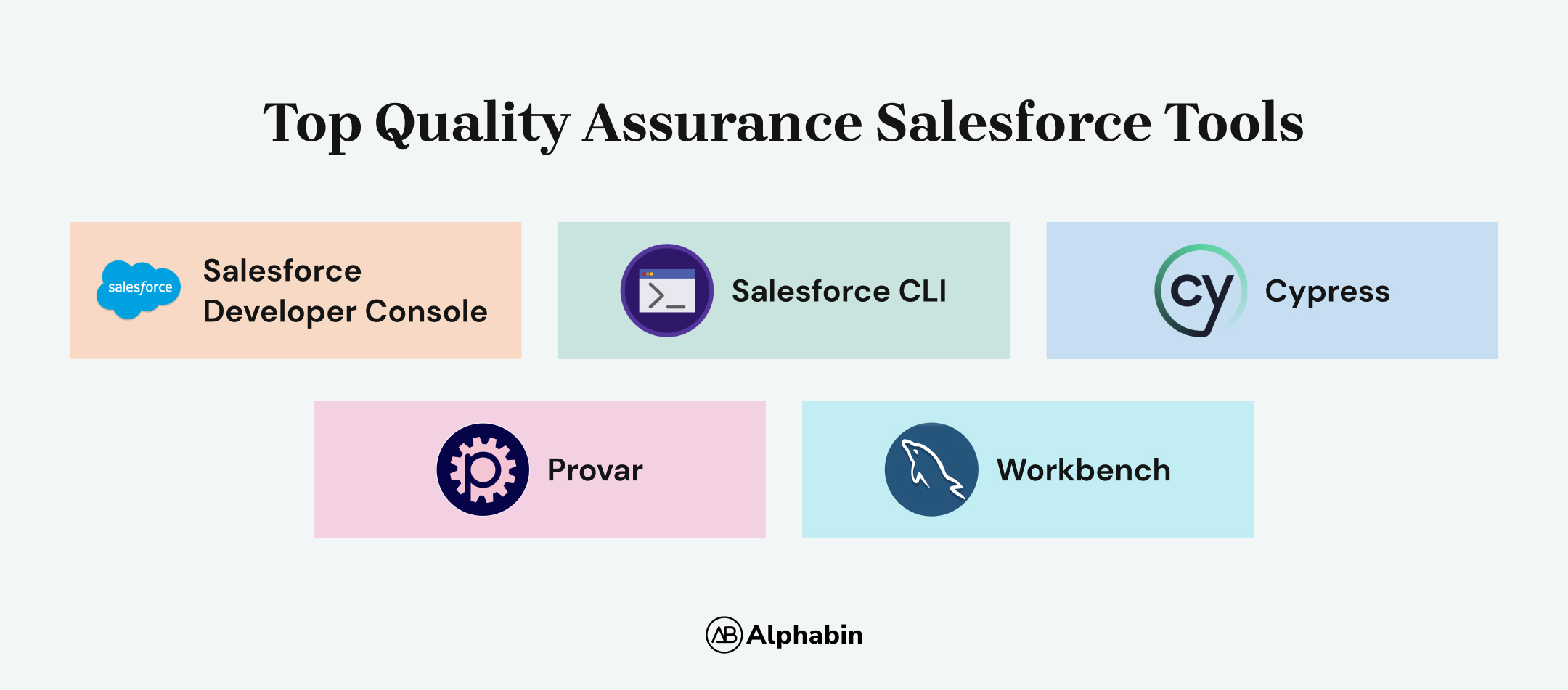
    What are the Top Quality Assurance Salesforce Tools? 

    ‍These all tools help Automation testing processes, manage data, and ensure seamless integration. In this section, we’ll introduce some of the top quality assurance tools for Salesforce, highlighting their key features.

    Top quality assurance Salesforce tools
    1. Salesforce Developer Console: A built-in feature of Salesforce’s UI, the Developer Console, the Developer Console is preferred for its ease of use. Some of the features included are quick fixes, the possibility to execute anonymous Apex code, and testing.
    2. Salesforce CLI (Command Line Interface): A must-have for testers in the CI/CD pipeline. The Salesforce CLI allows tests to be run directly from the command line, ensuring faster deployment cycles.
    3. Cypress: It has been Also known as a front-end testing tool, it is very fast and dependable and could be used for end-to-end testing of Salesforce applications.
    4. Provar: This tool provides comprehensive quality management and test automation solutions specifically designed for Salesforce. Its main goal is to uphold a high standard of quality for your Salesforce system and identify potential issues early. 
    5. Workbench: This suite of tools is perfect for those who frequently interact with Salesforce over its APIs. From SOQL queries to data manipulations, Workbench offers a wide range of functionalities.

    Benefits of Comprehensive Salesforce Testing and Integration

    We’ll look at different their specific benefits, showcasing how comprehensive testing and integration can significantly enhance business operations.

    • Enhanced Data Accuracy: Thorough Automation testing is useful to guarantee data consistency and correctness so that avoidable mistakes cannot occur when migrating or joining data from different applications.
    • Increased Efficiency and Productivity: Automation testing and integration help to minimize the amount of performing routine work, thus optimally distributing the efforts of project teams.
    • Better Security and Compliance: It is important for any system to be tested for security so that all the security holes are found and sealed to meet the standard and regulatory measures such as HIPAA for safeguarding healthcare information.
    • Faster Time to Market Quality: Automation  testing and dependable integrations help to launch new features and updates faster helping the business stay fit.
    • Improved Customer Satisfaction: By having an effective Salesforce system, companies can offer good service to their clients thus making them more loyal.

    What are the Types of Salesforce Quality Assurance? 

    Now that we have a brief idea of salesforce testing & its benefits let’s look at the various types of testing why so many testers around the world are using the Salesforce Testing.

    Types of Salesforce quality assurance

    1. Performance Testing

    • Identify the performance testing of the application under various circumstances such as speed, capability of expanding on, and robustness.
    • Helps in finding out the system constraints and guarantees that the system can handle the anticipated loads.

    2. Security Testing

    • Avoid and control risks that are related to security.
    • Helps to maintain adherence to the set standards and rules of the industry including the HIPAA rules in the protection of data.

    3. Automated Testing

    • Can contain the scripts for the test cases which can be run automatically to enhance the speed and extent of tests.
    • Good for regression and performance testing.

    4. Smoke Testing

    • A smoke test is used to determine if the core features of the Salesforce application work, or not.
    • Conducts tests limited to the critical functions to check whether or not they are working as required.

    5. End-to-End Testing

    • Confirms various processes, which define the Salesforce application, from the initiation to its successful completion.
    • It ensures that all components and systems that are put in place run as required for them to function as a single entity.

    {{cool-component}}

    The Impact of Salesforce Testing on Business Operations

    Let’s now examine the significant benefits that Salesforce testing brings to business operations. Effective Manual testing ensures seamless integration, data accuracy, and workflow efficiency.Understanding these impacts is crucial for leveraging Salesforce to its full potential and driving operational success.

    The impact of Salesforce testing on business operations
    • Improved Efficiency
      Thorough Salesforce application testing automation, workflows, and integrations streamlines business processes. This reduces manual effort, minimizes errors, and allows employees to focus on higher-value tasks, thus enhancing overall operational efficiency.
    • Enhanced Data Quality
      ‍
      Salesforce is a central repository for all a business’s data, hence, proper testing credentials that data is in the system before making business decisions. Ideally, businesses will be able to reduce data inconsistencies and errors, which will drive high data quality hence promoting enhanced reliability of insights and strategies.
    • Informed Decision-Making
      ‍
      A tested and validated Salesforce produces accurate data that favors the leadership’s decision-making process. The strategies being suggested here enable businesses to aggressively leverage their Salesforce data to support business execution, performance monitoring, and action against opportunities as they present themselves in the market.
    • Cost Savings
      ‍
      Salesforce testing refers to the process of accessing the software Manual testing development for problems and rectifying them as early as possible to reduce the need of having to correct problems after the deployment of the software. These preventive measures that are taken towards quality assurance translate to great savings and effective use of resources.
    • Increased User Adoption
      ‍
      The salesforce environment, if proven and fine-tuned, is very friendly to the user which in turn leads to increased usage by the employees. Whenever the user is assured of the quality and effectiveness of the system, the numbers and features of the platform are utilized to the maximum degree of return on investment.

    The Future of Salesforce Testing and Integration

    As we move forward, it’s essential to explore how Salesforce testing and integration will evolve. Emerging trends like AI-driven testing, automated test scripts, and Mobile and Cross-Platform are set to revolutionize the Manual testing landscape.

    The future of Salesforce testing and Integration

    Integration with AI and Machine Learning

    ‍Prediction analysis in testing and integration will be significantly enhanced by the use of AI-driven insights and machine learning algorithms. These technologies will enable the identification of possible problems, the improvement of testing approaches, and the improvement of integration activities.

    Enhanced Security Protocols

    ‍When it comes to the next Salesforce testing, new types of threats are expected to appear and therefore more complex testing security measures will be implemented. This shall comprise constant security testing and meeting of the higher standard of regulations like the GDPR and the HIPAA.

    Mobile and Cross-Platform Testing

    ‍As the trend of mobile device use continues to grow in the future Manual testing testing on force.com & salesforce will incorporate compatibility of devices and the performance of its applications on the screen of these devices. Depending on the project and used technologies, cross-platform testing will make sure that the user experience is uniform across platforms and devices.

    {{cta-image-second}}

    Future-Proofing Applications

    Salesforce testing will focus on future-proofing applications, ensuring they can adapt to technological advancements and evolving business needs. Regular updates and proactive enhancements will maintain optimal performance and compatibility.

    At Alphabin, we are committed to leveraging these future trends in Salesforce testing and integration, providing our clients with cutting-edge solutions that ensure robust, secure, and high-performing applications.

    How Does Alphabin Help Your Project In Sales-Force Testing 

    Now, let’s discuss how AlphaBin can be instrumental in ensuring the success of your Salesforce testing project. Our organization offers comprehensive testing solutions tailored to meet your unique needs.

    Real-World Project Examples

    1. Functional Testing for a Global Retailer‍
      • Project Scope: Recent work was the broad functional testing for a Customer Relation Management solution based on the Salesforce Compliance Testing system applied in an International chain of stores. This included conducting trials with functional units like inventory control, customer relations, and sales modules.
      • Outcome: Thorough testing for the system functions yielded positive results, such that system efficiency was increased by 20% and the rate of customer complaints was decreased by 15%.‍
    2. Performance Testing for a Large Healthcare Provider‍
      • Project Scope: We were doing some performance testing of Salesforce for the Healthcare provider for huge user loads at a certain time.
      • Outcome: The tests pointed out areas of slow processing and optimizations were made to increase the response time by 30% guaranteeing users comfort during peak periods.‍
    3. Security Testing for a Banking Application‍
      • Project Scope: We conducted security testing for a banking institution’s Salesforce application, focusing on data protection and compliance with industry standards like HIPAA.
      • Outcome: Our testing identified and mitigated security vulnerabilities, ensuring the application was compliant with regulations and secure against potential threats.

    How Alphabin Can Help Your Project

    1. Custom Testing Strategies: We tailor our testing approaches to meet your specific business needs, ensuring comprehensive coverage of all Salesforce functionalities.
    2. Advanced Automation: Utilizing the latest automation tools, we streamline testing processes, reducing manual effort and ensuring faster, more accurate results.
    3. Expertise in Compliance: Our team ensures your Salesforce application complies with industry standards and regulations, safeguarding sensitive data and maintaining trust.
    4. Scalability and Performance: We conduct thorough performance testing to ensure your system can scale with business growth, maintaining high performance even under increased loads.
    5. Continuous Integration: Our CI/CD practices enable seamless and continuous testing and deployment, minimizing downtime and ensuring that updates and new features are rolled out efficiently.

    Final Thoughts

    When developed and tested correctly, Salesforce Compliance Testing can deliver significant value and boost business ROI. Proper Salesforce testing and a comprehensive application understanding can prevent deployment delays, enhance efficiency, and yield immediate returns.

    Ready to implement best practices in your Salesforce QA testing process? Start by partnering with a QA services provider like Alphabin. Our team of Salesforce testing experts can help refine your QA checklist, ensuring streamlined testing practices. Experience the benefits of efficient Salesforce testing with Alphabin. Get a free consultation today!

  • Salesforce Testing Guide: Best Practices and Strategies

    Salesforce Testing Guide: Best Practices and Strategies

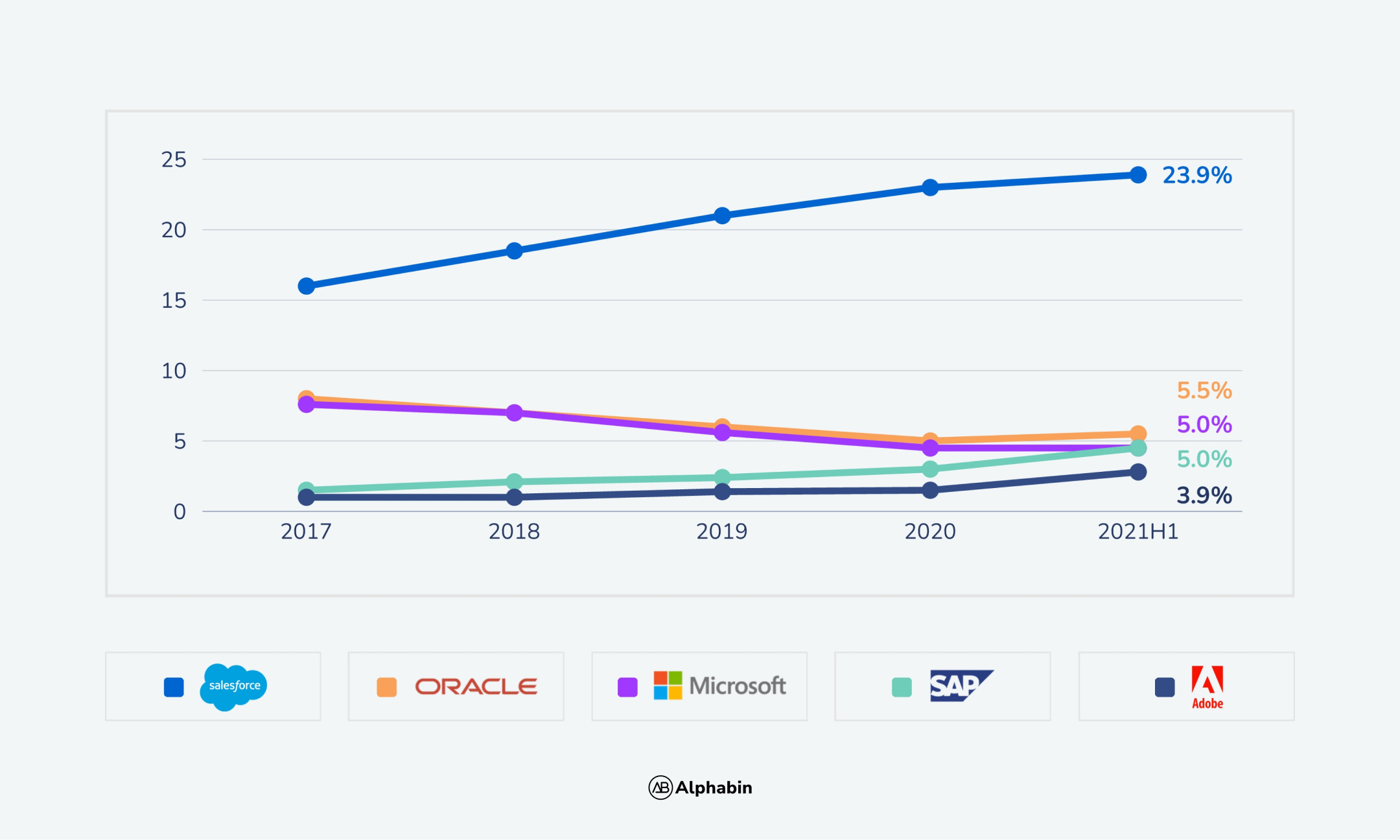
    Salesforce is a popular customer relationship management (CRM) platform. It helps businesses manage their customer relationships. More than 150,000 companies use Salesforce, including 83% of Fortune 500 companies. Salesforce offers many features and can be customized. In today’s competitive business world, it is very important to keep your Salesforce system reliable and working well.

    Salesforce Usage Chart

    Great flexibility does, however, necessitate thorough testing to guarantee flawless functioning and peak performance. Better quality assurance and automation testing procedures are cited by 40% of organizations as a major obstacle in their digital transformation journeys, according a World Quality research research. This is the point at which Salesforce testing becomes essential.

    Validating your Salesforce instance’s customized features, integrations, and general operation is known as Salesforce testing. Businesses can ensure that their Salesforce configuration completely satisfies their operational needs and provides an exceptional user experience by carefully testing each component.

    Why is Salesforce Testing Crucial?

    • Salesforce systems handle vast amounts of sensitive customer data. Accurate testing ensures data is correctly processed, stored, and retrieved, safeguarding against errors that could lead to significant business disruptions.
    • A well-tested Salesforce environment guarantees fewer bugs and issues, increasing productivity and satisfaction.
    • Organisations can build this expertise in-house by upskilling their team through a certified Salesforce Admin training program.
    • Various industries are subject to stringent regulations regarding data handling and security. Salesforce testing helps ensure compliance, avoiding costly penalties and enhancing stakeholder trust.

    Types of Salesforce Testing

    Salesforce testing involves several types of testing methodologies to ensure comprehensive coverage:

    1. Functional Testing – Validates the functionality of Salesforce features to ensure they work according to requirements. This includes checking customizations, workflows, and automation rules.
    2. Regression Testing – Ensures that new updates or changes do not adversely affect existing functionalities. Regular regression testing is essential due to Salesforce’s frequent updates.
    3. Integration Testing – Verifies that Salesforce integrates seamlessly with other systems and applications. Integration testing is crucial for businesses relying on multiple software solutions.
    4. User Acceptance Testing (UAT) – Involves end-users to validate that the Salesforce implementation meets their needs and expectations. UAT helps identify any gaps or issues from the user’s perspective.

    Challenges in Salesforce Testing

    Salesforce environments come with their own set of challenges that can complicate the testing process:

    • Because Salesforce enables substantial customizations, testing may become more difficult. To guarantee that any customization functions well with the rest of the system, it must be extensively tested.
    • Regular upgrades from Salesforce may affect current integrations and customizations. To make sure that these upgrades don’t interfere with the system, ongoing testing is required.
    • Numerous companies utilize a variety of apps, all of which require Salesforce integration. One of the most important aspects of Salesforce testing is making sure these connectors function properly.
    • It is critical to protect sensitive client data. To guarantee that data is secure against breaches and unauthorized access, security checks must be a part of testing.

    {{cta-image}}

    Best Practices for Effective Salesforce Testing

    Best practices for effective salesforce testing

    Implementing a successful Salesforce testing strategy requires a combination of best practices that ensure thorough coverage and efficient testing processes. Here are some key practices to consider:

    1. Develop a Comprehensive Testing Strategy

    • Clearly outline the goals of your testing efforts. Identify which functionalities and customizations need testing and what success looks like.
    • Focus on critical areas such as custom objects, workflows, and integrations. Prioritize testing efforts based on the potential impact on business operations.

    2. Automate Testing Where Possible

    • Testing that is automated can save time and lower the possibility of human mistakes. Regression testing and repetitious jobs benefit from its use.
    • Utilize tools like Selenium, Provar, and Salesforce DX to automate your tests. These tools help streamline the testing process and ensure consistency.

    3. Test Data Management

    • Use realistic and anonymized data for testing to simulate actual usage scenarios. Ensure that test data covers a wide range of cases, including edge cases and negative scenarios.
    • Verify that test data conforms with applicable data protection laws. Anonymization of sensitive data is necessary to avoid privacy violations.

    4. Continuous Testing and Integration

    • Integrate continuous testing into your development pipeline using Continuous Integration and Continuous Deployment (CI/CD) practices. This ensures that tests are run automatically whenever changes are made, catching issues early.
    • Schedule regular testing cycles to coincide with Salesforce updates and major changes to your system. This helps maintain system integrity and performance.

    5. Involving End-Users in Testing

    • Involve end-users in the testing process through User Acceptance Testing (UAT). This helps identify usability issues and ensures that the system meets user needs.
    • Conduct UAT sessions where end-users perform real-world tasks using the Salesforce system. Gather feedback and address any issues before the system goes live.

    6. Performance Testing

    • Conduct performance testing to ensure that your Salesforce instance can handle the expected load. Test for scenarios like high user traffic and large data volumes.
    • Continuously monitor system performance and optimize configurations to maintain optimal performance levels.

    7. Documentation and Reporting

    • Keep thorough records of all the test cases, scripts, and outcomes associated with your testing procedures. This facilitates monitoring advancement and spotting persistent problems.
    • Use reporting tools to analyze test results and identify trends. This information can guide future testing efforts and improve overall testing efficiency.

    Comparison of Popular Salesforce Testing Tools


    Tool Key Features Pros Cons
    Salesforce DX Source-driven development, CI/CD support Seamless integration with Salesforce, modern development practices Requires learning curve for new users
    Provar Native Salesforce integration, point-and-click test creation User-friendly, detailed reporting Higher cost compared to open-source
    Apex Unit Testing Built-in Salesforce unit testing Direct integration, coverage reports Limited to Apex code testing

    {{cool-component}}

    Tips for Implementing Salesforce Testing in Your Organization

    Implementing an effective Salesforce testing strategy requires careful planning and execution. Here are some practical tips to help you achieve the best results and ensure your Salesforce environment performs optimally.

    1. Building a Testing Team
      • Bring together a team with expertise in Salesforce, testing methodologies, and automation tools. This might include Salesforce developers, QA engineers, and test automation specialists.
      • Keep the team updated with the latest Salesforce features and testing tools. 
      • Regular training sessions and certifications can help maintain a high level of expertise.‍
    2. Develop a Testing Plan‍
      • Outline the goals of testing efforts, such as ensuring data accuracy, validating customizations, and testing integrations.
      • Based on the outline, develop comprehensive test cases that cover all functionalities, including custom objects, workflows, and third-party integrations. 
      • Ensure that these test cases are well-documented and easy to understand.‍
    3. Leverage Automation
      • To significantly reduce testing time and improve accuracy, use automation tools like Selenium and Provar to automate repetitive and time-consuming tasks.
      • Implement CI/CD practices to automate testing as part of the development pipeline. This ensures that tests are run automatically with every change, catching issues early.‍
    4. Manage Test Data Effectively
      • Avoid using sensitive customer data directly; instead, anonymize or generate synthetic data.
      • Ensure that your test data management processes comply with data protection regulations to avoid breaches and ensure privacy.‍
    5. Conduct Performance Testing
      • To ensure your Salesforce environment can handle peak usage times, Perform load testing to simulate high-traffic conditions.
      • Continuously monitor performance and optimize configurations based on performance testing results to maintain optimal performance.‍
    6. Engage End-Users in Testing
      • Involve end-users in the testing process to validate that the system meets their needs and expectations. Collect feedback and make necessary adjustments based on their input.
      • Before a full rollout, conduct pilot testing with a small group of users to identify any issues and gather feedback in a controlled environment.‍
    7. Document and Track Testing Activities
      • Keep comprehensive records of your testing activities, including test cases, results, and any issues encountered. This helps track progress and provides a reference for future testing efforts.
      • Utilize tools like JIRA to manage and track testing activities, ensuring that all tasks are completed on time and any issues are promptly addressed.‍
    8. ‍Measure Success and ROI
      • Establish key performance indicators (KPIs) to measure the success of your testing efforts. 
      • These might include the number of defects detected, test coverage, and time to resolution.
      • Regularly review testing results to identify trends and areas for improvement. Use this data to refine your testing strategy and processes.

    For a more in-depth insight into how performance metrics might impact business outcomes, read our article on key SaaS performance metrics for business performance. It looks into critical metrics that contribute to the analysis and optimization of SaaS applications, supplementing our discussion on Salesforce testing with insights into performance measurement methodologies.

    {{cta-image-second}}

    Conclusion

    Ensuring your Salesforce environment is robust and reliable is essential for smooth operations and a superior user experience. Proper testing protects data accuracy, boosts user satisfaction, and ensures compliance with industry regulations.

    You can greatly enhance your Salesforce implementation by crafting a comprehensive testing strategy, using automation tools, and involving end-users. Regular performance testing ensures your system can handle growth and adapt seamlessly.

    At Alphabin, we provide customized Salesforce testing solutions with cutting-edge tools and best practices. Whether rolling out new features or integrating third-party applications, our advanced software testing services assure you to focus on your core business.

    Following the best practices outlined in this blog will help you develop a strong testing strategy that supports your business objectives. Conducting thorough testing helps prevent costly mistakes and sets your organization up for long-term success.

    Thank you for reading, and we look forward to assisting you in achieving excellence in Salesforce testing.