
Category: Cloud testing

  • Complete Guide to Test Data Automation for Better Testing

    Complete Guide to Test Data Automation for Better Testing

    As the concept of data continues to dominate the strategic management of organizations, the efficiency of data systems is essential for the achievement of organizational goals. Automated testing is more or less changing the way organizations are verifying the quality, security, and performance of the data they store and process. 

    Automated testing is changing how the testing process is done by providing different, better, and full-proof techniques of validating that a system works as expected. Companies that adopt cloud-based test automation and dynamic testing frameworks hence stand to gain—in terms of productivity, cost savings, and compliance with new regulations. 

    Automation testing helps businesses tackle challenges like data integrity and empowers them to stay competitive and future-ready with processes like dynamic and scalable test environments.

    For instance, in Mobile Test Data Management, there are advanced strategies that enable the organization to generate, manage, and anonymize test data for mobile application testing in a confident and compliant way.

    This comprehensive guide dives deep into the role of test data automation, its benefits, and the challenges that make it indispensable for modern enterprises.!

    {{cta-image}}

    What is Test Data Automation?

    Test data automation is the process of automatically distributing test data to lower-level settings, as well as generating and managing test data for usage by software development and test teams.

    Here an example of test data automation in an e-commerce application may be the creation of a list of product catalog data, varying by category, price, and stock level. Once this test data is safely anonymized, it seamlessly integrates into the testing framework so that you can have comprehensive ‘search’ functionality testing, ‘cart’ operations testing, and ‘check out’ workflow testing all with data privacy compliance.

    Why is Test Data Automation Important?

    Foundational to modern businesses are data systems. They enable analytics, machine learning, and operational decision-making. Low or inaccurate data can result in bad insights, compliance problems, and errors that cost us money. Automation ensures:

    • Data Accuracy: Identifies and rectifies discrepancies in real time.
    • System Reliability: Detects potential issues before they escalate.
    • Efficiency: Cut time and testing costs using approaches for automated data-driven testing.

    Benefits of Automation Testing

    There are several advantages of automation testing for organizations and the process of testing is efficient, accurate, and economical. By automating the testing process, organizations can:
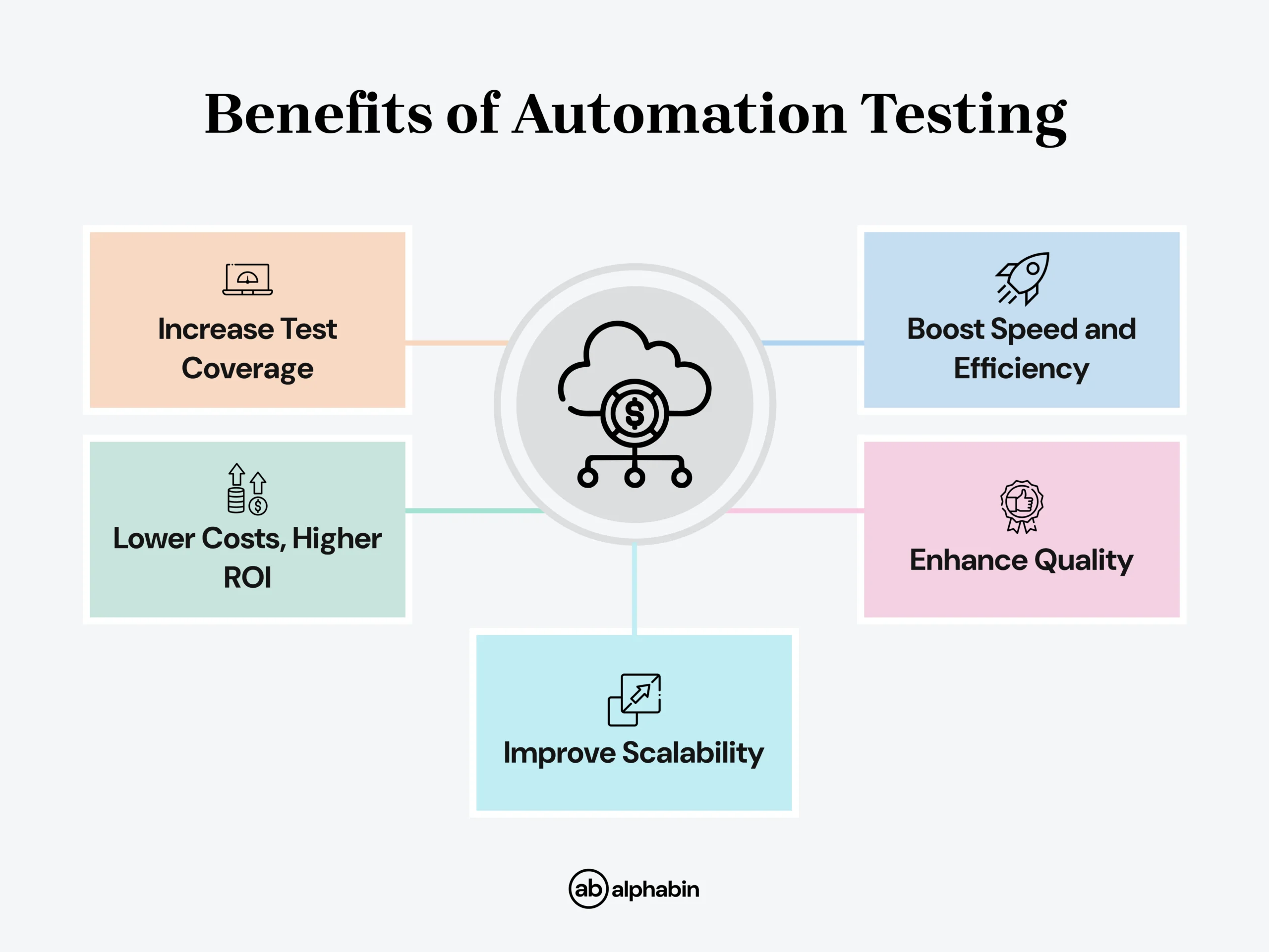
    Benefits of Automation Testing
    • Increase Test Coverage: It automates extensive scenarios and leaves less room for human error for more reliable results.
    • Boost Speed and Efficiency: Runs your tests faster, with better feedback and release cycles.
    • Lower Costs, Higher ROI: Initial investments are made and it cuts labor costs, but with long-term returns.
    • Enhance Quality: It detects defects early; therefore, all testing must be completed thoroughly, and there is a higher rate of customer satisfaction.
    • Improve Scalability: It is very easy to adapt to growing projects as well as changing requirements.

    Understanding Data Quality Assurance (QA)

    Data Quality Assurance (QA) is a set of processes designed to ensure data integrity, accuracy, and consistency throughout its lifecycle. Since both AI and ML heavily depend on high-quality data, automation testing for data systems becomes critical in maintaining unbiased models, accurate predictions, and trust in AI systems.

    Key Components

    ‍Data Profiling

    • Detects repetitive patterns, variations, and variations of data points in a data set.
    • Enables the definition of requirements that will help prepare the data for analytics and reporting.
    • For a better understanding, consider the example of retailers analyzing customer demographics before launching targeted campaigns.

    Data Cleansing

    • Erases modulate or update incorrect, incomplete, or unnecessary information.
    • It is necessary for the compliance of the various regulations, such as the GDPR.
    • For instance, cleaning of CRM systems, where actual and duplicated records of customers are stored.

    Data Validation

    • Checks the values against some calibrated criteria, including the schema and the range.
    • Measured input data to avoid corrupted or incomplete data appearing in the system.

    Test Data Management

    Test data management is important as it helps in the testing process, i.e., creating, managing, and maintaining the test data. Effective test data management enables organizations to:

    • Create Realistic and Relevant Test Data: Organizations simulate real-world scenarios and create test data that are close to actual production data. This ensures that tests mean something and can accurately predict how the system will behave in actual conditions.
    • Manage and Maintain Large Volumes of Test Data: When systems become more complex, the volume of test data grows. Good test data management practices make sure the data is well organized, accessible, and kept up-to-date to promote an efficient testing process.
    • Ensure Data Security and Compliance: With stringent regulatory requirements like GDPR and HIPAA, ensuring data security and compliance is paramount. Test data management practices include data masking, anonymization, and other techniques to protect sensitive information.
    • Improve Testing Efficiency and Effectiveness: Setting up and executing tests is a tedious process, and well-managed test data helps speed up this process. They do that, which means more efficient testing processes and more reliable results.
    • Reduce Risk of Data-Related Errors and Defects: Organizations keeping high-quality test data can reduce the risk of data-related errors and defects. More accurate testing outcomes and higher quality software are resulting from this.

    Role of Test Data Automation in Data Systems

    ‍ERP test data automation is located at the critical point to achieve better data quality, good system quality, and preferable system performance. Key advantages include:

    Role of Test Data Automation in Data Systems

    1. Data Quality 

    • Ensures that our data holds credibility as well as providing reliable and comparable results.
    • It minimizes the chances of critical mistakes being made.

    2. System Reliability

    • Checks that a given system works depending on the environment that they are in.
    • Example: Conduct functional checks on systems under various conditions, such as a test data scenario on e-commerce for sales season.

    3. Time and Cost Efficiency

    • Reduces testing time and efforts, reducing resource utilization in testing.
    • Automations safely scale linearly with the complexity of the system.

    4. Performance Optimization

    • Find out where there are areas of inefficiency within a query, search, or data pipeline.
    • Example: In many cases, accelerating a query is desirable for data warehouses to minimize processing time.

    Provisioning Test Data

    Test data provisioning is making test data available to the testing team in one or more ways. Effective test data provisioning enables organizations to:

    • Create Test Data from Scratch: New test data that is generated to the needs of particular testing is generated, ensuring that all necessary scenarios are covered. Specifically, this is a great way to test new features or functionality.
    • Use Existing Production Data: Testing can be done with production data and the resulting test scenarios will be realistic and relevant. But you can’t use data masking and anonymization techniques without protecting sensitive information.
    • Use Synthetic Data Generation Tools: Generation of large volumes of test data can be done quickly with these tools for a wide variety of scenarios. This is super handy as it can be used for stress or performance testing.
    • Use Data Masking and Anonymization Techniques: Protecting sensitive information is very important. Two data masking and anonymization techniques are employed to secure and comply with regulatory requirements on test data.
    • Use Data Subsetting and Sampling Techniques: These are techniques where smaller, representative subsets of the production data are created. That is it reduces the amount of data required to test while retaining meaningful, relevant test scenarios.

    Best Practices for Implementing Test Data

    In modern software testing, the test data deployment strategy, especially the procedure of how to utilize the test data, is important. For effective automation testing for data systems, here’s a detailed breakdown of best practices:

    Best Practices for Implementing Test Data

    Collaborative Approach

    The most effective test data deployment also requires integration between the developers, testers, and data management teams. It was used to verify that the testing procedure complies with system specifications. 

    Together, they also idealize resource use, specify appropriate test data cases, and automate the testing process. However, since the collaborative dynamic test data generation is used in cloud-based test automation, scalability, and accessibility are required, making it especially useful.

    Security Measures

    Sensitivity makes it important to protect sensitive information in test environments. It enables safe use in test scenarios (especially in cloud-based automation) while complying with laws and regulations. It provides data safety and facilitates dynamic, non-deterministic test generation.

    Documentation

    It is recommended to keep comprehensive records for test data automation to share knowledge and facilitate debugging and future strategy reviews. Documentation eliminates ambiguity with contract transparency, allows for the identification of problems and possible pitfalls, and prevents the failure of the automation testing framework.

    Regular Updates

    There is also an option for the dynamic generation of test data that will help to avoid working with outdated requirements and system changes. This will mitigate data leakage risks while providing for ever-changing needs in the concept of automated testing.

    Challenges in Test Data Automation

    By making the testing process very efficient through test data automation, we also have some challenges with how test data automation can take automated testing efforts in a contentious place.
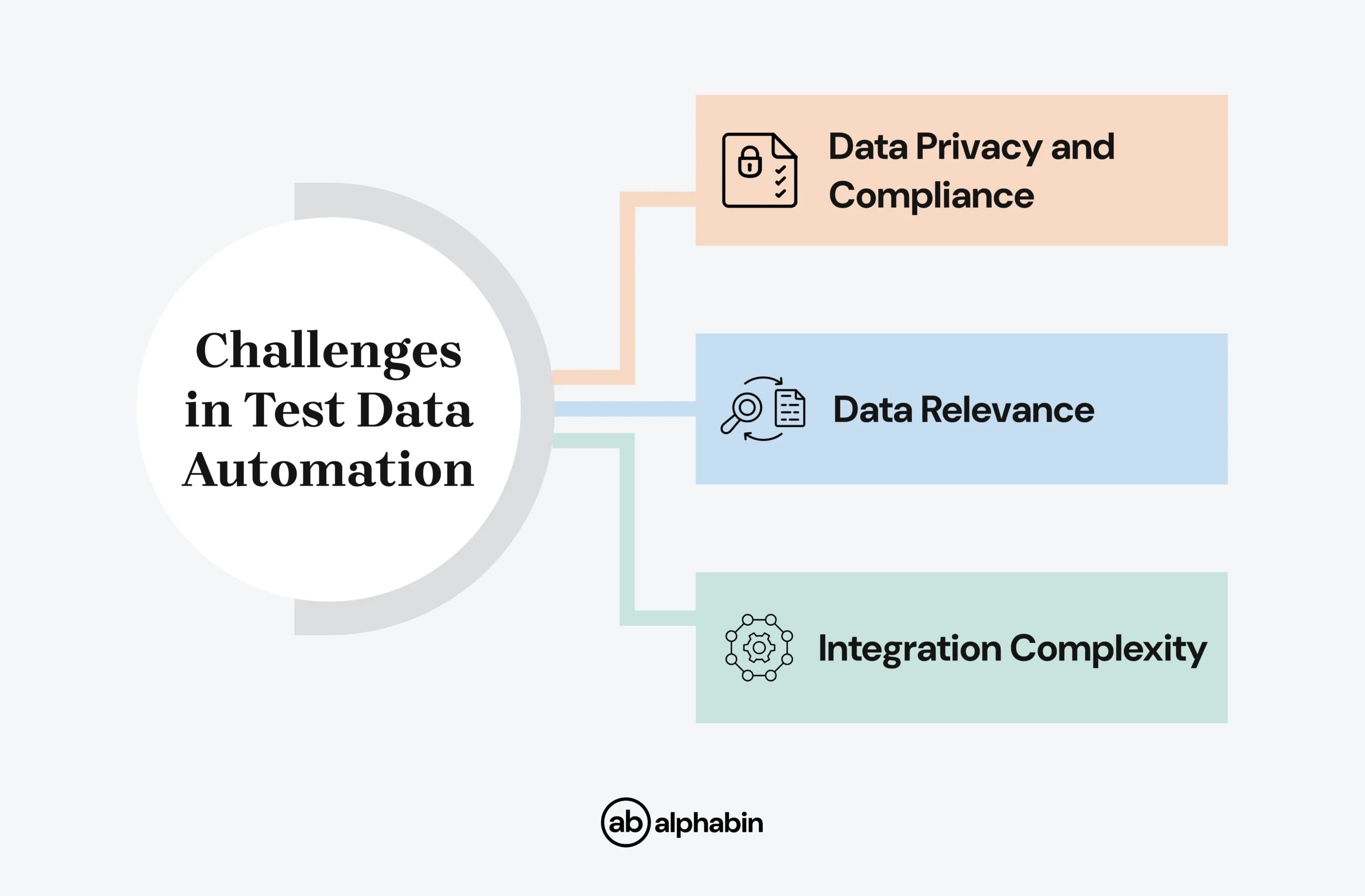
    Challenges in Test Data Automation

    1. Data Privacy and Compliance

    • During the test, make sure you are enforcing compliance with GDPR, HIPAA, and CCPA.
    • Do not take production data and use them directly; instead, stop using production data and use data masks or anonymization techniques.
    • Balancing notions of privacy and realism: test data automation.

    2. Data Relevance

    • Can be applied to real-world scenarios.
    • Generating dynamic test data for varied (edge) cases.
    • Data-driven testing to pick the data for test data scenarios.

    3. Integration Complexity

    • Reducing technical difficulty strategies on test data automation implementation in any environment.
    • This means overcoming compatibility problems that occur when having to test legacy systems with different frameworks.
    • Way of cloud-based test automation to discover integrated and flexible solutions for various industries.

    {{cta-image-second}}

    Wrapping Up

    Currently, information systems heavily rely on automated testing for its capacity to speed up and improve accuracy. Testing has become more accurate and flexible through data-driven testing, which has become an innovative breakthrough in software testing in organizations. At the end of globalization and the digitalization era, automation testing is not only an instrument but also a way to succeed.

    Alphabin is the industry’s innovative automation solution provider, offering its whole range of services, including software testing services, automation testing in data systems, and effective testing processes. We hope that we can take your systems to a hyper-level and revolutionize automated testing.

  • 5 Best Practices for Cloud Performance Testing

    5 Best Practices for Cloud Performance Testing

    The cloud has turned the environment of application development and deployment. Since the worldwide outbreak, some businesses have transferred to cloud testing services and technology, with an incredible 37% year over year rise after 2020. Cloud environments enable scalability, flexibility, and cost-effectiveness, making them perfect for modern applications.

    Cloud-based testing helps in identifying challenges, measuring scalability, and ensuring that applications can manage expected and exceeded user loads. By proactively resolving performance concerns, you may avoid disruptions assure seamless operation, and ultimately offer the quality that consumers expect.

    Different performance testing in cloud environment

    The wonderful thing about cloud availability is that it supports a wide range of domains through various cloud environment types. Here are a few of them:

    Infrastructure as a Service (IaaS)

    Provides the most control over resources (virtual machines, storage, and networking) but requires the most configuration and management effort. Performance depends on the chosen resources and configuration.

    Platform as a Service (PaaS)

    Offers a development platform with pre-configured resources. Provides a balance between control and ease of use. Performance may be limited by the underlying infrastructure offered by the provider.

    Software as a Service (SaaS)

    Delivers complete applications over the Internet. Least control over resources but is the easiest to use. Performance depends entirely on the provider’s infrastructure.

    Understanding Cloud Performance Testing

    The practice of assessing an application’s performance that has been deployed in a cloud environment is called cloud performance testing. It assists in measuring scalability, locating any bottlenecks, and confirming that the application satisfies performance goals under varied load scenarios.

    Key cloud performance testing metrics

    • Response Time
      Time taken for the application to respond to a user request.
    • Throughput
      The number of requests handled in a certain amount of time.
    • Scalability
      ‍
      Ability of the application to handle an increasing user load.
    • Resource Utilization
      ‍
      How efficiently the application utilizes cloud resources (CPU, memory, and network).
    • Concurrency
      ‍
      Ability of the application to handle multiple user requests simultaneously.

    Types of cloud performance testing

    Cloud-based testing encompasses various approaches, each targeting specific aspects of application behavior under load. A range of techniques and methodologies are tailored to assess different aspects of app performance in the cloud environment.

    Load Testing

    Cloud performance testing simulates increasing user loads to find performance bottlenecks. For an e-commerce site during a holiday sale, it progressively increases concurrent users to see if the system can handle the load without crashing. Key metrics are response time, throughput, and resource utilization. For more details, see our guide on Concepts and Metrics of performance testing.

    Stress Testing

    Stress testing, also known as load testing, aims to evaluate an application’s performance under extreme conditions. By simulating a high volume of user logins and transactions, we can identify the application’s breaking point, determine system limits, and ensure stability under peak loads. This helps in understanding how the system behaves under pressure and in planning for capacity and scaling.

    Scalability Testing

    Scalability testing evaluates an application’s ability to scale resources to handle increased traffic without compromising performance. For example, a cloud-based video streaming service, it gradually ramps up user load to observe how well the system scales, such as by adding more servers. The objective is to ensure optimal performance under increased traffic. Key metrics include resource allocation, response time, and auto-scaling efficiency.

    Soak Testing

    Soak testing simulates sustained user load over extended periods to uncover stability issues. For example, in a social media platform, tests run for hours or days to detect memory leaks, database connection issues, and performance degradation. The objective is to identify long-term issues that may not be apparent in shorter tests. Key metrics include memory usage, response time consistency, and system stability.

    Spike Testing

    Spike testing simulates sudden bursts of traffic to assess an application’s responsiveness. For example, a ticket booking website might test a surge in user requests when tickets for a popular event go on sale to see if the system can handle the spike without crashing. The objective is to evaluate the system’s ability to manage sudden increases in load. Key metrics include response time during the spike, error rates, and system recovery time.

    Cloud performance testing best practices

    Now let’s get down to the main objective of this blog post, the five most effective practices or strategies that every quality assurance engineer must adopt for cloud performance testing.

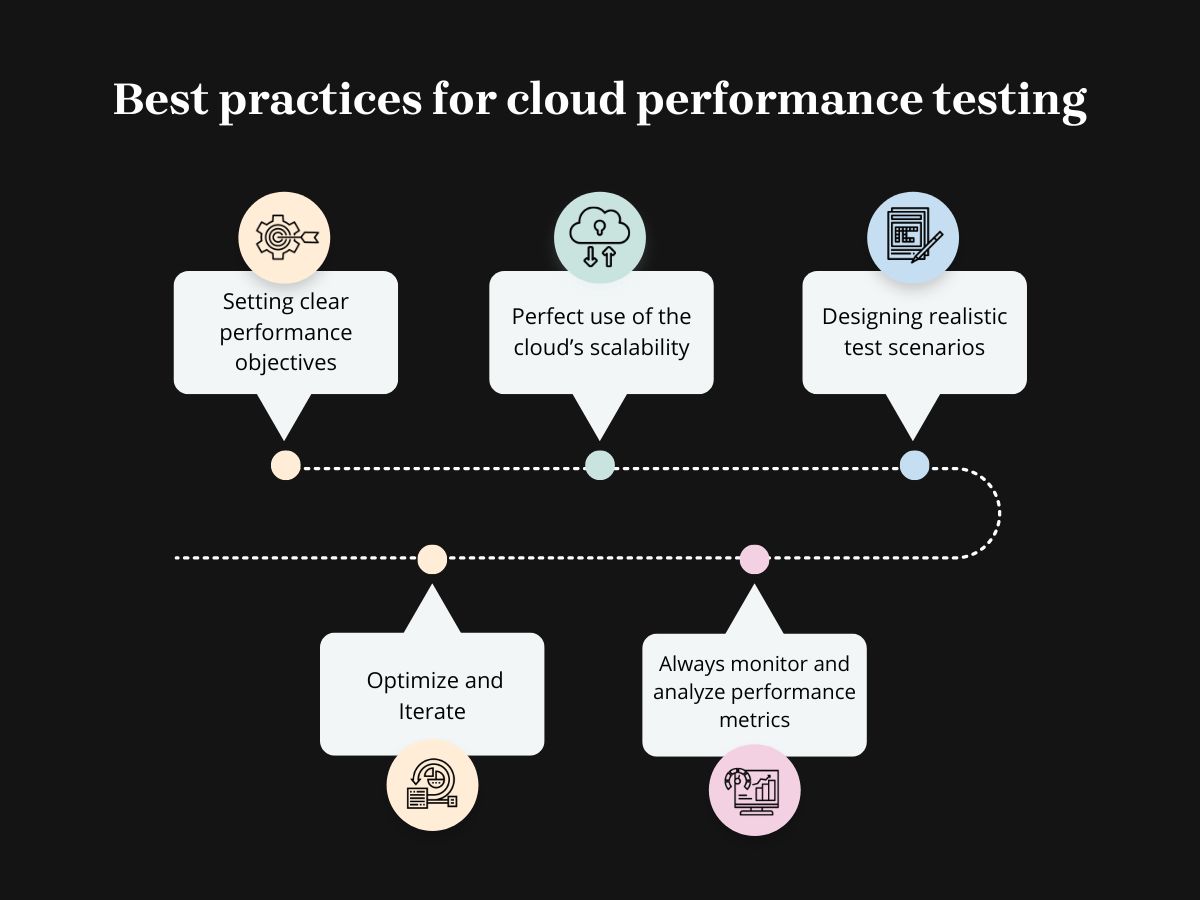
    Best practices for cloud performance testing

    1. Setting clear performance objectives

    Driving a car without a destination is like performance testing in cloud without clear objectives: you lack a roadmap to guide your efforts and measure progress. Clearly defined objectives are crucial—they ensure you gather meaningful data and know when you’ve achieved your testing goals.

    The SMART framework helps establish focused and achievable performance goals. Here’s how to apply it:

    • Specific: Clearly define what to improve (e.g., reduce response time by 20%). Ex: Keep response times under 500 ms during peak hours and weekends, and maintain 99.9% uptime over a month.
    • Measurable: Track progress with metrics (e.g., average response time). Ex: Support a high number of concurrent users without exceeding 500 ms response time.
    • Achievable: Set realistic goals based on resources. Don’t aim for a 1-second response time if your application relies on complex calculations. Ex: Test with a dummy promotional event to handle the expected surge.
    • ‍Relevant: Align business goals with user expectations to optimize UX. Ex: Prioritizing features that improve user experience (e.g., faster checkout) which in turn benefits the business (e.g., higher sales).
    • Time-bound: Set a timeframe to achieve goals. This creates a sense of urgency and helps prioritize testing efforts. Ex: Meet these targets before the holiday shopping season.

    2. Perfect use of the cloud’s scalability

    Cloud environments offer unmatched scalability through dynamic resource provisioning and de-provisioning in response to demand. This flexibility enables testers to replicate real-world scenarios with varying user activity and workload levels.

    Unlike traditional on-premises infrastructure, cloud platforms provide instant scalability without the need for manual intervention. This makes it easier to conduct performance tests at scale, accommodating varying workloads and user activity levels seamlessly.

    Types of performance scaling tests

    • Horizontal scaling tests: Add more application instances (horizontal scaling) to assess how the app behaves when distributed across multiple servers. This helps determine if your application can leverage horizontal scaling for increased capacity.
    • Vertical scaling tests: Increase resource allocation (CPU, memory) for a single application instance (vertical scaling) to measure performance gains with more powerful hardware. This helps identify if resource limitations are causing any bottlenecks.

    Before and After cloud performance testing for an E-commerce platform.

    The expected response time for the example project is 100 ms of response time.

    Before and after cloud performace testing for an Ecommerce platform

    3. Designing realistic test scenarios

    Imagine testing a social media app with just login scenarios. It wouldn’t reflect real-world usage where users post content, interact with friends, and upload photos. Realistic test scenarios that mimic user behavior are crucial for uncovering potential performance issues that might arise during the actual use of the product.

    Let’s look at how you could craft realistic scenarios:

    • User persona development: Create user personas representing different user types (e.g., casual browser, frequent poster, mobile user). Each persona should have a defined set of actions they perform within the application.
    • Think like a user: Map out typical user journeys, including login, browsing content, performing actions (e.g., posting a video, posting comments), and logout.
    • Load balancing: Simulate different user loads throughout the day. Morning login surges, peak traffic during business hours, and evening entertainment usage patterns should all be reflected in your test scenarios.

    4. Always monitor and analyze performance metrics

    Not monitoring and analyzing performance metrics is like conducting a science experiment without observing the results. Performance testing without real-time monitoring leaves you blind to the impact of your tests. Monitoring allows you to track key metrics and identify performance issues during testing.

    Key KPIs to look out for during testing:

    • Response time: The amount of time it takes a program to reply to a request from a user. This is an essential user experience metric.
    • Throughput: The number of requests processed per unit time. This indicates how efficiently your application handles concurrent user activity.
    • Resource utilization: Track CPU, memory, and network usage to identify if resource limitations are causing performance issues.
    • Error rates: Monitor the number of errors encountered during testing. A spike in errors could indicate overloaded servers or application bugs.
    • Concurrency: Measure how well the application handles multiple user requests simultaneously. High concurrency issues can lead to slowdowns or crashes.

    The majority of cloud service providers have integrated monitoring tools or third-party platform interfaces, such as Middleware, Datadog and New Relic. These tools let you efficiently monitor performance indicators using real-time dashboards, visualizations, and alerts.

    5. Optimize and Iterate

    Test results are a gold mine for optimizing your cloud infrastructure. By analyzing the test results and resource limitations, you can:

    • Right-size resources: Adjust virtual machine configurations (CPU, memory) to ensure efficient resource usage without overpaying.
    • Auto-scaling: Implement automation testing that automatically scales resources (up or down) based on real-time demand. This helps maintain optimal performance while avoiding unnecessary costs.
    • ‍Caching: Use caching techniques to save data that is accessed often, which will lighten the strain on the application server and speed up response times.

    The importance of iterative testing

    Performance optimization is an ongoing process, it’s not a one-time thing, rather, there is always an opportunity to optimize the product to a level further beyond the threshold. Here’s why iterative testing is crucial:

    • Shifting business needs: As your business grows and user demands evolve, performance needs might change. Iterative testing helps adapt your cloud infrastructure to stay one step ahead of these changing requirements.
    • Evolving cloud landscape: Cloud providers constantly introduce new features and services. Iterative testing helps ensure your application takes advantage of these advancements for optimal performance.
    • ‍Continuous improvement: Regular performance testing with evolving application features and usage patterns helps identify new bottlenecks and ensure ongoing performance excellence.

    Top cloud performance testing tools

    The best cloud-based testing tools for you will depend on your budget and unique requirements. Here is a summary of several well-liked choices, with an emphasis on their features, advantages, and special features.

    PFLB

    PFLB (Performance-Focused Load Balancer) is a cloud-native load balancing solution designed to optimize performance by distributing traffic across multiple instances. It uses real-time performance metrics to ensure efficient resource use and minimal latency for users.

    • ‍Pros of PFLB:
      • ‍Ability to seamlessly scale with increasing traffic volume, accommodating growing application demands without manual intervention.
      • The fault-tolerant architecture of PFLB ensures high availability and reliability, minimizing service disruptions.
      • PFLB offers intuitive configuration options, allowing users to define routing rules and load-balancing algorithms effortlessly.

    PFLB’s unique selling point lies in its ability to prioritize performance optimization while maintaining fault tolerance and scalability. By dynamically adjusting traffic routing based on real-time performance data.

    SOASTA CloudTest

    SOASTA CloudTest is an adequate performance cloud testing platform that enables organizations to simulate real-world user behavior, analyze app performance, and identify bottlenecks. It offers a range of features, including load testing, stress testing, and real-user monitoring.

    • Pros of SOASTA CloudTest:
      • An easy-to-use interface offered by SOASTA CloudTest makes it easier to create, run, and analyze tests.
      • SOASTA Cloud Test provides a unified platform for all your performance testing needs, eliminating the need for multiple tools.
      • The platform offers visual scripting capabilities alongside traditional code-based testing, making it accessible to testers with varying technical skill sets.

    CloudTest’s selling point lies in its ability to offer end-to-end performance testing capabilities, from test creation to result analysis. By providing a solution for load testing and monitoring.

    K6

    Using K6, an open-source performance testing tool, we can create JavaScript test scripts and run large-scale tests. Because of its developer-friendly architecture, teams can easily integrate cloud software testing into their pipelines for continuous integration and delivery.

    • Pros of K6:
      • K6 is lightweight and efficient, making it suitable for testing applications of any size or complexity.
      • Leverages JavaScript (ES6) for writing test scripts, offering a familiar and efficient language for developers.
      • K6 integrates seamlessly with cloud environments and containerization technologies like Docker.

    K6’s selling point lies in its simplicity and flexibility. By leveraging the power of JavaScript for test scripting, K6 enables us to create and execute performance tests with ease, facilitating rapid feedback loops and continuous improvement.

    Gatling

    A Scala-written high-throughput load testing tool for assessing application performance and simulating concurrent users is called Gatling. It is appropriate for testing complex web applications and APIs since it has a strong scripting engine and extensive reporting features.

    • ‍Pros of Gatling:
      • Being open-source, Gatling offers greater flexibility and customization compared to some commercial tools.
      • Gatling can handle large-scale load testing scenarios effectively.
      • Gatling provides a wide range of features, including performance reports, comprehensive data analysis, and integration with CI/CD pipelines.

    Gatling is a powerful option for experienced testers or development teams comfortable with Scala. It provides extensive features, scalability, and the flexibility of an open-source solution.

    Conclusion

    Cloud performance QA plays a pivotal role in this endeavor by enabling organizations to proactively identify and address performance issues, optimize resource utilization, and ensure the reliability and scalability of cloud-based applications.

    As businesses increasingly rely on cloud-based solutions, ensuring exceptional cloud application performance has become a fundamental for success. That’s where Alphabin comes in. We are a trusted partner for businesses seeking to optimize their cloud applications. Our team of performance quality professionals will provide you an upper hand when it comes to performance quality.